
OpenShift上部署Redis主从集群
客户有部署有状态服务的需求,单机部署模式相对简单,尝试一下集群部署。
关于Redis的master,slave 以及sentinal的架构和作用不提,有兴趣可以参考之前的博客
https://www.cnblogs.com/ericnie/p/7203950.html
github上参考的文章不少,但很多都需要基于连接互联网进行构建,同时也创建不少的buildconfig,研究了一下,还需要在本地部署一个git.
立刻觉得把问题搞复杂了。所以本文主要以简化为主,说明主要核心步骤,当然也掉到坑里浪费了些时间,不失为一种学习过程吧。
github上参考链接
https://github.com/mjudeikis/redis-openshift
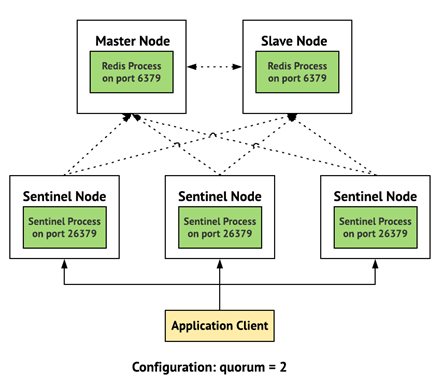
架构
传统的Redis个节点角色和端口
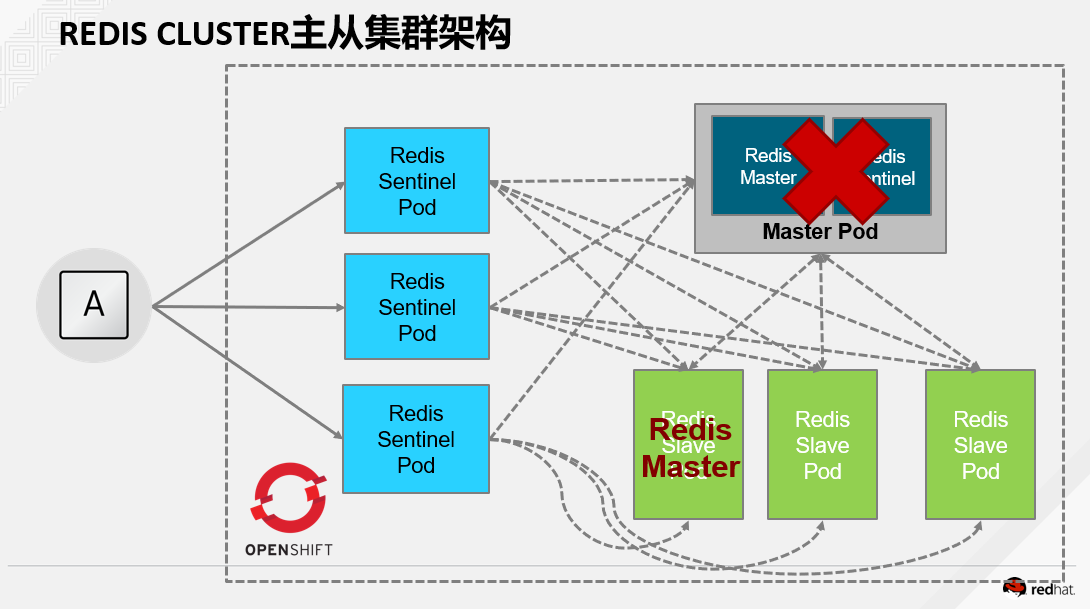
在OpenShift上部署架构图
1.构建镜像
先clone到本地
git clone https://github.com/mjudeikis/redis-openshift
目录结构比较清晰明了,我喜欢
[root@master ~]# tree redis-openshift

redis-openshift

├── image

│   ├── Dockerfile

│   ├── Dockerfile.

│   ├── epel-.repo

│   ├── redis-master.conf

│   ├── redis-openshift.tar

│   ├── redis-slave.conf

│   └── run.sh

├── list.yaml

├── openshift

│   ├── build.yaml

│   ├── is-base.yaml

│   ├── is-output.yaml

│   ├── redis-master-dc.yaml

│   ├── redis-master-service.yaml

│   ├── redis-sentinel-dc.yaml

│   ├── redis-sentinel-services.yaml

│   └── redis.yaml

└── README.md
对了,这里我也根据我的环境修改了Dockerfile,主要是yum源的问题
先下载一个放到目录下
http://mirrors.aliyun.com/repo/epel-7.repo,
Dockerfile
FROM rhel7

#RUN yum install epel-release -y

COPY epel-.repo  /etc/yum.repos.d/epel.repo

RUN yum install redis hostname -y ; yum clean all

COPY redis-master.conf /redis-master/redis.conf

COPY redis-slave.conf /redis-slave/redis.conf

RUN mkdir -p /redis-sentinel ; chmod -R  /redis-sentinel /redis-slave

COPY run.sh /run.sh

CMD [ "/run.sh" ]

ENTRYPOINT [ "bash", "-c" ]
比较核心的run文件,我修改成这样
[root@master image]# cat run.sh

#!/bin/bash

# Copyright  The Kubernetes Authors All rights reserved.

#

# Licensed under the Apache License, Version 2.0 (the "License");

# you may not use this file except in compliance with the License.

# You may obtain a copy of the License at

#

#     http://www.apache.org/licenses/LICENSE-2.0

#

# Unless required by applicable law or agreed to in writing, software

# distributed under the License is distributed on an "AS IS" BASIS,

# WITHOUT WARRANTIES OR CONDITIONS OF ANY KIND, either express or implied.

# See the License for the specific language governing permissions and

# limitations under the License.

function launchmaster() {

  if [[ ! -e /redis-master-data ]]; then

    echo "Redis master data doesn't exist, data won't be persistent!"

    mkdir /redis-master-data

  fi

  redis-server /redis-master/redis.conf --protected-mode no

}

function launchsentinel() {

  echo "Enter launch sentinel...."

   while true; do

    master=$(redis-cli -h ${REDIS_SENTINEL_SERVICE_HOST} -p ${REDIS_SENTINEL_SERVICE_PORT} --csv SENTINEL get-master-addr-by-name mymaster | tr ',' ' ' | cut -d' ' -f1)

    if [[ -n ${master} ]]; then

      master="${master//\"}"

    else

      master=$(hostname -i)

    fi

    redis-cli -h ${master} INFO

    if [[ "$?" == "" ]]; then

      break

    fi

    echo "Connecting to master failed.  Waiting..."

    sleep

  done

  sentinel_conf=/redis-sentinel/sentinel.conf

  echo "sentinel monitor mymaster ${master} 6379 2" > ${sentinel_conf}

  echo "sentinel down-after-milliseconds mymaster 60000" >> ${sentinel_conf}

  echo "sentinel failover-timeout mymaster 180000" >> ${sentinel_conf}

  echo "sentinel parallel-syncs mymaster 1" >> ${sentinel_conf}

  echo "bind 0.0.0.0" >> ${sentinel_conf}

  redis-sentinel ${sentinel_conf} --protected-mode no

}

function launchslave() {

  echo "Enter lauch slave....."

   while true; do

    master=$(redis-cli -h ${REDIS_SENTINEL_SERVICE_HOST} -p ${REDIS_SENTINEL_SERVICE_PORT} --csv SENTINEL get-master-addr-by-name mymaster | tr ',' ' ' | cut -d' ' -f1)

    if [[ -n ${master} ]]; then

      master="${master//\"}"

    else

      echo "Failed to find master."

      sleep

      exit

    fi

    redis-cli -h ${master} INFO

    if [[ "$?" == "" ]]; then

      break

    fi

    echo "Connecting to master failed.  Waiting..."

    sleep

  done

  sed -i "s/%master-ip%/${master}/" /redis-slave/redis.conf

  sed -i "s/%master-port%/6379/" /redis-slave/redis.conf

  redis-server /redis-slave/redis.conf --protected-mode no

}

if [[ "${MASTER}" == "true" ]]; then

  launchmaster

  exit

fi

if [[ "${SENTINEL}" == "true" ]]; then

  launchsentinel

  exit

fi

launchslave
oc new-project建立一个项目,然后
docker build -t  registry.example.com/openshift/redis-openshift:1.0 .

docker push  registry.example.com/openshift/redis-openshift:1.0

oc import-image redis-openshift:latest --from=registry.example.com/openshift/redis-openshift:1.0  --insecure --confirm
这里必须表扬一下openshift的了,因为在调试过程中我的run.sh改来改去,每次改动需要build镜像,搞完后,直接运行上面三条,就把镜像刷新了
而Openshift的dc的trigger功能发挥作用,每次发现镜像更新后就自动更新,发布新应用,减少大量时间,感觉非常不错!
2.构建一系列的dc和service
修改openshift下的配置文件,确保镜像地址无误。
oc create -f openshift/redis-master-dc.yaml

oc create -f openshift/redis-master-service.yaml

oc create -f openshift/redis-sentinel-dc.yaml

oc create -f openshift/redis-sentinel-services.yaml

oc create -f openshift/redis.yaml
会建立一个master,3个sentinel和3个slave,如图

进去逐个检查日志,确保成功启动
运行下面命令,查看集群信息。
redis-cli -h redis-master info Replication
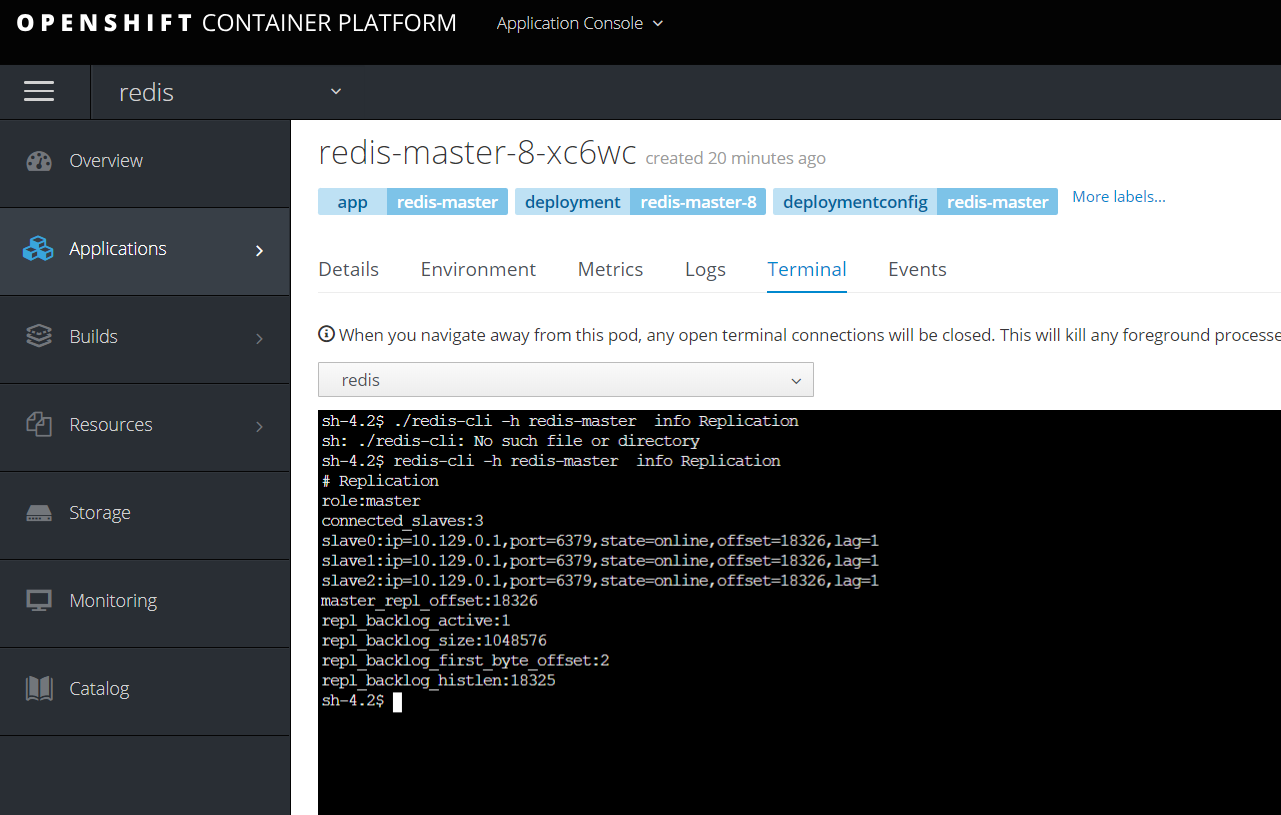
构建成功,可以愉快的使用了。
3.集群切换
讲redis-master直接scale到0,模拟down掉
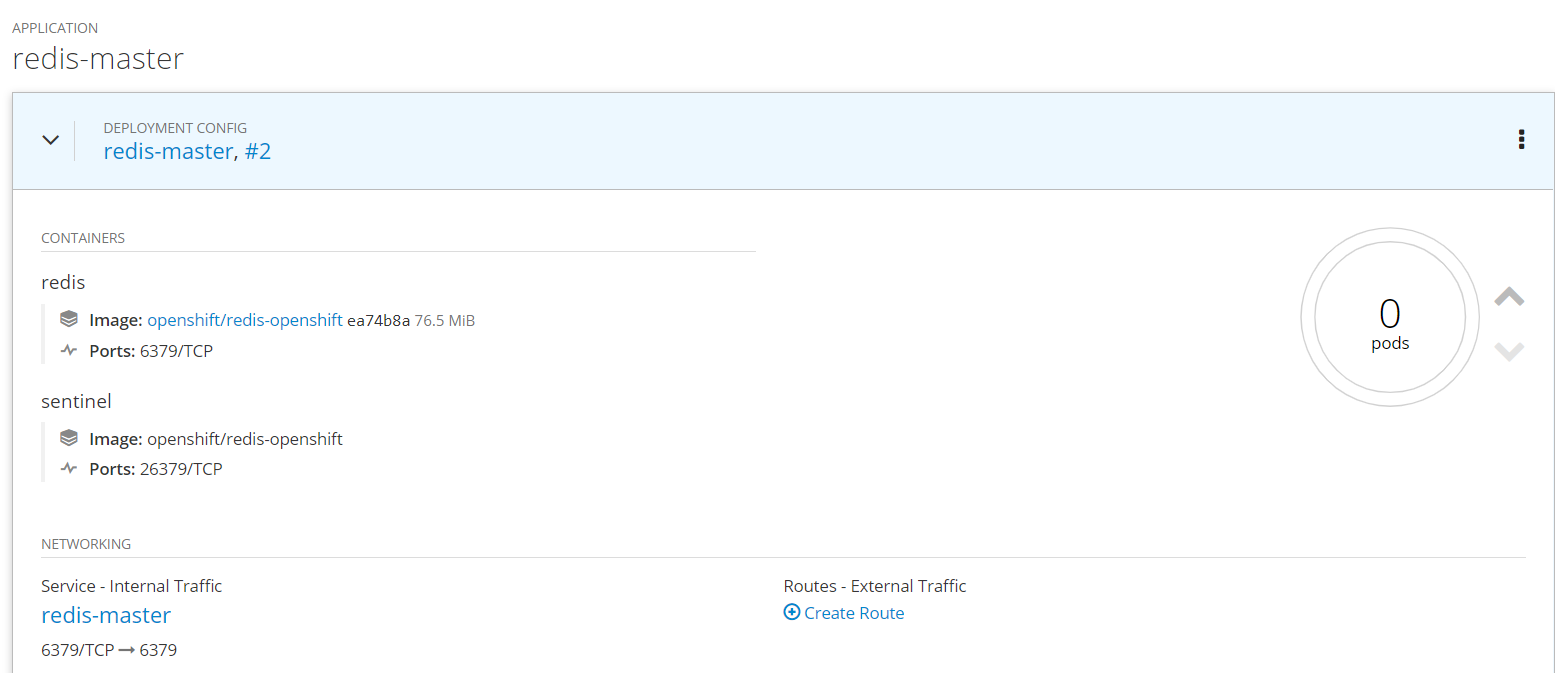
然后检查sentinel的日志,发现mymaster已经从10.129.0.2切换到了10.129.0.8的redis pod.
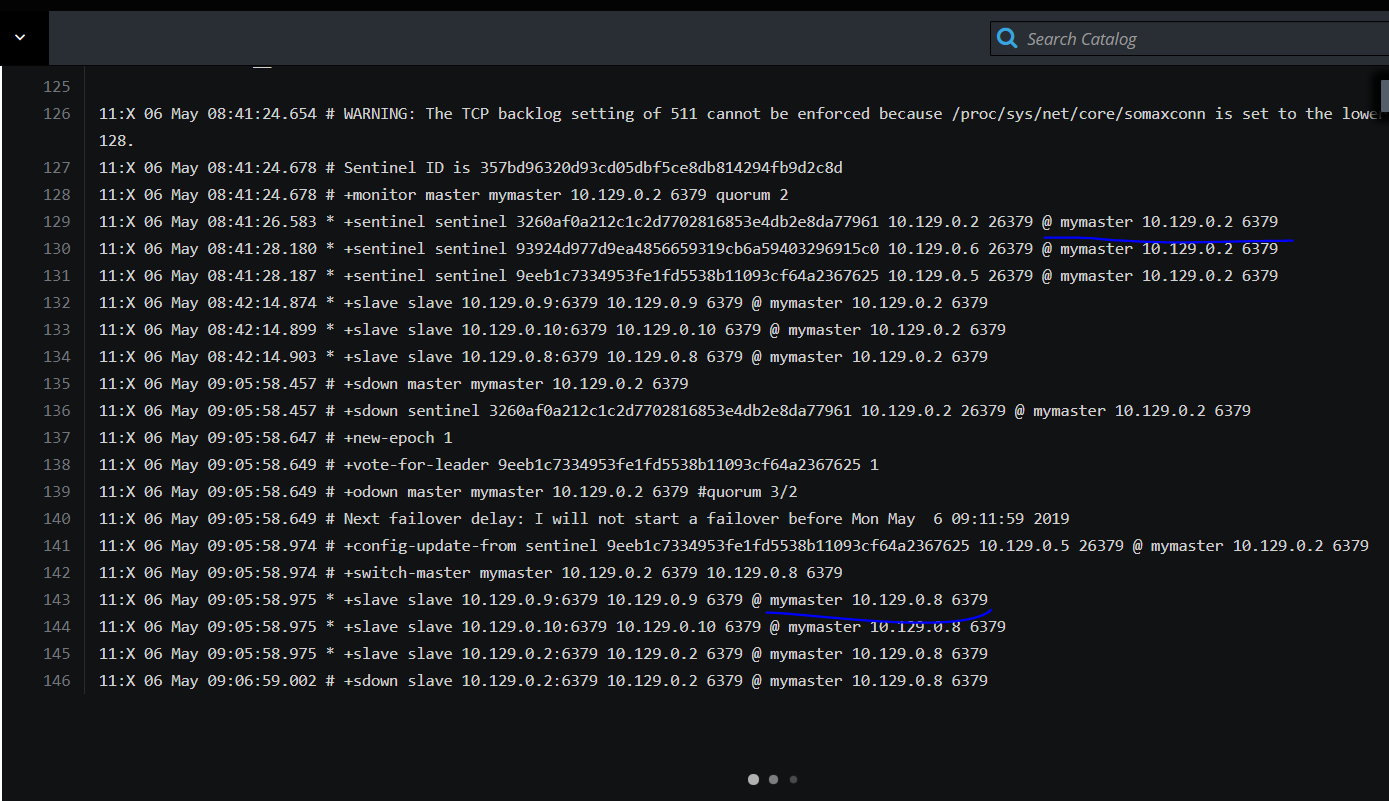
在reids节点上运行 redis-cli -h 10.129.0.8 info Replication
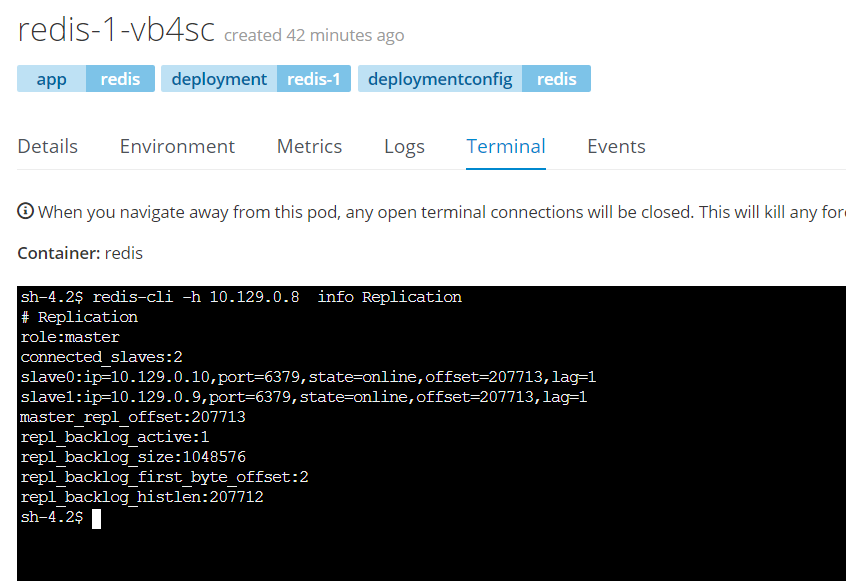
可以看到集群状态已经发生变化
OpenShift上部署Redis主从集群的更多相关文章
- 02.Redis主从集群的Sentinel配置
1.集群环境 1.Linux服务器列表 使用4台CentOS Linux服务器搭建环境,其IP地址如下: 192.168.110.100 192.168.110.101 192.168.110.102 ...
- 一、全新安装搭建redis主从集群
前言· 这里分为三篇文章来写我是如何重新搭建redis主从集群和哨兵集群的及原本服务器上有单redis如何通过升级脚本来实现redis集群.(redis结构:主-从(备)-从(备)) 至于为什么要搭建 ...
- docker搭建redis主从集群和sentinel哨兵集群,springboot客户端连接
花了两天搭建redis主从集群和sentinel哨兵集群,讲一下springboot客户端连接测试情况 redis主从集群 从网上查看说是有两种方式:一种是指定配置文件,一种是不指定配置文件 引用地址 ...
- K8S部署Redis Cluster集群
kubernetes部署单节点redis: https://www.cnblogs.com/zisefeizhu/p/14282299.html Redis 介绍 • Redis代表REmote DI ...
- K8S部署Redis Cluster集群(三主三从模式) - 部署笔记
一.Redis 介绍 Redis代表REmote DIctionary Server是一种开源的内存中数据存储,通常用作数据库,缓存或消息代理.它可以存储和操作高级数据类型,例如列表,地图,集合和排序 ...
- helm部署Redis哨兵集群
介绍 Redis Sentinel集群是由若干Sentinel节点组成的分布式集群,可以实现故障发现.故障自动转移.配置中心和客户端通知. 如下图: Redis Sentinel 故障转移过程: 从这 ...
- redis —主从&&集群(CLUSTER)
REDIS主从配置 为了节省资源,本实验在一台机器进行.即,在一台机器上启动两个端口,模拟两台机器. 机器准备: [root@adailinux ~]# cp /etc/redis.conf /etc ...
- Redis主从集群及哨兵模式
本次实验环境准备用一台服务器模拟3台redis服务器,1主2从 主从集群搭建 第一步:安装Redis 安装Redis,参考前面安装Redis文章,保证单机使用没有问题. 第二步:配置服务器文件 定位到 ...
- docker swarm快速部署redis分布式集群
环境准备 四台虚拟机 192.168.2.38(管理节点) 192.168.2.81(工作节点) 192.168.2.100(工作节点) 192.168.2.102(工作节点) 时间同步 每台机器都执 ...
随机推荐
- LOADRUNNER连接ORACLE数据库的方法
LOADRUNNER连接ORACLE数据库的方法 最近正在做一个测试数据库性能的项目,直接写出来的连接数据库并且进行数据库查询和插入的脚本在VUSER_INIT中(连接数据库)#include ...
- 【Java】java.lang.NullPointerException的两个原因
自己写程序时出现过 java.lang.NullPointerException错误的一些原因 (1)自己建立了一个数组,但每个数组元素没单独初始化(单独new一个新对象). (2)在进行if (ar ...
- UBB/HTML互相转换简单实现源码一览
查看源码,主要用的就是正则匹配,多的不说,直接读码. 资源原地址:在线UBB/HTML转换 效果图如下 以下源码: <!DOCTYPE html> <html lang=" ...
- Ionic实战二:购物车
用户名密码都为空 此app功能主要有如下 1.首页轮播和商品列表展示 2.左侧侧滑页面分类展示 3.商品详情页面展示 以及购买 4.购物车 订单填写 支付等页面          
- The file will have its original line endings in your working directory.
在空仓库的情况下,add,出现一下问题 The file will have its original line endings in your working directory. 当报这个警告时是 ...
- Android Actionbar Tab 导航模式
Android Actionbar Tab 下图中,红色矩形圈起来的就是我们 ActionBar Tab,下面我们将一步一步的实现下图中的效果. 初次尝试 package com.example.it ...
- [flask]flask_login模块,session及其他
读flask源码的时候,有一点一直到现在都没有一个清晰的概念,比如四个全局变量g,current_app,session,request是怎么做到的 按照查到的资料里面的说法,为了不至于每次都主动调用 ...
- 希尔排序之Java实现
希尔排序之Java实现 一.方法一 package cn.com.zfc.lesson21.sort; /** * * @title ShellSort * @describe 希尔排序 1959 年 ...
- [ZHOJ1954]lyd的旅行
题目大意: 一个做直线运动的物体已知初速度v0和v1,每分钟速度最大改变d,总共运动了t分钟,问至多运动了多少距离.(每个单位时间只能以同一种速度行驶) 思路: 肯定是先尽可能加速再减速,我们可以想一 ...
- bzoj 1047 单调队列
做4次单调队列优化DP. /************************************************************** Problem: 1047 User: idy ...