
i.mx6 Android5.1.1 build解析
参考资料:理解 Android Build 系统
把总结放前面:
1. 常用编译命令
| make clean | 执行清理,等同于:rm -rf out/。 |
| make sdk | 编译出 Android 的 SDK。 |
| make clean-sdk | 清理 SDK 的编译产物。 |
| make update-api | 更新 API。在 framework API 改动之后,需要首先执行该命令来更新 API,公开的 API 记录在 frameworks/base/api 目录下。 |
| make dist | 执行 Build,并将 MAKECMDGOALS 变量定义的输出文件拷贝到 /out/dist 目录。 |
| make all | 编译所有内容,不管当前产品的定义中是否会包含。 |
| make help | 帮助信息,显示主要的 make 目标。 |
| make snod | 从已经编译出的包快速重建系统镜像。 |
| make libandroid_runtime | 编译所有 JNI framework 内容。 |
| make framework | 编译所有 Java framework 内容。 |
| make services | 编译系统服务和相关内容。 |
| make <local_target> | 编译一个指定的模块,local_target 为模块的名称。 |
| make clean-<local_target> | 清理一个指定模块的编译结果。 |
| make dump-products | 显示所有产品的编译配置信息,例如:产品名,产品支持的地区语言,产品中会包含的模块等信息。 |
| make PRODUCT-xxx-yyy | 编译某个指定的产品。 |
| make bootimage | 生成 boot.img |
| make recoveryimage | 生成 recovery.img |
| make userdataimage | 生成 userdata.img |
| make cacheimage | 生成 cache.img |
2.常用命令:
| 名称 | 说明 |
|---|---|
| croot | 切换到源码树的根目录 |
| m | 在源码树的根目录执行 make |
| mm | Build 当前目录下的模块 |
| mmm | Build 指定目录下的模块 |
| cgrep | 在所有 C/C++ 文件上执行 grep |
| jgrep | 在所有 Java 文件上执行 grep |
| resgrep | 在所有 res/*.xml 文件上执行 grep |
| godir | 转到包含某个文件的目录路径 |
| printconfig | 显示当前 Build 的配置信息 |
| add_lunch_combo | 在 lunch 函数的菜单中添加一个条目 |
我们正常步骤为:
1). source build/envsetup.sh
2). lunch
3). make -jx
build/envsetup.sh
打开build/envsetup.sh,发现里面全都是函数,折叠全部函数,一直拖到最后,发现代码
if [ "x$SHELL" != "x/bin/bash" ]; then

    case `ps -o command -p $$` in

        *bash*)

            ;;

        *)

            echo "WARNING: Only bash is supported, use of other shell would lead to erroneous results"

            ;;

    esac

fi

# Execute the contents of any vendorsetup.sh files we can find.
#包含各种vendorsetup.s脚本文件进来,然后去执行

for f in `test -d device && find -L device -maxdepth  -name 'vendorsetup.sh' > /dev/null` \
         `test -d vendor && find -L vendor -maxdepth  -name 'vendorsetup.sh' > /dev/null`

do

    echo "including $f"

    . $f

done

unset f

addcompletions
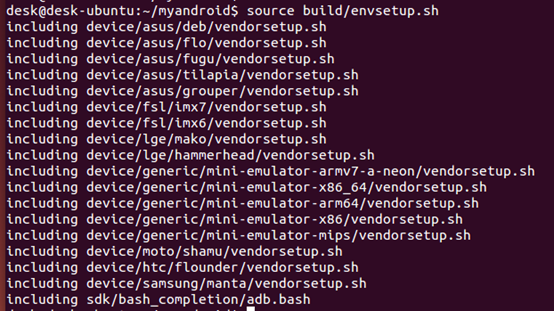
查看发现没错,查看lunch
function lunch()

{

    local answer

  #如果有第一个参数

    if [ "$1" ] ; then

        answer=$

    else  #如果没有参数,就进入print_lunch_menu函数

        print_lunch_menu

        echo -n "Which would you like? [aosp_arm-eng] "

        read answer

    fi

    local selection=

    if [ -z "$answer" ]

    then

        selection=aosp_arm-eng

    elif (echo -n $answer | grep -q -e "^[0-9][0-9]*$")

    then

        if [ $answer -le ${#LUNCH_MENU_CHOICES[@]} ]

        then

            selection=${LUNCH_MENU_CHOICES[$(($answer-))]}

        fi

    elif (echo -n $answer | grep -q -e "^[^\-][^\-]*-[^\-][^\-]*$")

    then

        selection=$answer

    fi

    if [ -z "$selection" ]

    then

        echo

        echo "Invalid lunch combo: $answer"

        return

    fi

    export TARGET_BUILD_APPS=

    local product=$(echo -n $selection | sed -e "s/-.*$//")

    check_product $product

    if [ $? -ne  ]

    then

        echo

        echo "** Don't have a product spec for: '$product'"

        echo "** Do you have the right repo manifest?"

        product=

    fi

    local variant=$(echo -n $selection | sed -e "s/^[^\-]*-//")

    check_variant $variant

    if [ $? -ne  ]

    then

        echo

        echo "** Invalid variant: '$variant'"

        echo "** Must be one of ${VARIANT_CHOICES[@]}"

        variant=

    fi

    if [ -z "$product" -o -z "$variant" ]

    then

        echo

        return

    fi

  #到处环境变量

    export TARGET_PRODUCT=$product

    export TARGET_BUILD_VARIANT=$variant

    export TARGET_BUILD_TYPE=release

    echo

    set_stuff_for_environment

    printconfig

}
function hmm() {

cat <<EOF

Invoke ". build/envsetup.sh" from your shell to add the following functions to your environment:

- lunch:   lunch <product_name>-<build_variant>

- tapas:   tapas [<App1> <App2> ...] [arm|x86|mips|armv5|arm64|x86_64|mips64] [eng|userdebug|user]

- croot:   Changes directory to the top of the tree.

- m:       Makes from the top of the tree.

- mm:      Builds all of the modules in the current directory, but not their dependencies.

- mmm:     Builds all of the modules in the supplied directories, but not their dependencies.

           To limit the modules being built use the syntax: mmm dir/:target1,target2.

- mma:     Builds all of the modules in the current directory, and their dependencies.

- mmma:    Builds all of the modules in the supplied directories, and their dependencies.

- cgrep:   Greps on all local C/C++ files.

- ggrep:   Greps on all local Gradle files.

- jgrep:   Greps on all local Java files.

- resgrep: Greps on all local res/*.xml files.

- sgrep:   Greps on all local source files.

- godir:   Go to the directory containing a file.

Look at the source to view more functions. The complete list is:

EOF

    T=$(gettop)

    local A

    A=""

    for i in `cat $T/build/envsetup.sh | sed -n "/^[ \t]*function /s/function \([a-z_]*\).*/\/p" | sort | uniq`; do

      A="$A $i"

    done

    echo $A

}
i.mx6 Android5.1.1 build解析的更多相关文章
- i.mx6 Android5.1.1 初始化流程之init.rc解析(未完成)
接上一篇:i.mx6 Android5.1.1 初始化流程之init进程 参考资料:http://blog.csdn.net/mr_raptor/article/category/799879 这个博 ...
- i.mx6 Android5.1.1 System server
1. 概述: 1. Zygote进程是Android Java世界的开创者,所有的Java应用程序进程都由Zygote进程创建: 2. Zygote创建应用程序进程过程其实就是复制自身进程地址空间作为 ...
- i.mx6 Android5.1.1 初始化流程之框架
Android启动过程分为以下几个步骤: 1. Boot ROM: 上电后启动芯片固话代码. 2. BootLoader:固话代码会根据启动模式启动bootloader,(一般为启动引脚的电平的 ...
- i.mx6 Android5.1.1 初始化流程之init进程(未完成)
概述: 接在i.mx6 Android5.1.1 初始化流程之框架之后 参考资料:http://blog.csdn.net/mr_raptor/article/category/799879 相关源码 ...
- i.mx6 Android5.1.1 servicemanager本地服务
接在之前的 i.mx6 Android5.1.1 初始化流程之init进程 i.mx6 Android5.1.1 初始化流程之init.rc解析 servicemanager是由init创建的本地服务 ...
- I.MX6 Linux U-boot 环境变量解析
/********************************************************************************** * I.MX6 Linux U- ...
- Android5.x Notification应用解析
Notification可以让我们在获得消息的时候,在状态栏,锁屏界面来显示相应的信息,很难想象如果没有Notification,那我们的qq和微信以及其他应用没法主动通知我们,我们就需要时时的看手机 ...
- i.mx6 Android5.1.1 系统属性
属性变更的请求时init事件循环处理的另一个事件,在Android平台中,为了让运行中的所有进程共享系统运行时所需要的各种设置值,系统开辟了属性存储区域,并提供了访问该区域的API.属性由键(key) ...
- i.mx6 Android5.1.1 Zygote
0. 总结: 0.1 相关源码目录: framework/base/cmds/app_process/app_main.cppframeworks/base/core/jni/AndroidRunti ...
随机推荐
- Microsoft SQL Server 2012 管理 (1): 安装配置SQL Server 重点
SQL Server 可以在实例,数据库,列,查询分别指定排序规则 /* Module 1 - working with Clollations */ -- 1.1 Obtain the Instan ...
- 【加密算法】DES
一.简介 DES对称加密,是一种比较传统的加密方式,其加密运算.解密运算使用的是同样的密钥,信息的发送者和信息的接收者在进行信息的传输与处理时,必须共同持有该密码(称为对称密码),是一种对称加密算法. ...
- 关于gridview改变行内容事件需要点击别的行或控件才能执行
一般的datagridview控件: this.dgvAssetList.CurrentCell = null;//取消datagridview行的编辑状态 Dev gridcontrol控件 Gr ...
- 《JavaScript高级程序设计》第六章【面向对象的程序设计】 包括对象、创建对象、继承
一.理解对象 二.创建对象 1. 工厂模式 2. 构造函数模式 3. 原型模式 4. 组合使用构造函数模式和原型模式[使用最广泛] 5. 动态原型模式 ...
- 深入浅出“跨视图粒度计算”--3、EXCLUDE表达式
本文由 网易云发布. 深入嵌入“跨视图粒度计算”的前面两篇分别讲了 1.理解数据的粒度 2.INCLUDE表达式 这一篇讲一下EXCLUDE表达式的用法. EXCLUDE,中文译为“排除”,顾名思义 ...
- Kubernetes性能测试实践
本文由 网易云 发布. 概述 随着容器技术的发展,容器服务已经成为行业主流,然而想要在生产环境中成功部署和操作容器,关键还是容器编排技术.市场上有各种各样的容器编排工具,如Docker原生的Swar ...
- NGINX部署
- elasticsearch 5.x Delete By Query API(根据条件删除)
之前在 2.X版本里 这个Delete By Query功能被去掉了 因为官方认为会引发一些错误 如需使用 需要自己安装插件. bin/plugin install delete-by-query 需 ...
- maven 服务器搭建 -- nexus
参考文档 http://blog.sina.com.cn/s/blog_5745d6cb0100hasa.html 首先下载nexus webapp,可以使用wget来下载: Java代码 wget ...
- Jmeter之Bean shell使用
转载地址:http://www.cnblogs.com/puresoul/p/4915350.html 一.什么是Bean Shell BeanShell是一种完全符合Java语法规范的脚本语言,并且 ...