
小细节--Extjs中,renderTo 和applyTo的区别
说到web前端框架,extjs绝对算是非常优秀的一个。
extjs中,两个方法很像,renderTo和applyTo,我在网上也搜了很多相关的内容,在这里举例为大家进行区分,欢迎大家交流指正。
主要区分内容:比较renderTo和applyTo在显示和渲染生成代码上的异同。
使用方法:使用嵌套的div层,分别用renderTo和applyTo方法进行渲染。
js代码:
<script type="text/javascript">

        Ext.onReady(function () {

            var button1 = new Ext.Button({

                renderTo: 'top',

                text: 'top'

            });

            var button2 = new Ext.Button({

                applyTo: 'center',

                text: 'center'

            });

            var button3 = new Ext.Button({

                applyTo: 'bottom1',

                text: 'bottom1'

            });

        })

    </script>
HTML代码:
<body>

    <div id="top" style=" background-color:red; width:100px;height:100px; ">top</div>

    <div id="center" style=" background-color:Blue; width:100px;height:100px; ">center</div>

    <div id="bottom" style=" background-color:Green; width:100px;height:100px; " >bottom

        <div id="bottom1" style="background-color:Yellow; width:60px;height:20px;">bottom1</div>

        <div id="bottom2" style="background-color:Orange;width:60px;height:20px;">bottom2</div>

    </div>

</body>
网页效果:
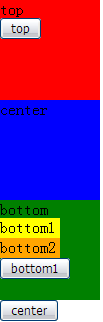
简单总结:
由生成的效果我们可以看出:
1.renderTo生成的控件,是在指定的节点下生成,并且顺序排列在此节点内所有的元素之后。
2.applyTo生成的控件,是在指定的节点的父节点下生成,并且顺序排列在此节点的父节点所有元素之后。
代码验证:
生成的页面代码:
<body class=" ext-safari" id="ext-gen13">
<div id="top" style=" background-color:red; width:100px;height:100px; ">top
<table border="0" cellpadding="0" cellspacing="0" class="x-btn-wrap x-btn" id="ext-comp-1001" style="width: auto;">
<tbody>
<tr>
<td class="x-btn-left"><i> </i></td><td class="x-btn-center">
<em unselectable="on"><button class="x-btn-text" type="button" id="ext-gen7">top</button></em>
</td><td class="x-btn-right"><i> </i></td>
</tr>
</tbody>
</table> </div> <div id="center" style=" background-color:Blue; width:100px;height:100px; ">center</div>
<div id="bottom" style=" background-color:Green; width:100px;height:100px; ">bottom
<div id="bottom1" style="background-color:Yellow; width:60px;height:20px;">bottom1</div>
<div id="bottom2" style="background-color:Orange;width:60px;height:20px;">bottom2</div>
<table border="0" cellpadding="0" cellspacing="0" class="x-btn-wrap x-btn" id="ext-comp-1003" style="width: auto;">
<tbody>
<tr>
<td class="x-btn-left"><i> </i></td><td class="x-btn-center">
<em unselectable="on"><button class="x-btn-text" type="button" id="ext-gen22">bottom1</button></em>
</td><td class="x-btn-right"><i> </i></td>
</tr>
</tbody>
</table>
</div> <table border="0" cellpadding="0" cellspacing="0" class="x-btn-wrap x-btn" id="ext-comp-1002" style="width: auto;">
<tbody>
<tr>
<td class="x-btn-left"><i> </i></td><td class="x-btn-center">
<em unselectable="on"><button class="x-btn-text" type="button" id="ext-gen15">center</button></em>
</td><td class="x-btn-right"><i> </i></td>
</tr>
</tbody>
</table>
</body>
小细节--Extjs中,renderTo 和applyTo的区别的更多相关文章
- Android Studio ---------------- 软件使用小细节(更新中。。。。。。)
###鼠标放到相关类或方法等上,没有提示. *解决方法:File----Setting-----Editor-----General------Show quik documentation on m ...
- ExtJs4学习(四):Extjs 中id与itemId的区别
为了方便表示或是指定一个组件的名称,我们通常会使用id或者itemId进行标识命名.(推荐尽量使用itemId,这样可以减少页面唯一标识而产生的冲突) id: id是作为整个页面的Compo ...
- 【转载】Extjs 中id与itemId的区别
为了方便表示或是指定一个组件的名称,我们通常会使用id或者itemId进行标识命名.(推荐尽量使用itemId,这样可以减少页面唯一标识而产生的冲突) id: id是作为整个页面的Com ...
- 17.EXTJs 中icon 与iconCls的区别及用法!
转自:https://blog.csdn.net/u013890437/article/details/38315717?utm_source=blogxgwz7
- ASP.NET MVC 自定义路由中几个需要注意的小细节
本文主要记录在ASP.NET MVC自定义路由时,一个需要注意的参数设置小细节. 举例来说,就是在访问 http://localhost/Home/About/arg1/arg2/arg3 这样的自定 ...
- C++在使用Qt中SLOT宏须要注意的一个小细节
大家都知道C++虚函数的机制,对于基类定义为虚函数的地方,子类假设覆写,在基类指针或者引用来指向子类的时候会实现动态绑定. 但假设指针去调用非虚函数,这个时候会调用C++的静态绑定,去推断当前的指针是 ...
- C++在使用Qt中SLOT宏需要注意的一个小细节
大家都知道C++虚函数的机制,对于基类定义为虚函数的地方,子类如果覆写,在基类指针或者引用来指向子类的时候会实现动态绑定. 但如果指针去调用非虚函数,这个时候会调用C++的静态绑定,去判断当前的指针是 ...
- ArrayList中的一些小细节@JDK8
ArrayList中的一些小细节@JDK8 protected transient int modCount = 0; 该变量用于记录ArrayList的版本号,不可被序列化,每次对ArrayList ...
- Extjs中Store小总结
http://blog.csdn.net/without0815/article/details/7798170 1.什么是store? Store类似于一个本地仓库(即数据存储器),包括有 Arra ...
随机推荐
- iOS 之使用CAShapeLayer中的CAGradientLayer实现圆环的颜色渐变
本文转载自:http://blog.csdn.net/zhoutao198712/article/details/20864143 在 Github上看到一些进度条的功能,都是通过Core Graph ...
- set--常见成员函数及基本用法
c++ stl集合set介绍 c++ stl集合(Set)是一种包含已排序对象的关联容器. set/multiset会根据待定的排序准则,自动将元素排序.两者不同在于前者不允许元素重复,而后者允许. ...
- hdu 1284 关于钱币兑换的一系列问题 九度oj 题目1408:吃豆机器人
钱币兑换问题 Time Limit: 2000/1000 MS (Java/Others) Memory Limit: 65536/32768 K (Java/Others) Total Sub ...
- iOS 开发设计常用软件及工具整理
1, xCode 2, AppCode 3, Skech 原型设计软件 4, Hype 动画设计工具 5, fontawsome 免费图表 6, Prepo icon, images.catlog 生 ...
- svn笔记
安装部署 1.yum install subversion 2.创建svn版本库目录 mkdir -p /svn 3.创建版本库 svnadmin create /svn/fengchao/ ...
- JSONP跨域的原理解析[转]
转自 http://www.nowamagic.net/librarys/veda/detail/224 JavaScript是一种在Web开发中经常使用的前端动态脚本技术.在JavaScript中, ...
- 开大Stack的一个小技巧
在程序头部添加一行 #pragma comment(linker, "/STACK:16777216") 可有效开大堆栈 实验效果如下: 11330179 2014-08-05 1 ...
- 笔记之Cyclone IV 第一卷第一章FPGA 器件系列概述
因为本人用的黑金四代开发板,中央芯片采用ALTERA的cycloneIV E,所以就此器件阅读altera官网资料,并做相应的笔记,以便于以后查阅 Cyclone IV 器件系列具有以下特性:■ 低成 ...
- Linux下的在线播放神器
Linux下的在线播放神器:一个是Amarok缺点是,每个音乐源都要更新后才能播放. 在一个就是中国造的:linux deepin下的深度音乐,缺点就是连不上.反正我是连不上
- 红黑树和AVL树的实现与比较-----算法导论
一.问题描述 实现3种树中的两种:红黑树,AVL树,Treap树 二.算法原理 (1)红黑树 红黑树是一种二叉查找树,但在每个结点上增加一个存储位表示结点的颜色,可以是red或black.红黑树满足以 ...