
Win7网络检测 WindowsAPICodePack
原文:http://www.cnblogs.com/yincheng01/archive/2010/05/30/2213234.html
在Windows7操作系统下,支持的网络类型越来越复杂,微软提供了WindowsAPICodePack来进行简化底层开发,
我们大家来亲自实践一下关于网络状态开发,基于WindowsAPICodePack
启动VS2010
引入dll文件,添加如下代码即可
private void LoadNetworkConnections()

        {

            try

            {

                NetworkCollection networks = NetworkListManager.GetNetworks(NetworkConnectivityLevels.All);

                foreach (Network n in networks)

                {

                    // 创建 tab

                    TabItem tabItem = new TabItem();

                    tabItem.Header = string.Format("Network {0} ({1})", tabControl1.Items.Count, n.Name);

                    tabControl1.Items.Add(tabItem);

                    //

                    StackPanel stackPanel2 = new StackPanel();

                    stackPanel2.Orientation = Orientation.Vertical;

                    // 列举所有信息

                    AddProperty("网络名称: ", n.Name, stackPanel2);

                    AddProperty("网络类型: ", n.Description, stackPanel2);

                    AddProperty("域类型: ", n.DomainType.ToString(), stackPanel2);

                    AddProperty("是否连接: ", n.IsConnected.ToString(), stackPanel2);

                    AddProperty("是否上网: ", n.IsConnectedToInternet.ToString(), stackPanel2);

                    AddProperty("网络 ID: ", n.NetworkId.ToString(), stackPanel2);

                    AddProperty("类别: ", n.Category.ToString(), stackPanel2);

                    AddProperty("创建时间: ", n.CreatedTime.ToString(), stackPanel2);

                    AddProperty("连接时间: ", n.ConnectedTime.ToString(), stackPanel2);

                    AddProperty("连接: ", n.Connectivity.ToString(), stackPanel2);

                    //

                    StringBuilder s = new StringBuilder();

                    s.AppendLine("网络连接:");

                    NetworkConnectionCollection connections = n.Connections;

                    string hh = System.Environment.NewLine;

                    foreach (NetworkConnection nc in connections)

                    {

                        s.AppendFormat(hh + "连接 ID: {0}" + hh + "类型: {1}" + hh + "是否连接: {2}" + hh + "是否连接因特网: {3}" + hh,

                            nc.ConnectionId, nc.DomainType, nc.IsConnected, nc.IsConnectedToInternet);

                        s.AppendFormat(hh + "适配器 ID: {0}" + hh + "连接: {1}" + hh,

                            nc.AdapterId, nc.Connectivity);

                    }

                    s.AppendLine();

                    Label label = new Label();

                    label.Content = s.ToString();

                    stackPanel2.Children.Add(label);

                    tabItem.Content = stackPanel2;

                }

            }

            catch (Exception ex)

            {

                txtReadWrite.WriteLog("检测网络异常!" + ex.GetType().FullName + ex.Message + ex.StackTrace);

                (new Win_Popup("消息", "删除数据时出错!" + ex.Message, MessageBoxButton.OK)).ShowDialog();

            }

        }

        private void AddProperty(string propertyName, string propertyValue, StackPanel parent)

        {

            StackPanel panel = new StackPanel();

            panel.Orientation = Orientation.Horizontal;

            Label propertyNameLabel = new Label();

            propertyNameLabel.Content = propertyName;

            panel.Children.Add(propertyNameLabel);

            Label propertyValueLabel = new Label();

            propertyValueLabel.Content = propertyValue;

            panel.Children.Add(propertyValueLabel);

            parent.Children.Add(panel);

        }
窗口代码如下:
 <Grid>

        <TabControl Height="Auto" HorizontalAlignment="Stretch" Margin="10,10,10,10" Name="tabControl1" VerticalAlignment="Stretch" Width="Auto">

        </TabControl>

    </Grid>
看下效果图吧:
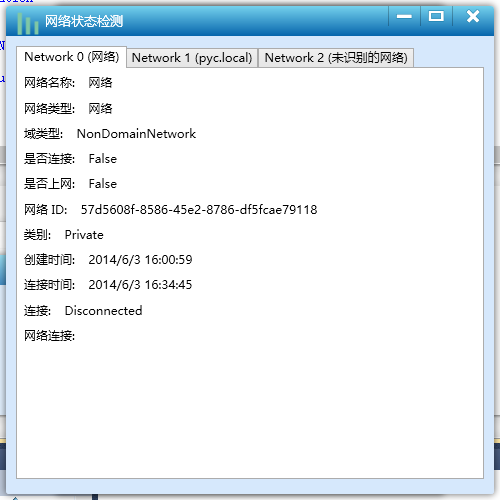
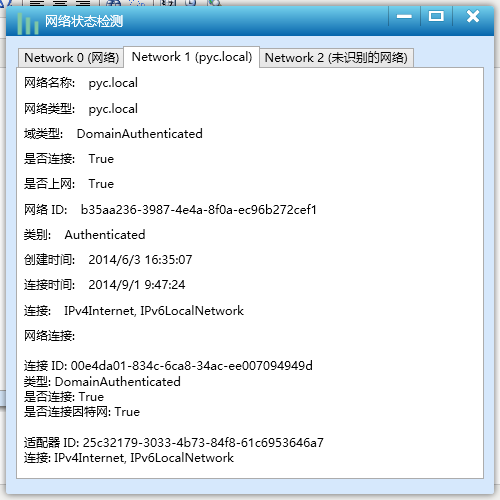
通过这个接口,可以获取各个网络的信息。dll下载点这。
Win7网络检测 WindowsAPICodePack的更多相关文章
- iOS开发——网络篇——NSURLSession,下载、上传代理方法,利用NSURLSession断点下载,AFN基本使用,网络检测,NSURLConnection补充
一.NSURLConnection补充 前面提到的NSURLConnection有些知识点需要补充 NSURLConnectionDataDelegate的代理方法有一下几个 - (void)conn ...
- WinForm多线程实现HTTP网络检测工具
一.背景描述与课程介绍 明人不说暗话,跟着阿笨一起玩WinForm.本次分享课程属于<C#高级编程实战技能开发宝典课程系列>中的一部分,阿笨后续会计划将实际项目中的一些比较实用的关于C#高 ...
- ios - 高效,准确的网络检测
//网络检测 // 1.创建网络监听者管理者对象 AFNetworkReachabilityManager *manager = [AFNetworkReachabilityManager share ...
- Hyper-V虚拟机win7网络红叉,无法上网解决方法
之前一直都是玩Vmware虚拟机,后来win8之后的系统有Hyper-V虚拟机就开始接触了. Windows 中内置的Hyper-V管理器可以说是给很多人带来了惊喜!至少运行的流畅程度要比Vmware ...
- 解除win7网络限速.
在电脑刚买或者系统重装了的时候,win7系统会默认限制20%的网络速度,限制了我们的上网速度,我们可以解决这个限制,让上网变得更快 下面是操作步骤 1.开始>运行 2.输入以下命令,然后确定 g ...
- iOS网络检测
使用之前请从Apple网站下载示例:点此下载 Reachability 中定义了3种网络状态: typedef enum : NSInteger { NotReachable = ,//无网络 Rea ...
- Win7网络修复,winsock/tcpip
1.win7自带网络诊断提示没有安装一个或多个协议,ip地址为169.254.x.x,dns地址为空 2.修复winsock时,提示系统找不到指定的文件. 解决办法: 1. netsh int ip ...
- Linux网络检测手段汇总
1.iftop iftop可测量通过每一个套接字连接传输的数据:它采用的工作方式有别于nload.iftop使用pcap库来捕获进出网络适配器的数据包,然后汇总数据包大小和数量,搞清楚总的带宽使用情况 ...
- (020)[虚拟系统]Win7网络连接红叉(无解决)
该虚拟机在重装主系统前是可以连接网络的,主系统重新安装以后,导入新安装的VM以后,网络图标显示红叉. 查看设备管理,显示没有安装以太网驱动. 重新安装 Vmware Tools,未果.VMware官网 ...
随机推荐
- 使用QtCreator作为ROS调试器
如果你用过QtCreator,你一定会喜欢上它. 流畅的速度,强大的功能,优雅的外观,友好的界面,一切让人如此舒服.而且它支持从命令行作为调试器启动,只需加上-debug exe即可. 因此我想如果能 ...
- Extjs4.0.7 MVC Architecture异常
uncaught exception: Ext.Loader is not enabled, so dependencies cannot be resolved dynamically. Mi ...
- PowerShell_零基础自学课程_6_PS中获取帮助信息详解、管道、格式化输
前些文章陆续的说了一些关于这些主题,但是讨论的都不够深入,今天我们深入的了解一下获取帮助信息.管道以及格式化输出的内容. 一.获取帮助信息 在PS中获取帮助信息,最常用的有: -? .get-comm ...
- poj 3498 March of the Penguins(最大流+拆点)
题目大意:在南极生活着一些企鹅,这些企鹅站在一些冰块上,现在要让这些企鹅都跳到同一个冰块上.但是企鹅有最大的跳跃距离,每只企鹅从冰块上跳走时会给冰块造成损害,因此企鹅跳离每个冰块都有次数限制.找出企鹅 ...
- RedHat9通过Host-only配置网络连接
首先我用的是VMware8版本安装的RedHat9.VMware给我们提供了三种让虚拟机里的安装系统连上网的方式.分别是Host-only,Bridge,NAT.我要讲的是Host-only. 第一步 ...
- hdu 4585 Shaolin_set用法
题目链接 题意:有n个人想成为少林,但是成为少林必须跟少林的大师大一场,当然要选择战斗力很近的,有两大师战斗力跟那人相近程度一样就选战斗力小的那个,按输入顺序,先输入的人先成为少林大师,后面输入的人, ...
- 用户登陆,退出等基本Action
用户登陆页面user_login.jsp对应action为login.do: <!DOCTYPE html PUBLIC "-//W3C//DTD XHTML 1.0 Transiti ...
- poj 3320 Jessica's Reading Problem(尺取法)
Description Jessica's a very lovely girl wooed by lots of boys. Recently she has a problem. The fina ...
- JavaScript 基础二
JavaScript 事件处理程序就是一组语句,在事件(如点击鼠标或移动鼠标等)发生时执行 ●当事件之间互相影响时,需要有个先后顺序,这时我们声明一个Bool值来做约束 浏览对象: window 对象 ...
- pyqt 配置文件例子学习
# -*- coding: utf-8 -*- # python:2.x __author__ = 'Administrator' import sys,datetime from PyQt4.QtC ...