
Win7网络检测 WindowsAPICodePack
原文:http://www.cnblogs.com/yincheng01/archive/2010/05/30/2213234.html
在Windows7操作系统下,支持的网络类型越来越复杂,微软提供了WindowsAPICodePack来进行简化底层开发,
我们大家来亲自实践一下关于网络状态开发,基于WindowsAPICodePack
启动VS2010
引入dll文件,添加如下代码即可
private void LoadNetworkConnections()

        {

            try

            {

                NetworkCollection networks = NetworkListManager.GetNetworks(NetworkConnectivityLevels.All);

                foreach (Network n in networks)

                {

                    // 创建 tab

                    TabItem tabItem = new TabItem();

                    tabItem.Header = string.Format("Network {0} ({1})", tabControl1.Items.Count, n.Name);

                    tabControl1.Items.Add(tabItem);

                    //

                    StackPanel stackPanel2 = new StackPanel();

                    stackPanel2.Orientation = Orientation.Vertical;

                    // 列举所有信息

                    AddProperty("网络名称: ", n.Name, stackPanel2);

                    AddProperty("网络类型: ", n.Description, stackPanel2);

                    AddProperty("域类型: ", n.DomainType.ToString(), stackPanel2);

                    AddProperty("是否连接: ", n.IsConnected.ToString(), stackPanel2);

                    AddProperty("是否上网: ", n.IsConnectedToInternet.ToString(), stackPanel2);

                    AddProperty("网络 ID: ", n.NetworkId.ToString(), stackPanel2);

                    AddProperty("类别: ", n.Category.ToString(), stackPanel2);

                    AddProperty("创建时间: ", n.CreatedTime.ToString(), stackPanel2);

                    AddProperty("连接时间: ", n.ConnectedTime.ToString(), stackPanel2);

                    AddProperty("连接: ", n.Connectivity.ToString(), stackPanel2);

                    //

                    StringBuilder s = new StringBuilder();

                    s.AppendLine("网络连接:");

                    NetworkConnectionCollection connections = n.Connections;

                    string hh = System.Environment.NewLine;

                    foreach (NetworkConnection nc in connections)

                    {

                        s.AppendFormat(hh + "连接 ID: {0}" + hh + "类型: {1}" + hh + "是否连接: {2}" + hh + "是否连接因特网: {3}" + hh,

                            nc.ConnectionId, nc.DomainType, nc.IsConnected, nc.IsConnectedToInternet);

                        s.AppendFormat(hh + "适配器 ID: {0}" + hh + "连接: {1}" + hh,

                            nc.AdapterId, nc.Connectivity);

                    }

                    s.AppendLine();

                    Label label = new Label();

                    label.Content = s.ToString();

                    stackPanel2.Children.Add(label);

                    tabItem.Content = stackPanel2;

                }

            }

            catch (Exception ex)

            {

                txtReadWrite.WriteLog("检测网络异常!" + ex.GetType().FullName + ex.Message + ex.StackTrace);

                (new Win_Popup("消息", "删除数据时出错!" + ex.Message, MessageBoxButton.OK)).ShowDialog();

            }

        }

        private void AddProperty(string propertyName, string propertyValue, StackPanel parent)

        {

            StackPanel panel = new StackPanel();

            panel.Orientation = Orientation.Horizontal;

            Label propertyNameLabel = new Label();

            propertyNameLabel.Content = propertyName;

            panel.Children.Add(propertyNameLabel);

            Label propertyValueLabel = new Label();

            propertyValueLabel.Content = propertyValue;

            panel.Children.Add(propertyValueLabel);

            parent.Children.Add(panel);

        }
窗口代码如下:
 <Grid>

        <TabControl Height="Auto" HorizontalAlignment="Stretch" Margin="10,10,10,10" Name="tabControl1" VerticalAlignment="Stretch" Width="Auto">

        </TabControl>

    </Grid>
看下效果图吧:
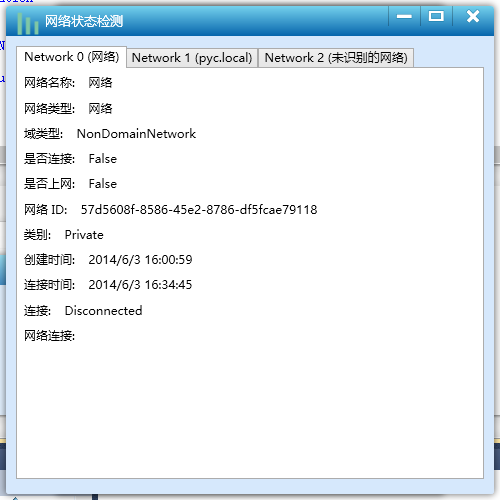
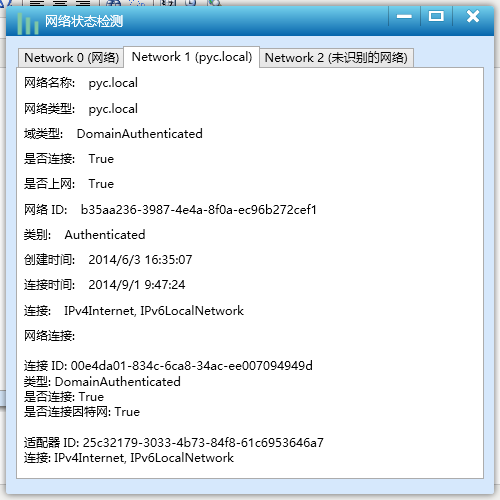
通过这个接口,可以获取各个网络的信息。dll下载点这。
Win7网络检测 WindowsAPICodePack的更多相关文章
- iOS开发——网络篇——NSURLSession,下载、上传代理方法,利用NSURLSession断点下载,AFN基本使用,网络检测,NSURLConnection补充
一.NSURLConnection补充 前面提到的NSURLConnection有些知识点需要补充 NSURLConnectionDataDelegate的代理方法有一下几个 - (void)conn ...
- WinForm多线程实现HTTP网络检测工具
一.背景描述与课程介绍 明人不说暗话,跟着阿笨一起玩WinForm.本次分享课程属于<C#高级编程实战技能开发宝典课程系列>中的一部分,阿笨后续会计划将实际项目中的一些比较实用的关于C#高 ...
- ios - 高效,准确的网络检测
//网络检测 // 1.创建网络监听者管理者对象 AFNetworkReachabilityManager *manager = [AFNetworkReachabilityManager share ...
- Hyper-V虚拟机win7网络红叉,无法上网解决方法
之前一直都是玩Vmware虚拟机,后来win8之后的系统有Hyper-V虚拟机就开始接触了. Windows 中内置的Hyper-V管理器可以说是给很多人带来了惊喜!至少运行的流畅程度要比Vmware ...
- 解除win7网络限速.
在电脑刚买或者系统重装了的时候,win7系统会默认限制20%的网络速度,限制了我们的上网速度,我们可以解决这个限制,让上网变得更快 下面是操作步骤 1.开始>运行 2.输入以下命令,然后确定 g ...
- iOS网络检测
使用之前请从Apple网站下载示例:点此下载 Reachability 中定义了3种网络状态: typedef enum : NSInteger { NotReachable = ,//无网络 Rea ...
- Win7网络修复,winsock/tcpip
1.win7自带网络诊断提示没有安装一个或多个协议,ip地址为169.254.x.x,dns地址为空 2.修复winsock时,提示系统找不到指定的文件. 解决办法: 1. netsh int ip ...
- Linux网络检测手段汇总
1.iftop iftop可测量通过每一个套接字连接传输的数据:它采用的工作方式有别于nload.iftop使用pcap库来捕获进出网络适配器的数据包,然后汇总数据包大小和数量,搞清楚总的带宽使用情况 ...
- (020)[虚拟系统]Win7网络连接红叉(无解决)
该虚拟机在重装主系统前是可以连接网络的,主系统重新安装以后,导入新安装的VM以后,网络图标显示红叉. 查看设备管理,显示没有安装以太网驱动. 重新安装 Vmware Tools,未果.VMware官网 ...
随机推荐
- javax.net.ssl.SSLException: java.lang.UnsupportedOperationException
Loading KeyStore C:\Tool\jdk1.7.0_71\jre\lib\security\jssecacerts... Opening connection to www.googl ...
- 不要怂,就是GAN (生成式对抗网络) (二)
前面我们了解了 GAN 的原理,下面我们就来用 TensorFlow 搭建 GAN(严格说来是 DCGAN,如无特别说明,本系列文章所说的 GAN 均指 DCGAN),如前面所说,GAN 分为有约束条 ...
- Source Insight设置总结
在网上搜索了一些关于Source Insight的设置技巧,把这些结果给总结下来: 1. 背景色选择 要改变背景色Options->preference->windows backgrou ...
- openwrt下和云端通讯的例程,
openwrt下和云端通讯的例程 ibcurl 官方文档请参考这里 http://curl.haxx.se/libcurl/c/curl_easy_setopt.html 刚接触 libcurl的时候 ...
- 利用jquery表格添加一行并在每行第一列大写字母显示实现方法
表格添加一行并在每行第一列大写字母显示jquery实现方法 <!DOCTYPE html PUBLIC "-//W3C//DTD HTML 4.01 Transitional//EN& ...
- cf486A Calculating Function
A. Calculating Function time limit per test 1 second memory limit per test 256 megabytes input stand ...
- 简易的C/S系统(实现两个数的和)
//Client:#include <string.h> #include <sys/socket.h> #include <stdio.h> #include & ...
- FZU 2102 Solve equation(水,进制转化)&& FZU 2111(贪心,交换使数字最小)
C Time Limit:1000MS Memory Limit:32768KB 64bit IO Format:%I64d & %I64u Submit Status Pra ...
- linux在文件打包和压缩
1. 打包和压缩文件 linux现在经常使用gzip和bzip2要压缩的文件.tar压缩文件. 经常使用的扩展: *.gz gzip压缩文件 *.bz2 bzip2压缩的文件 *.tar t ...
- 动态修改UINavigationBar的背景色
这是我们最终想要得到的效果: 思路 在UISrollView的delegate方法 1 - (void)scrollViewDidScroll:(UIScrollView *)scrollView ...