
Junit 学习
一. 断言核心方法
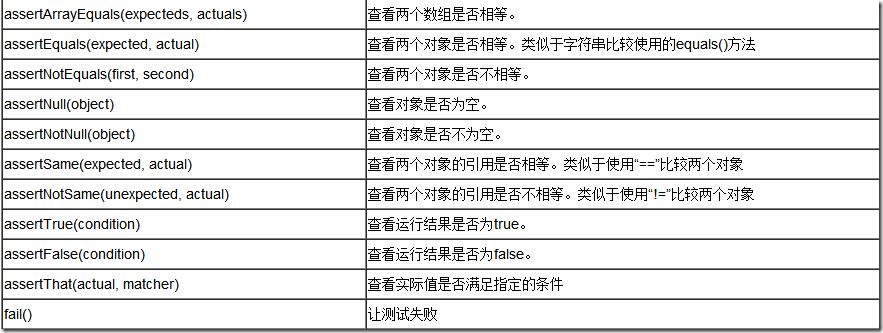
示例代码:
package com.test;

import org.junit.Assert;

import org.junit.Test;

/**

* @Title: testAssert.java

* @Package com.test

* @Description: junit中常见的断言

* @author lky

* @date 2015年10月17日 上午9:15:59

* @version V1.0

 */

public class testAssert {

    /**

    * @Title: testAssertByteArrayEqual

    * @Description: 判断字节数组是否相等

     */

    @Test

    public void testAssertByteArrayEqual(){

        Assert.assertArrayEquals("byteArray fail to equal ", "lky".getBytes(),"lky".getBytes());

    }

    /**

    * @Title: testAssertEqual

    * @Description: 判断两个对象是否相等,只比较值,不比较它们的地址,类似于java中的equal的比较

     */

    @Test

    public void testAssertEqual(){

        Assert.assertEquals("fail to equql", 50,50);

    }

    @Test

    public void testAssertNotEqual(){

        Assert.assertNotEquals("should be not equal",50,49);

    }

    /**

    * @Title: testAssertNotNull

    * @Description: 判断一个对象是否为空

     */

    @Test

    public void testAssertNotNull(){

        Assert.assertNotNull("should be not null", new Object());

    }

    @Test

    public void testAssertNull(){

        Assert.assertNull("should be null", null);

    }

    /**

    * @Title: testAssertSame

    * @Description: 判断两个对象是否相等,包括值和地址,类似于java中的=

     */

    @Test

    public void testAssertSame(){

        Integer number=Integer.valueOf(10);

        Assert.assertSame("should be same",number ,number);

    }

    @Test

    public void testAssertNotSame(){

        Assert.assertNotSame("should be not same", new Object(), new Object());

    }

}
二.注解核心方法
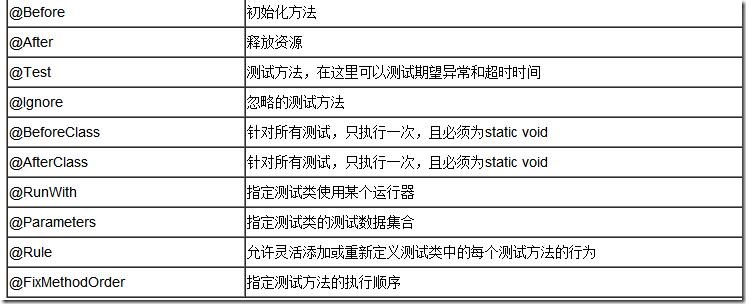
- 执行顺序
一个测试类单元测试的执行顺序为:
@BeforeClass –> @Before –> @Test –> @After –> @AfterClass
- 每一个测试方法的调用顺序为:
@Before –> @Test –> @After
示例代码:
package com.test;

import org.junit.After;

import org.junit.AfterClass;

import org.junit.Assert;

import org.junit.Before;

import org.junit.BeforeClass;

import org.junit.Ignore;

import org.junit.Test;

/**

* @Title: testAnnotation.java

* @Package com.test

* @Description: junit测试中注解测试

* @author lky

* @date 2015年10月17日 上午9:36:39

* @version V1.0

 */

public class testAnnotation {

    private static Demo demo=null;

    /**

    * @Title: testBeforeClass

    * @Description: 在该类加载时运行,有且仅仅执行一次

     */

    @BeforeClass

    public static void testBeforeClass(){

        demo=new Demo();

        System.out.println("Test --------->testBeforeClass");

    }

    /**

    * @Title: testBefore

    * @Description: 在每一个测试执行前,自动被调用

     */

    @Before

    public void testBefore(){

        System.out.println("Test---------->testBefore");

    }

    /**

    * @Title: testAdd

    * @Description: 真正去做测试的代码

     */

    @Test

    public void testAdd(){

        Assert.assertEquals(5, demo.add(2, 3));

    }

    /**

    * @Title: testAdd1

    * @Description: ignore表示忽略该测试

     */

    @Ignore

    @Test

    public void testAdd1(){

         Assert.assertEquals(4, demo.add(2, 2));

    }

    /**

    * @Title: testAfter

    * @Description: 每一个测试执行结束后会被调用

     */

    @After

    public void testAfter(){

        System.out.println("Test----------->testAfter");

    }

    /**

    * @Title: testAfterClass

    * @Description: 所有测试执行结束以后,执行(有且执行一次)

     */

    @AfterClass

    public static void testAfterClass(){

        System.out.println("Test------------>testAfterClass");

    }

}
三.参数化测试
有时一个测试方法,不同的参数值会产生不同的结果,那么我们为了测试全面,会把多个参数值都写出来并一一断言测试,这样有时难免费时费力,这是我们便可以采用参数化测试来解决这个问题。参数化测试就好比把一个“输入值,期望值”的集合传入给测试方法,达到一次性测试的目的。
示例代码:
package com.test;

public class Demo {

    public int add(int a,int b){

        return a+b;

    }

}
package com.test;

import java.util.Arrays;

import java.util.Collection;

import org.junit.Assert;

import org.junit.BeforeClass;

import org.junit.Test;

import org.junit.runner.RunWith;

import org.junit.runners.Parameterized;

import org.junit.runners.Parameterized.Parameters;

/**

* @Title: testParam.java

* @Package com.test

* @Description: 多组数据的单元测试(参数化测试)

* @author lky

* @date 2015年10月17日 上午9:20:54

* @version V1.0

 */

//不使用junit默认的运行器,指定特定的运行器

@RunWith(Parameterized.class)

public class testParam {

    private int expected;

    private int input1;

    private int input2;

    private static  Demo demo;

    public testParam(int expected,int input1,int input2) {

        this.expected=expected;

        this.input1=input1;

        this.input2=input2;

    }

    /**

    * @Title: initData

    * @Description: 测试数据初始化

    * @param @return    设定文件

    * @return Collection<? extends Object>    返回类型

    * @throws

     */

    @Parameters(name="第 {index} 组:-------> {1} + {2} = {0}")

    public static Collection<?extends Object> initData(){

        return Arrays.asList(new Object [][]{{3,2,1},{5,-1,6},{-7,-3,-4},{7,3,4}});

    }

    @BeforeClass

    public static void loadUp(){

        demo=new Demo();

    }

    @Test

    public void testAdd(){

        Assert.assertEquals("should be equal", this.expected, demo.add(this.input1, this.input2));

    }

}
四.异常测试
示例代码:
package com.test;

import java.util.ArrayList;

import java.util.List;

import org.junit.Assert;

import org.junit.Rule;

import org.junit.Test;

import org.junit.rules.ExpectedException;

/**

 *

* @Title: testException.java

* @Package com.test

* @Description: 异常测试(两种方法)

* @author lky

* @date 2015年10月17日 上午10:00:32

* @version V1.0

 */

public class testException {

    @Test(expected=IndexOutOfBoundsException.class)

    public void empty(){

        new ArrayList<Object>().get(0);

    }

    @Rule

    public ExpectedException thrown=ExpectedException.none();

    @Test

    public void shouldTestExceptionMessage() throws IndexOutOfBoundsException {

        List<?extends Object> list=new ArrayList<Object>();

        thrown.expectMessage("Index: 0, Size: 0");

        thrown.expect(IndexOutOfBoundsException.class);

        list.get(0);

        Assert.assertEquals(1, list.get(0));

    }

}
五.超时测试
有时为了防止出现死循环或者方法执行过长(或检查方法效率),而需要使用到限时测试。顾名思义,就是超出设定时间即视为测试失败。共有两种写法
示例代码:
package com.test;

import org.junit.Rule;

import org.junit.Test;

import org.junit.rules.Timeout;

/**

* @Title: testTimeOut.java

* @Package com.test

* @Description: 超时测试

* @author lky

* @date 2015年10月17日 上午9:58:18

* @version V1.0

 */

public class testTimeOut {

    //定义被测试方法的时间参数,

    @Rule

    public Timeout timeout=new Timeout(10000);

    @Test

    public void test(){

    }

    @Test(timeout=10000)

    public void test1(){

    }

}
六.打包测试
如果一个项目中有很多个测试用例,如果一个个测试也很麻烦,因此打包测试就是一次性测试完成包中含有的所有测试用例。
示例代码:
package com.test;

import org.junit.runner.RunWith;

import org.junit.runners.Suite;

import org.junit.runners.Suite.SuiteClasses;

/**

* @Title: testSuite.java

* @Package com.test

* @Description: 打包测试

* @author lky

* @date 2015年10月17日 上午10:05:25

* @version V1.0

 */

@RunWith(Suite.class)

@SuiteClasses({testAnnotation.class,testAssert.class,testParam.class,testException.class,testTimeOut.class})

public class testSuite {

}
七.Spring框架中的使用
Junit 学习的更多相关文章
- 积极主动敲代码,使用Junit学习Java程序设计
积极主动敲代码,使用JUnit学习Java 早起看到周筠老师在知乎的回答软件专业成绩很好但是实际能力很差怎么办?,很有感触. 从读大学算起,我敲过不下100本程序设计图书的代码,我的学习经验带来我的程 ...
- JUnit学习
很早以前就知道JUnit也知道它用来做单元测试.今天突然又想到还是要学一下这个JUnit,不然说出去不知道怎么用JUnit做单元测试……作为一个程序员怪丢人的.第一篇JUnit不算是一个总结性的文章, ...
- JUnit 学习资料
JUnit 学习资料 网址 JUnit 入门教程(极客学院) http://wiki.jikexueyuan.com/project/junit/ 官方网站 https://junit.org/jun ...
- Junit 学习笔记
目录 Junit 学习笔记 1. 编写测试用例时需要注意 2. 出现结果分析 3. Junit 运行流程 4. Junit 常用注解 5. Junit 测试套件的使用 6. Junit 参数化设置 J ...
- Junit 学习1 junit的简单使用
package junit; import java.sql.Connection; import java.sql.SQLException; import org.junit.Test; impo ...
- junit学习笔记
junit编程规范 测试方法上必须使用@Test进行修饰 测试方法必须使用public void 进行修饰,不能带任何的参数 新建一个源代码目录 测试类的包应该和被测试类保持一致 测试单元中的每个方法 ...
- junit学习(3.x)
自动化测试 测试所有测试类 import junit.framework.TestCase; import junit.framework.Assert; /** *测试类必须要继承TestCase类 ...
- JUnit学习总结
Junit简介: Junit最初是由Erich Gamma 和 Kent Beck 编写的一个回归测试框架(regression testing framework),为单元测试(Unit Test) ...
- junit学习笔记(二):hamcrest和TestSuit
1. hamcrest hamcrest可以有效增加junit的测试能力,用一些对通俗语言来进行测试. Hamcrest 是一个测试的框架,它提供了一套通用的匹配符 Matcher,灵活使用这些匹配符 ...
随机推荐
- Linq使用GroupBy筛选数据
StringBuilder sb = new StringBuilder(); List<IGrouping<string, modle>> listRepeat = mode ...
- Arcgis Android 基本概念 - 浅谈
MapView MapView 是 Android 中 ViewGroup的子类,也是 ArcGIS Runtime SDK for Android 中的地图容器,与很多 ArcGIS API ...
- 无法连接vCenter Server清单https://IP:10443
VMware vCenter Server服务器安装系统的时候使用一个IP,安装完VMware vCenter后来更换了另外一个IP,当使用vSphere Web Client登陆VMware vCe ...
- 28 Corn表达式详解 (转自http://blog.csdn.net/claram/article/details/51785193)
Cron表达式是一个字符串,字符串以5或6个空格隔开,分为6或7个域,每一个域代表一个含义,Cron有如下两种语法格式: Seconds Minutes Hours DayofMonth Month ...
- centos安装redis-3.2.3
这次介绍的是在虚拟机centos下安装redis-3.2.3 首先进入官网http://redis.io/download
- codeforces 672 D
题目链接:http://codeforces.com/problemset/problem/672/D 题目大意:进行k次操作,每次将最大值集合中最大值-1,最小值+1,问你K次操作之后,最大值和最小 ...
- C++ template随笔
话题从重用开始说起: 最基本的重用,重用一个方法,被重用的逻辑被抽取封装成为方法,之后我们把方法当成一种工具来使用(处理数据,输入输出,或者改变状态). 来到了面向对象的时代,如果这个方法出现父类上面 ...
- SQL Server 2008 查询所有用户表
SQL Server 2008 查询所有用户表的T-SQL语句是: SELECT * FROM sysobjects WHERE [xtype] = 'U' 或者是: SELECT * FROM sy ...
- DropdownList控件绑定数据源显示system.data.datarowview的问题
.net开发的时候经常需要用到在后台取数据再绑定到控件的问题,通常只需要连接数据库,从数据库取出数据,放到Dataset里面,然后再设置控件的DataSource为这个Dataset,然后再datab ...
- HTML5 canvas中的转换方法
转换方法 scale(scalewidth,scaleheight) 缩放当前绘图至更大或更小 scalewidth 缩放当前绘图的宽度 (1=100%, ...