
AutoLayout自动布局之VFL语言代码实现(一个神奇的语言)
NSArray *arr = [NSLayoutConstraint constraintsWithVisualFormat:<#(NSString *)#> options:<#(NSLayoutFormatOptions)#> metrics:<#(NSDictionary *)#> views:<#(NSDictionary *)#>]
 - (void)viewDidLoad{
 2     [super viewDidLoad];
 3     UIView *redView = [[UIView alloc]init];
 4     redView.backgroundColor = [UIColor redColor];
 5     redView.translatesAutoresizingMaskIntoConstraints= NO;
     [self.view addSubview:redView];
     UIView *blueView = [[UIView alloc]init];

     blueView.backgroundColor = [UIColor blueColor];

     blueView.translatesAutoresizingMaskIntoConstraints= NO;

     [self.view addSubview:blueView];

    //水平方向

     NSString *hVFL=@"H:|-20-[redView]-30-[blueView(==redView)]-20-|";

     NSArray *hCons =[NSLayoutConstraint constraintsWithVisualFormat:hVFL options:NSLayoutFormatAlignAllTop | NSLayoutFormatAlignAllBottom metrics:nil views:@{@"redView":redView,@"blueView":blueView}];

     [self.view addConstraints:hCons];

     //垂直方向

     NSString *vVFL =@"V:|-20-[redView(50)]";

     NSArray *vCons =[NSLayoutConstraint constraintsWithVisualFormat:vVFL options: metrics:nil views:@{@"redView":redView}];

     [self.view addConstraints:vCons];

 }
效果:
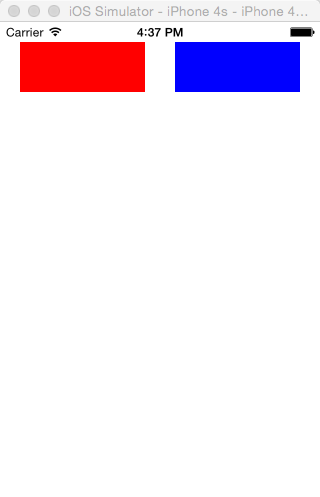
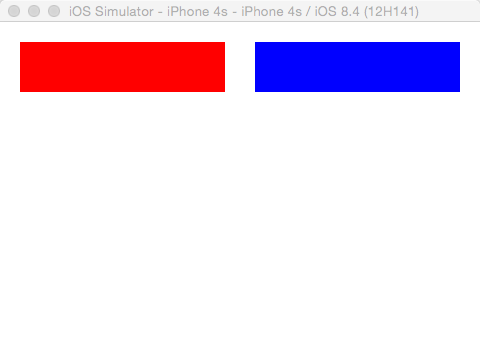
2. 复杂VFL无法完整表示 必须结合 constraintWithItem:attribute:relatedBy:toItem:attribute:multiplier:constant:. 一起使用
 - (void)viewDidLoad{
 2     [super viewDidLoad];
     UIView *blueView = [[UIView alloc]init];
     blueView.backgroundColor = [UIColor blueColor];
     blueView.translatesAutoresizingMaskIntoConstraints= NO;
     [self.view addSubview:blueView];
     UIView *redView = [[UIView alloc]init];

     redView.backgroundColor = [UIColor redColor];

     redView.translatesAutoresizingMaskIntoConstraints= NO;

     [self.view addSubview:redView];

     //水平方向

     NSString *hVFL =@"H:|-30-[blueView]-30-|";

     NSArray *hCons = [NSLayoutConstraint constraintsWithVisualFormat:hVFL options: metrics:nil views:@{@"blueView":blueView}];

     [self.view addConstraints:hCons];

     //垂直方向

     NSString *vVFL =@"V:|-30-[blueView(50)]-20-[redView(==blueView)]";

     NSArray *vCons = [NSLayoutConstraint constraintsWithVisualFormat:vVFL options:NSLayoutFormatAlignAllRight metrics:nil views:@{@"blueView":blueView,@"redView":redView}];

     [self.view addConstraints:vCons];

     //VFL无法描述 redView 左边 和 blueViwe 中心对齐

     NSLayoutConstraint *redLeftCon = [NSLayoutConstraint constraintWithItem:redView attribute:NSLayoutAttributeLeft relatedBy:NSLayoutRelationEqual toItem:blueView attribute:NSLayoutAttributeCenterX multiplier:1.0 constant:0.0];

     [self.view addConstraint:redLeftCon];

 }
//注意 :官方文档中
The notation prefers good visualization over completeness of expressibility. Most of the constraints that are useful in real user interfaces can be expressed using visual format syntax, but there are a few that cannot. One useful constraint that cannot be expressed is a fixed aspect ratio (for example, imageView.width = 2 * imageView.height). To create such a constraint, you must use
constraintWithItem:attribute:relatedBy:toItem:attribute:multiplier:constant:.
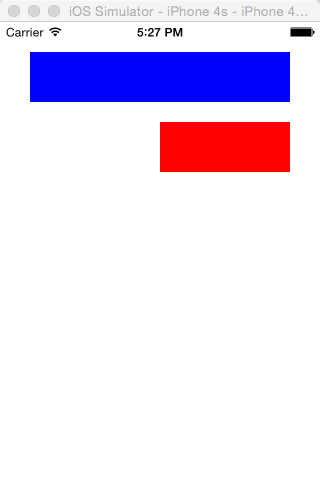
效果:

AutoLayout自动布局之VFL语言代码实现(一个神奇的语言)的更多相关文章
- HTML-参考手册: HTML 语言代码
ylbtech-HTML-参考手册: HTML 语言代码 1.返回顶部 1. HTML 语言代码 参考手册 ISO 语言代码 HTML 的 lang 属性可用于声明网页或部分网页的语言.这对搜索引擎和 ...
- C语言编译器为什么能够用C语言编写?
不知道大家有没有想过一个问题:C语言编译器为什么能够用C语言编写? 所谓C语言编译器,就是把编程得到的文件,比如.c,.h的文件,进行读取,并对内容进行分析,按照C语言的规则,将其转换成cpu可以执行 ...
- 【C语言】03-第一个C程序代码分析
前面我们已经创建了一个C程序,接下来分析一下里面的代码. 项目结构如下: 一.代码分析 打开项目中的main.c文件(C程序的源文件拓展名为.c),可以发现它是第一个C程序中的唯一一个源文件,代码如下 ...
- 【C语言】01-第一个c程序代码分析
创建了一个C程序,接下来分析一下里面的代码. 项目结构如下: 一.代码分析 打开项目中的main.c文件(C程序的源文件拓展名为.c),可以发现它是第一个C程序中的唯一一个源文件,代码如下: 1 #i ...
- AutoLayout(自动布局)
1. iOS两种自适应布局方式:(修正说明:) -AutoLayout(自动布局) + SizeClasses(尺寸类别) -Autoresizing (自动调整尺寸/弹簧式调整尺寸) 前者 Auto ...
- iOS自动布局高级用法 && 纯代码约束写法
本文主要介绍几个我遇到的总结的高级用法(当然我相信肯定有不少比这还高级的). 简单的storyboard中上下左右约束,固定宽高啥的用法在这里就不做赘述了. autolayout自动布局是iOS6以后 ...
- iOS:Autolayout自动布局实例
Autolayout自动布局实例即可以用故事板布局,也可以用纯代码创建,各有各的优点:用故事板布局,比较方便,而且直观,可以很直白的看到视图布局后的变化:采用代码布局,虽然代码比较多,有些麻烦,但是可 ...
- Latex中插入C语言代码
Latex是一个文本排版的语言,能排版出各种我们想要的效果.而且用代码排版的优点是易于修改板式,因此在文本内容的排版时,Latex应用十分广泛. 当我们需要在Latex中插入代码时,就需要用到 \us ...
- loadrnner添加C语言代码的几种方式
今天有人在群里问,想直接把自己的C语言代码让lr调用,该怎么搞. 这东西说来简单,只是对Loadrunner这工具不熟悉可能才会有这种问题吧.个人理解,一般有三种方法吧,废话不多,直接干货. 1.直接 ...
随机推荐
- IDEA生成serialVersionUID的警告
默认情况下Intellij IDEA是关闭了继承了java.io.Serializable的类生成serialVersionUID的警告.如果需要ide提示生成serialVersionUID,那么需 ...
- BZOJ4755:[JSOI2016]扭动的回文串
浅谈\(Manacher\):https://www.cnblogs.com/AKMer/p/10431603.html 题目传送门:https://lydsy.com/JudgeOnline/pro ...
- JMeter启动时显示Could not open/create prefs root node Software\JavaSoft\Prefs at root 0X80000002
在windows 7上启动jmeter时,提示错误: Java.util.prefs.WindowsPreferences <init> WARNING: Could not open/c ...
- Oracle事务的隔离
事务是指一些列操作的集合,它有4个属性:原子性(Automacity).一致性(Consistency).隔离性(Isolation)和持久性(Durability),这4个属性简称为ACID.原子性 ...
- nagios(centreon)监控lvs
客户端配置:让nagios账户有权限查看ipvsadminvim /etc/sudoers[root@SSAVL2318 etc]# visodu /etc/sudoers加入 nagios ALL ...
- nginx虚拟主机的配置
nginx虚拟主机的配置 server { listen ; server_name 127.0.0.1; access_log off; root /var/www/html/; location ...
- vs2003属性窗口空白的问题
一个困扰很久的问题一直没有解决,因为vs的属性窗口没显示不方便修改mfc程序的id和属性等等,但是可以直接在代码里修改.问题始终是问题,最近准备画时间解决之,上网差资料搜索办法,一帖说是win7的问题 ...
- (转)C# Socket异步通信
本文转载自:http://www.cnblogs.com/llllll/archive/2009/05/13/1455703.html 服务器端 TCPServer 1.使用的通讯通道:socket ...
- android httpclient 设置超时
3.X是这样的 HttpClient httpClient=new DefaultHttpClient();4.3是这样的CloseableHttpClient httpClient = HttpCl ...
- 分布式缓存系统 Memcached 主线程之main函数
前两节中对工作线程的工作流程做了较为详细的分析,现把其主要流程总结为下图: 接下来本节主要分析主线程相关的函数设计,主函数main的基本流程如下图所示: 对于主线程中的工作线程的初始化到启动所有的工作 ...