
数据库——MySQL——多表查询
这里多表,为了方便我只建了两张表,更复杂的表间也就是这些东西,就是复杂程度不一样。
数据源准备
建立一个学生表,和一个班级表

# 建立学生表

create table student(

id int not null unique auto_increment,

name varchar(20) not null,

sex enum('male','female') not null default 'male',

age int(3) unsigned not null default 28,

birthday date not null,

class_id int

);

# 建立班级表

create table class(

id int not null unique auto_increment,

class_name varchar(20) not null

);
建立表
# 给学生表插入数据

insert into student(name,sex,age,birthday,class_id) values

('成龙','male',48,'',1),

('歪歪','female',48,'',2),

('丫丫','female',38,'',2),

('丁丁','female',18,'',2),

('星星','female',18,'',2),

('格格','female',28,'',2),

('张野','male',28,'',3),

('程咬金','male',18,'',3),

('程咬银','female',18,'',3),

('程咬铜','male',18,'',3),

('程咬铁','female',18,'',3);

# 给班级表插入数据

insert into class (class_name) values

 ("一班"),

 ("二班");
插入数据
多表连接查询
交叉连接
不适用任何匹配条件,生成笛卡儿积。
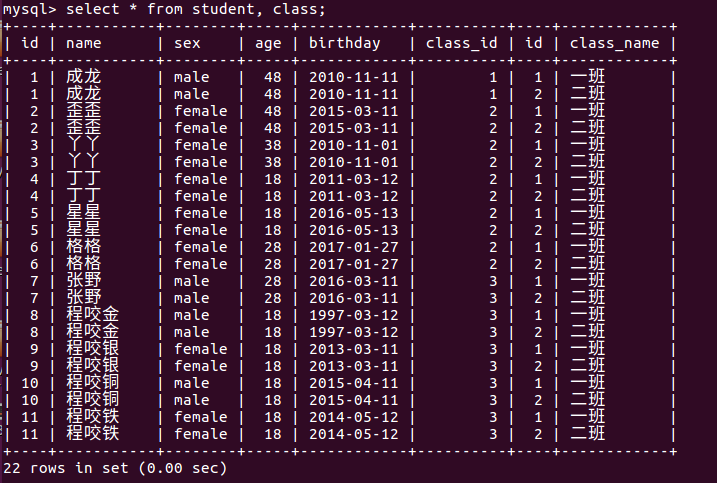
交叉连接生成的笛卡儿积是最全的数据源,但是基本无用,因为大量无用的数据充斥其中。所以我们需要加入条件,找到我们需要的数据。
内连接
只连接匹配的行
找两张表共有个部分,相当于利用条件从笛卡儿积结果中筛选正确的结果。
mysql> mysql> select * from student, class where student.class_id = class.id;

+----+--------+--------+-----+------------+----------+----+------------+

| id | name   | sex    | age | birthday   | class_id | id | class_name |

+----+--------+--------+-----+------------+----------+----+------------+

|  1 | 成龙   | male   |  48 | 2010-11-11 |        1 |  1 | 一班       |

|  2 | 歪歪   | female |  48 | 2015-03-11 |        2 |  2 | 二班       |

|  3 | 丫丫   | female |  38 | 2010-11-01 |        2 |  2 | 二班       |

|  4 | 丁丁   | female |  18 | 2011-03-12 |        2 |  2 | 二班       |

|  5 | 星星   | female |  18 | 2016-05-13 |        2 |  2 | 二班       |

|  6 | 格格   | female |  28 | 2017-01-27 |        2 |  2 | 二班       |

+----+--------+--------+-----+------------+----------+----+------------+
因为我在班级表中没有定义三班,所以筛选的查询结果中没有找到三班和三班人员的记录。
除了上面的的写法外,还有一种写法
select * from student inner join class on student.class_id=class.id;
两个语句查找的内容是一致的。
外连接
外连接之左连接:优先显示左表的全部记录
本质上就是在内连接的基础上增加左边有,右边没有的结果
mysql> select * from student left join class on student.class_id=class.id;
+----+-----------+--------+-----+------------+----------+------+------------+

| id | name      | sex    | age | birthday   | class_id | id   | class_name |

+----+-----------+--------+-----+------------+----------+------+------------+

|  1 | 成龙      | male   |  48 | 2010-11-11 |        1 |    1 | 一班       |

|  2 | 歪歪      | female |  48 | 2015-03-11 |        2 |    2 | 二班       |

|  3 | 丫丫      | female |  38 | 2010-11-01 |        2 |    2 | 二班       |

|  4 | 丁丁      | female |  18 | 2011-03-12 |        2 |    2 | 二班       |

|  5 | 星星      | female |  18 | 2016-05-13 |        2 |    2 | 二班       |

|  6 | 格格      | female |  28 | 2017-01-27 |        2 |    2 | 二班       |

|  7 | 张野      | male   |  28 | 2016-03-11 |        3 | NULL | NULL       |

|  8 | 程咬金    | male   |  18 | 1997-03-12 |        3 | NULL | NULL       |

|  9 | 程咬银    | female |  18 | 2013-03-11 |        3 | NULL | NULL       |

| 10 | 程咬铜    | male   |  18 | 2015-04-11 |        3 | NULL | NULL       |

| 11 | 程咬铁    | female |  18 | 2014-05-12 |        3 | NULL | NULL       |

+----+-----------+--------+-----+------------+----------+------+------------+

11 rows in set (0.00 sec)
外连接之右连接,优先显示右表的全部记录
本质上就是在内连接的基础上加上右边有,左边没有的结果
mysql> select * from student right join class on student.class_id=class.id;

+------+--------+--------+------+------------+----------+----+------------+

| id   | name   | sex    | age  | birthday   | class_id | id | class_name |

+------+--------+--------+------+------------+----------+----+------------+

|    1 | 成龙   | male   |   48 | 2010-11-11 |        1 |  1 | 一班       |

|    2 | 歪歪   | female |   48 | 2015-03-11 |        2 |  2 | 二班       |

|    3 | 丫丫   | female |   38 | 2010-11-01 |        2 |  2 | 二班       |

|    4 | 丁丁   | female |   18 | 2011-03-12 |        2 |  2 | 二班       |

|    5 | 星星   | female |   18 | 2016-05-13 |        2 |  2 | 二班       |

|    6 | 格格   | female |   28 | 2017-01-27 |        2 |  2 | 二班       |

+------+--------+--------+------+------------+----------+----+------------+

6 rows in set (0.00 sec)
全外连接,显示左右两个表中全部记录
全连接本质上就是在内连接的基础上增加左边有,右边没有的,和右边没有,左边没有的结果。
然而在mysql中是没有full join的,所以,我们需要用union。
mysql> select * from student left join class on student.class_id=class.id

    -> union

    -> select * from student right join class on student.class_id=class.id;

+------+-----------+--------+------+------------+----------+------+------------+

| id   | name      | sex    | age  | birthday   | class_id | id   | class_name |

+------+-----------+--------+------+------------+----------+------+------------+

|    1 | 成龙      | male   |   48 | 2010-11-11 |        1 |    1 | 一班       |

|    2 | 歪歪      | female |   48 | 2015-03-11 |        2 |    2 | 二班       |

|    3 | 丫丫      | female |   38 | 2010-11-01 |        2 |    2 | 二班       |

|    4 | 丁丁      | female |   18 | 2011-03-12 |        2 |    2 | 二班       |

|    5 | 星星      | female |   18 | 2016-05-13 |        2 |    2 | 二班       |

|    6 | 格格      | female |   28 | 2017-01-27 |        2 |    2 | 二班       |

|    7 | 张野      | male   |   28 | 2016-03-11 |        3 | NULL | NULL       |

|    8 | 程咬金    | male   |   18 | 1997-03-12 |        3 | NULL | NULL       |

|    9 | 程咬银    | female |   18 | 2013-03-11 |        3 | NULL | NULL       |

|   10 | 程咬铜    | male   |   18 | 2015-04-11 |        3 | NULL | NULL       |

|   11 | 程咬铁    | female |   18 | 2014-05-12 |        3 | NULL | NULL       |

+------+-----------+--------+------+------------+----------+------+------------+

11 rows in set (0.00 sec)
子查询
子查询是将一个查询语句嵌套在另一个查询语句中。
内层查询语句的结果可以为外层查询语句提供查询条件
子查询中可以包含:in, not in, any, all, exists , not exists,union, union all等关键字。还可以包含:=,!=, >, <等。
# any 关键字

select ...from ... where a > any(...);

相当于

select ...from ... where a > result1 or a > result2 or a > result3;

# all关键字

与any关键字类似,只不过上面的or改成and。即:

select ...from ... where a > all(...);

相当于

select ...from ... where a > result1 and a > result2 and a > result3;

# some关键字

some关键字和any关键字是一样的功能。所以:

select ...from ... where a > some(...);

相当于

select ...from ... where a > result1 or a > result2 or a > result3;

# in关键字

in运算符用于where语句中,以列表项的形式支持多个选择。

select * from student where class_id in (1,3);

select * from student where class_id not in (1,3);

select * from student where class_id in (select id from class);

最后的这个查询语句等价于:select * from student where class_id=any (select id from class);

not in 和in作用相反

# exists关键字

exists只返回True或者False。

select * from student where exists (select * from class);    # exists返回True,外层查询会执行。

select * from student where exists (select * );    # exists返回True,外层查询会执行。

select * from student where exists (select 1);    # exists返回True,外层查询会执行。

select * from student where exists (select * from class where class_id =4);    # exists返回True,外层查询不会执行。

select * from student where sex="male" and exists(select * from class);        # 可以配合其他查询条件一起使用。

not exists和exists作用相反

# union关键字

用来将多个select语句的结果组合到一个结果集中,前面说全外间连接有相应的例子。

在多个select语句中,对应的列应该有相同的字段属性,且第一个select语句中被使用的字段名称也被用于结果的字段名称。

union和union all的区别:当使用union时,MySQL会把结果集中重复的记录删除掉,而使用union all后,mysql会把所有记录返回,而且效率要比union高。
数据库——MySQL——多表查询的更多相关文章
- 数据库——MySQL——单表查询
单表查询语法: SELECT 字段1,字段2... FROM 表名 WHERE 条件 GROUP BY field HAVING 筛选 ORDER BY field LIMIT 限制条数 关键字的执行 ...
- MySQL数据库语法-多表查询练习一
MySQL数据库语法-多表查询练习一 作者:尹正杰 版权声明:原创作品,谢绝转载!否则将追究法律责任. 本篇博客主要介绍的多表查询的外键约束,以及如何使用外链接和内连接查询数据信息. 一.数据表和测试 ...
- MySQL数据库之单表查询中关键字的执行顺序
目录 MySQL数据库之单表查询中关键字的执行顺序 1 语法顺序 2 执行顺序 3 关键字使用语法 MySQL数据库之单表查询中关键字的执行顺序 1 语法顺序 select distinct from ...
- MySQL/MariaDB数据库的多表查询操作
MySQL/MariaDB数据库的多表查询操作 作者:尹正杰 版权声明:原创作品,谢绝转载!否则将追究法律责任. 一.单表查询小试牛刀 [root@node105.yinzhengjie.org.cn ...
- MySQL数据库语法-单表查询练习
MySQL数据库语法-单表查询练习 作者:尹正杰 版权声明:原创作品,谢绝转载!否则将追究法律责任. 本篇博客主要是对聚合函数和分组的练习. 一.数据表和测试数据准备 /* @author :yinz ...
- MySQL多表查询之外键、表连接、子查询、索引
MySQL多表查询之外键.表连接.子查询.索引 一.外键: 1.什么是外键 2.外键语法 3.外键的条件 4.添加外键 5.删除外键 1.什么是外键: 主键:是唯一标识一条记录,不能有重复的,不允许为 ...
- 数据库 MySQL 之 表操作、存储引擎
数据库 MySQL 之 表操作.存储引擎 浏览目录 创建(复制) 删除 修改 查询 存储引擎介绍 一.创建(复制) 1.语法: 1 2 3 4 5 CREATE TABLE 表名( 字段名1 ...
- python 3 mysql 单表查询
python 3 mysql 单表查询 1.准备表 company.employee 员工id id int 姓名 emp_name varchar 性别 sex enum 年龄 age int 入职 ...
- Mysql 单表查询-排序-分页-group by初识
Mysql 单表查询-排序-分页-group by初识 对于select 来说, 分组聚合(((group by; aggregation), 排序 (order by** ), 分页查询 (limi ...
随机推荐
- 【Shell】shell的运算
一.除法 a=12 b=7 1) expr $a / $b 计算出结果为个1 ,只支持整除 2) echo "scale=2;$a/$b" | bc结果为 1.71 3) awk ...
- java 获取网络地址图片
收藏一个获取网络图片的方法. //获取网络图片 public void ImageRequest(String ImageName,String GifUrl) throws Exception { ...
- 微信token验证源码分享(c#版)
在开发时遇到一个问题: 上线后提交申请微信提示"您的服务器没有正确响应token验证...",我查看日志发现根本就没有接收到来自微信的参数. 后来我又记录了微信请求方式和请求的字符 ...
- Spring注解之Controller中获取请求参数及验证使用
1.处理request的uri部分的参数:@PathVariable. 2.处理request header部分的参数:@RequestHeader,@CookieValue@RequestHeade ...
- Android开发ListView嵌套ImageView实现单选按钮
做Android开发两年的时间,技术稍稍有一些提升,刚好把自己实现的功能写出来,记录一下,如果能帮助到同行的其他人,我也算是做了件好事,哈哈!!废话不多说,先上个图. 先上一段代码: if (last ...
- javascript对象(2)
这个对象,不是那个对象.续更第二篇.. 昨天说了对象的基本概念以及创建,今天来说一下它的其他方法: 1.访问属性的两种方式:点语法.[]语法 var dog =new Object(); dog.na ...
- 【起航计划 034】2015 起航计划 Android APIDemo的魔鬼步伐 33 App->Service->Local Service Binding 绑定服务 ServiceConnection Binder
本例和下列Local Service Controller 的Activity代码都定义在LocalServiceActivities.Java 中,作为LocalServiceActivities ...
- Consul在linux系统, 群集实战
Consul作为微服务的服务注册与发现组件,是非常重要的一部分 目前想用Consul作为配置管理的统一管理 准备两台机器 11.11.11.1011.11.11.20 下载consul linux版 ...
- day5-基础 函数
函数 函数一词来源于数学,但编程中的「函数」概念,与数学中的函数是有很大不同的,具体区别,我们后面会讲,编程中的函数在英文中也有很多不同的叫法.在BASIC中叫做subroutine(子过程或子程序 ...
- Oracle分区表分批迁移
遇到个分区表数据量超大的case,磁盘空间不够,所以考虑使用数据泵分批导数据,测试如下: source : oracle windows 32bit 10.2.0.1target : oracle ...