
Spring Cloud Ribbon负载均衡配置类放在Spring boot主类同级增加Exclude过滤后报Field config in com.cloud.web.controller.RibbonConfiguration required a bean of type 'com.netflix.client.config.IClientConfig' that could not b
环境:
Spring Cloud:Finchley.M8
Spring Boot:2.0.0.RELEASE
目录结构:
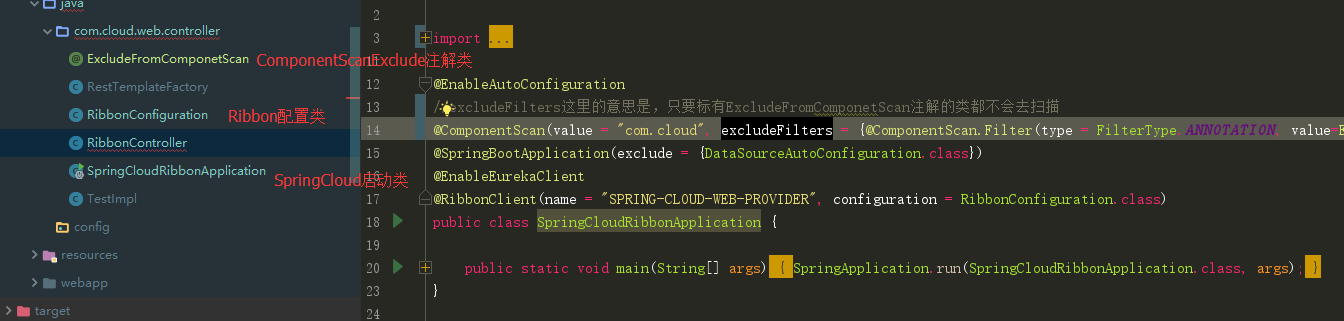
可以看到代码第13行的注释,我已经在@ComponentScan注解中添加了Exclude配置项,但是启动服务的时候还是报如下的错误:
2018-04-12 15:59:37.815  WARN 17828 --- [           main] o.s.b.f.support.DisposableBeanAdapter    : Invocation of destroy method 'close' failed on bean with name 'eurekaRegistration': org.springframework.beans.factory.BeanCreationNotAllowedException: Error creating bean with name 'org.springframework.cloud.netflix.eureka.EurekaClientAutoConfiguration$RefreshableEurekaClientConfiguration': Singleton bean creation not allowed while singletons of this factory are in destruction (Do not request a bean from a BeanFactory in a destroy method implementation!)

2018-04-12 15:59:37.825  INFO 17828 --- [           main] o.apache.catalina.core.StandardService   : Stopping service [Tomcat]

2018-04-12 15:59:37.828  WARN 17828 --- [ost-startStop-1] o.a.c.loader.WebappClassLoaderBase       : The web application [ROOT] appears to have started a thread named [spring.cloud.inetutils] but has failed to stop it. This is very likely to create a memory leak. Stack trace of thread:

 java.net.Inet6AddressImpl.getHostByAddr(Native Method)

 java.net.InetAddress$2.getHostByAddr(InetAddress.java:932)

 java.net.InetAddress.getHostFromNameService(InetAddress.java:617)

 java.net.InetAddress.getHostName(InetAddress.java:559)

 java.net.InetAddress.getHostName(InetAddress.java:531)

 org.springframework.cloud.commons.util.InetUtils$2.call(InetUtils.java:162)

 org.springframework.cloud.commons.util.InetUtils$2.call(InetUtils.java:159)

 java.util.concurrent.FutureTask.run(FutureTask.java:266)

 java.util.concurrent.ThreadPoolExecutor.runWorker(ThreadPoolExecutor.java:1149)

 java.util.concurrent.ThreadPoolExecutor$Worker.run(ThreadPoolExecutor.java:624)

 java.lang.Thread.run(Thread.java:748)

2018-04-12 15:59:37.838  INFO 17828 --- [           main] ConditionEvaluationReportLoggingListener :

Error starting ApplicationContext. To display the conditions report re-run your application with 'debug' enabled.

2018-04-12 15:59:37.961 ERROR 17828 --- [           main] o.s.b.d.LoggingFailureAnalysisReporter   :

***************************

APPLICATION FAILED TO START

***************************

Description:

Field config in com.cloud.web.controller.RibbonConfiguration required a bean of type 'com.netflix.client.config.IClientConfig' that could not be found.

Action:

Consider defining a bean of type 'com.netflix.client.config.IClientConfig' in your configuration.

Process finished with exit code 1
日志关键点在倒数第二行,其实原因很简单ComponentScan不去扫单个Ribbon的配置(RibbonConfigureration)不应用于所有Ribbon客户端,那这个当个客户端去加载的时候就要让Component知道不去管理他,否则就回去扫一遍,看我的Ribbon配置类,55行,被我注释了,没有引用到Exclude注解,所以还是去扫了:
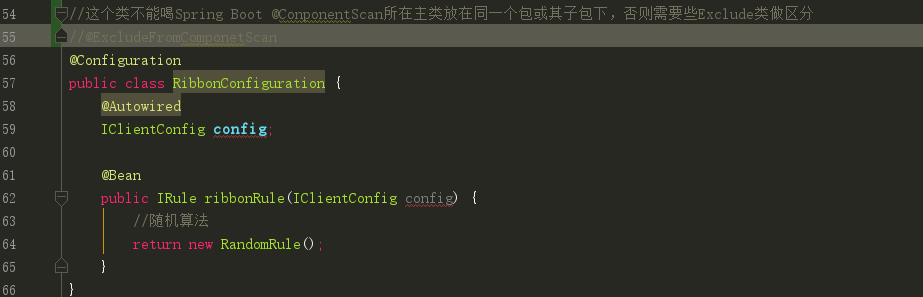
问题很简单,把注解加上就好了。。
贴一下几个类的代码:
1、ExcludeFromComponetScan
public @interface ExcludeFromComponetScan {

}
2、spring cloud启动加载类:
@EnableAutoConfiguration

//excludeFilters这里的意思是,只要标有ExcludeFromComponetScan注解的类都不会去扫描

@ComponentScan(value = "com.cloud", excludeFilters = {@ComponentScan.Filter(type = FilterType.ANNOTATION, value=ExcludeFromComponetScan.class)})

@SpringBootApplication(exclude = {DataSourceAutoConfiguration.class})

@EnableEurekaClient

@RibbonClient(name = "SPRING-CLOUD-WEB-PROVIDER", configuration = RibbonConfiguration.class)

public class SpringCloudRibbonApplication {

	public static void main(String[] args) {

		SpringApplication.run(SpringCloudRibbonApplication.class, args);

	}

}
3、RibbonConfiguration
//这个类不能喝Spring Boot @ConponentScan所在主类放在同一个包或其子包下,否则需要些Exclude类做区分

@ExcludeFromComponetScan

@Configuration

public class RibbonConfiguration {

    @Autowired

    IClientConfig config;

    @Bean

    public IRule ribbonRule(IClientConfig config) {

        //随机算法

        return new RandomRule();

    }

}
Spring Cloud Ribbon负载均衡配置类放在Spring boot主类同级增加Exclude过滤后报Field config in com.cloud.web.controller.RibbonConfiguration required a bean of type 'com.netflix.client.config.IClientConfig' that could not b的更多相关文章
- spring-cloud: eureka之:ribbon负载均衡配置(一)
spring-cloud: eureka之:ribbon负载均衡配置(一) 比如我有: 一个eureka服务:8761 两个user用户服务: 7900/7901端口 一个movie服务:8010 1 ...
- spring eureka required a bean of type 'com.netflix.discovery.DiscoveryClient' that could not be found.
spring在集成第三方过程很容易出现类名相同,且基本作用相同的类.这样给初学者带来一定的困惑. 导致用错类而出现以下问题. required a bean of type 'com.netflix. ...
- spring cloud: zuul(三): ribbon负载均衡配置
zuul的routes配置下path/url组合不支持负载均衡 下面介绍zuul的routes配置下的path/serviceId负载均衡配置 spring-boot-user微服务开启了:7901, ...
- Spring Cloud06: Ribbon 负载均衡
一.使用背景 前面的学习中,我们已经使用RestTemplate来实现了服务消费者对服务提供者的调用,如果在某个具体的业务场景下,对某个服务的调用量突然大幅提升,这个时候就需要对该服务实现负载均衡以满 ...
- SpringCloud之Ribbon负载均衡配置
一.负载均衡解决方案分类及特征 业界主流的负载均衡解决方案有: 1.1 集中式负载均衡 即在客户端和服务端之间使用独立的负载均衡设施(可以是硬件,如F5, 也可以是软件,如nginx), 由该设施负责 ...
- Spring Cloud Ribbon负载均衡
目录 一.简介 二.客户端负载均衡 三.RestTemplate详解 GET请求 POST请求 PUT请求 DELETE请求 一.简介 Spring Cloud Ribbon是一个基于HTTP 和 ...
- Spring Cloud Ribbon负载均衡(快速搭建)
Spring Cloud Ribbon 是一个基于HTTP和TCP的客户端负载均衡工具,它基于Netflix Ribbon实现.通过 Spring Cloud 的封装, 可以让我们轻松地将面向服务的 ...
- SpringCloud微服务实战二:Spring Cloud Ribbon 负载均衡 + Spring Cloud Feign 声明式调用
1.Spring Cloud Ribbon的作用 Ribbon是Netflix开发的一个负载均衡组件,它在服务体系中起着重要作用,Pivotal将其整合成为Spring Cloud Ribbon,与其 ...
- spring boot 2.0 ribbon 负载均衡配置
1.pom.xml <dependency> <groupId>org.springframework.cloud</groupId> <artifactId ...
随机推荐
- 洛谷P4458 /loj#2512.[BJOI2018]链上二次求和(线段树)
题面 传送门(loj) 传送门(洛谷) 题解 我果然是人傻常数大的典型啊-- 题解在这儿 //minamoto #include<bits/stdc++.h> #define R regi ...
- 【智能算法】变邻域搜索算法(Variable Neighborhood Search,VNS)超详细解析和TSP代码实例以及01背包代码实例
喜欢的话可以扫码关注我们的公众号哦,更多精彩尽在微信公众号[程序猿声] 00 目录 局部搜索再次科普 变邻域搜索 造轮子写代码 01 局部搜索科普三连 虽然之前做的很多篇启发式的算法都有跟大家提过局部 ...
- C++_类入门3-嵌套类
可以将类B声明在另一个类中.在另一个类A中声明的类B被称为嵌套类(nested class). 类A的成员函数可以创建和使用嵌套类B的对象. 当且仅当声明为公有部分时,才能在类A的外面使用嵌套类.而且 ...
- ES6问题记录--Promise
在读[阮一峰]的 ES6 入门文档的时候,有一段代码是这样的. 文章中,还有一段是这样写的 所以,Promise.resolve(3).finally(()=>{}),解析出来的resolve ...
- CSS2.1
学而时习之,不亦说乎! --<论语> CSS:cascading style sheet(层叠样式表) 作用:描述页面的样式. 书 ...
- poj3176
一.题意:给定一些数,成三角形排列.从上往下走,每个数只能往它相邻的两个数走,一直走到底端得到一条线路.这条线路上的数的和最大是多少 二.思路:简单的动态规划.dp[i+1][j+1]:=以第i+1行 ...
- Spark遇到的报错和坑
1. Java版本不一致,导致启动报错. # 解决方法: 在启动脚本最前边添加系统参数,指定Java版本 export JAVA_HOME=/usr/java/jdk1..0_181-amd64/jr ...
- SpringBoot---开发的热部署
1.模板的热部署 在SpringBoot中,模板引擎的页面默认是开启缓存的: 如果修改了页面的内容,则刷新不到修改后的页面: 可以在application.properties中关闭模板引擎的缓存: ...
- twitter storm学习 - 安装部署问题汇总
已经碰到的或者将来碰到的关于安装部署方面的问题以及解决方法,先挖个坑 1.提交的topology在admin界面上看emitted始终都是0,查看日志发现有如下错误: worker [ERROR] E ...
- ABP Zero集成微信小程序登录
首先是ABPZero的第三方登录模块,通过调用第三方的登录接口返回用户信息,再交给ABP的登录验证模块去执行对应的登录注册. 涉及的数据库表主要是这两个表,AbpUsers存储了用户信息,AbpUse ...