
Spring Cloud Ribbon负载均衡配置类放在Spring boot主类同级增加Exclude过滤后报Field config in com.cloud.web.controller.RibbonConfiguration required a bean of type 'com.netflix.client.config.IClientConfig' that could not b
环境:
Spring Cloud:Finchley.M8
Spring Boot:2.0.0.RELEASE
目录结构:
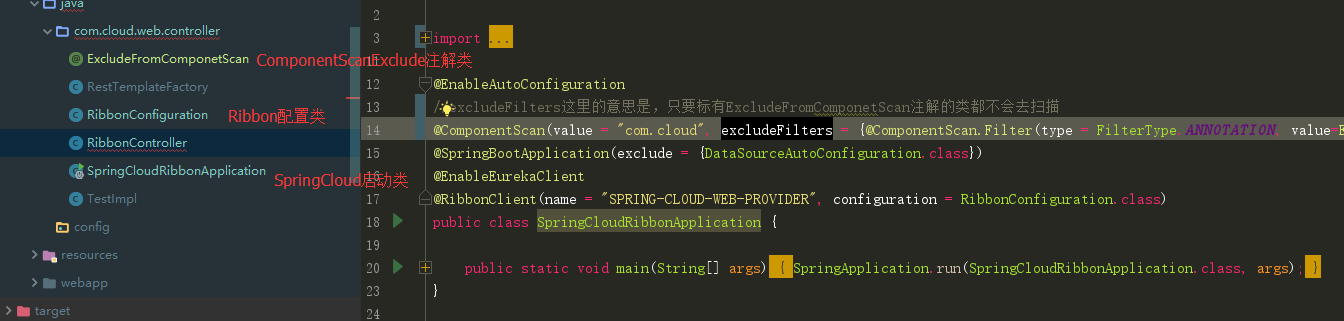
可以看到代码第13行的注释,我已经在@ComponentScan注解中添加了Exclude配置项,但是启动服务的时候还是报如下的错误:
2018-04-12 15:59:37.815  WARN 17828 --- [           main] o.s.b.f.support.DisposableBeanAdapter    : Invocation of destroy method 'close' failed on bean with name 'eurekaRegistration': org.springframework.beans.factory.BeanCreationNotAllowedException: Error creating bean with name 'org.springframework.cloud.netflix.eureka.EurekaClientAutoConfiguration$RefreshableEurekaClientConfiguration': Singleton bean creation not allowed while singletons of this factory are in destruction (Do not request a bean from a BeanFactory in a destroy method implementation!)

2018-04-12 15:59:37.825  INFO 17828 --- [           main] o.apache.catalina.core.StandardService   : Stopping service [Tomcat]

2018-04-12 15:59:37.828  WARN 17828 --- [ost-startStop-1] o.a.c.loader.WebappClassLoaderBase       : The web application [ROOT] appears to have started a thread named [spring.cloud.inetutils] but has failed to stop it. This is very likely to create a memory leak. Stack trace of thread:

 java.net.Inet6AddressImpl.getHostByAddr(Native Method)

 java.net.InetAddress$2.getHostByAddr(InetAddress.java:932)

 java.net.InetAddress.getHostFromNameService(InetAddress.java:617)

 java.net.InetAddress.getHostName(InetAddress.java:559)

 java.net.InetAddress.getHostName(InetAddress.java:531)

 org.springframework.cloud.commons.util.InetUtils$2.call(InetUtils.java:162)

 org.springframework.cloud.commons.util.InetUtils$2.call(InetUtils.java:159)

 java.util.concurrent.FutureTask.run(FutureTask.java:266)

 java.util.concurrent.ThreadPoolExecutor.runWorker(ThreadPoolExecutor.java:1149)

 java.util.concurrent.ThreadPoolExecutor$Worker.run(ThreadPoolExecutor.java:624)

 java.lang.Thread.run(Thread.java:748)

2018-04-12 15:59:37.838  INFO 17828 --- [           main] ConditionEvaluationReportLoggingListener :

Error starting ApplicationContext. To display the conditions report re-run your application with 'debug' enabled.

2018-04-12 15:59:37.961 ERROR 17828 --- [           main] o.s.b.d.LoggingFailureAnalysisReporter   :

***************************

APPLICATION FAILED TO START

***************************

Description:

Field config in com.cloud.web.controller.RibbonConfiguration required a bean of type 'com.netflix.client.config.IClientConfig' that could not be found.

Action:

Consider defining a bean of type 'com.netflix.client.config.IClientConfig' in your configuration.

Process finished with exit code 1
日志关键点在倒数第二行,其实原因很简单ComponentScan不去扫单个Ribbon的配置(RibbonConfigureration)不应用于所有Ribbon客户端,那这个当个客户端去加载的时候就要让Component知道不去管理他,否则就回去扫一遍,看我的Ribbon配置类,55行,被我注释了,没有引用到Exclude注解,所以还是去扫了:
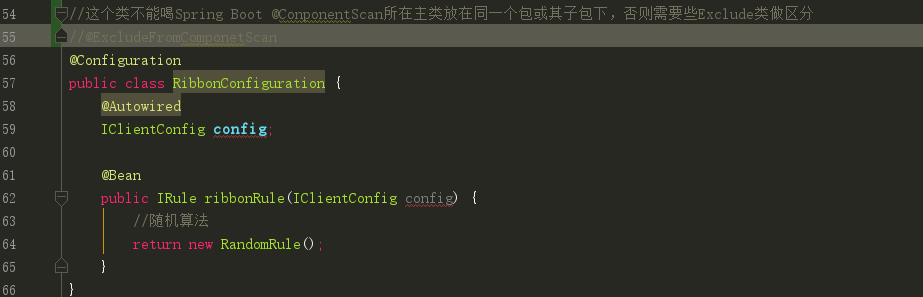
问题很简单,把注解加上就好了。。
贴一下几个类的代码:
1、ExcludeFromComponetScan
public @interface ExcludeFromComponetScan {

}
2、spring cloud启动加载类:
@EnableAutoConfiguration

//excludeFilters这里的意思是,只要标有ExcludeFromComponetScan注解的类都不会去扫描

@ComponentScan(value = "com.cloud", excludeFilters = {@ComponentScan.Filter(type = FilterType.ANNOTATION, value=ExcludeFromComponetScan.class)})

@SpringBootApplication(exclude = {DataSourceAutoConfiguration.class})

@EnableEurekaClient

@RibbonClient(name = "SPRING-CLOUD-WEB-PROVIDER", configuration = RibbonConfiguration.class)

public class SpringCloudRibbonApplication {

	public static void main(String[] args) {

		SpringApplication.run(SpringCloudRibbonApplication.class, args);

	}

}
3、RibbonConfiguration
//这个类不能喝Spring Boot @ConponentScan所在主类放在同一个包或其子包下,否则需要些Exclude类做区分

@ExcludeFromComponetScan

@Configuration

public class RibbonConfiguration {

    @Autowired

    IClientConfig config;

    @Bean

    public IRule ribbonRule(IClientConfig config) {

        //随机算法

        return new RandomRule();

    }

}
Spring Cloud Ribbon负载均衡配置类放在Spring boot主类同级增加Exclude过滤后报Field config in com.cloud.web.controller.RibbonConfiguration required a bean of type 'com.netflix.client.config.IClientConfig' that could not b的更多相关文章
- spring-cloud: eureka之:ribbon负载均衡配置(一)
spring-cloud: eureka之:ribbon负载均衡配置(一) 比如我有: 一个eureka服务:8761 两个user用户服务: 7900/7901端口 一个movie服务:8010 1 ...
- spring eureka required a bean of type 'com.netflix.discovery.DiscoveryClient' that could not be found.
spring在集成第三方过程很容易出现类名相同,且基本作用相同的类.这样给初学者带来一定的困惑. 导致用错类而出现以下问题. required a bean of type 'com.netflix. ...
- spring cloud: zuul(三): ribbon负载均衡配置
zuul的routes配置下path/url组合不支持负载均衡 下面介绍zuul的routes配置下的path/serviceId负载均衡配置 spring-boot-user微服务开启了:7901, ...
- Spring Cloud06: Ribbon 负载均衡
一.使用背景 前面的学习中,我们已经使用RestTemplate来实现了服务消费者对服务提供者的调用,如果在某个具体的业务场景下,对某个服务的调用量突然大幅提升,这个时候就需要对该服务实现负载均衡以满 ...
- SpringCloud之Ribbon负载均衡配置
一.负载均衡解决方案分类及特征 业界主流的负载均衡解决方案有: 1.1 集中式负载均衡 即在客户端和服务端之间使用独立的负载均衡设施(可以是硬件,如F5, 也可以是软件,如nginx), 由该设施负责 ...
- Spring Cloud Ribbon负载均衡
目录 一.简介 二.客户端负载均衡 三.RestTemplate详解 GET请求 POST请求 PUT请求 DELETE请求 一.简介 Spring Cloud Ribbon是一个基于HTTP 和 ...
- Spring Cloud Ribbon负载均衡(快速搭建)
Spring Cloud Ribbon 是一个基于HTTP和TCP的客户端负载均衡工具,它基于Netflix Ribbon实现.通过 Spring Cloud 的封装, 可以让我们轻松地将面向服务的 ...
- SpringCloud微服务实战二:Spring Cloud Ribbon 负载均衡 + Spring Cloud Feign 声明式调用
1.Spring Cloud Ribbon的作用 Ribbon是Netflix开发的一个负载均衡组件,它在服务体系中起着重要作用,Pivotal将其整合成为Spring Cloud Ribbon,与其 ...
- spring boot 2.0 ribbon 负载均衡配置
1.pom.xml <dependency> <groupId>org.springframework.cloud</groupId> <artifactId ...
随机推荐
- select展开时 重新加载 option,ie 折叠问题 以及 chrome 没有变化问题
这个bug是因为浏览器的渲染问题引起的 一:重新加载option的渲染处理 1:火狐能重新渲染,并且select不折叠 2:ie重新渲染,但是select收缩折叠 3:chrome直接不重新进行渲染, ...
- ubtuntu 如何查看内存用量 mongostat详解
free -h top free或者top或者cat /proc/meminfo mongostat是mongdb自带的状态检测工具,在命令行下使用.它会间隔固定时间获取mongodb的当前运行状态, ...
- SDUT OJ 效率至上(线段树)
效率至上 Time Limit: 5000 ms Memory Limit: 65536 KiB Submit Statistic Problem Description 题意很简单,给出一个数目为n ...
- redis读取自增时候指定的key问题
首先,此文章是接了如下文章写的 Spring boot redis自增编号控制 踩坑 上面这个问题解决后,公司这边功能其实已经实现了,但是考虑到一种情况,因为我们这边号的生成就是根据上面的自增编号来的 ...
- 洛谷 P2286 [HNOI2004]宠物收养场
题目描述 凡凡开了一间宠物收养场.收养场提供两种服务:收养被主人遗弃的宠物和让新的主人领养这些宠物. 每个领养者都希望领养到自己满意的宠物,凡凡根据领养者的要求通过他自己发明的一个特殊的公式,得出该领 ...
- jquery查找子元素和兄弟元素
<!DOCTYPE html> <html> <head lang="en"> <meta charset="UTF-8&quo ...
- Qt 学习之路 2(29):绘制设备
Qt 学习之路 2(29):绘制设备 豆子 2012年12月3日 Qt 学习之路 2 28条评论 绘图设备是继承QPainterDevice的类.QPaintDevice就是能够进行绘制的类,也就是说 ...
- 在pycharm中使用指定的虚拟环境virtualenv
第一步 建立虚拟环境 cmd下: pip install virtualenv 创建虚拟环境目录 env 第二步:激活虚拟环境 进入虚拟环境下的script目录 第三步:创建一个flask文件夹并打开 ...
- java 常用模块代码
1.文件的读写操作 (1)进行读操作 import java.io.BufferedReader; import java.io.FileNotFoundException; import java. ...
- 学习掌握oracle外表(external table)
[转自] http://blog.chinaunix.net/uid-10697776-id-2935685.html 定义 External tables access data in extern ...