
[转]OpenCV2.4.12 开启OpenGL启用三维可视化支持
OpenCV默认情况下是不支持OpenGL的,如果要使OpenCV支持OpenGL,则需要重编译,具体步骤如下:
注意事项:从The OpenCV Reference ManualOpenCV参考手册 opencv2refman.pdf [点击下载]228页来看,OpenGL仅支持32位操作系统;
一、准备工作:
(1)下载OpenCV2.4.12 [点击下载] ,并解压到相应路径,本文解压在 D:\opencv-2.4.12;
(2)下载CMake工具 [点击下载],并安装;
(3)建一个重编译后文件存放文件夹,本文存放在 D:\opencv-2.4.12 build.
二、开始重编译:
(1)打开CMake,设置OpenCV2.4.12源码目录及 OpenCV2.4.12编译存放目录,勾选 Advanced 选项,如图:

(2)点击 Configure,Specify the generator for this project 选择对应的 Visual Studio 版本,比如:我电脑装的是 Visual Studio 2013,故选择 Visual Studio 12 2013,如图所示:
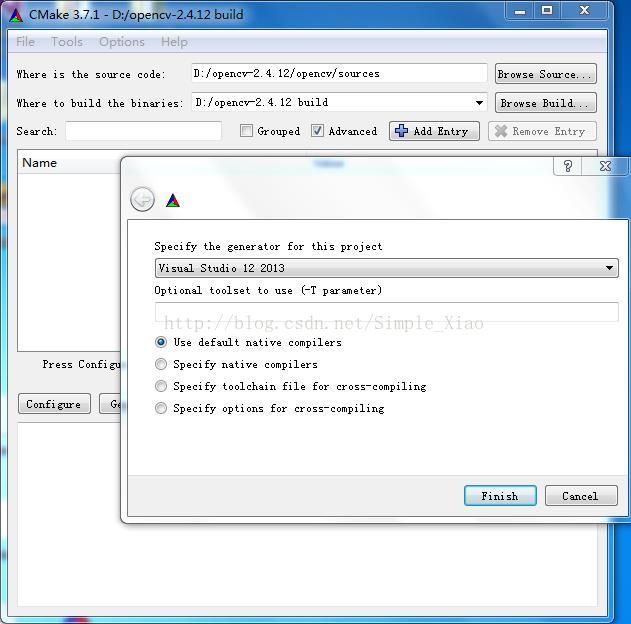
然后按 Finish;
(3)找到 WHTH_OPENGL ,并打勾,如图:
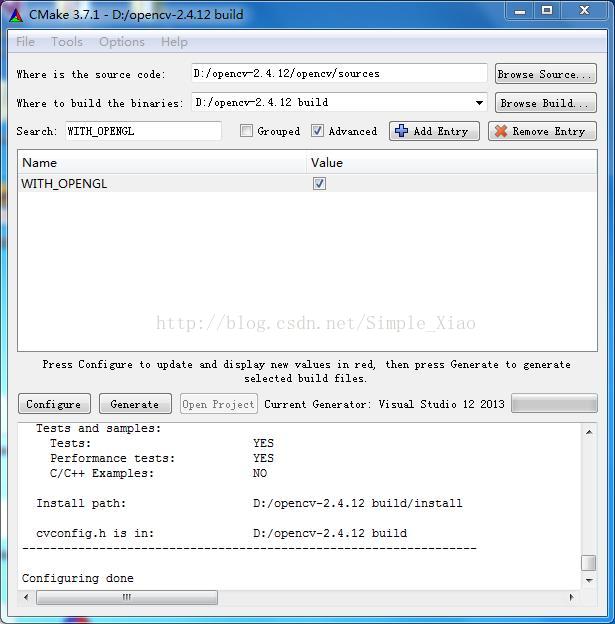
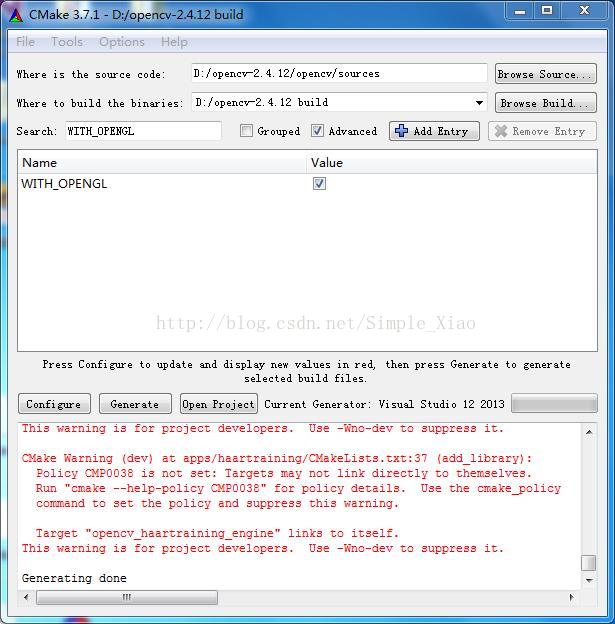
(4)再次点击 Configure,完成之后点击 Generate,结果如下:
(5)打开 D:\opencv-2.4.12 build,找到 OpenCV.sln 并双击(使用 Visual Studio 打开);
(6)在 Debug 、Win32 环境下,选择 ALL_BUILD,单击右键,选择 生成,如图:

如果提示错误 error LNK1104:无法打开文件“python27_d.lib”,则把 python27_d.lib 下载下来点击打开链接,放在Visual Studio 安装目录下的 VC\lib 文件下即可;然后,重新选择 ALL_BUILD,单击右键,选择 生成即可;
(7)选择 INSTALL,单击右键,选择 生成,如下图:

(8)在 Release、Win32 环境下,重复(6)(7)步;
三、Visual Studio环境配置:
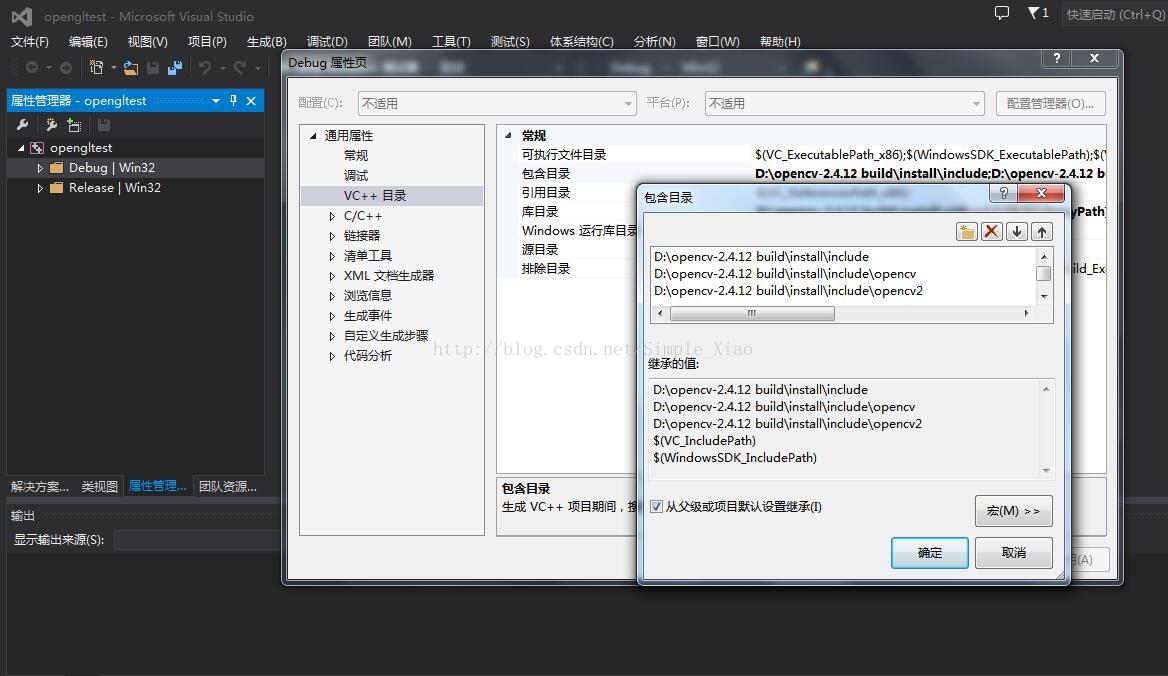
(1)点击 属性管理器,分别打开 Debug | Win32 和Release | Win32 下的Microsoft.Cpp.Win32.user ,通用属性 -> VC++ 目录 -> 包含目录 设置为:
D:\opencv-2.4.12 build\install\include
D:\opencv-2.4.12 build\install\include\opencv
D:\opencv-2.4.12 build\install\include\opencv2
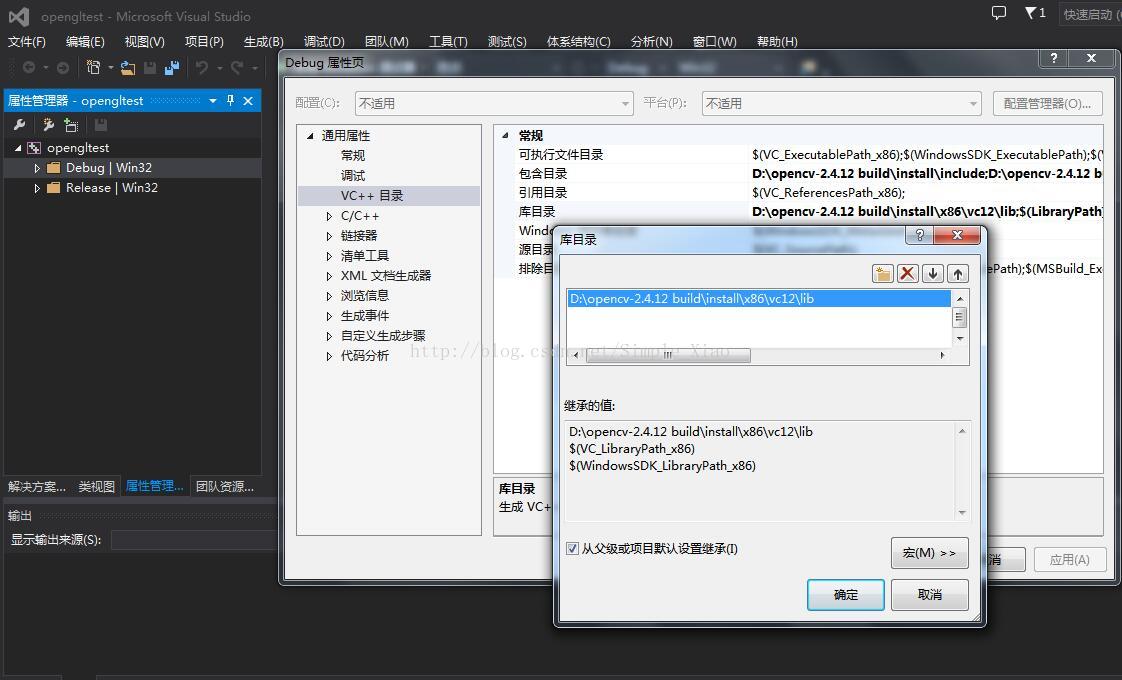
通用属性 -> VC++ 目录 -> 库目录 设置为:
D:\opencv-2.4.12 build\install\x86\vc12\lib
如图:
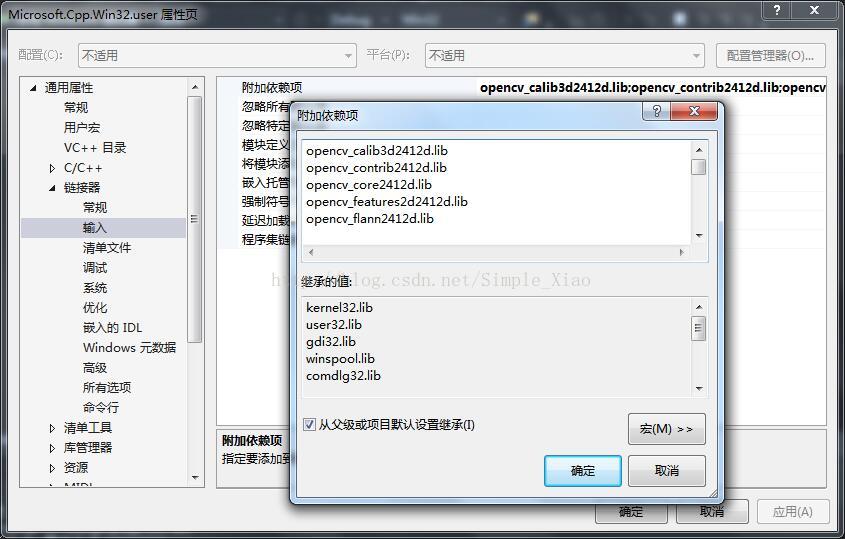
(2)链接器 -> 输入 ->附加依赖项,Debug 环境配置为:
opencv_calib3d2412d.lib
opencv_contrib2412d.lib
opencv_core2412d.lib
opencv_features2d2412d.lib
opencv_flann2412d.lib
opencv_gpu2412d.lib
opencv_highgui2412d.lib
opencv_imgproc2412d.lib
opencv_legacy2412d.lib
opencv_ml2412d.lib
opencv_nonfree2412d.lib
opencv_objdetect2412d.lib
opencv_ocl2412d.lib
opencv_photo2412d.lib
opencv_stitching2412d.lib
opencv_superres2412d.lib
opencv_ts2412d.lib
opencv_video2412d.lib
opencv_videostab2412d.lib
Release 环境配置为:
opencv_calib3d2412.lib
opencv_contrib2412.lib
opencv_core2412.lib
opencv_features2d2412.lib
opencv_flann2412.lib
opencv_gpu2412.lib
opencv_highgui2412.lib
opencv_imgproc2412.lib
opencv_legacy2412.lib
opencv_ml2412.lib
opencv_nonfree2412.lib
opencv_objdetect2412.lib
opencv_ocl2412.lib
opencv_photo2412.lib
opencv_stitching2412.lib
opencv_superres2412.lib
opencv_ts2412.lib
opencv_video2412.lib
opencv_videostab2412.lib
kernel32.lib
user32.lib
gdi32.lib
winspool.lib
comdlg32.lib
advapi32.lib
shell32.lib
ole32.lib
oleaut32.lib
uuid.lib
odbc32.lib
odbccp32.lib
如图:
(3)至此配置完成。
四、编译时常见错误:
(1)若报如下错误:
错误     error C4430: 缺少类型说明符 - 假定为 int。注意:  C++ 不支持默认 int   c:\program files\windows kits\8.1\include\um\gl\gl.h           opengltest

错误     error C4430: 缺少类型说明符 - 假定为 int。注意:  C++ 不支持默认 int   c:\program files\windows kits\8.1\include\um\gl\gl.h           opengltest

错误    error C4430: 缺少类型说明符 - 假定为 int。注意:  C++ 不支持默认 int   c:\program files\windows kits\8.1\include\um\gl\gl.h           opengltest

错误    error C4430: 缺少类型说明符 - 假定为 int。注意:  C++ 不支持默认 int   c:\program files\windows kits\8.1\include\um\gl\gl.h           opengltest

错误    error C4430: 缺少类型说明符 - 假定为 int。注意:  C++ 不支持默认 int   c:\program files\windows kits\8.1\include\um\gl\gl.h           opengltest

错误    error C4430: 缺少类型说明符 - 假定为 int。注意:  C++ 不支持默认 int   c:\program files\windows kits\8.1\include\um\gl\gl.h           opengltest

错误    error C4430: 缺少类型说明符 - 假定为 int。注意:  C++ 不支持默认 int   c:\program files\windows kits\8.1\include\um\gl\gl.h           opengltest

错误    error C4430: 缺少类型说明符 - 假定为 int。注意:  C++ 不支持默认 int   c:\program files\windows kits\8.1\include\um\gl\gl.h           opengltest

错误    error C4430: 缺少类型说明符 - 假定为 int。注意:  C++ 不支持默认 int   c:\program files\windows kits\8.1\include\um\gl\gl.h           opengltest

错误    error C4430: 缺少类型说明符 - 假定为 int。注意:  C++ 不支持默认 int   c:\program files\windows kits\8.1\include\um\gl\gl.h           opengltest

错误    error C4430: 缺少类型说明符 - 假定为 int。注意:  C++ 不支持默认 int   c:\program files\windows kits\8.1\include\um\gl\gl.h           opengltest

错误    error C4430: 缺少类型说明符 - 假定为 int。注意:  C++ 不支持默认 int   c:\program files\windows kits\8.1\include\um\gl\gl.h           opengltest

错误    error C4430: 缺少类型说明符 - 假定为 int。注意:  C++ 不支持默认 int   c:\program files\windows kits\8.1\include\um\gl\gl.h           opengltest

错误    error C4430: 缺少类型说明符 - 假定为 int。注意:  C++ 不支持默认 int   c:\program files\windows kits\8.1\include\um\gl\gl.h           opengltest

错误    error C4430: 缺少类型说明符 - 假定为 int。注意:  C++ 不支持默认 int   c:\program files\windows kits\8.1\include\um\gl\gl.h           opengltest

错误    error C4430: 缺少类型说明符 - 假定为 int。注意:  C++ 不支持默认 int   c:\program files\windows kits\8.1\include\um\gl\gl.h           opengltest

错误    error C4430: 缺少类型说明符 - 假定为 int。注意:  C++ 不支持默认 int   c:\program files\windows kits\8.1\include\um\gl\gl.h           opengltest

错误   error C4430: 缺少类型说明符 - 假定为 int。注意:  C++ 不支持默认 int   c:\program files\windows kits\8.1\include\um\gl\gl.h           opengltest

错误   error C4430: 缺少类型说明符 - 假定为 int。注意:  C++ 不支持默认 int   c:\program files\windows kits\8.1\include\um\gl\gl.h           opengltest

错误   error C4430: 缺少类型说明符 - 假定为 int。注意:  C++ 不支持默认 int   c:\program files\windows kits\8.1\include\um\gl\gl.h           opengltest

错误   error C4430: 缺少类型说明符 - 假定为 int。注意:  C++ 不支持默认 int   c:\program files\windows kits\8.1\include\um\gl\gl.h           opengltest

错误    error C2371: “APIENTRY”: 重定义;不同的基类型 c:\program files\windows kits\8.1\include\um\gl\gl.h           opengltest

错误     error C2182: “APIENTRY”: 非法使用“void”类型   c:\program files\windows kits\8.1\include\um\gl\gl.h           opengltest

错误     error C2182: “APIENTRY”: 非法使用“void”类型   c:\program files\windows kits\8.1\include\um\gl\gl.h           opengltest

错误    error C2182: “APIENTRY”: 非法使用“void”类型   c:\program files\windows kits\8.1\include\um\gl\gl.h           opengltest

错误    error C2182: “APIENTRY”: 非法使用“void”类型   c:\program files\windows kits\8.1\include\um\gl\gl.h           opengltest

错误    error C2182: “APIENTRY”: 非法使用“void”类型   c:\program files\windows kits\8.1\include\um\gl\gl.h           opengltest

错误    error C2182: “APIENTRY”: 非法使用“void”类型   c:\program files\windows kits\8.1\include\um\gl\gl.h           opengltest

错误    error C2182: “APIENTRY”: 非法使用“void”类型   c:\program files\windows kits\8.1\include\um\gl\gl.h           opengltest

错误    error C2182: “APIENTRY”: 非法使用“void”类型   c:\program files\windows kits\8.1\include\um\gl\gl.h           opengltest

错误    error C2182: “APIENTRY”: 非法使用“void”类型   c:\program files\windows kits\8.1\include\um\gl\gl.h           opengltest

错误    error C2182: “APIENTRY”: 非法使用“void”类型   c:\program files\windows kits\8.1\include\um\gl\gl.h           opengltest

错误    error C2182: “APIENTRY”: 非法使用“void”类型   c:\program files\windows kits\8.1\include\um\gl\gl.h           opengltest

错误    error C2182: “APIENTRY”: 非法使用“void”类型   c:\program files\windows kits\8.1\include\um\gl\gl.h           opengltest

错误    error C2182: “APIENTRY”: 非法使用“void”类型   c:\program files\windows kits\8.1\include\um\gl\gl.h           opengltest

错误    error C2182: “APIENTRY”: 非法使用“void”类型   c:\program files\windows kits\8.1\include\um\gl\gl.h           opengltest

错误    error C2182: “APIENTRY”: 非法使用“void”类型   c:\program files\windows kits\8.1\include\um\gl\gl.h           opengltest

错误    error C2182: “APIENTRY”: 非法使用“void”类型   c:\program files\windows kits\8.1\include\um\gl\gl.h           opengltest

错误   error C2182: “APIENTRY”: 非法使用“void”类型   c:\program files\windows kits\8.1\include\um\gl\gl.h           opengltest

错误   error C2182: “APIENTRY”: 非法使用“void”类型   c:\program files\windows kits\8.1\include\um\gl\gl.h           opengltest

错误   error C2182: “APIENTRY”: 非法使用“void”类型   c:\program files\windows kits\8.1\include\um\gl\gl.h           opengltest

错误   error C2182: “APIENTRY”: 非法使用“void”类型   c:\program files\windows kits\8.1\include\um\gl\gl.h           opengltest

错误   error C2146: 语法错误: 缺少“;”(在标识符“glColor3dv”的前面)   c:\program files\windows kits\8.1\include\um\gl\gl.h           opengltest

错误   error C2146: 语法错误: 缺少“;”(在标识符“glColor3d”的前面)    c:\program files\windows kits\8.1\include\um\gl\gl.h           opengltest

错误   error C2146: 语法错误: 缺少“;”(在标识符“glColor3bv”的前面)   c:\program files\windows kits\8.1\include\um\gl\gl.h           opengltest

错误   error C2146: 语法错误: 缺少“;”(在标识符“glColor3b”的前面)    c:\program files\windows kits\8.1\include\um\gl\gl.h           opengltest

错误    error C2146: 语法错误: 缺少“;”(在标识符“glClipPlane”的前面)  c:\program files\windows kits\8.1\include\um\gl\gl.h           opengltest

错误    error C2146: 语法错误: 缺少“;”(在标识符“glClearStencil”的前面)   c:\program files\windows kits\8.1\include\um\gl\gl.h           opengltest

错误    error C2146: 语法错误: 缺少“;”(在标识符“glClearIndex”的前面) c:\program files\windows kits\8.1\include\um\gl\gl.h           opengltest

错误    error C2146: 语法错误: 缺少“;”(在标识符“glClearDepth”的前面) c:\program files\windows kits\8.1\include\um\gl\gl.h           opengltest

错误    error C2146: 语法错误: 缺少“;”(在标识符“glClearColor”的前面) c:\program files\windows kits\8.1\include\um\gl\gl.h           opengltest

错误    error C2146: 语法错误: 缺少“;”(在标识符“glClearAccum”的前面) c:\program files\windows kits\8.1\include\um\gl\gl.h           opengltest

错误    error C2146: 语法错误: 缺少“;”(在标识符“glClear”的前面)  c:\program files\windows kits\8.1\include\um\gl\gl.h           opengltest

错误    error C2146: 语法错误: 缺少“;”(在标识符“glCallLists”的前面)  c:\program files\windows kits\8.1\include\um\gl\gl.h           opengltest

错误    error C2146: 语法错误: 缺少“;”(在标识符“glCallList”的前面)   c:\program files\windows kits\8.1\include\um\gl\gl.h           opengltest

错误    error C2146: 语法错误: 缺少“;”(在标识符“GLboolean”的前面)    c:\program files\windows kits\8.1\include\um\gl\gl.h           opengltest

错误    error C2146: 语法错误: 缺少“;”(在标识符“glBlendFunc”的前面)  c:\program files\windows kits\8.1\include\um\gl\gl.h           opengltest

错误    error C2146: 语法错误: 缺少“;”(在标识符“glBitmap”的前面) c:\program files\windows kits\8.1\include\um\gl\gl.h           opengltest

错误    error C2146: 语法错误: 缺少“;”(在标识符“glBindTexture”的前面)    c:\program files\windows kits\8.1\include\um\gl\gl.h           opengltest

错误    error C2146: 语法错误: 缺少“;”(在标识符“glBegin”的前面)  c:\program files\windows kits\8.1\include\um\gl\gl.h           opengltest

错误    error C2146: 语法错误: 缺少“;”(在标识符“glArrayElement”的前面)   c:\program files\windows kits\8.1\include\um\gl\gl.h           opengltest

错误    error C2146: 语法错误: 缺少“;”(在标识符“glAreTexturesResident”的前面)    c:\program files\windows kits\8.1\include\um\gl\gl.h           opengltest

错误     error C2146: 语法错误: 缺少“;”(在标识符“glAlphaFunc”的前面)  c:\program files\windows kits\8.1\include\um\gl\gl.h           opengltest

错误     error C2146: 语法错误: 缺少“;”(在标识符“glAccum”的前面)  c:\program files\windows kits\8.1\include\um\gl\gl.h           opengltest

错误     error C2144: 语法错误:“void”的前面应有“;”    c:\program files\windows kits\8.1\include\um\gl\gl.h           opengltest

错误     error C2144: 语法错误:“void”的前面应有“;”    c:\program files\windows kits\8.1\include\um\gl\gl.h           opengltest

错误    error C2144: 语法错误:“void”的前面应有“;”    c:\program files\windows kits\8.1\include\um\gl\gl.h           opengltest

错误    error C2144: 语法错误:“void”的前面应有“;”    c:\program files\windows kits\8.1\include\um\gl\gl.h           opengltest

错误    error C2144: 语法错误:“void”的前面应有“;”    c:\program files\windows kits\8.1\include\um\gl\gl.h           opengltest

错误    error C2144: 语法错误:“void”的前面应有“;”    c:\program files\windows kits\8.1\include\um\gl\gl.h           opengltest

错误    error C2144: 语法错误:“void”的前面应有“;”    c:\program files\windows kits\8.1\include\um\gl\gl.h           opengltest

错误    error C2144: 语法错误:“void”的前面应有“;”    c:\program files\windows kits\8.1\include\um\gl\gl.h           opengltest

错误    error C2144: 语法错误:“void”的前面应有“;”    c:\program files\windows kits\8.1\include\um\gl\gl.h           opengltest

错误    error C2144: 语法错误:“void”的前面应有“;”    c:\program files\windows kits\8.1\include\um\gl\gl.h           opengltest

错误    error C2144: 语法错误:“void”的前面应有“;”    c:\program files\windows kits\8.1\include\um\gl\gl.h           opengltest

错误    error C2144: 语法错误:“void”的前面应有“;”    c:\program files\windows kits\8.1\include\um\gl\gl.h           opengltest

错误    error C2144: 语法错误:“void”的前面应有“;”    c:\program files\windows kits\8.1\include\um\gl\gl.h           opengltest

错误    error C2144: 语法错误:“void”的前面应有“;”    c:\program files\windows kits\8.1\include\um\gl\gl.h           opengltest

错误    error C2144: 语法错误:“void”的前面应有“;”    c:\program files\windows kits\8.1\include\um\gl\gl.h           opengltest

错误    error C2144: 语法错误:“void”的前面应有“;”    c:\program files\windows kits\8.1\include\um\gl\gl.h           opengltest

错误   error C2144: 语法错误:“void”的前面应有“;”    c:\program files\windows kits\8.1\include\um\gl\gl.h           opengltest

错误   error C2144: 语法错误:“void”的前面应有“;”    c:\program files\windows kits\8.1\include\um\gl\gl.h           opengltest

错误   error C2144: 语法错误:“void”的前面应有“;”    c:\program files\windows kits\8.1\include\um\gl\gl.h           opengltest

错误   error C2144: 语法错误:“void”的前面应有“;”    c:\program files\windows kits\8.1\include\um\gl\gl.h           opengltest

错误     error C2086: “int WINGDIAPI”: 重定义   c:\program files\windows kits\8.1\include\um\gl\gl.h           opengltest

错误    error C2086: “int WINGDIAPI”: 重定义   c:\program files\windows kits\8.1\include\um\gl\gl.h           opengltest

错误    error C2086: “int WINGDIAPI”: 重定义   c:\program files\windows kits\8.1\include\um\gl\gl.h           opengltest

错误    error C2086: “int WINGDIAPI”: 重定义   c:\program files\windows kits\8.1\include\um\gl\gl.h           opengltest

错误    error C2086: “int WINGDIAPI”: 重定义   c:\program files\windows kits\8.1\include\um\gl\gl.h           opengltest

错误    error C2086: “int WINGDIAPI”: 重定义   c:\program files\windows kits\8.1\include\um\gl\gl.h           opengltest

错误    error C2086: “int WINGDIAPI”: 重定义   c:\program files\windows kits\8.1\include\um\gl\gl.h           opengltest

错误    error C2086: “int WINGDIAPI”: 重定义   c:\program files\windows kits\8.1\include\um\gl\gl.h           opengltest

错误    error C2086: “int WINGDIAPI”: 重定义   c:\program files\windows kits\8.1\include\um\gl\gl.h           opengltest

错误    error C2086: “int WINGDIAPI”: 重定义   c:\program files\windows kits\8.1\include\um\gl\gl.h           opengltest

错误    error C2086: “int WINGDIAPI”: 重定义   c:\program files\windows kits\8.1\include\um\gl\gl.h           opengltest

错误    error C2086: “int WINGDIAPI”: 重定义   c:\program files\windows kits\8.1\include\um\gl\gl.h           opengltest

错误    error C2086: “int WINGDIAPI”: 重定义   c:\program files\windows kits\8.1\include\um\gl\gl.h           opengltest

错误    error C2086: “int WINGDIAPI”: 重定义   c:\program files\windows kits\8.1\include\um\gl\gl.h           opengltest

错误    error C2086: “int WINGDIAPI”: 重定义   c:\program files\windows kits\8.1\include\um\gl\gl.h           opengltest

错误    error C2086: “int WINGDIAPI”: 重定义   c:\program files\windows kits\8.1\include\um\gl\gl.h           opengltest

错误   error C2086: “int WINGDIAPI”: 重定义   c:\program files\windows kits\8.1\include\um\gl\gl.h           opengltest

错误   error C2086: “int WINGDIAPI”: 重定义   c:\program files\windows kits\8.1\include\um\gl\gl.h           opengltest

错误   error C2086: “int WINGDIAPI”: 重定义   c:\program files\windows kits\8.1\include\um\gl\gl.h           opengltest

错误   error C2086: “int WINGDIAPI”: 重定义   c:\program files\windows kits\8.1\include\um\gl\gl.h           opengltest

错误    error C2086: “int APIENTRY”: 重定义    c:\program files\windows kits\8.1\include\um\gl\gl.h           opengltest

错误    error C2086: “int APIENTRY”: 重定义    c:\program files\windows kits\8.1\include\um\gl\gl.h           opengltest

错误    error C2086: “int APIENTRY”: 重定义    c:\program files\windows kits\8.1\include\um\gl\gl.h           opengltest

错误    error C2086: “int APIENTRY”: 重定义    c:\program files\windows kits\8.1\include\um\gl\gl.h           opengltest

错误    error C2086: “int APIENTRY”: 重定义    c:\program files\windows kits\8.1\include\um\gl\gl.h           opengltest

错误    error C2086: “int APIENTRY”: 重定义    c:\program files\windows kits\8.1\include\um\gl\gl.h           opengltest

错误    error C2086: “int APIENTRY”: 重定义    c:\program files\windows kits\8.1\include\um\gl\gl.h           opengltest

错误    error C2086: “int APIENTRY”: 重定义    c:\program files\windows kits\8.1\include\um\gl\gl.h           opengltest

错误    error C2086: “int APIENTRY”: 重定义    c:\program files\windows kits\8.1\include\um\gl\gl.h           opengltest

错误    error C2086: “int APIENTRY”: 重定义    c:\program files\windows kits\8.1\include\um\gl\gl.h           opengltest

错误    error C2086: “int APIENTRY”: 重定义    c:\program files\windows kits\8.1\include\um\gl\gl.h           opengltest

错误    error C2086: “int APIENTRY”: 重定义    c:\program files\windows kits\8.1\include\um\gl\gl.h           opengltest

错误    error C2086: “int APIENTRY”: 重定义    c:\program files\windows kits\8.1\include\um\gl\gl.h           opengltest

错误    error C2086: “int APIENTRY”: 重定义    c:\program files\windows kits\8.1\include\um\gl\gl.h           opengltest

错误    error C2086: “int APIENTRY”: 重定义    c:\program files\windows kits\8.1\include\um\gl\gl.h           opengltest

错误   error C2086: “int APIENTRY”: 重定义    c:\program files\windows kits\8.1\include\um\gl\gl.h           opengltest

错误   error C2086: “int APIENTRY”: 重定义    c:\program files\windows kits\8.1\include\um\gl\gl.h           opengltest

错误   error C2086: “int APIENTRY”: 重定义    c:\program files\windows kits\8.1\include\um\gl\gl.h           opengltest

错误   error C1003: 错误计数超过 ;正在停止编译  c:\program files\windows kits\8.1\include\um\gl\gl.h           opengltest
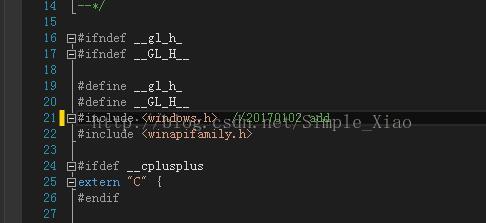
则在 GL.h 文件下,添加 #include <windows.h> 头文件即可;
如图:
(2)若报如下错误:
错误     error LNK2019: 无法解析的外部符号 __imp__glRectf@,该符号在函数 "void __cdecl onDraw(void *)" (?onDraw@@YAXPAX@Z) 中被引用    F:\VS2013 program\opengltest\opengltest\opengltest.obj  opengltest

错误     error LNK2019: 无法解析的外部符号 __imp__glFlush@,该符号在函数 "void __cdecl onDraw(void *)" (?onDraw@@YAXPAX@Z) 中被引用 F:\VS2013 program\opengltest\opengltest\opengltest.obj  opengltest

错误     error LNK2019: 无法解析的外部符号 __imp__glColor3f@,该符号在函数 "void __cdecl onDraw(void *)" (?onDraw@@YAXPAX@Z) 中被引用  F:\VS2013 program\opengltest\opengltest\opengltest.obj  opengltest

错误     error LNK2019: 无法解析的外部符号 __imp__glClearColor@,该符号在函数 "void __cdecl onDraw(void *)" (?onDraw@@YAXPAX@Z) 中被引用   F:\VS2013 program\opengltest\opengltest\opengltest.obj  opengltest

错误     error LNK2019: 无法解析的外部符号 __imp__glClear@,该符号在函数 "void __cdecl onDraw(void *)" (?onDraw@@YAXPAX@Z) 中被引用 F:\VS2013 program\opengltest\opengltest\opengltest.obj  opengltest

错误     error LNK1120:  个无法解析的外部命令 F:\VS2013 program\opengltest\Debug\opengltest.exe   opengltest
[转]OpenCV2.4.12 开启OpenGL启用三维可视化支持的更多相关文章
- Ubuntu 12.04 Virtualbox 启用USB 设备支持
转载自:http://www.cnblogs.com/ericsun/archive/2013/06/10/3130679.html 具体步骤在上面的链接中 今天在ubuntu下安装了Virtualb ...
- 在Ubuntu 12.04 上为Virtualbox 启用USB 设备支持
在Ubuntu 12.04 上为Virtualbox 启用USB 设备支持 http://www.cnblogs.com/ericsun/archive/2013/06/10/3130679.htm ...
- Vs2013+opencv2.4.12+x64用VideoCapture无法打开视频
环境变量中匹配的是x86的opencv_ffmpeg244.dll,与项目不匹配,需在项目exe文件同目录下添加X:\opencv\opencv2.4.12\build\x64\vc12\bin\op ...
- 基于OpenGL的三维曲面动态显示实现
在使用Visual C++的MFC AppWizard建立应用程序框架后,生成了多个类,与OpenGL编程相关的类是视图类,主要的显示任务都在其中完成. 1.基于OpenGL绘图的基本设置 1.1 设 ...
- 在qt的QOpenGLWidget开启opengl的抗锯齿
在QOpenGLWidget的构造函数添加下面几句代码即可 QSurfaceFormat surfaceFormat; surfaceFormat.setSamples();//多重采样 setFor ...
- ubuntu14.04上Virtualbox安装win7(使用Ghost镜像安装,启用USB设备支持,设置共享目录)
由于某些软件只有windows版本,于是只好安装个虚拟机win7 /**************************安装*************************************/ ...
- 科学计算三维可视化---TVTK入门(安装与测试)
推文:http://docs.huihoo.com/scipy/scipy-zh-cn/tvtk_intro.html 推文:http://code.enthought.com/pages/mayav ...
- Python科学计算三维可视化(整理完结)
中国MOOC<Pyhton计算计算三维可视化>总结 课程url:here ,教师:黄天宇,嵩天 下文的图片和问题,答案都是从eclipse和上完课后总结的,转载请声明. Python数据三 ...
- C# WPF 嵌入网页版WebGL油田三维可视化监控
0x00 楔子 最近做的一个项目,是一个油田三维可视化监控的场景编辑和监控的系统,和三维组态有些类似,不过主要用于油田上. 效果如下图所示: 首先当然是上模型,设计人员跟进. 有了相关的模型,使用我们 ...
随机推荐
- 解决代码报红:Cannot resolve symbol 'xxx'
直接复制别人的代码,maven依赖到自己的IDEA中,个别代码报红,说是不能加载这个东西,检查代码没错,依赖没错,引入jar包也没错 最后网上找到了解决方法,参考文章 如上图所示,一般建议点击Inva ...
- Java - 线程优先级和守护线程
Java多线程系列--“基础篇”10之 线程优先级和守护线程 概要 本章,会对守护线程和线程优先级进行介绍.涉及到的内容包括:1. 线程优先级的介绍2. 线程优先级的示例3. 守护线程的示例 转载请注 ...
- Redis常用数据类型及使用场景
Redis最为常用的数据类型 字符串(String) 字符串列表(list) 字符串集合(set) 哈希(hash) 有序的字符串集合(sorted set) String(字符串) 字符串是最基本的 ...
- Javascript 回调函数理解---二娃子买肾机6
在Javascript中什么是回调函数,我认为简单来说就是把一个函数B作为参数传递给另一个函数A,在A函数中的一定时机调用函数B. 这里可以看出回调函数形成了一个闭包,它可以访问函数A中的活动对象. ...
- BZOJ2388: 旅行规划(分块 凸包)
题意 题目链接 Sol 直接挂队爷的题解了 分块题好难调啊qwq #include<bits/stdc++.h> #define LL long long using namespace ...
- 如何删除PeopleSoft Process Definition
PeopleSoft没有在页面提供删除Process Definition的快捷方式. 可以通过AD创建一个新的project加入这个process definition,在upgrade tab选择 ...
- windows与虚拟机的linux共享一个文件夹
1.安装VMware Tools,在VMware面板上选择“虚拟机-重新安装VMware tools…” 2.使用命令 Ctrl+Alt+T 打开终端: 3.切换用户到root,命令 su 回车,输入 ...
- php完美分页工具
<?php /** file: page.class.php 完美分页类 Page */ class Page { private $total; //数据表中总记录数 private $lis ...
- plsql 导出查询结果
点击青色按钮即可 说明: 会将查询到的所有数据导出到指定文件,并不是只导出下面列表显示的几行数据: 也不用点击"获取最后页"那个按钮. 注意: 当你选择导出为excel文件时, ...
- React Native - TextInput详细解说
1,TextInput组件介绍 TextInput 组件除了作为输入框实现基本的输入功能外,它还提供了许多其他功能,比如自动校验.占位符以及指定弹出不同的键盘类型等. 2,组件的属性 (1)autoC ...