
[转]OpenCV2.4.12 开启OpenGL启用三维可视化支持
OpenCV默认情况下是不支持OpenGL的,如果要使OpenCV支持OpenGL,则需要重编译,具体步骤如下:
注意事项:从The OpenCV Reference ManualOpenCV参考手册 opencv2refman.pdf [点击下载]228页来看,OpenGL仅支持32位操作系统;
一、准备工作:
(1)下载OpenCV2.4.12 [点击下载] ,并解压到相应路径,本文解压在 D:\opencv-2.4.12;
(2)下载CMake工具 [点击下载],并安装;
(3)建一个重编译后文件存放文件夹,本文存放在 D:\opencv-2.4.12 build.
二、开始重编译:
(1)打开CMake,设置OpenCV2.4.12源码目录及 OpenCV2.4.12编译存放目录,勾选 Advanced 选项,如图:

(2)点击 Configure,Specify the generator for this project 选择对应的 Visual Studio 版本,比如:我电脑装的是 Visual Studio 2013,故选择 Visual Studio 12 2013,如图所示:
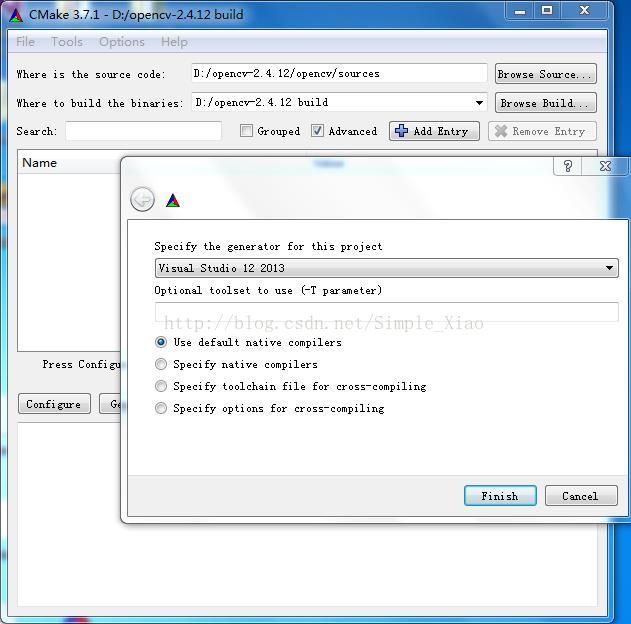
然后按 Finish;
(3)找到 WHTH_OPENGL ,并打勾,如图:
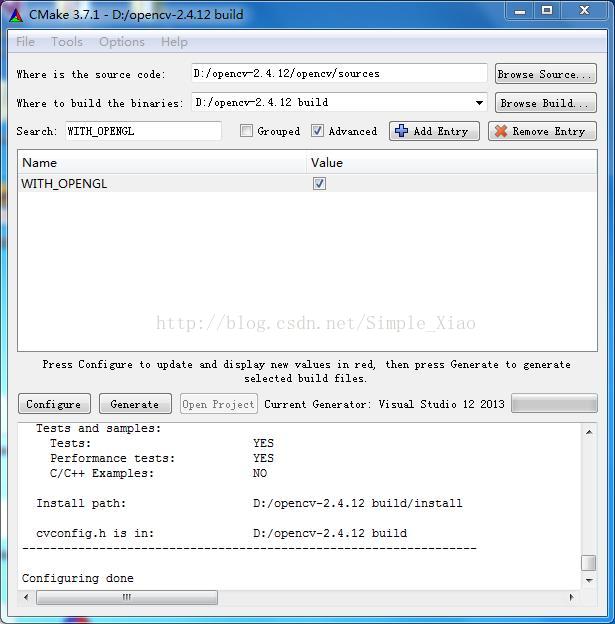
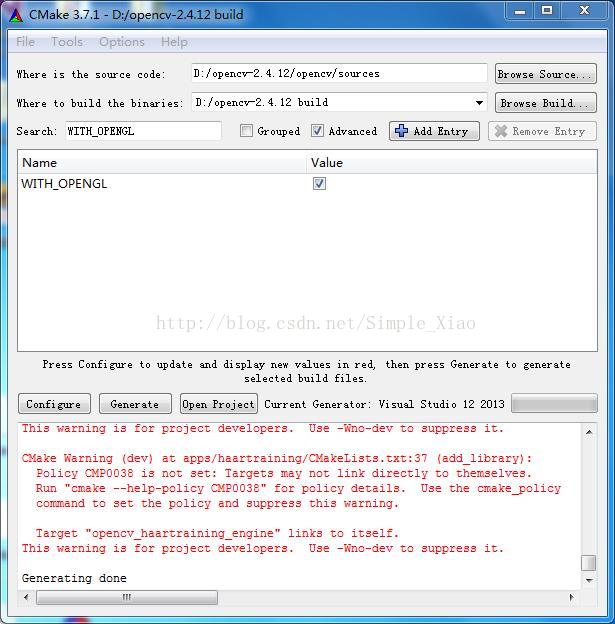
(4)再次点击 Configure,完成之后点击 Generate,结果如下:
(5)打开 D:\opencv-2.4.12 build,找到 OpenCV.sln 并双击(使用 Visual Studio 打开);
(6)在 Debug 、Win32 环境下,选择 ALL_BUILD,单击右键,选择 生成,如图:

如果提示错误 error LNK1104:无法打开文件“python27_d.lib”,则把 python27_d.lib 下载下来点击打开链接,放在Visual Studio 安装目录下的 VC\lib 文件下即可;然后,重新选择 ALL_BUILD,单击右键,选择 生成即可;
(7)选择 INSTALL,单击右键,选择 生成,如下图:

(8)在 Release、Win32 环境下,重复(6)(7)步;
三、Visual Studio环境配置:
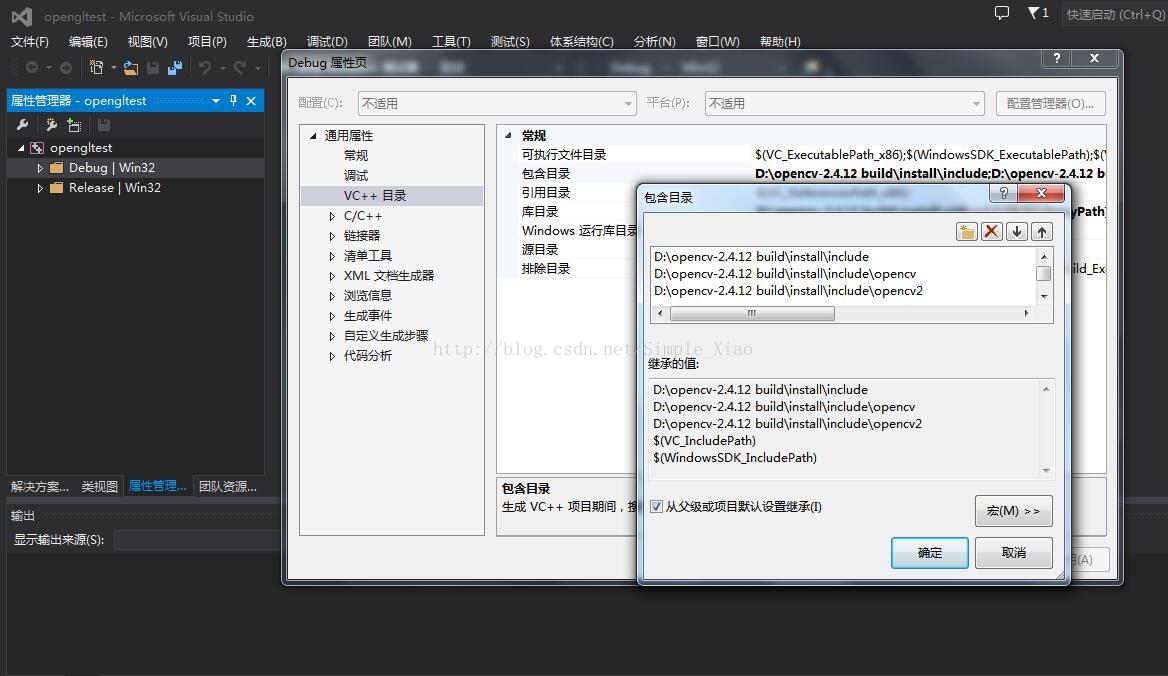
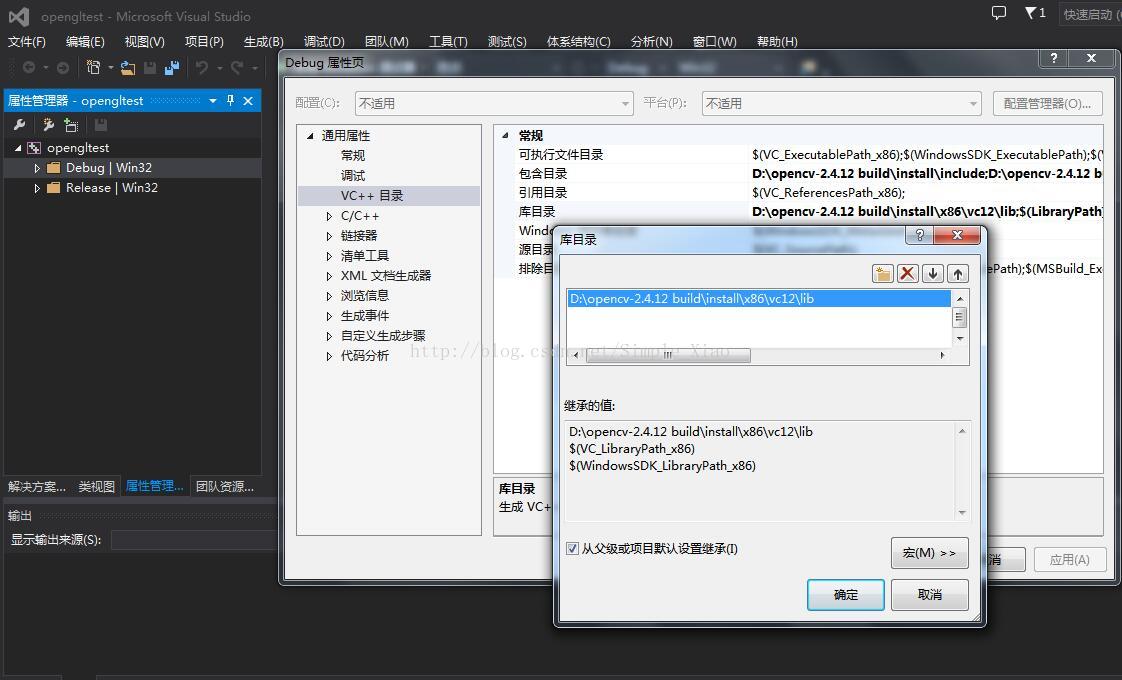
(1)点击 属性管理器,分别打开 Debug | Win32 和Release | Win32 下的Microsoft.Cpp.Win32.user ,通用属性 -> VC++ 目录 -> 包含目录 设置为:
D:\opencv-2.4.12 build\install\include
D:\opencv-2.4.12 build\install\include\opencv
D:\opencv-2.4.12 build\install\include\opencv2
通用属性 -> VC++ 目录 -> 库目录 设置为:
D:\opencv-2.4.12 build\install\x86\vc12\lib
如图:
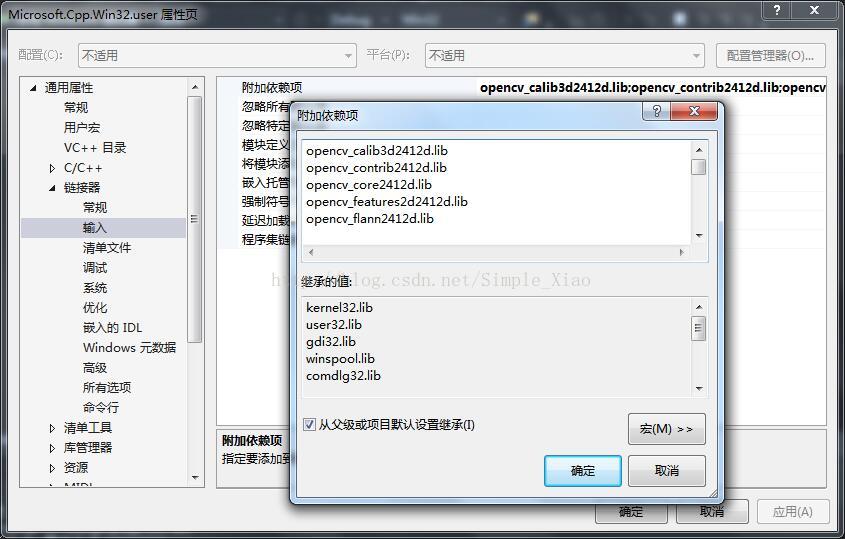
(2)链接器 -> 输入 ->附加依赖项,Debug 环境配置为:
opencv_calib3d2412d.lib
opencv_contrib2412d.lib
opencv_core2412d.lib
opencv_features2d2412d.lib
opencv_flann2412d.lib
opencv_gpu2412d.lib
opencv_highgui2412d.lib
opencv_imgproc2412d.lib
opencv_legacy2412d.lib
opencv_ml2412d.lib
opencv_nonfree2412d.lib
opencv_objdetect2412d.lib
opencv_ocl2412d.lib
opencv_photo2412d.lib
opencv_stitching2412d.lib
opencv_superres2412d.lib
opencv_ts2412d.lib
opencv_video2412d.lib
opencv_videostab2412d.lib
Release 环境配置为:
opencv_calib3d2412.lib
opencv_contrib2412.lib
opencv_core2412.lib
opencv_features2d2412.lib
opencv_flann2412.lib
opencv_gpu2412.lib
opencv_highgui2412.lib
opencv_imgproc2412.lib
opencv_legacy2412.lib
opencv_ml2412.lib
opencv_nonfree2412.lib
opencv_objdetect2412.lib
opencv_ocl2412.lib
opencv_photo2412.lib
opencv_stitching2412.lib
opencv_superres2412.lib
opencv_ts2412.lib
opencv_video2412.lib
opencv_videostab2412.lib
kernel32.lib
user32.lib
gdi32.lib
winspool.lib
comdlg32.lib
advapi32.lib
shell32.lib
ole32.lib
oleaut32.lib
uuid.lib
odbc32.lib
odbccp32.lib
如图:
(3)至此配置完成。
四、编译时常见错误:
(1)若报如下错误:
错误     error C4430: 缺少类型说明符 - 假定为 int。注意:  C++ 不支持默认 int   c:\program files\windows kits\8.1\include\um\gl\gl.h           opengltest

错误     error C4430: 缺少类型说明符 - 假定为 int。注意:  C++ 不支持默认 int   c:\program files\windows kits\8.1\include\um\gl\gl.h           opengltest

错误    error C4430: 缺少类型说明符 - 假定为 int。注意:  C++ 不支持默认 int   c:\program files\windows kits\8.1\include\um\gl\gl.h           opengltest

错误    error C4430: 缺少类型说明符 - 假定为 int。注意:  C++ 不支持默认 int   c:\program files\windows kits\8.1\include\um\gl\gl.h           opengltest

错误    error C4430: 缺少类型说明符 - 假定为 int。注意:  C++ 不支持默认 int   c:\program files\windows kits\8.1\include\um\gl\gl.h           opengltest

错误    error C4430: 缺少类型说明符 - 假定为 int。注意:  C++ 不支持默认 int   c:\program files\windows kits\8.1\include\um\gl\gl.h           opengltest

错误    error C4430: 缺少类型说明符 - 假定为 int。注意:  C++ 不支持默认 int   c:\program files\windows kits\8.1\include\um\gl\gl.h           opengltest

错误    error C4430: 缺少类型说明符 - 假定为 int。注意:  C++ 不支持默认 int   c:\program files\windows kits\8.1\include\um\gl\gl.h           opengltest

错误    error C4430: 缺少类型说明符 - 假定为 int。注意:  C++ 不支持默认 int   c:\program files\windows kits\8.1\include\um\gl\gl.h           opengltest

错误    error C4430: 缺少类型说明符 - 假定为 int。注意:  C++ 不支持默认 int   c:\program files\windows kits\8.1\include\um\gl\gl.h           opengltest

错误    error C4430: 缺少类型说明符 - 假定为 int。注意:  C++ 不支持默认 int   c:\program files\windows kits\8.1\include\um\gl\gl.h           opengltest

错误    error C4430: 缺少类型说明符 - 假定为 int。注意:  C++ 不支持默认 int   c:\program files\windows kits\8.1\include\um\gl\gl.h           opengltest

错误    error C4430: 缺少类型说明符 - 假定为 int。注意:  C++ 不支持默认 int   c:\program files\windows kits\8.1\include\um\gl\gl.h           opengltest

错误    error C4430: 缺少类型说明符 - 假定为 int。注意:  C++ 不支持默认 int   c:\program files\windows kits\8.1\include\um\gl\gl.h           opengltest

错误    error C4430: 缺少类型说明符 - 假定为 int。注意:  C++ 不支持默认 int   c:\program files\windows kits\8.1\include\um\gl\gl.h           opengltest

错误    error C4430: 缺少类型说明符 - 假定为 int。注意:  C++ 不支持默认 int   c:\program files\windows kits\8.1\include\um\gl\gl.h           opengltest

错误    error C4430: 缺少类型说明符 - 假定为 int。注意:  C++ 不支持默认 int   c:\program files\windows kits\8.1\include\um\gl\gl.h           opengltest

错误   error C4430: 缺少类型说明符 - 假定为 int。注意:  C++ 不支持默认 int   c:\program files\windows kits\8.1\include\um\gl\gl.h           opengltest

错误   error C4430: 缺少类型说明符 - 假定为 int。注意:  C++ 不支持默认 int   c:\program files\windows kits\8.1\include\um\gl\gl.h           opengltest

错误   error C4430: 缺少类型说明符 - 假定为 int。注意:  C++ 不支持默认 int   c:\program files\windows kits\8.1\include\um\gl\gl.h           opengltest

错误   error C4430: 缺少类型说明符 - 假定为 int。注意:  C++ 不支持默认 int   c:\program files\windows kits\8.1\include\um\gl\gl.h           opengltest

错误    error C2371: “APIENTRY”: 重定义;不同的基类型 c:\program files\windows kits\8.1\include\um\gl\gl.h           opengltest

错误     error C2182: “APIENTRY”: 非法使用“void”类型   c:\program files\windows kits\8.1\include\um\gl\gl.h           opengltest

错误     error C2182: “APIENTRY”: 非法使用“void”类型   c:\program files\windows kits\8.1\include\um\gl\gl.h           opengltest

错误    error C2182: “APIENTRY”: 非法使用“void”类型   c:\program files\windows kits\8.1\include\um\gl\gl.h           opengltest

错误    error C2182: “APIENTRY”: 非法使用“void”类型   c:\program files\windows kits\8.1\include\um\gl\gl.h           opengltest

错误    error C2182: “APIENTRY”: 非法使用“void”类型   c:\program files\windows kits\8.1\include\um\gl\gl.h           opengltest

错误    error C2182: “APIENTRY”: 非法使用“void”类型   c:\program files\windows kits\8.1\include\um\gl\gl.h           opengltest

错误    error C2182: “APIENTRY”: 非法使用“void”类型   c:\program files\windows kits\8.1\include\um\gl\gl.h           opengltest

错误    error C2182: “APIENTRY”: 非法使用“void”类型   c:\program files\windows kits\8.1\include\um\gl\gl.h           opengltest

错误    error C2182: “APIENTRY”: 非法使用“void”类型   c:\program files\windows kits\8.1\include\um\gl\gl.h           opengltest

错误    error C2182: “APIENTRY”: 非法使用“void”类型   c:\program files\windows kits\8.1\include\um\gl\gl.h           opengltest

错误    error C2182: “APIENTRY”: 非法使用“void”类型   c:\program files\windows kits\8.1\include\um\gl\gl.h           opengltest

错误    error C2182: “APIENTRY”: 非法使用“void”类型   c:\program files\windows kits\8.1\include\um\gl\gl.h           opengltest

错误    error C2182: “APIENTRY”: 非法使用“void”类型   c:\program files\windows kits\8.1\include\um\gl\gl.h           opengltest

错误    error C2182: “APIENTRY”: 非法使用“void”类型   c:\program files\windows kits\8.1\include\um\gl\gl.h           opengltest

错误    error C2182: “APIENTRY”: 非法使用“void”类型   c:\program files\windows kits\8.1\include\um\gl\gl.h           opengltest

错误    error C2182: “APIENTRY”: 非法使用“void”类型   c:\program files\windows kits\8.1\include\um\gl\gl.h           opengltest

错误   error C2182: “APIENTRY”: 非法使用“void”类型   c:\program files\windows kits\8.1\include\um\gl\gl.h           opengltest

错误   error C2182: “APIENTRY”: 非法使用“void”类型   c:\program files\windows kits\8.1\include\um\gl\gl.h           opengltest

错误   error C2182: “APIENTRY”: 非法使用“void”类型   c:\program files\windows kits\8.1\include\um\gl\gl.h           opengltest

错误   error C2182: “APIENTRY”: 非法使用“void”类型   c:\program files\windows kits\8.1\include\um\gl\gl.h           opengltest

错误   error C2146: 语法错误: 缺少“;”(在标识符“glColor3dv”的前面)   c:\program files\windows kits\8.1\include\um\gl\gl.h           opengltest

错误   error C2146: 语法错误: 缺少“;”(在标识符“glColor3d”的前面)    c:\program files\windows kits\8.1\include\um\gl\gl.h           opengltest

错误   error C2146: 语法错误: 缺少“;”(在标识符“glColor3bv”的前面)   c:\program files\windows kits\8.1\include\um\gl\gl.h           opengltest

错误   error C2146: 语法错误: 缺少“;”(在标识符“glColor3b”的前面)    c:\program files\windows kits\8.1\include\um\gl\gl.h           opengltest

错误    error C2146: 语法错误: 缺少“;”(在标识符“glClipPlane”的前面)  c:\program files\windows kits\8.1\include\um\gl\gl.h           opengltest

错误    error C2146: 语法错误: 缺少“;”(在标识符“glClearStencil”的前面)   c:\program files\windows kits\8.1\include\um\gl\gl.h           opengltest

错误    error C2146: 语法错误: 缺少“;”(在标识符“glClearIndex”的前面) c:\program files\windows kits\8.1\include\um\gl\gl.h           opengltest

错误    error C2146: 语法错误: 缺少“;”(在标识符“glClearDepth”的前面) c:\program files\windows kits\8.1\include\um\gl\gl.h           opengltest

错误    error C2146: 语法错误: 缺少“;”(在标识符“glClearColor”的前面) c:\program files\windows kits\8.1\include\um\gl\gl.h           opengltest

错误    error C2146: 语法错误: 缺少“;”(在标识符“glClearAccum”的前面) c:\program files\windows kits\8.1\include\um\gl\gl.h           opengltest

错误    error C2146: 语法错误: 缺少“;”(在标识符“glClear”的前面)  c:\program files\windows kits\8.1\include\um\gl\gl.h           opengltest

错误    error C2146: 语法错误: 缺少“;”(在标识符“glCallLists”的前面)  c:\program files\windows kits\8.1\include\um\gl\gl.h           opengltest

错误    error C2146: 语法错误: 缺少“;”(在标识符“glCallList”的前面)   c:\program files\windows kits\8.1\include\um\gl\gl.h           opengltest

错误    error C2146: 语法错误: 缺少“;”(在标识符“GLboolean”的前面)    c:\program files\windows kits\8.1\include\um\gl\gl.h           opengltest

错误    error C2146: 语法错误: 缺少“;”(在标识符“glBlendFunc”的前面)  c:\program files\windows kits\8.1\include\um\gl\gl.h           opengltest

错误    error C2146: 语法错误: 缺少“;”(在标识符“glBitmap”的前面) c:\program files\windows kits\8.1\include\um\gl\gl.h           opengltest

错误    error C2146: 语法错误: 缺少“;”(在标识符“glBindTexture”的前面)    c:\program files\windows kits\8.1\include\um\gl\gl.h           opengltest

错误    error C2146: 语法错误: 缺少“;”(在标识符“glBegin”的前面)  c:\program files\windows kits\8.1\include\um\gl\gl.h           opengltest

错误    error C2146: 语法错误: 缺少“;”(在标识符“glArrayElement”的前面)   c:\program files\windows kits\8.1\include\um\gl\gl.h           opengltest

错误    error C2146: 语法错误: 缺少“;”(在标识符“glAreTexturesResident”的前面)    c:\program files\windows kits\8.1\include\um\gl\gl.h           opengltest

错误     error C2146: 语法错误: 缺少“;”(在标识符“glAlphaFunc”的前面)  c:\program files\windows kits\8.1\include\um\gl\gl.h           opengltest

错误     error C2146: 语法错误: 缺少“;”(在标识符“glAccum”的前面)  c:\program files\windows kits\8.1\include\um\gl\gl.h           opengltest

错误     error C2144: 语法错误:“void”的前面应有“;”    c:\program files\windows kits\8.1\include\um\gl\gl.h           opengltest

错误     error C2144: 语法错误:“void”的前面应有“;”    c:\program files\windows kits\8.1\include\um\gl\gl.h           opengltest

错误    error C2144: 语法错误:“void”的前面应有“;”    c:\program files\windows kits\8.1\include\um\gl\gl.h           opengltest

错误    error C2144: 语法错误:“void”的前面应有“;”    c:\program files\windows kits\8.1\include\um\gl\gl.h           opengltest

错误    error C2144: 语法错误:“void”的前面应有“;”    c:\program files\windows kits\8.1\include\um\gl\gl.h           opengltest

错误    error C2144: 语法错误:“void”的前面应有“;”    c:\program files\windows kits\8.1\include\um\gl\gl.h           opengltest

错误    error C2144: 语法错误:“void”的前面应有“;”    c:\program files\windows kits\8.1\include\um\gl\gl.h           opengltest

错误    error C2144: 语法错误:“void”的前面应有“;”    c:\program files\windows kits\8.1\include\um\gl\gl.h           opengltest

错误    error C2144: 语法错误:“void”的前面应有“;”    c:\program files\windows kits\8.1\include\um\gl\gl.h           opengltest

错误    error C2144: 语法错误:“void”的前面应有“;”    c:\program files\windows kits\8.1\include\um\gl\gl.h           opengltest

错误    error C2144: 语法错误:“void”的前面应有“;”    c:\program files\windows kits\8.1\include\um\gl\gl.h           opengltest

错误    error C2144: 语法错误:“void”的前面应有“;”    c:\program files\windows kits\8.1\include\um\gl\gl.h           opengltest

错误    error C2144: 语法错误:“void”的前面应有“;”    c:\program files\windows kits\8.1\include\um\gl\gl.h           opengltest

错误    error C2144: 语法错误:“void”的前面应有“;”    c:\program files\windows kits\8.1\include\um\gl\gl.h           opengltest

错误    error C2144: 语法错误:“void”的前面应有“;”    c:\program files\windows kits\8.1\include\um\gl\gl.h           opengltest

错误    error C2144: 语法错误:“void”的前面应有“;”    c:\program files\windows kits\8.1\include\um\gl\gl.h           opengltest

错误   error C2144: 语法错误:“void”的前面应有“;”    c:\program files\windows kits\8.1\include\um\gl\gl.h           opengltest

错误   error C2144: 语法错误:“void”的前面应有“;”    c:\program files\windows kits\8.1\include\um\gl\gl.h           opengltest

错误   error C2144: 语法错误:“void”的前面应有“;”    c:\program files\windows kits\8.1\include\um\gl\gl.h           opengltest

错误   error C2144: 语法错误:“void”的前面应有“;”    c:\program files\windows kits\8.1\include\um\gl\gl.h           opengltest

错误     error C2086: “int WINGDIAPI”: 重定义   c:\program files\windows kits\8.1\include\um\gl\gl.h           opengltest

错误    error C2086: “int WINGDIAPI”: 重定义   c:\program files\windows kits\8.1\include\um\gl\gl.h           opengltest

错误    error C2086: “int WINGDIAPI”: 重定义   c:\program files\windows kits\8.1\include\um\gl\gl.h           opengltest

错误    error C2086: “int WINGDIAPI”: 重定义   c:\program files\windows kits\8.1\include\um\gl\gl.h           opengltest

错误    error C2086: “int WINGDIAPI”: 重定义   c:\program files\windows kits\8.1\include\um\gl\gl.h           opengltest

错误    error C2086: “int WINGDIAPI”: 重定义   c:\program files\windows kits\8.1\include\um\gl\gl.h           opengltest

错误    error C2086: “int WINGDIAPI”: 重定义   c:\program files\windows kits\8.1\include\um\gl\gl.h           opengltest

错误    error C2086: “int WINGDIAPI”: 重定义   c:\program files\windows kits\8.1\include\um\gl\gl.h           opengltest

错误    error C2086: “int WINGDIAPI”: 重定义   c:\program files\windows kits\8.1\include\um\gl\gl.h           opengltest

错误    error C2086: “int WINGDIAPI”: 重定义   c:\program files\windows kits\8.1\include\um\gl\gl.h           opengltest

错误    error C2086: “int WINGDIAPI”: 重定义   c:\program files\windows kits\8.1\include\um\gl\gl.h           opengltest

错误    error C2086: “int WINGDIAPI”: 重定义   c:\program files\windows kits\8.1\include\um\gl\gl.h           opengltest

错误    error C2086: “int WINGDIAPI”: 重定义   c:\program files\windows kits\8.1\include\um\gl\gl.h           opengltest

错误    error C2086: “int WINGDIAPI”: 重定义   c:\program files\windows kits\8.1\include\um\gl\gl.h           opengltest

错误    error C2086: “int WINGDIAPI”: 重定义   c:\program files\windows kits\8.1\include\um\gl\gl.h           opengltest

错误    error C2086: “int WINGDIAPI”: 重定义   c:\program files\windows kits\8.1\include\um\gl\gl.h           opengltest

错误   error C2086: “int WINGDIAPI”: 重定义   c:\program files\windows kits\8.1\include\um\gl\gl.h           opengltest

错误   error C2086: “int WINGDIAPI”: 重定义   c:\program files\windows kits\8.1\include\um\gl\gl.h           opengltest

错误   error C2086: “int WINGDIAPI”: 重定义   c:\program files\windows kits\8.1\include\um\gl\gl.h           opengltest

错误   error C2086: “int WINGDIAPI”: 重定义   c:\program files\windows kits\8.1\include\um\gl\gl.h           opengltest

错误    error C2086: “int APIENTRY”: 重定义    c:\program files\windows kits\8.1\include\um\gl\gl.h           opengltest

错误    error C2086: “int APIENTRY”: 重定义    c:\program files\windows kits\8.1\include\um\gl\gl.h           opengltest

错误    error C2086: “int APIENTRY”: 重定义    c:\program files\windows kits\8.1\include\um\gl\gl.h           opengltest

错误    error C2086: “int APIENTRY”: 重定义    c:\program files\windows kits\8.1\include\um\gl\gl.h           opengltest

错误    error C2086: “int APIENTRY”: 重定义    c:\program files\windows kits\8.1\include\um\gl\gl.h           opengltest

错误    error C2086: “int APIENTRY”: 重定义    c:\program files\windows kits\8.1\include\um\gl\gl.h           opengltest

错误    error C2086: “int APIENTRY”: 重定义    c:\program files\windows kits\8.1\include\um\gl\gl.h           opengltest

错误    error C2086: “int APIENTRY”: 重定义    c:\program files\windows kits\8.1\include\um\gl\gl.h           opengltest

错误    error C2086: “int APIENTRY”: 重定义    c:\program files\windows kits\8.1\include\um\gl\gl.h           opengltest

错误    error C2086: “int APIENTRY”: 重定义    c:\program files\windows kits\8.1\include\um\gl\gl.h           opengltest

错误    error C2086: “int APIENTRY”: 重定义    c:\program files\windows kits\8.1\include\um\gl\gl.h           opengltest

错误    error C2086: “int APIENTRY”: 重定义    c:\program files\windows kits\8.1\include\um\gl\gl.h           opengltest

错误    error C2086: “int APIENTRY”: 重定义    c:\program files\windows kits\8.1\include\um\gl\gl.h           opengltest

错误    error C2086: “int APIENTRY”: 重定义    c:\program files\windows kits\8.1\include\um\gl\gl.h           opengltest

错误    error C2086: “int APIENTRY”: 重定义    c:\program files\windows kits\8.1\include\um\gl\gl.h           opengltest

错误   error C2086: “int APIENTRY”: 重定义    c:\program files\windows kits\8.1\include\um\gl\gl.h           opengltest

错误   error C2086: “int APIENTRY”: 重定义    c:\program files\windows kits\8.1\include\um\gl\gl.h           opengltest

错误   error C2086: “int APIENTRY”: 重定义    c:\program files\windows kits\8.1\include\um\gl\gl.h           opengltest

错误   error C1003: 错误计数超过 ;正在停止编译  c:\program files\windows kits\8.1\include\um\gl\gl.h           opengltest
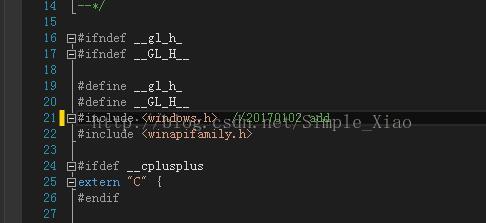
则在 GL.h 文件下,添加 #include <windows.h> 头文件即可;
如图:
(2)若报如下错误:
错误     error LNK2019: 无法解析的外部符号 __imp__glRectf@,该符号在函数 "void __cdecl onDraw(void *)" (?onDraw@@YAXPAX@Z) 中被引用    F:\VS2013 program\opengltest\opengltest\opengltest.obj  opengltest

错误     error LNK2019: 无法解析的外部符号 __imp__glFlush@,该符号在函数 "void __cdecl onDraw(void *)" (?onDraw@@YAXPAX@Z) 中被引用 F:\VS2013 program\opengltest\opengltest\opengltest.obj  opengltest

错误     error LNK2019: 无法解析的外部符号 __imp__glColor3f@,该符号在函数 "void __cdecl onDraw(void *)" (?onDraw@@YAXPAX@Z) 中被引用  F:\VS2013 program\opengltest\opengltest\opengltest.obj  opengltest

错误     error LNK2019: 无法解析的外部符号 __imp__glClearColor@,该符号在函数 "void __cdecl onDraw(void *)" (?onDraw@@YAXPAX@Z) 中被引用   F:\VS2013 program\opengltest\opengltest\opengltest.obj  opengltest

错误     error LNK2019: 无法解析的外部符号 __imp__glClear@,该符号在函数 "void __cdecl onDraw(void *)" (?onDraw@@YAXPAX@Z) 中被引用 F:\VS2013 program\opengltest\opengltest\opengltest.obj  opengltest

错误     error LNK1120:  个无法解析的外部命令 F:\VS2013 program\opengltest\Debug\opengltest.exe   opengltest
[转]OpenCV2.4.12 开启OpenGL启用三维可视化支持的更多相关文章
- Ubuntu 12.04 Virtualbox 启用USB 设备支持
转载自:http://www.cnblogs.com/ericsun/archive/2013/06/10/3130679.html 具体步骤在上面的链接中 今天在ubuntu下安装了Virtualb ...
- 在Ubuntu 12.04 上为Virtualbox 启用USB 设备支持
在Ubuntu 12.04 上为Virtualbox 启用USB 设备支持 http://www.cnblogs.com/ericsun/archive/2013/06/10/3130679.htm ...
- Vs2013+opencv2.4.12+x64用VideoCapture无法打开视频
环境变量中匹配的是x86的opencv_ffmpeg244.dll,与项目不匹配,需在项目exe文件同目录下添加X:\opencv\opencv2.4.12\build\x64\vc12\bin\op ...
- 基于OpenGL的三维曲面动态显示实现
在使用Visual C++的MFC AppWizard建立应用程序框架后,生成了多个类,与OpenGL编程相关的类是视图类,主要的显示任务都在其中完成. 1.基于OpenGL绘图的基本设置 1.1 设 ...
- 在qt的QOpenGLWidget开启opengl的抗锯齿
在QOpenGLWidget的构造函数添加下面几句代码即可 QSurfaceFormat surfaceFormat; surfaceFormat.setSamples();//多重采样 setFor ...
- ubuntu14.04上Virtualbox安装win7(使用Ghost镜像安装,启用USB设备支持,设置共享目录)
由于某些软件只有windows版本,于是只好安装个虚拟机win7 /**************************安装*************************************/ ...
- 科学计算三维可视化---TVTK入门(安装与测试)
推文:http://docs.huihoo.com/scipy/scipy-zh-cn/tvtk_intro.html 推文:http://code.enthought.com/pages/mayav ...
- Python科学计算三维可视化(整理完结)
中国MOOC<Pyhton计算计算三维可视化>总结 课程url:here ,教师:黄天宇,嵩天 下文的图片和问题,答案都是从eclipse和上完课后总结的,转载请声明. Python数据三 ...
- C# WPF 嵌入网页版WebGL油田三维可视化监控
0x00 楔子 最近做的一个项目,是一个油田三维可视化监控的场景编辑和监控的系统,和三维组态有些类似,不过主要用于油田上. 效果如下图所示: 首先当然是上模型,设计人员跟进. 有了相关的模型,使用我们 ...
随机推荐
- 2017 年 PHP 程序员未来路在何方
PHP 从诞生到现在已经有20多年历史,从Web时代兴起到移动互联网退潮,互联网领域各种编程语言和技术层出不穷, Node.js . GO . Python 不断地在挑战 PHP 的地位.这些技术的推 ...
- AutoMapper在项目中的应用
一.先说说DTO DTO是个什么东东? DTO(Data Transfer Object)就是数据传输对象,说白了就是一个对象,只不过里边全是数据而已. 为什么要用DTO? 1.DTO更注重数据,对领 ...
- 1-初识java
目录 java 历史 Java 平台 Java 开发环境 Java 运行原理[简] Java 历史 这里不详细记录java的历史,只是标记出时间点和事件. 时间点 事件 1991 Sun公司成立Gre ...
- 学习html/css基础的重点笔记
1.权重问题 内联样式表 > id选择符 > class选择符 > 类型选择符(所有html标签名称) 内联样式表 > 内部样式表.外部样式表 内部样式表.外部样式表的权重与书 ...
- OSGI企业应用开发(七)细说Blueprint & Gemini Blueprint(二)
上篇文章介绍了标准的Blueprint 规范与 Gemini Blueprint如何自定义Bean配置文件路径,本文接着上篇文章继续介绍Blueprint的使用. 一.Bean的配置 前面提到过,Ge ...
- ActiveReports 报表应用教程 (14)---数据可视化
葡萄城ActiveReports报表中提供了丰富的数据可视化解决方案,用户可以将数据以图像化的方式进行显示,让报表数据更加形象且便于理解.在葡萄城ActiveReports报表中提供了大多数常用的二维 ...
- FileWriter剖析
集合这种容器存储数据,它只能在内存中临时存储,不能永久存储,这样会导致数据的丢失,所以出现了IO流. IO流用来处理设备之间的数据传输.可以用来做复制文件,上传文件,下载文件. 读数据是输入流,写数据 ...
- 【Kibana】Kibana入门教程
一.Kibana简介及下载安装 Kibana是专门用来为ElasticSearch设计开发的,可以提供数据查询,数据可视化等功能. 下载地址为:https://www.elastic.co/downl ...
- 【Python】keras卷积神经网络识别mnist
卷积神经网络的结构我随意设了一个. 结构大概是下面这个样子: 代码如下: import numpy as np from keras.preprocessing import image from k ...
- Win10命令行激活 & 电脑组装
系统激活: 1. 管理员身份运行 cmd 2. slmgr.vbs /upk ...