
多用户在线人数监听(基于TomCat)
服务器Servlet端
package com.sxt.mvcpro.servlet;

import java.io.IOException;

import java.util.HashSet;

import java.util.Set;

import javax.servlet.ServletException;

import javax.servlet.http.HttpServlet;

import javax.servlet.http.HttpServletRequest;

import javax.servlet.http.HttpServletResponse;

public class OnlineNumberServlet extends HttpServlet{

private Set<String> names=new HashSet<>();

@Override

    protected void doGet(HttpServletRequest req, HttpServletResponse resp) throws ServletException, IOException {

               //编码修改为utf-8(需要中文显示不乱码必须设置)

        req.setCharacterEncoding("utf-8");

              //获取操作路径请求

        String pathInfo=req.getPathInfo();

              //登录请求

        if ("/login".equals(pathInfo)) {

            this.login(req,resp);

        }

              //登出请求

                        else if ("/logout".equals(pathInfo)) {

            this.logout(req,resp);

        }

    }
//实现登录统计的方法

public void login(HttpServletRequest req, HttpServletResponse resp) throws ServletException, IOException {

    String username=req.getParameter("username");

    //如果为null则表示还没有登录

    if (req.getSession().getAttribute("username")==null) {

        if (!"".equals(username)) {

       //只有输入的用户名不能为空字符串才能进行操作

            req.getSession().setAttribute("username", username);

            //将用户名保存到set集合中

            names.add(username);

            //再将names集合保存到application内置对象中

            req.getServletContext().setAttribute("users", names);

                       //集合大小即为人数多少

            req.getServletContext().setAttribute("count", names.size());

        }

    }

    //继续跳转到在线显示的页面

    resp.sendRedirect("/Mvcpro/pages/online.jsp");

}
//实现注销的方法

public void logout(HttpServletRequest req, HttpServletResponse resp) throws ServletException, IOException{

    //移除当前用户输入的用户名

    names.remove(req.getSession().getAttribute("username"));

       //销毁当前用户的session内置对象

    req.getSession().invalidate();

    req.getServletContext().setAttribute("count", names.size());

    resp.sendRedirect("/Mvcpro/pages/online.jsp");

}

@Override

       //通过doPost来调用doGet方法可以使账号不在地址栏显示

    protected void doPost(HttpServletRequest req, HttpServletResponse resp) throws ServletException, IOException {

    this.doGet(req, resp);

    }

}
TomCat配置文件xml的修改
<?xml version="1.0" encoding="UTF-8"?>

<web-app xmlns:xsi="http://www.w3.org/2001/XMLSchema-instance" xmlns="http://java.sun.com/xml/ns/javaee" xsi:schemaLocation="http://java.sun.com/xml/ns/javaee http://java.sun.com/xml/ns/javaee/web-app_3_0.xsd" id="WebApp_ID" version="3.0">

  <display-name>Mvcpro</display-name>

  <welcome-file-list>

    <welcome-file>index.html</welcome-file>

    <welcome-file>index.htm</welcome-file>

    <welcome-file>index.jsp</welcome-file>

    <welcome-file>default.html</welcome-file>

    <welcome-file>default.htm</welcome-file>

    <welcome-file>default.jsp</welcome-file>

  </welcome-file-list>

 <!--容器中配置出 路径对应的servlet-->
<servlet>
<servlet-name>lineNumberServlet</servlet-name>
<servlet-class>com.sxt.mvcpro.servlet.OnlineNumberServlet</servlet-class>
 <load-on-startup>1</load-on-startup>
</servlet>
<!--定义出上面的servlet处理路径 这个路径叫做servlet的映射路径-->
<servlet-mapping>
<servlet-name> lineNumberServlet</servlet-name>
<url-pattern>/online/*</url-pattern> </servlet-mapping>
 </web-app>
客户端(前端)
由于需要传动态参数所以采用jsp格式而不是html(注意编码统一为utf-8以防止乱码)
<%@ page language="java" contentType="text/html; charset=UTF-8"

    pageEncoding="UTF-8"%>

<!DOCTYPE html>

<html>

<head>

<base href="/Mvcpro/">

<meta http-equiv="Content-Type" content="text/html; charset=UTF-8">

<title>Insert title here</title>

</head>

<body>

 <h1>在线人数为:${count==null? 0:count}</h1>

   ${users}

     <form action="online/login"  method="post">

         <fieldset>

           <legend>请登录</legend>

             用户名:<input  type="text" name="username"><br><br>

             <input type="submit" value="登陆">

         </fieldset>

     </form>

     <a  href="online/logout">注销</a>

</body>

</html>
效果图
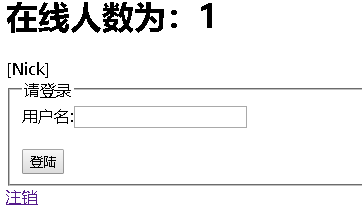
后期会在加入其他功能(敬请期待!!!)
多用户在线人数监听(基于TomCat)的更多相关文章
- 基于tomcat插件的maven多模块工程热部署(附插件源码)
内容属原创,转载请注明出处 写在前面的话 最近一直比较纠结,归根结底在于工程的模块化拆分.以前也干过这事,但是一直对以前的结果不满意,这会重操旧业,希望搞出个自己满意的结果. 之前有什么不满意的呢? ...
- 简单读!tomcat源码(一)启动与监听
tomcat 作为知名的web容器,很棒! 本文简单了从其应用命令开始拆解,让我们对他有清晰的了解,揭开神秘的面纱!(冗长的代码流水线,给你一目了然) 话分两头: 1. tomcat是如何启动的? 2 ...
- android事件处理之基于监听
Android提供了了两种事件处理方式:基于回调和基于监听. 基于监听: 监听涉及事件源,事件,事件监听器.用注册监听器的方法将某个监听器注册到事件源上,就可以对发生在事件源上的时间进行监听. 最简单 ...
- tomcat触发ServletContext初始化监听事件的源码(原创)
tomcat 8.0.36 知识点: 动态监听器的好处可以根据环境条件进行选择性添加. 静态监听器有七类. ServletContextAttributeListener ServletRequest ...
- 解决tomcat启动Socket监听端口死循环被hold问题
原文链接:http://blog.csdn.net/dead_cicle/article/details/7073433 1.SOCKET监听置于servlet的init方法中,在web.xml里加入 ...
- JavaWeb学习记录(二十六)——在线人数统计HttpSessionListener监听实现
一.session销毁控制层代码 public class InvalidateSession extends HttpServlet { public void doGet(HttpServletR ...
- Android的事件处理机制详解(二)-----基于监听的事件处理机制
基于监听的事件处理机制 前言: 我们开发的app更多的时候是需要与用户的交互----即对用户的操作进行响应 这就涉及到了android的事件处理机制; android给我们提供了两套功能强大的处理机制 ...
- 普通用户从非80端口启动tomcat,通过端口转发监听80端口
linux下小于1024的端口都需要root去绑定. root权限启动tomcat是不明智的,可以使用非root权限启动tomcat监听8080端口,然后利用端口转发实现对80端口的监听. 端口转发: ...
- 监听tomcat服务器启动/关闭并从配置文件中读取参数进行初始化
监听tomcat服务器启动/关闭很简单(2步): 1. 建立一个类实现ServletContextListener接口,重写其中的方法(contextDestroyed和contextInitiali ...
随机推荐
- win8 本地化
先看个简单的案例:新时尚Windows8开发(6):资源 & 本地化 http://www.silverlightchina.net/html/windows8/study/2012/0902 ...
- mybatis学习 十三 resultMap标签 一对一
1 .<resultMap>标签 写在mapper.xml中,由程序员控制SQL查询结果与实体类的映射关系. 在写<select>标签中,有一个resultType属性,此时s ...
- python对数据类型的相关操作
一.int的相关操作 int只有一个相关操作,bit_length() 用于计算一个数字的二进制长度 二.bool的相关操作 1.把数字转换成bool,除了0,返回的都是True a = 10 p ...
- 【转】CentOS 7 安装配置 NFS
环境 nps 192.168.1.97 client 192.168.1.98 一.yum 安装 yum -y install nfs-utils rpcbind nfs 的配置文件 /etc/exp ...
- 824. Goat Latin
class Solution { public: string toGoatLatin(string S) { S.push_back(' '); //add a space that the loo ...
- hadoop学习笔记-目录
以下是hadoop学习笔记的顺序: hadoop学习笔记(一):概念和组成 hadoop学习笔记(二):centos7三节点安装hadoop2.7.0 hadoop学习笔记(三):hdfs体系结构和读 ...
- ext中对json数据的处理解析
看贴:http://blog.csdn.net/xieshengjun2009/article/details/5959687
- 第23章:MongoDB-聚合操作--聚合命令
①count() 范例:统计students表中的数据量 db.students.count(); 范例:模糊查询 db.students.count("name":/张/i); ...
- 编译时:virtual memory exhausted: Cannot allocate memory,常见于VPS
原文链接:http://blog.csdn.net/taiyang1987912/article/details/41695895 一.问题 当安装虚拟机时系统时没有设置swap大小或设置内存太小,编 ...
- 空指针、NULL指针、零指针
1. 空指针.NULL指针.零指针 1.1 什么是空指针常量 0.0L.'\0'.3 - 3.0 * 17 (它们都是“integer constant expression”)以及 (void*)0 ...