
Spring Security认证配置(三)
学习本章之前,可以先了解下上篇Spring Security认证配置(二)
本篇想要达到这样几个目的:
1、登录成功处理
2、登录失败处理
3、调用方自定义登录后处理类型
具体配置代码如下:
spring-security-browser
登录成功处理:
/**

 * 自定义登录成功后处理

 */

@Slf4j

@Component

public class LoginSuccessHandler implements AuthenticationSuccessHandler {

    @Autowired

    private ObjectMapper objectMapper;

    @Override

    public void onAuthenticationSuccess(HttpServletRequest request, HttpServletResponse response,

            Authentication authentication) throws IOException, ServletException {

        log.info("登录成功...");

        response.setContentType("application/json;charset=UTF-8");

        // 返回authentication 认证信息

        response.getWriter().write(objectMapper.writeValueAsString(authentication));

    }

}
这段配置表示,登录成功后,会向response中塞入authentication对象
代码解析:
点开 AuthenticationSuccessHandler 类,可以看到里面只有一个onAuthenticationSuccess方法,如下:
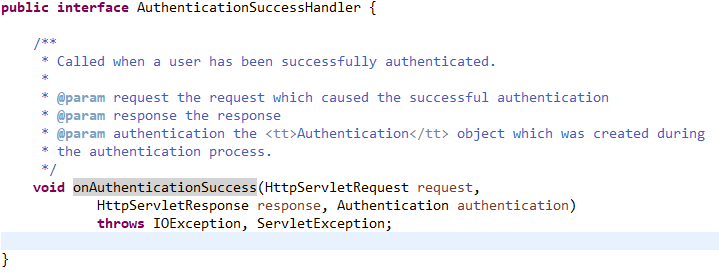
在onAuthenticationSuccess方法中,有个Authentication对象,其用法可参考AuthenticationManager、ProviderManager
登录失败处理:
/**

 * 自定义登录失败后处理

 */

@Slf4j

@Component

public class LoginFailureHandler implements AuthenticationFailureHandler {

    @Autowired

    private ObjectMapper objectMapper;

    @Override

    public void onAuthenticationFailure(HttpServletRequest request, HttpServletResponse response,

            AuthenticationException exception) throws IOException, ServletException {

        log.info("登录失败");

        response.setStatus(HttpStatus.INTERNAL_SERVER_ERROR.value()); // 服务器内部异常500

        response.setContentType("application/json;charset=UTF-8");

        // 返回异常信息

        response.getWriter().write(objectMapper.writeValueAsString(exception));

    }

}
这段配置表示,登录失败后,会向response中塞入AuthenticationException 对象,并返回500状态码
代码解析:
在 AuthenticationFailureHandler 中也只有一个onAuthenticationFailure方法,其入参 AuthenticationException 是认证授权过程中抛出的异常类的基类,
有以下几个子类:
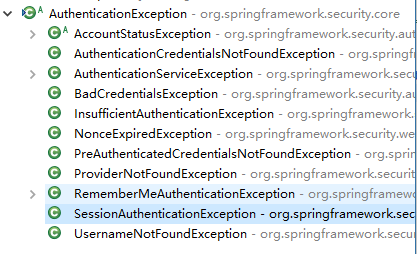
比较常用的是 BadCredentialsException(密码错误)、UsernameNotFoundException(用户名找不到)等等
修改下SecurityConfig类中的配置:
  @Autowired

    private SecurityProperty securityProperty;

    @Autowired

    private LoginSuccessHandler loginSuccessHandler; //登录成功处理

    @Autowired

    private LoginFailureHandler loginFailureHandler; //登录失败处理

    @Override

    protected void configure(HttpSecurity http) throws Exception {

        // formLogin()是默认的登录表单页,如果不配置 loginPage(url),则使用 spring security

        // 默认的登录页,如果配置了 loginPage()则使用自定义的登录页

        http.formLogin() // 表单登录

            .loginPage(SecurityConst.AUTH_REQUIRE)

            .loginProcessingUrl(SecurityConst.AUTH_FORM) // 登录请求拦截的url,也就是form表单提交时指定的action

            .successHandler(loginSuccessHandler)

            .failureHandler(loginFailureHandler)

            .and()

            .authorizeRequests() // 对请求授权

            .antMatchers(SecurityConst.AUTH_REQUIRE, securityProperty.getBrowser().getLoginPage()).permitAll() // 允许所有人访问login.html和自定义的登录页

            .anyRequest() // 任何请求

            .authenticated()// 需要身份认证

            .and()

            .csrf().disable() // 关闭跨站伪造

        ;

    }
启动服务,访问 http://localhost:18081/index.html,跳转到登录页,输入正确的用户名密码(xwj/1234),跳转到如下页面:

查看控制台,可以看到Authentication对象包含的数据:
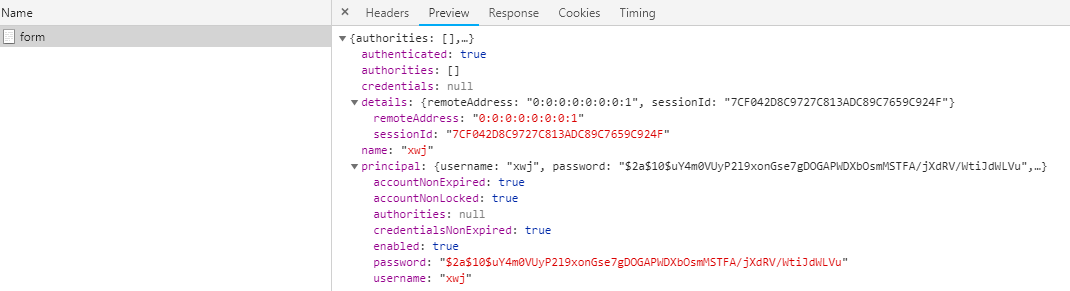
清掉浏览器缓存,然后再输入错误的密码,跳转到如下页面:

查看控制台,可以看到AuthenticationException对象包含的数据:

上面配置了登录成功和失败的处理,但是只能够返回JSON格式的数据。如果希望返回一个页面或者是跳转,那就可以使用Security默认的处理方式
在Security中,默认的成功跟失败处理分别是 SavedRequestAwareAuthenticationSuccessHandler 与 SimpleUrlAuthenticationFailureHandler
通过分析 AbstractAuthenticationProcessingFilter 类,可以看到:
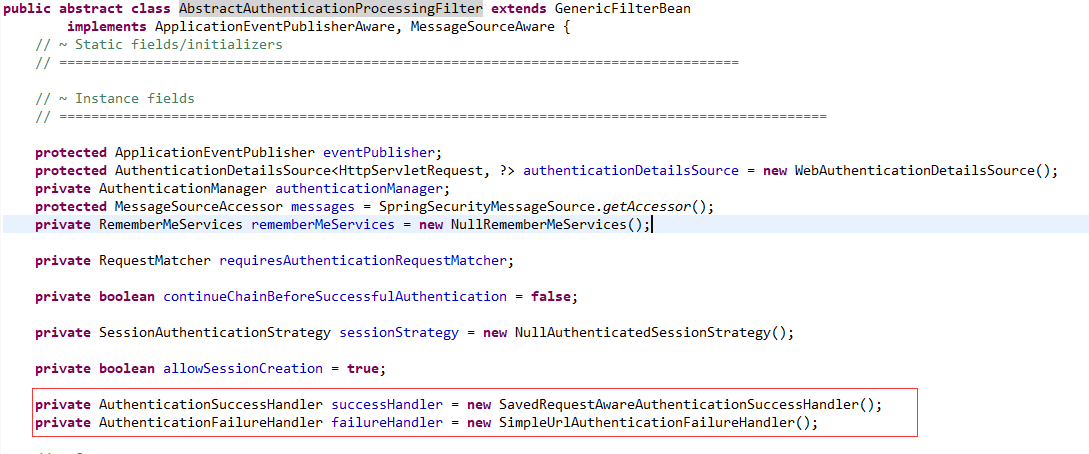
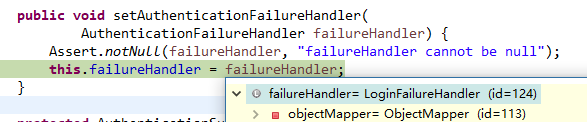
在服务启动时,如果在我们的配置类中,没有配置这AuthenticationSuccessHandler跟AuthenticationFailureHandler,则使用这两个默认的。如果配置了,则使用配置中
定义的登录处理类。打个断点可以看到:

修改下上面的配置代码:
spring-security-browser
为了达到调用方自定义跳转方式,增加配置类,如下:
/**

 * 登录类型枚举

 */

public enum LoginType {

    REDIRECT,

    JSON

}
修改BrowserProperty,增加默认的登录类型(JSON):
@Getter

@Setter

public class BrowserProperty {

    private String loginPage = "/login.html"; // 登录页

    private LoginType loginType = LoginType.JSON; //登录类型

}
接下来修改登录与失败处理类:
/**

 * 自定义登录成功后处理

 * (继承SavedRequestAwareAuthenticationSuccessHandler,这是默认的成功处理器,其带有requestCache)

 */

@Slf4j

@Component

public class LoginSuccessHandler extends SavedRequestAwareAuthenticationSuccessHandler {

    @Autowired

    private ObjectMapper objectMapper;

    @Autowired

    private SecurityProperty securityProperty;

    @Override

    public void onAuthenticationSuccess(HttpServletRequest request, HttpServletResponse response,

            Authentication authentication) throws IOException, ServletException {

        log.info("登录成功...");

        if (LoginType.JSON.equals(securityProperty.getBrowser().getLoginType())) { // json请求(如ajax)

            response.setContentType("application/json;charset=UTF-8");

            // 返回authentication 认证信息

            response.getWriter().write(objectMapper.writeValueAsString(authentication));

        } else { // 跳转

            super.onAuthenticationSuccess(request, response, authentication);

        }

    }

}
/**

 * 自定义登录失败后处理

 * (继承SimpleUrlAuthenticationFailureHandler,这是默认的失败处理器)

 */

@Slf4j

@Component

public class LoginFailureHandler extends SimpleUrlAuthenticationFailureHandler {

    @Autowired

    private ObjectMapper objectMapper;

    @Autowired

    private SecurityProperty securityProperty;

    @Override

    public void onAuthenticationFailure(HttpServletRequest request, HttpServletResponse response,

            AuthenticationException exception) throws IOException, ServletException {

        log.info("登录失败");

        if (LoginType.JSON.equals(securityProperty.getBrowser().getLoginType())) { // json请求(如ajax)

            response.setStatus(HttpStatus.INTERNAL_SERVER_ERROR.value()); // 服务器内部异常500

            response.setContentType("application/json;charset=UTF-8");

            // 返回异常信息

            response.getWriter().write(objectMapper.writeValueAsString(exception));

        } else {

            super.onAuthenticationFailure(request, response, exception);

        }

    }

}
spring-security-demo
在配置文件(application.yml)中,加上:
security:

  browser:

    #loginPage: /plogin.html

    loginType: REDIRECT
重新启动服务,访问 http://localhost:18081/index.html,跳转到登录页,输入正确的用户名密码(xwj/1234),跳转到具体的页面:

清掉浏览器缓存,然后再输入错误的密码,跳转到如下页面:
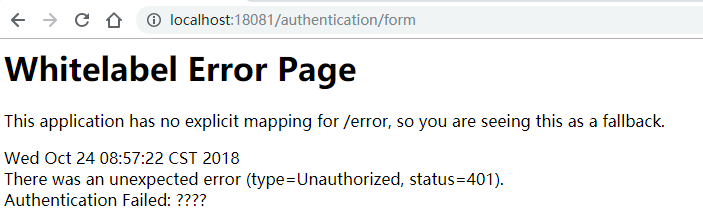
从上面可以看到,返回401状态码,类型为Unauthorized,表示未认证。这里的????其实是认证失败原因,打个断点可以看到:
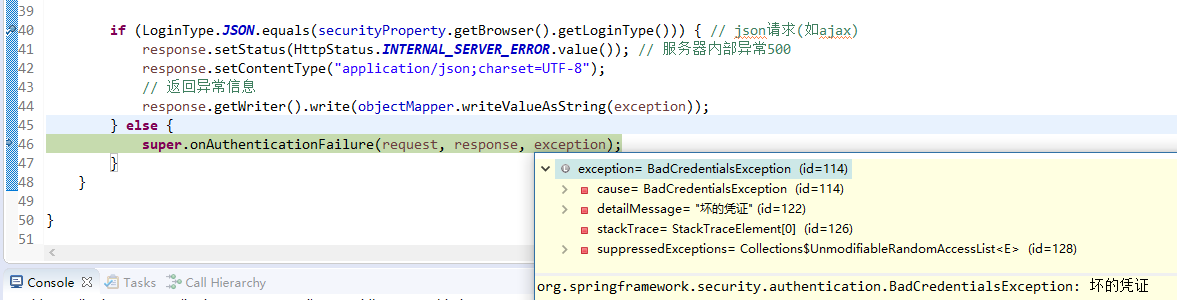
抛出了BadCredentialsException异常,"坏的凭证"表示密码错误
Spring Security认证配置(三)的更多相关文章
- Spring Security认证配置(一)
学习本章之前,可以先了解下上篇 Spring Security基本配置. 本篇主要讲述Spring Security基于表单,自定义用户认证配置(上篇中的配置,本篇将不再阐述).一共分为三步: 1.处 ...
- Spring Security认证配置(二)
学习本章之前,可以先了解下上篇Spring Security基本配置. 本篇想要达到这样几个目的: 1.访问调用者服务时,如果是html请求,则跳转到登录页,否则返回401状态码和错误信息 2.调用方 ...
- spring-security-4 (5)spring security Java配置实现自定义表单认证与授权
前面三篇讲解了spring security的搭建以及简单的表单认证与授权原理.本篇将实现我们自定义的表单登录与认证. 本篇不会再讲项目的搭建过程,因为跟第二节的搭建如出一辙.本篇也不会将项目中所有 ...
- spring security 认证源码跟踪
spring security 认证源码跟踪 在跟踪认证源码之前,我们先根据官网说明一下security的内部原理,主要是依据一系列的filter来实现,大家可以根据https://docs.sp ...
- Spring Security 入门(1-2)Spring Security - 从 配置例子例子 开始我们的学习历程
1.Spring Security 的配置文件 我们需要为 Spring Security 专门建立一个 Spring 的配置文件,该文件就专门用来作为 Spring Security 的配置. &l ...
- SPRING SECURITY JAVA配置:Web Security
在前一篇,我已经介绍了Spring Security Java配置,也概括的介绍了一下这个项目方方面面.在这篇文章中,我们来看一看一个简单的基于web security配置的例子.之后我们再来作更多的 ...
- Spring Security 入门(1-4-1)Spring Security - 认证过程
理解时可结合一下这位老兄的文章:http://www.importnew.com/20612.html 1.Spring Security的认证过程 1.1.登录过程 - 如果用户直接访问登录页面 用 ...
- spring-security-4 (4)spring security 认证和授权原理
在上一节我们讨论了spring security过滤器的创建和注册原理.请记住springSecurityFilterChain(类型为FilterChainProxy)是实际起作用的过滤器链,Del ...
- Spring boot+Spring Security 4配置整合实例
本例所覆盖的内容: 1. 使用Spring Security管理用户身份认证.登录退出 2. 用户密码加密及验证 3. 采用数据库的方式实现Spring Security的remember-me功能 ...
随机推荐
- Linux-系统相关命令及配置文件
1.查看/配置主机名 # 查看主机名 hostname # 配置主机名(临时) hostname <HOSTNAME> # 配置主机名(永久) hostnamectl set-hostna ...
- QuartzNet使用
quartz.config # You can configure your scheduler in either <quartz> configuration section # or ...
- C# 移动及限制移动距离
public class PlaneMove : MonoBehaviour { //h:水平方向的控制,v:前后方向的控制 float h,v; //Speed:飞机的飞行速度 public flo ...
- .NET MVC 学习笔记(二)— Bootstrap框架
二..NET MVC 学习笔记(一)—— Bootstrap框架 在实际开发过程中,页面的样式问题是让人很头疼的问题,良好的用户界面可以大大提高用户体检,而在你没有前端开发人员的火力支援情况下,并不是 ...
- gulp 打包错误 TypeError: Path must be string. Received undefined
Running gulp gives “path.js:7 throw new TypeError('Path must be a string. Received ' + inspect(path) ...
- hadoop集群搭建(hdfs)
(搭建hadoop集群的前提是服务器已成功安装jdk以及服务器之间已设置免密码登录,服务器之间的免密码登录可参考<linux服务器间ssh免密码登录>) 1.下载hadoop安装包 wge ...
- Hive在drop表的时候报错
问题背景: 在安装完Hive之后,初始化mysql是成功的,hive启动也是成功的,也能创建database,在database中也能创建表,也能查看表结构,但是在drop的时候就不行了,在hive ...
- D12——C语言基础学PYTHON
C语言基础学习PYTHON——基础学习D12 20180912内容纲要: 1.数据库介绍 2.RDMS术语 3.MySQL数据库介绍和基本使用 4.MySQL数据类型 5.MySQL常用命令 6.外键 ...
- centos7下elasticSearch安装配置
OS:Centos7x虚拟机 1H2Gjdk:1.8elasticsearch:5.6.0 1.下载“elasticsearch-5.6.0.tar.gz”解压到/usr/local/elastics ...
- 弹出AlertDialog的时候报You need to use a Theme.AppCompat theme (or descendant) with this activity错误
今天遇到一个bug,用百度地图的时候,我对上面的标注设置了点击监听,设置的相应的反应是弹出一个AlertDialog 记录一解决bug的历程 但是Dialog却没有弹出来,一看AS下面,报了这错,起初 ...