
SSH 公钥登录
一般使用SSH进行远程登录时需要提供密码,这也是我们所熟知的一种方式。
另外,就是通过公钥登录的方式,本文将简要介绍公钥登录的两种方法,建议使用方法二。本文也将简单演示公钥登录过程,以及强制使用公钥和密码的双因子认证。
公钥登录:法一
Step 1:创建公钥/私钥对ssh-keygen
$ ssh-keygen

Generating public/private rsa key pair.

...

$ ls

id_rsa  id_rsa.pub  known_hosts
Step 2:将id_rsa.pub上传到要远程登录到的机器上
$ scp id_rsa.pub root@142.93.198.56:/tmp

root@142.93.198.56's password:

id_rsa.pub                                                         %       .5KB/s   :
Step 3:将公钥添加到authorized_keys中
首先,远程登录到目标机器,在远程进行操作。
$ ssh root@142.93.198.56

...

root@ubuntu-s-1vcpu-1gb-nyc1-:~# cd /tmp/

root@ubuntu-s-1vcpu-1gb-nyc1-:/tmp# cat id_rsa.pub >> ~/.ssh/authorized_keys
Step 4:更改文件权限
root@ubuntu-s-1vcpu-1gb-nyc1-:/tmp# chmod ~/.ssh/authorized_keys
Step 5:查看配置
查看和更改配置文件:/etc/ssh/sshd_config
root@ubuntu-s-1vcpu-1gb-sfo2-:~# vim /etc/ssh/sshd_config
PasswordAuthentication yes      # 口令登录

RSAAuthentication yes         # RSA认证

PubkeyAuthentication yes       # 公钥登录
然后重启sshd服务。如果不想使用口令登录,可以修改PasswordAuthentication 为no。不过还是建议保留这项配置,如果一不下心执行了一下ssh-keygen命令,那这台远程服务器就真的离你有点远了。
Step 6:ssh公钥登录
现在便能使用私钥登录到远程机器了。
$ ssh -i id_rsa root@142.93.198.56

Welcome to Ubuntu 16.04. LTS (GNU/Linux 4.4.--generic x86_64)

 * Documentation:  https://help.ubuntu.com

 * Management:     https://landscape.canonical.com

 * Support:        https://ubuntu.com/advantage

  Get cloud support with Ubuntu Advantage Cloud Guest:

    http://www.ubuntu.com/business/services/cloud

 packages can be updated.

 updates are security updates.

New release '18.04.1 LTS' available.

Run 'do-release-upgrade' to upgrade to it.
vps :142.93.198.56仅供测试,已销毁。
公钥登录:法二
在接触Hadoop环境搭建的过程中,由于Hadoop集群之间是使用公钥直接进行数据传输。接触和使用了ssh-copy-id命令,该命令可轻松完成上述方法一的所有步骤。
root@kali:~# ssh-keygen                      # 生成公钥

Generating public/private rsa key pair.

Enter file in which to save the key (/root/.ssh/id_rsa):

Enter passphrase (empty for no passphrase):

Enter same passphrase again:

Your identification has been saved in /root/.ssh/id_rsa.

Your public key has been saved in /root/.ssh/id_rsa.pub.

The key fingerprint is:

SHA256:+E2PL7KFGu9pdzg9gEkg5OhMToGQxvMipMkXgBNub/k root@kali

The key's randomart image is:

+---[RSA ]----+

|*=o..            |

|*= =. .          |

|==* o. .         |

|=O.o.  ..        |

|. *+  ..So.      |

|  . .  .o+.o     |

|     E. o ++.    |

|       +oo=.+    |

|      .o=+ +..   |

+----[SHA256]-----+

root@kali:~#

root@kali:~# ssh-copy-id root@172.16.82.136          # ssh-copy-id 命令

/usr/bin/ssh-copy-id: INFO: Source of key(s) to be installed: "/root/.ssh/id_rsa.pub"

The authenticity of host '172.16.82.136 (172.16.82.136)' can't be established.

ECDSA key fingerprint is SHA256:buanLhYcZbfmeZ2rRECFo5K1v2EcfUAutraLAIQH/yU.

Are you sure you want to continue connecting (yes/no)? yes

/usr/bin/ssh-copy-id: INFO: attempting to log in with the new key(s), to filter out any that are already installed

/usr/bin/ssh-copy-id: INFO:  key(s) remain to be installed -- if you are prompted now it is to install the new keys

root@172.16.82.136's password:

Number of key(s) added:

Now try logging into the machine, with:   "ssh 'root@172.16.82.136'"

and check to make sure that only the key(s) you wanted were added.

root@kali:~# ssh root@172.16.82.136          # 可直接公钥登录,无需输入密码

Last failed login: Mon Mar   :: CST  from 172.16.83.136 on ssh:notty

There was  failed login attempt since the last successful login.

Last login: Mon Mar   ::

[root@hadoop ~]#
强制需要同时使用公钥和密码登录
在公钥登录的基础之上,需要增加如下配置:
[lz@mail ~]$ sudo vim /etc/ssh/sshd_config

...

AuthenticationMethods publickey,password
重启SSHD服务:
[lz@mail ~]$ sudo service sshd restart
具体展示如下如所示:
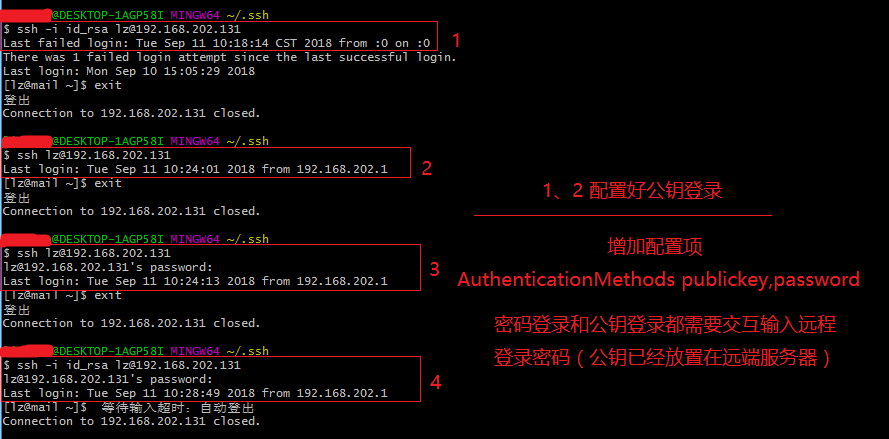
需要公钥和输入密码才能登录。
以上!
Reference:
SSH 公钥登录的更多相关文章
- [linux]SSH公钥登录
由于口令密码容易泄露,SSH公钥登录相比口令登录更加安全.SSH可以轻松使用非对称加密技术给两台机子订立契约,步骤如下: 第一步 本地机生成秘钥对 指令:ssh-keygen 功能:在本地(~/.ss ...
- SSH公钥登录原理
在平时工作中我们经常要远程登录服务器,这就要用到SSH协议: $ ssh user@host 主要有两种登录方式:第一种为密码口令登录,第二种为公钥登录 密码口令登录 通过密码进行登录,主要流程为: ...
- Linux建立互信关系(ssh公钥登录)
Linux有多种登录方式,比如telnet.ssh.支持ssh登录方式:口令登录和公钥登录 ssh登录方式:ssh [-l login_name] [-p port] [user@]hostname ...
- SSH公钥登录和RSA非对称加密
SSH登录方式 接触过Linux服务器的同学肯定用过SSH协议登录系统,通常SSH协议都有两种登录方式:密码口令登录和公钥登陆. 一.密码口令(类似于账号密码登录) 1.客户端连接服务器,服务器把公钥 ...
- ssh 公钥登录远程主机 并禁止密码登录
https://www.digitalocean.com/community/tutorials/how-to-set-up-ssh-keys-on-centos7 如果在新的机器上,得先用密码登录一 ...
- SSH公钥登录且禁止密码登录及更改默认端口
1.ssh生成公私钥 ssh-keygen -t rsa -C "zhangsan@qq.com" 生成密钥的位置如下,id_rsa是私钥.id_rsa.pub是公钥: ➜ .ss ...
- 配置github SSH公钥登录
git的安装见https://www.cnblogs.com/liliyang/p/9829931.html 配置git使用ssh密钥 git支持https和git两种传输协议,github分享链接时 ...
- ssh 公钥登录远程主机
ssh-keygen 然后一路回车就可以了 ssh-copy-id user@host user代表用户名,host代表主机地址 然后根据提示输入远程主机的密码,成功,再登录就不用输入密码了
- linux ssh公钥免密码登录
ssh 无密码登录要使用公钥与私钥.linux下可以用用ssh-keygen生成公钥/私钥对,下面我以CentOS为例. 一.SSH公钥登录原理 在平时工作中我们经常要远程登录服务器,这就要用到SSH ...
随机推荐
- thinkphp在wamp 配置去掉url中index.php方法
http://blog.csdn.net/youmypig/article/details/45008971
- #个人博客作业Week1——浏览教材后提出的5个问题
1.对于MSF的团队模型,请问是团队中的哪个角色监督9项原则的实现?是否会浪费时间和精力在践行9项原则上?2.在调查用户需求和用户体验时如何让不同阶层的用户更多的参与度?3.想成为一位优秀的PM需要从 ...
- 《Linux内核分析》第四周笔记 扒开系统调用的三层皮(上)
扒开系统调用的三层皮(上) 一.用户态.内核态和中断 库函数将系统调用封装起来. 1.什么是用户态和内核态 一般现代CPU都有几种不同的指令执行级别. 在高执行级别下,代码可以执行特权指令,访问任意的 ...
- Linux内核分析作业二
贾瑗 + 原创作品转载请注明出处 + <Linux内核分析>MOOC课程http://mooc.study.163.com/course/USTC-1000029000 一.操作系统是如 ...
- 20135337朱荟潼 Linux第一周学习总结——计算机是如何工作的
朱荟潼 + 原创作品转载请注明出处 + <Linux内核分析>MOOC课http://mooc.study.163.com/course/USTC-1000029000 1.冯诺依曼体系结 ...
- 四则运算APP最后阶段
四则运算APP最后阶段 [开发环境]:eclipse [开发项目]:小学生四则运算APP [开发人员]:郑胜斌 http://www.cnblogs.com/zsb1/ 孔德颖 http://www. ...
- Java的三大特性:封装、继承、多态
一.类的概念: 类一般包括两个部分:属性(成员变量)和方法(成员方法)方法组成部分:修饰符(可选) 返回值类型(必须) 方法名(必须)参数列表(可选) package com.classTest.pr ...
- 团队作业4——WBS练习
一.作业要求 对团队项目进行任务分解 要求所有人共同参与 队长列出需求 成员进行估计 队长领导大家达成共识 形成团队报告,发至团队博客 注意:分解的粒度最小不应超过6小时(即一个人在6小时以内能够完 ...
- 基于 ARM的 Windows 10S 笔记本 转帖
首款骁龙笔记本华硕畅370评测:续航不俗 性能拖后腿 2018年06月21日 12:23 新浪数码 缩小字体放大字体收藏微博微信分享 相关阅读:国内首款骁龙本华硕畅370发布:6199元送一年无限 ...
- 深入 Java Web
该系列 记录下,深入 学习 Java Web 过程. 1.Tomcat总体结构 2.Tomcat 启动流程 3.ServletContext详解 4.Servlet详解