
Spring Environment(一)API 介绍
Spring Environment(一)API 使用
Spring 系列目录(https://www.cnblogs.com/binarylei/p/10198698.html)
Spring 3.1 提供了新的属性管理 API,而且功能非常强大且很完善,对于一些属性配置信息都应该使用新的 API 来管理。位于 org.springframework.core.env 包内。
Spring Environment 属性配置管理系列文章:
一、新的属性管理 API
PropertySource:属性源,key-value 属性对抽象,比如用于配置数据PropertyResolver:属性解析器,用于解析相应 key 的 valueEnvironment:环境,本身是一个 PropertyResolver,但是提供了 Profile 特性,即可以根据环境得到相应数据(即激活不同的 Profile,可以得到不同的属性数据,比如用于多环境场景的配置(正式机、测试机、开发机 DataSource 配置)Profile:剖面,只有激活的剖面的组件/配置才会注册到 Spring 容器,类似于 maven 中 profile
也就是说,新的 API 主要从配置属性、解析属性、不同环境解析不同的属性、激活哪些组件/配置进行注册这几个方面进行了重新设计,使得 API 的目的更加清晰,而且功能更加强大。
@Test

public void test() {

    Environment env = new StandardEnvironment();

    // 1. 操作系统的环境变量

    Map<String, Object> systemEnvironment = ((StandardEnvironment) env).getSystemEnvironment();

    Assert.assertNotNull(systemEnvironment);

    // 2. JVM 属性配置

    Map<String, Object> systemProperties = ((StandardEnvironment) env).getSystemProperties();

    Assert.assertNotNull(systemProperties);

    // 3. 属性

    Assert.assertEquals("UTF-8", env.getProperty("file.encoding"));

    Assert.assertTrue(env.containsProperty("file.encoding"));

    // 4. 剖面 spring.profiles.default(默认为 default) spring.profiles.active

    //    只要有一个返回 true acceptsProfiles 方法就返回 true,!a 为不包含该 profiles

    Assert.assertTrue(env.acceptsProfiles("default"));

    Assert.assertTrue(env.acceptsProfiles("a", "default"));

    Assert.assertFalse(env.acceptsProfiles("a"));

    Assert.assertTrue(env.acceptsProfiles("!a", "b"));

}
二、PropertySource
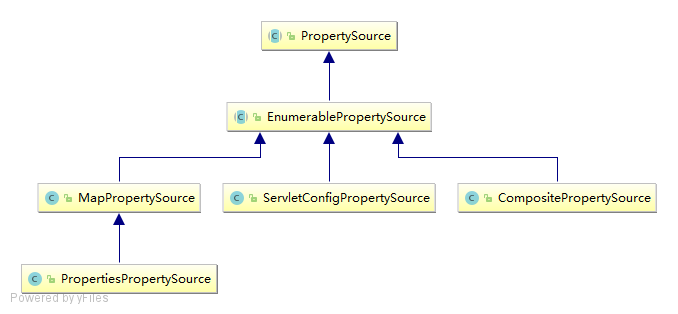
public abstract class PropertySource<T> {

    // 给数据源起个名称

    protected final String name;

    // 数据源,可能为 Map 或 Properties ...

    protected final T source;

    public boolean containsProperty(String name) {

        return (getProperty(name) != null);

    }

    public abstract Object getProperty(String name);

}
PropertySource 非常类似于 Map,数据源可来自 Map、Properties、Resource 等。PropertySource 接口有两个特殊的子类:StubPropertySource 用于占位用,ComparisonPropertySource 用于集合排序,不允许获取属性值。
2.1 PropertySource 实现类
MapPropertySource 的属性来自于一个 Map,而 ResourcePropertySource 的属性来自于一个 properties 文件,另外还有如 PropertiesPropertySource,其属性来自 Properties,ServletContextPropertySource 的属性来自 ServletContext 上下文初始化参数等等,大家可以查找 PropertySource 的继承层次查找相应实现。
@Test

public void PropertySourceTest() throws IOException {

    PropertySource mapPropertySource = new MapPropertySource("map",

            Collections.singletonMap("key", "source1"));

    Assert.assertEquals("value1", mapPropertySource.getProperty("key"));

    ResourcePropertySource resourcePropertySource = new ResourcePropertySource(

            "resource", "classpath:resources.properties");

    Assert.assertEquals("value2", resourcePropertySource.getProperty("key"));

}
2.2 CompositePropertySource
CompositePropertySource 提供了组合 PropertySource 的功能,查找顺序就是注册顺序。
@Test

public void CompositePropertySourceTest() throws IOException {

    PropertySource propertySource1 = new MapPropertySource("source1",

            Collections.singletonMap("key", "value1"));

    PropertySource propertySource2 = new MapPropertySource("source2",

            Collections.singletonMap("key", "value2"));

    CompositePropertySource compositePropertySource = new CompositePropertySource("composite");

    compositePropertySource.addPropertySource(propertySource1);

    compositePropertySource.addPropertySource(propertySource2);

    Assert.assertEquals("value1", compositePropertySource.getProperty("key"));

}
2.3 PropertySources
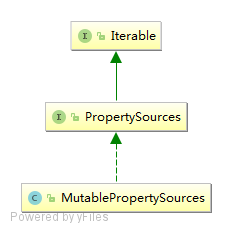
另外还有一个 PropertySources,从名字可以看出其包含多个 PropertySource。默认提供了一个 MutablePropertySources 实现,可以调用 addFirst 添加到列表的开头,addLast 添加到末尾,另外可以通过 addBefore(propertySourceName, propertySource) 或 addAfter(propertySourceName, propertySource) 添加到某个 propertySource 前面/后面;最后大家可以通过 iterator 迭代它,然后按照顺序获取属性。
注意:PropertySource 的顺序非常重要,因为 Spring 只要读到属性值就返回。
@Test

public void PropertySourcesTest() throws IOException {

    PropertySource propertySource1 = new MapPropertySource("source1",

            Collections.singletonMap("key", "value1"));

    PropertySource propertySource2 = new MapPropertySource("source2",

            Collections.singletonMap("key", "value2"));

    MutablePropertySources propertySources = new MutablePropertySources();

    propertySources.addFirst(propertySource1);

    propertySources.addLast(propertySource2);

    Assert.assertEquals("value1", propertySources.get("source1").getProperty("key"));

    Assert.assertEquals("value2", propertySources.get("source2").getProperty("key"));

}
到目前我们已经有属性了,接下来需要更好的 API 来解析属性了。
三、PropertyResolver
PropertyResolver 的使用参考:https://www.cnblogs.com/binarylei/p/10284826.html
四、Environment
Environment 是对 JDK 环境、Servlet 环境、Spring 环境的抽象;每个环境都有自己的配置数据,如 System.getProperties()、System.getenv() 等可以拿到 JDK 环境数据;ServletContext.getInitParameter()可以拿到 Servlet 环境配置数据等等;也就是说 Spring 抽象了一个 Environment 来表示环境配置。
public interface Environment extends PropertyResolver {

    String[] getActiveProfiles();

    String[] getDefaultProfiles();

    // @since 5.1 废弃,改用 Profiles(Profiles.of("dev"))

    @Deprecated

    boolean acceptsProfiles(String... profiles);

    boolean acceptsProfiles(Profiles profiles);

}
从 API 上可以看出,除了可以解析相应的属性信息外,还提供了剖面相关的 API。目的是:可以根据剖面有选择的进行注册组件/配置。比如对于不同的环境注册不同的组件/配置(正式机、测试机、开发机等的数据源配置)。它的主要几个实现如下所示:
MockEnvironment:模拟的环境,用于测试时使用;StandardEnvironment:标准环境,普通 Java 应用时使用,会自动注册 System.getProperties() 和 System.getenv()到环境;StandardServletEnvironment:标准 Servlet 环境,其继承了 StandardEnvironment,Web 应用时使用,除了 StandardEnvironment 外,会自动注册 ServletConfig(DispatcherServlet)、ServletContext 及 JNDI 实例到环境;
4.1 web.xml 配置 Servlet 属性
<context-param>

    <param-name>myConfig</param-name>

    <param-value>hello</param-value>

</context-param>

<servlet>

    <servlet-name>spring</servlet-name>

    <servlet-class>org.springframework.web.servlet.DispatcherServlet</servlet-class>

    <init-param>

        <param-name>contextConfigLocation</param-name>

        <param-value>classpath:spring-mvc.xml</param-value>

    </init-param>

</servlet>
使用 StandardServletEnvironment 加载时,默认除了 StandardEnvironment 的两个属性外,还有另外三个属性:servletContextInitParams(ServletContext)、servletConfigInitParams(ServletConfig)、jndiProperties(JNDI)。
4.2 Environment 获取
(1) 注解
@Autowired

Environment env;
(2) ApplicationContext
applicationContext.getEnvironment();
五、Profile
profile 剖面,大体意思是:我们程序可能从某几个剖面来执行应用,比如正式机环境、测试机环境、开发机环境等,每个剖面的配置可能不一样(比如开发机可能使用本地的数据库测试,正式机使用正式机的数据库测试)等;因此呢,就需要根据不同的环境选择不同的配置;如果 maven 中的 profile 的概念。
profile 有两种:
- 默认的:通过 "spring.profiles.default" 属性获取,如果没有配置默认值是 "default"
- 明确激活的:通过 "spring.profiles.active" 获取
查找顺序是:先进性明确激活的匹配,如果没有指定明确激活的(即集合为空)就找默认的;配置属性值从 Environment 读取。
profile 设置方式常见的有三种:
(1) -D 传入系统参数
-Dspring.profiles.active=dev
(2) web 环境
<context-param>

    <param-name>spring.profiles.active</param-name>

    <param-value>dev</param-value>

</context-param>
(3) xml 配置
通过在 beans 标签上加上 profile 属性,这样当我们激活相应的 profile 时,此 beans 标签下的 bean 就会注册,如下所示:
<beans>

    <beans profile="dev">

        <bean id="dataSource" class="...">

        </bean>

    </beans>

    <beans profile="test">

        <bean id="dataSource" class="...">

        </bean>

    </beans>

</beans>
启动应用时设置相应的 "spring.profiles.active" 即可。另外,如果想指定一个默认的,可以使用 指定(如果不是 default,可以通过 "spring.profiles.default" 指定)。
(4) 注解配置
Java Config 方式的 Profile,功能等价于 XML 中的 ,使用方式如下:
@Profile("dev")

@Configuration

@PropertySource(value = "classpath:resources.properties", ignoreResourceNotFound = false)

public class AppConfig {

    @Bean

    public PropertySourcesPlaceholderConfigurer propertySourcesPlaceholderConfigurer() {

        return new PropertySourcesPlaceholderConfigurer();

    }

}
Spring4 提供了一个新的 @Conditional 注解,请参考 http://jinnianshilongnian.iteye.com/blog/1989379
(5) @ActiveProfiles()
在测试时,有时候不能通过系统启动参数/上下文参数等指定 Profile,此时 Spring 测试框架提供了 @ActiveProfiles() 注解,示例如下:
@ActiveProfiles("test")

@RunWith(SpringJUnit4ClassRunner.class)

@ContextConfiguration(classes = GenericConfig.class)

public class GenricInjectTest {

}
到此整个 Spring 的属性管理 API 就介绍完了,对于属性管理,核心是 Environment。
参考:
- 《pring3.1新属性管理API:PropertySource、Environment、Profile》:https://jinnianshilongnian.iteye.com/blog/2000183
每天用心记录一点点。内容也许不重要,但习惯很重要!
Spring Environment(一)API 介绍的更多相关文章
- Spring入门篇——第6章 Spring AOP的API介绍
第6章 Spring AOP的API介绍 主要介绍Spring AOP中常用的API. 6-1 Spring AOP API的Pointcut.advice概念及应用 映射方法是sa开头的所有方法 如 ...
- Spring PropertyResolver 占位符解析(一)API 介绍
Spring PropertyResolver 占位符解析(一)API 介绍 Spring 系列目录(https://www.cnblogs.com/binarylei/p/10198698.html ...
- Spring Boot 2.x 编写 RESTful API (一) RESTful API 介绍 & RestController
用Spring Boot编写RESTful API 学习笔记 RESTful API 介绍 REST 是 Representational State Transfer 的缩写 所有的东西都是资源,所 ...
- Spring Environment(二)源码分析
Spring Environment(二)源码分析 Spring 系列目录(https://www.cnblogs.com/binarylei/p/10198698.html) Spring Envi ...
- Spring Environment(三)生命周期
Spring Environment(三)生命周期 Spring 系列目录(https://www.cnblogs.com/binarylei/p/10198698.html) Spring Envi ...
- Spring Data REST API集成Springfox、Swagger
原文: Documenting a Spring Data REST API with Springfox and Swagger 使用Spring Date REST,你可以迅速为Spring Da ...
- MyBatis 强大之处 多环境 多数据源 ResultMap 的设计思想是 缓存算法 跨数据库 spring boot rest api mybaits limit 传参
总结: 1.mybaits配置工2方面: i行为配置,如数据源的实现是否利用池pool的概念(POOLED – This implementation of DataSource pools JDBC ...
- 使用 JSONDoc 记录 Spring Boot RESTful API
这个博文可以分为两部分:第一部分我将编写一个Spring Boot RESTful API,第二部分将介绍如何使用JSONDoc来记录创建的API.做这两个部分最多需要15分钟,因为使用Spring ...
- Spring Cloud Alibaba-MyShop-项目介绍
本节视频 [视频]Spring Cloud Alibaba-MyShop-项目介绍 开发环境 操作系统:Windows 10 Enterprise 开发工具:Intellij IDEA 数据库:MyS ...
随机推荐
- Flex Basis与Width的区别
[Flex Basis与Width的区别] Flex Items的应用准则 content –> width –> flex-basis (limted by max|min-width) ...
- [疯狂Java]JDBC:PreparedStatement预编译执行SQL语句
1. SQL语句的执行过程——Statement直接执行的弊病: 1) SQL语句和编程语言一样,仅仅就会普通的文本字符串,首先数据库引擎无法识别这种文本字符串,而底层的CPU更不理解这些文本字符串( ...
- .resources文件转为可视化.resx文件
ResGen.exe启动闪退.--方法不对 参考:http://www.opdown.com/soft/101205.html 在cmd中启动ResGen.exe. 打开cmd:输入 C:\Windo ...
- 网站访问者UA检测及跳转
/*!* UA检测及跳转*/;(function(){ var whatdevice = {}; var myUA = window.navigator.userAgent.toLowerCase() ...
- JS参数转发
在没有装饰器之前不方便. 可以用Reflect.apply. cls = function f() { let obj = {}; obj.show = function(a, b) { consol ...
- maven 创建project
------------------------------maven3常用命令--------------------------- 1.常用命令 1)创建一个Project mvn archety ...
- TZOJ 2725 See you~(二维树状数组单点更新区间查询)
描述 Now I am leaving hust acm. In the past two and half years, I learned so many knowledge about Algo ...
- Js或 Activex 控件调用打印预览等操作
<input value="打印" type="button" onclick="javascript:window.print()" ...
- AngularJS——第4章 数据绑定
第4章 数据绑定 AngularJS是以数据做为驱动的MVC框架,所有模型(Model)里的数据经由控制器(Controller)展示到视图(View)中. 所谓数据绑定指的就是将模型(Model)中 ...
- linux命令学习之:df
df命令用于显示磁盘分区上的可使用的磁盘空间.默认显示单位为KB.可以利用该命令来获取硬盘被占用了多少空间,目前还剩下多少空间等信息. 语法 df (选项) (参数) 选项 -a或--all:包含全部 ...