
pm2 官方文档 学习笔记
零、介绍
PM2 是进程管理器,是一种应用程序“容器”,用于促进部署,提供高可用性,并支持用户在运行时管理应用程序。
除了 PM2,还有类似的工具:
- StrongLoop Process Manager
- Forever
这里不做过多介绍,待写。
一、安装
1、安装
npm install pm2 -g
2、更新
npm install pm2 -g && pm2 update
pm2 update是为了刷新 PM2 的守护进程
二、使用 js 配置文件启动
1、生成配置文件
pm2 ecosystem
会自动生成 ecosystem.config.js 文件 (下文的 "五、配置文件实例" 会详细说到如何配置)
2、启动配置文件
pm2 start /path/ecosystem.config.js
pm2 start /path/ecosystem.config.js -i max

// PM2 将自动检测可用 CPU 的数量并运行尽可能多的进程
三、管理 PM2 进程
1、常规
pm2 start

pm2 restart

pm2 reload

pm2 ls

pm2 stop

pm2 delete
restartvsreloadrestart:pm2 同时杀死并重启所有进程。短时间内服务不可用
reload:pm2 逐个重启所有进程,但始终保持至少一个进程在运行
所以推荐使用 reload
2、操作多个进程
写法一:
pm2 restart / reload / stop / delete app1 app2 app3
写法二:
pm2 restart / reload / stop / delete all
node.js 中如何判断当前程序执行的是哪个进程?
使用 NODE_APP_INSTANCE 环境变量
if(process.env.NODE_APP_INSTANCE === 0){

    //todo

}
多个进程相互独立,若需要共享某些数据,可使用 Redis 。
3、保存 / 恢复进程 list
# save your list in hard disk memory

pm2 save

# resurrect your list previously saved

pm2 resurrect
4、监视进程
pm2 monit
5、使主机重启后可以恢复之前的进程
pm2 startup

//在 CLI 中复制并粘贴此命令的输出以设置启动挂钩

pm2 unstartup
四、日志
# all apps logs

pm2 logs

# only app logs

pm2 logs app

# 加上 [--err | --out],可以分别只列出 out 或 err 部分
五、配置文件实例
module.exports = {

  /**

   * Application configuration section

   * http://pm2.keymetrics.io/docs/usage/application-declaration/

   */

  apps: [

    // First application

    {

      name: 'UB',

      script: './bin/www',

      instances: "max",

      exec_mode: "cluster",

      env: {

        NODE_ENV: 'development'

      },

      env_testing: {

        NODE_ENV: 'testing'

      },

      env_production: {

        NODE_ENV: 'production'

      },

    //   log combines output and error, disabled by default

    //   "log": "./logs/combined.log",

      "error_file": "./logs/pm2_UB_err.log",

      "out_file": "./logs/pm2_UB_out.log",

    //   In cluster mode, each cluster has his own log files. You can use the merge options to gather all logs into a single file

      "merge_logs": true,

    //   "log_type":"json"

      "log_date_format": "YYYY-MM-DD HH:mm:ss Z"

    },

    // Second application

    {

      name: 'UB_schedule',

      script: './campaign_schedule.js',

      "error_file": "./logs/pm2_UB_schedule_err.log",

      "out_file": "./logs/pm2_UB_schedule_out.log",

      "merge_logs": true,

      "log_date_format": "YYYY-MM-DD HH:mm:ss Z"

    }

  ],

  /**

   * Deployment section

   * http://pm2.keymetrics.io/docs/usage/deployment/

   */

  deploy: {

    testing: {

      user: 'universe',

      host: 'xxx.xx.93.179',

      ssh_options: "StrictHostKeyChecking=no",

      ref: 'origin/backend-api',

      repo: 'git@gitlab.example.com:production-team/universal_backend.git',

      path: '/home/universe/universalapi',

      //    pre-deploy action (为了填坑,下文有述)

      'pre-deploy': "git fetch",

      'post-deploy': 'npm install --registry=https://registry.npm.taobao.org && pm2 startOrRestart ecosystem.config.js --env testing',

    },

    production: {

    //   SSH key path, default to $HOME/.ssh

    //   key: "/path/to/some.pem",

      // SSH user

      user: 'universe',

      // SSH host

      host: ['xxx.xx.103.209', 'xxx.xx.98.216', 'xxx.xx.61.173'],

    //   SSH options with no command-line flag, see 'man ssh'

    //   can be either a single string or an array of strings

      ssh_options: "StrictHostKeyChecking=no",

    //   GIT remote/branch

      ref: 'origin/backend-api',

    //   GIT remote

      repo: 'git@gitlab.example.com:production-team/universal_backend.git',

    //   path in the server

      path: '/home/universe/xxx',

    //   Pre-setup command or path to a script on your local machine

      'pre-setup': "yum install git ; ls -la",

    //   Post-setup commands or path to a script on the host machine

    //   eg: placing configurations in the shared dir etc

      'post-setup': "ls -la",

    //    pre-deploy action (为了填坑,下文有述)

      'pre-deploy': "git fetch",

    //   post-deploy action

      'post-deploy': 'npm install --registry=https://registry.npm.taobao.org && pm2 startOrRestart ecosystem.config.js --env production',

    }

  }

};
这里定义了 development | testing | production 三个环境变量
如何指定环境变量:
//启动

pm2 start ecosystem.config.js --env production

//更新

pm2 restart ecosystem.config.js --env production --update-env
nodejs中如何使用环境变量:
process.env.[环境变量]
if (process.env.NODE_ENV == "production") {

} else if (process.env.NODE_ENV == "testing") {

} else if (process.env.NODE_ENV == "development") {

} else {

}
3、deploy 部署
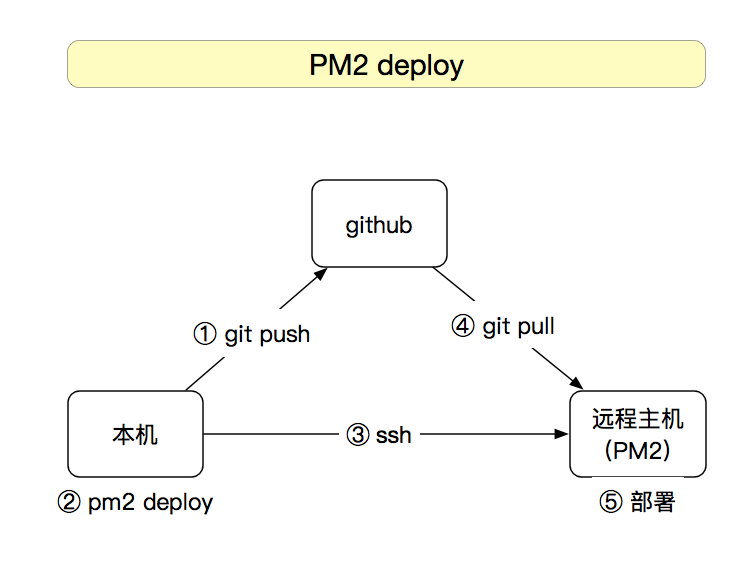
(1)前期准备:
a.本机:
1.安装 pm2 / git
2.跟 github 做好 ssh 授权登录(使用 密钥认证 方式)
b.远程主机:
1.安装 pm2 / git
2.跟 github 做好 ssh 授权登录(使用 密钥认证 方式)
c.本机 和 远程主机 做好 ssh 授权登录(使用 密钥认证 方式)
关于“github 做好 ssh 授权登录”,详见我的另一篇《 SSH 学习笔记 》
(2)先 setup
pm2 deploy ecosystem.config.js production setup
实质:执行了 git clone 的操作
(3)再 deploy
pm2 deploy ecosystem.config.js production
实质:执行了 git fetch 的操作
(4)其他操作
# Update remote version

pm2 deploy production update

# Revert to -1 deployment

pm2 deploy production revert 1

# execute a command on remote servers

pm2 deploy production exec "pm2 reload all"
(5)强制部署
如果你在本地修改了 ecosystem.config.js,却没有 push 到 github 上,这个时候 deploy 会报错:
--> Deploying to dev environment

--> on host 192.168.1.XX

  push your changes before deploying

Deploy failed
这时就可以使用到强制部署
pm2 deploy ecosystem.config.js production --force
注:--force 只对
ecosystem.config.js配置中的 “deploy” 部分有效,“apps” 部分依然是以 github 为准
填坑:
坑1、deploy的时候远程服务器不会拉取github上最新的commit
原因:
https://github.com/Unitech/pm2/issues/2935
@nukosuke:
Probably, it's caused by git. If you execute git fetch with depth option by using Git v1.8, fetch doesn't work in the worktree.
Use git v1.9 or later.
解决方案:
手动加上
'pre-deploy': "git fetch",
参考资料:
1.【 pm官方文档 】https://pm2.io/doc/en/runtime/guide/installation/#install-pm2
pm2 官方文档 学习笔记的更多相关文章
- vue.js 2.0 官方文档学习笔记 —— 01. vue 介绍
这是我的vue.js 2.0的学习笔记,采取了将官方文档中的代码集中到一个文件的形式.目的是保存下来,方便自己查阅. !官方文档:https://cn.vuejs.org/v2/guide/ 01. ...
- Vue2.0 官方文档学习笔记
VUE2.0官方文档 基础部分: 1.VUE简介 Vue是一个基于MVVM的框架,其中M代表数据处理层,V代表视图层即我们在Vue组件中的html部分,VM即M和V的结合层,处理M层相应的逻辑数据,在 ...
- Vue.js官方文档学习笔记(一)起步篇
Vue.js起步 Vue.js介绍 Vue (读音 /vjuː/,类似于 view) 是一套用于构建用户界面的渐进式框架.与其它大型框架不同的是,Vue 被设计为可以自底向上逐层应用.Vue 的核心库 ...
- Less 官方文档学习笔记
LESS 是css的一种扩展,它的编辑器是基于node.js 的less.js,将less文件编译成css文件(可压缩). 其中的概念: 变量:定义变量来代替某个值,只能编译一次,本质是“常量”.例如 ...
- Spark监控官方文档学习笔记
任务的监控和使用 有几种方式监控spark应用:Web UI,指标和外部方法 Web接口 每个SparkContext都会启动一个web UI,默认是4040端口,用来展示一些信息: 一系列调度的st ...
- Vue.js官方文档学习笔记(三)创建Vue实例
创建Vue实例 每个 Vue 应用都是通过用 Vue 函数创建一个新的 Vue 实例开始的: var vm=new Vue({ //选项 }) Vue的设计受到了mvvm的启发 当创建一个 Vue 实 ...
- Vue.js官方文档学习笔记(二)组件化应用的构建
组件化应用的构建 组件化应用允许我们使用小型.独立和通常可复用的组件构建大型应用. Vue注册组件 Vue.component('todo-item',{template:'<li>这是个 ...
- Spring Data Commons 官方文档学习
Spring Data Commons 官方文档学习 -by LarryZeal Version 1.12.6.Release, 2017-07-27 为知笔记版本在这里,带格式. Table o ...
- Spring 4 官方文档学习(十一)Web MVC 框架
介绍Spring Web MVC 框架 Spring Web MVC的特性 其他MVC实现的可插拔性 DispatcherServlet 在WebApplicationContext中的特殊的bean ...
随机推荐
- 2018.11.02 NOIP模拟 优美的序列(数论+单调栈/链表)
传送门 考虑如果一个区间满足最小值等于最大公约数那么这个区间是合法的. 因此我们对于每一个点维护可以延展到的最左/右端点保证这一段区间的gcdgcdgcd等于这个点的值. 这个可以用之前同类的链表或者 ...
- springboot深入学习(三)-----docker
一.spring data思路 spring data使用统一的api来对各种数据库存储技术进行数据访问操作提供了支持,包括oracle.mysql.redis.mongoDB等等.主要是通过spri ...
- springboot xml声明式事务管理方案
在开发过程中springboot提供的常见的事务解决方案是使用注解方式实现. 使用注解 在启动类上添加注解 @EnableTransactionManagement 在需要事务控制的方法添加@Tran ...
- 威伦TK6070iQ触摸屏的使用
A.TK6070iQ只支持U盘互相倒腾. TK6070iQ有2个串口Com1 (232) Com2 (485) U盘上传 需要选择COM2(485),因为上传后是PLC与触摸屏通过485通讯,协议选s ...
- matlab 向量场线积分
syms t x y z F x=cos(t); y=sin(t); z=*sin(t)^-; F=[x^*y , (/)*x^,x*y ] ; %场函数 V=[diff(x,t),diff(y,t) ...
- boost-使用format和lexical_cast实现数字和字符串之间的转换
使用boost的format可以实现数字到string的格式化转换,boost的lexical_cast可以实现string到数值的转换,eg: #include "boost/format ...
- Windows下python环境配置
步骤: 1.安装Python.Sublime Text: 2.打开Sublime Text,在菜单栏点击“Tools”->“Build System”->“New Build System ...
- git 版本库拆分和subtree用法
git 版本库拆分 原文地址: https://segmentfault.com/a/1190000002548731 程序员最爽的事情是什么?删删删!所有项目本来都很苗条的,时间长了难免有一些越搞越 ...
- [置顶] AngularJS实战之路由ui-sref-active使用
当我们使用angularjs的路由时,时常会出现一个需求,当选中菜单时把当前菜单的样式设置为选中状态(多数就是改变颜色) 接下来就看看Angular-UI-Router里的指令ui-sref-acti ...
- spring mvc使用ModelAndView时发生No request handling method with name '方法 名' in class [类名]的错误
我日,下午关于标题错误查了好久,网上啥说法都有, 后来发现是ModelAndView的路径引错了 正确路径应该为: import org.springframework.web.servlet.Mod ...