
Zabbix的LLD功能--Low-level discovery
感觉这个主题是和一个主题是一个系列,而且更基础。
准备深入研究一下。。。
相关文档准备:
https://www.zabbix.com/documentation/2.0/manual/discovery/low_level_discovery
http://itnihao.blog.51cto.com/1741976/1129725
Low-level discovery provides a way to automatically create items, triggers, and graphs for different entities on a computer. For instance, Zabbix can automatically start monitoring file systems or network interfaces on your machine, without the need to create items for each file system or network interface manually. Additionally it is possible to configure Zabbix to remove unneeded entities automatically based on actual results of periodically performed discovery.
In Zabbix 2.0, three types of item discovery are supported out of the box:
- discovery of file systems;
- discovery of network interfaces;
- discovery of SNMP OIDs.
A user can define their own types of discovery, provided they follow a particular JSON protocol.
The general architecture of the discovery process is as follows.
First, a user creates a discovery rule in “Configuration” → “Templates” → “Discovery” column. A discovery rule consists of (1) an item that discovers the necessary entities (for instance, file systems or network interfaces) and (2) prototypes of items, triggers, and graphs that should be created based on the value of that item.
An item that discovers the necessary entities is like a regular item seen elsewhere: the server asks a Zabbix agent (or whatever the type of the item is set to) for a value of that item, the agent responds with a textual value. The difference is that the value the agent responds with should contain a list of discovered entities in a specific JSON format. While the details of this format are only important for implementers of custom discovery checks, it is necessary to know that the returned value contains a list of macro → value pairs. For instance, item “net.if.discovery” might return two pairs: “{#IFNAME}” → “lo” and “{#IFNAME}” → “eth0”.
~~~~~~~~~~~~~~~~~~~~~~~~~~~~~~~~
需求:
现在有大量url需要监控,形式如http://itnihao.blog.51cto.com ,要求url状态不为200即报警。
需求详细分析:
大量的url,且url经常变化,现在监控用的是zabbix,如果手动添加模板,会造成大量重复工作,造成人力财力的浪费,造成休息时间的浪费,得不尝失,如果利用脚本+mail,无法图形呈现
解决方案:
zabbix有discovery功能,利用此功能,即可轻松解决此问题
zabbix客户端配置
#########cat /etc/zabbix/zabbix_agentd.conf|grep -v "^#"|grep -v "^$"##########
##此处省略N多信息,
Include=/etc/zabbix/zabbix_agentd.conf.d/ #配置文件路径
UnsafeUserParameters=1 #自定义key
###########自动发现脚本编写
########################cat /etc/zabbix/scripts/web_site_code_status##############
#!/bin/bash
# function:monitor tcp connect status from zabbix
# License: GPL
# mail:itnihao@qq.com
# version:1.0 date:2012-12-09
source /etc/bashrc >/dev/null 2>&1
source /etc/profile >/dev/null 2>&1
#/usr/bin/curl -o /dev/null -s -w %{http_code} http://$1/
WEB_SITE_discovery () {
WEB_SITE=($(cat WEB1.txt|grep -v "^#"))
printf '{\n'
printf '\t"data":[\n'
for((i=0;i<${#WEB_SITE[@]};++i))
{
num=$(echo $((${#WEB_SITE[@]}-1)))
if [ "$i" != ${num} ];
then
printf "\t\t{ \n"
printf "\t\t\t\"{#SITENAME}\":\"${WEB_SITE[$i]}\"},\n"
else
printf "\t\t{ \n"
printf "\t\t\t\"{#SITENAME}\":\"${WEB_SITE[$num]}\"}]}\n"
fi
}
}
web_site_code () {
/usr/bin/curl -o /dev/null -s -w %{http_code} http://$1
}
case "$1" in
web_site_discovery)
WEB_SITE_discovery
;;
web_site_code)
web_site_code $2
;;
*)
echo "Usage:$0 {web_site_discovery|web_site_code [URL]}"
;;
esac
客户端配置文件
#########cat /etc/zabbix/zabbix_agentd.conf.d/web_site_discovery.conf ###########
UserParameter=web.site.discovery,/etc/zabbix/scripts/web_site_code_status web_site_discovery
UserParameter=web.site.code[*],/etc/zabbix/scripts/web_site_code_status web_site_code $1
域名如下
######### cat /etc/zabbix/scripts/WEB.txt###########
www.qq.com
www.baidu.com
www.sina.com.cn
测试:
zabbix_get -s 127.0.0.1 -k web.site.discovery
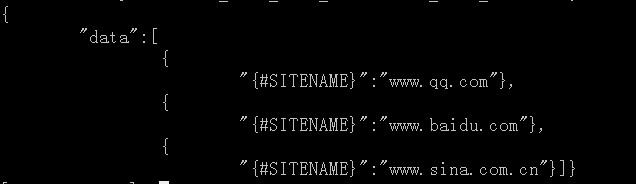
zabbix_get -s 127.0.0.1 -k web.site.code[www.qq.com]
此时返回状态为200
至此,脚本,客户端配置文件OK
接下来是web的添加
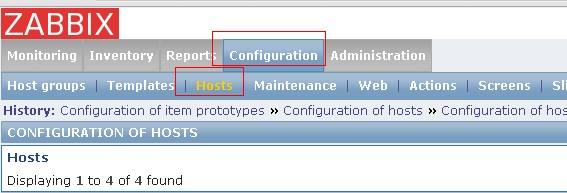


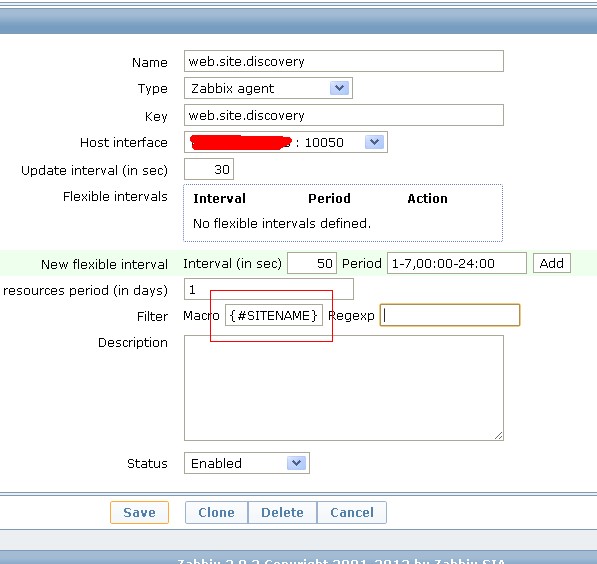


报警级别的设置:3个报警级别
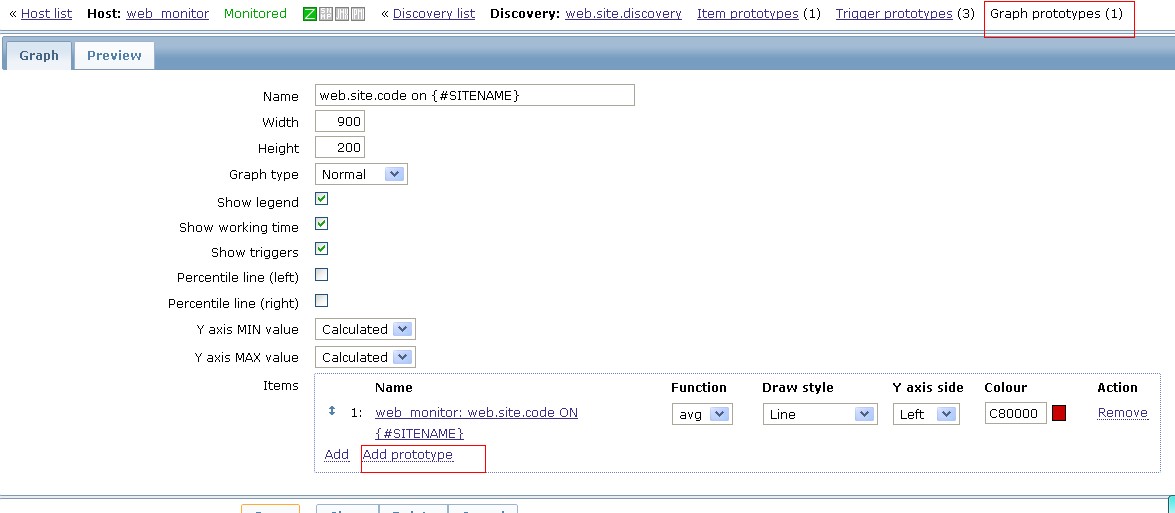

利用以上方法,哪怕是1000个url监控,也是分分钟的事情
总结:工欲善其事,必先利其器
参考文档:https://www.zabbix.com/documentation/2.0/manual/discovery/low_level_discovery
此外,还可以参考我写的文档:http://code.google.com/p/auto-task-pe/downloads/list zabbix自动发现监控http端口.pdf 如遇到问题,请先仔细阅读这2个文档,另外附模板文件。
欢迎交流。
http://my.itwnik.com/2013/03/zabbix-low-level-discovery-rule-script-for-md-devices/
~~~~~~~~~~~~~~~~~~~~~~~~~~~~~~~~~~~~~~~~~~~~
应用一则:
zabbix实现对web的监控有两种方式实现,一种是自带的web scenarios,基本能够实现大部分web监控的需求,但是方便简易性差很多;另一种是利用脚本+lld,可以实现任一机
器上的所有url监控,我们只需手动添加要监控的url,再加上zabbix模版的功能,就能够轻而易举的应用到所需要的监控的服务器上。
首先要感线itnihao童鞋提供的这种方式,博客地址为http://itnihao.blog.51cto.com/1741976/1129725
1.zabbix客户端配置
vim /etc/zabbix/zabbix_agent.conf
Include=/etc/zabbix/zabbix_agentd.conf
UnsafeUserParameters=1
允许用户使用自定义的参数进行传递
2.脚本及参数
[root@localhost zabbix]# tree
.
├── monitor_scripts
│ ├── discovertcpport.sh
│ ├── web_site_code_status.sh
│ └── WEB.txt
├── zabbix_agentd.conf
└── zabbix_agentd.d
├── userparameter_mysql.conf
└── web_site_discovery.conf
(1)zabbix传递参数及配置文件
[root@localhost zabbix]# cat zabbix_agentd.d/web_site_discovery.conf
UserParameter=web.site.discovery,/etc/zabbix/monitor_scripts/web_site_code_status.sh web_site_discovery
UserParameter=web.site.code[*],/etc/zabbix/monitor_scripts/web_site_code_status.sh web_site_code $1
(2)zabbix自动监控脚本
[root@localhost zabbix]# cat monitor_scripts/web_site_code_status.sh
#!/bin/bash
#function:monitor web site code status from zabbix
WEB_SITE_discovery(){
WEB_SITE=($(cat /etc/zabbix/monitor_scripts/WEB.txt |grep -v "^#"))
printf '{\n'
printf '\t"data":[\n'
for((i=0;i<${#WEB_SITE[@]};i++))
{
num=$(echo $((${#WEB_SITE[@]}-1)))
if [ "$i" != ${num} ];then
printf "\t\t{ \n"
printf "\t\t\t\"{#SITENAME}\":\"${WEB_SITE[$i]}\"},\n"
else
printf "\t\t{ \n"
printf "\t\t\t\"{#SITENAME}\":\"${WEB_SITE[$num]}\"}]}\n"
fi
}
}
web_site_code(){
/usr/bin/curl -o /dev/null -s -w %{http_code} http://$1
}
case "$1" in
web_site_discovery)
WEB_SITE_discovery
;;
web_site_code)
web_site_code $2
;;
*)
echo "Usage:$0 {web_site_discovery|web_site_code[URL]}"
;;
esac
(3)需要监控的url在WEB.TXT中
[root@localhost zabbix]# cat monitor_scripts/WEB.txt
s1.xd.com/Default.aspx
s2.xd.com/Default.aspx
3.在zabbix服务端进行监控测试
[root@83 yum.repos.d]# /usr/bin/zabbix_get -s 192.168.1.211 -p 10050 -k web.site.code[s1.xd.com/Default.aspx]
200
[root@83 yum.repos.d]# /usr/bin/zabbix_get -s 192.168.1.211 -p 10050 -k web.site.discovery
{
"data":[
{
"{#SITENAME}":"s1.xd.com/Default.aspx"},
{
"{#SITENAME}":"s2.xd.com/Default.aspx"}]}
测试成功
4.下面我们来配置下discovery模版,配好后直接应用到服务器即可。
(1)创建模版,并应用到需要监控的服务器上


(2)在新建的Template Web Monitor模版的Application中创建新应用

(3)在在新建的Template Web Monitor模版的Discovery rules中创建新rule

(4)在新建的web.site.discovery中创建Item porototyoed


(5)在新建的web.site.discovery中创建Trigger porotypes,此处设置为状态码大于399就报警。


ok,配置完后我们的web url监控就完成了
~~~~~~~~~~~~~~~~~~~~~~~~~~~~~~~
Zabbix的LLD功能--Low-level discovery的更多相关文章
- Zabbix监控Low level discovery实时监控网站URL状态
今天我们来聊一聊Low level discovery这个功能,我们为什么要用到loe level discovery这个功能呢? 很多时候,在使用zabbix监控一些东西,需要对类似于Itens进行 ...
- zabbix监控redis多实例(low level discovery)
对于多实例部署的tomcat.redis等应用,可以利用zabbix的low level discovery功能来实现监控,减少重复操作. 注:Zabbix版本: Zabbix 3.0.2 一.服务 ...
- zabbix(10)自动发现规则(low level discovery)
1.概念 在配置Iterms的过程中,有时候需要对类似的Iterms进行添加,这些Iterms具有共同的特征,表现为某些特定的参数是变量,而其他设置都是一样的,例如:一个程序有多个端口,而需要对端口配 ...
- zabbix 用 LLD 完全自动化监控 Oracle
文章转载自:http://mp.weixin.qq.com/s?__biz=MzA3MzYwNjQ3NA==&mid=2651296856&idx=1&sn=2bdf78071 ...
- Solr实现Low Level查询解析(QParser)
Solr实现Low Level查询解析(QParser) Solr基于Lucene提供了方便的查询解析和搜索服务器的功能,可以以插件的方式集成,非常容易的扩展我们自己需要的查询解析方式.其中,Solr ...
- zabbix自动发现功能实现批量web url监控
需求: 现在有大量url需要监控,形式如http://www.baidu.com ,要求url状态不为200即报警. 需求详细分析: 大量的url,且url经常变化,现在监控用的是zabbix,如果手 ...
- 使用Java Low Level REST Client操作elasticsearch
Java REST客户端有两种风格: Java低级别REST客户端(Java Low Level REST Client,以后都简称低级客户端算了,难得码字):Elasticsearch的官方low- ...
- C++ Low level performance optimize 2
C++ Low level performance optimize 2 上一篇 文章讨论了一些底层代码的优化技巧,本文继续讨论一些相关的内容. 首先,上一篇文章讨论cache missing的重要性 ...
- C++ Low level performance optimize
C++ Low level performance optimize 1. May I have 1 bit ? 下面两段代码,哪一个占用空间更少,那个速度更快?思考10秒再继续往下看:) //v1 ...
随机推荐
- [RxJS] Filtering operators: distinct and distinctUntilChanged
Operator distinct() and its variants are an important type of Filtering operator. This lessons shows ...
- [RxJS] Combination operator: zip
CombineLatest and withLatestFrom are both AND-style combination operators. In this lesson, we will l ...
- iOS UIKit:viewController之Present (3)
弹出和转换view controller技术是一种快速且简单的方式将新view content展示在屏幕中.目前有两种方式弹出新的view controller:Present方式和segues方式. ...
- MAC 环境下 初始化新的mysql root 密码
mac 环境下初始化mysql的root密码 关掉mysql服务,打开系统设置最后的mysql,然后将mysql先关掉 生成一个文件命名mysql-init,文件中放入:一句话,这句话不同版本不一样, ...
- Bginfo软件在域的部署和应用
在企业的IT管理中,很多用户都不知道怎么去查看自己计算机的IP地址.登陆帐户.而对于网络管理人员来说,他们可能需要知道用户在域中登录的一些信息,如那些用户登录过,在什么时间登录,IP和MAC地址是多少 ...
- mysql复习笔记
阅读目录 1.什么是SQL语句2.使用sql语句创建数据库和表3.创建数据表4.数据完整性约束5.四中基本字符类型说明6.SQL基本语句7.类型转换函数8.日期函数9.数学函数10.字符串函数11.联 ...
- C#语法糖之开篇
本人虽然大学不是学的计算机但是对于IT行业的热爱,依然决然进军IT行业了,自从踏进这个行业到现在也已经3年多了,从去年开发通过网上 了解博客园后深深的爱上这儿了,这里有很多牛人,通过拜读他们的代码,让 ...
- VS 创建 使用C++ 静态类库(Dll)
创建静态类库 Walkthrough: Creating and Using a Dynamic Link Library (C++) 1:菜单栏-->File, New, Project. 2 ...
- Log4j配置的经典总结,打印日志文件,日志存库
一.介绍 Log4j是Apache的一个开放源代码项目,通过使用Log4j,我们可以控制 日志信息输送的目的地是控制台.文件.GUI组件.甚至是套接口服务 器.NT的事件记录器.UNIX Sy ...
- IOS 中得runloop 详细解释
1.Runloop基础知识- 1.1 字面意思 a 运行循环 b 跑圈 - 1.2 基本作用(作用重大) a 保持程序的持续运行(ios程序为什么能一直活着不会死) b 处理app中的各种事件(比如触 ...