
Android Timer的使用
1:服务端使用PHP
<?php

    echo date('Y-m-d H:i:s');

?>
2:activity_main.xml
<RelativeLayout xmlns:android="http://schemas.android.com/apk/res/android"

    xmlns:tools="http://schemas.android.com/tools"

    android:layout_width="match_parent"

    android:layout_height="match_parent">

    <Button

        android:id="@+id/btn_click"

        android:layout_width="match_parent"

        android:layout_height="wrap_content"

        android:text="Button Start"/>

    <TextView

        android:id="@+id/tv_show"

        android:layout_below="@id/btn_click"

        android:layout_width="wrap_content"

        android:layout_height="wrap_content"

        android:text="@string/hello_world"

        android:textSize="28sp"/>

    <Button

        android:id="@+id/btn_stop"

        android:layout_below="@id/tv_show"

        android:layout_width="match_parent"

        android:layout_height="wrap_content"

        android:text="Button Stop"/>

</RelativeLayout>
3:MainActivity.java
HttpHelper.getStringFromNet2(param)此方法见:http://www.cnblogs.com/yshyee/p/3370147.html
public class MainActivity extends Activity {

    private Button btnClick=null;

    private Button btnStop=null;

    private TextView tvShow=null;

    private String info="";

    private Timer timer=null;

    @Override

    protected void onCreate(Bundle savedInstanceState) {

        super.onCreate(savedInstanceState);

        setContentView(R.layout.activity_main);

        btnClick=(Button)findViewById(R.id.btn_click);

        btnStop=(Button)findViewById(R.id.btn_stop);

        tvShow=(TextView)findViewById(R.id.tv_show);

        timer=new Timer();

        btnClick.setOnClickListener(new OnClickListener(){

            public void onClick(View view){

                timer.scheduleAtFixedRate(new MyTask(), 100, 2000);

            }

        });

        btnStop.setOnClickListener(new OnClickListener(){

            public void onClick(View view){

                timer.cancel();

            }

        });

    }

    Handler myHandler=new Handler(){

        public void handleMessage(Message msg){

            if(info!=""){

                tvShow.setText(info);

            }

        }

    };

    private class MyTask extends TimerTask{

        public void run(){

            String param="http://192.168.0.116/android/time.php";

            info=HttpHelper.getStringFromNet2(param);

            myHandler.obtainMessage(100).sendToTarget();

        }

    }

}
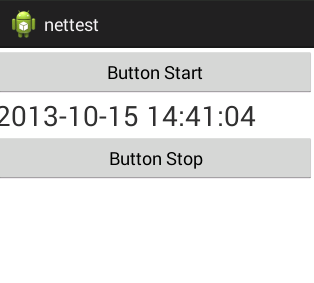
4:运行结果:
Android Timer的使用的更多相关文章
- android Timer and TImerTask
android Timer and TImerTask Caused by: java.lang.IllegalStateException: TimerTask is scheduled alrea ...
- Android Timer用法
Android考虑到线程安全问题,不允许在线程中执行UI线程,在Android中,有一个类:android.os.Handler,这个可以实现各处线程间的消息传递.先看段代码,这个实例化了一个Hand ...
- Android简易实战教程--第四十八话《Android - Timer、TimerTask和Handler实现倒计时》
之前本专栏文章中的小案例有写到:第三十九话<Chronometer实现倒计时> 以及使用异步实现倒计时:第三十三话< AsyncTask异步倒计时> 本篇文章 结合Timer. ...
- Android Timer的应用示例
package com.hyzhou.timerdemo1; import java.util.Timer; import java.util.TimerTask; import android.os ...
- android Timer TimerTask用法笔记
Android中经常会遇到执行一些周期性定时执行的任务.初学的时候经常会使用Thread.sleep()方法.在android中,有Timer可以专门干这个事情. 先看看Timer.class中都是些 ...
- Android Timer 的 schedule()方法定时循环切换图片
void java.util.Timer.schedule(TimerTask task, long delay, long period)第一个参数,是 TimerTask 类,在包:import ...
- android Timer使用方法
Timer属性:http://www.apihome.cn/api/java/Timer.html 声明创建: private Timer mTimer; protected void onCreat ...
- android Timer与TimerTask的相关操作
项目上面的部分操作需要使用到定时器进行周期性的控制.网络上面对于定时器的操作通常有三种实现方法. 我是通过Timer与TimerTask相结合实现的定时器功能.具体实现过程如下: 第一步,得到Time ...
- Xamarin.Android Timer使用方法
首先声明命名空间: using System.Threading; 然后创建Timer对象: Timer timer; 接着实例化timer并且给委托事件: TimerCallback timerDe ...
随机推荐
- tungsten
./tools/tungsten-installer --master-slave -a --datasource-type=mysql --master-host=master.puppet.org ...
- Selenium webdriver 元素操作
本来这些东西网上一搜一大堆,但是本着收集的精神,整理一份放着吧!哈!哈!哈! 1. 输入框(text field or textarea) WebElement element = driver.fi ...
- 斐波那契数列 51nod
1242 斐波那契数列的第N项 基准时间限制:1 秒 空间限制:131072 KB 分值: 0 难度:基础题 收藏 关注 斐波那契数列的定义如下: F(0) = 0 F(1) = 1 F(n) ...
- Thinkpad Edge E440 Ubuntu14.04 无线网卡驱动 解决
http://ubuntuforums.org/showthread.php?t=2190347 正文: Thinkpad Edge E440 安装 Ubuntu12.04 后 无法使用无线网卡, 须 ...
- [转] GDB disassemble
前面几篇谈GDB调试程序的帖子,都对反汇编语焉不详.这里详细讨论一下disassemble/disass命令 反汇编一个函数disass func_name 反汇编一段内存地址, 第1个参数是起始地址 ...
- Filtering Specific Columns with cut
Filtering Specific Columns with cut When working with text files, it can be useful to filter out s ...
- 向量的叉积 POJ 2318 TOYS & POJ 2398 Toy Storage
POJ 2318: 题目大意:给定一个盒子的左上角和右下角坐标,然后给n条线,可以将盒子分成n+1个部分,再给m个点,问每个区域内有多少各点 这个题用到关键的一步就是向量的叉积,假设一个点m在 由ab ...
- innodb的innodb_buffer_pool_size和MyISAM的key_buffer_size
一. key_buffer_size 对MyISAM表来说非常重要. 如果只是使用MyISAM表,可以把它设置为可用内存的 30-40%.合理的值取决于索引大小.数据量以及负载 -- 记住,MyISA ...
- SQL2008 存储过程参数相关
使用inputparame时,使用的是 varchar(20),和数据库中的DEPARTNAME完全匹配,可以查出值: USE [test] GO SET ANSI_NULLS OFF GO SE ...
- Win8 IE10 只能以管理员打开的解决方法
Win8 IE10 只能以管理员打开的解决方法 使用 Windows8 一段时间后,最近遇到 IE10 打不开,只能以管理员身份打开,很是郁闷.无论禁用IE加载项还是恢复默认设置都无效,也看到论坛不少 ...