
Android Timer的使用
1:服务端使用PHP
<?php

    echo date('Y-m-d H:i:s');

?>
2:activity_main.xml
<RelativeLayout xmlns:android="http://schemas.android.com/apk/res/android"

    xmlns:tools="http://schemas.android.com/tools"

    android:layout_width="match_parent"

    android:layout_height="match_parent">

    <Button

        android:id="@+id/btn_click"

        android:layout_width="match_parent"

        android:layout_height="wrap_content"

        android:text="Button Start"/>

    <TextView

        android:id="@+id/tv_show"

        android:layout_below="@id/btn_click"

        android:layout_width="wrap_content"

        android:layout_height="wrap_content"

        android:text="@string/hello_world"

        android:textSize="28sp"/>

    <Button

        android:id="@+id/btn_stop"

        android:layout_below="@id/tv_show"

        android:layout_width="match_parent"

        android:layout_height="wrap_content"

        android:text="Button Stop"/>

</RelativeLayout>
3:MainActivity.java
HttpHelper.getStringFromNet2(param)此方法见:http://www.cnblogs.com/yshyee/p/3370147.html
public class MainActivity extends Activity {

    private Button btnClick=null;

    private Button btnStop=null;

    private TextView tvShow=null;

    private String info="";

    private Timer timer=null;

    @Override

    protected void onCreate(Bundle savedInstanceState) {

        super.onCreate(savedInstanceState);

        setContentView(R.layout.activity_main);

        btnClick=(Button)findViewById(R.id.btn_click);

        btnStop=(Button)findViewById(R.id.btn_stop);

        tvShow=(TextView)findViewById(R.id.tv_show);

        timer=new Timer();

        btnClick.setOnClickListener(new OnClickListener(){

            public void onClick(View view){

                timer.scheduleAtFixedRate(new MyTask(), 100, 2000);

            }

        });

        btnStop.setOnClickListener(new OnClickListener(){

            public void onClick(View view){

                timer.cancel();

            }

        });

    }

    Handler myHandler=new Handler(){

        public void handleMessage(Message msg){

            if(info!=""){

                tvShow.setText(info);

            }

        }

    };

    private class MyTask extends TimerTask{

        public void run(){

            String param="http://192.168.0.116/android/time.php";

            info=HttpHelper.getStringFromNet2(param);

            myHandler.obtainMessage(100).sendToTarget();

        }

    }

}
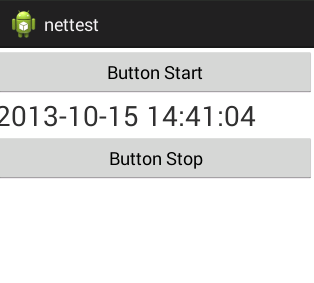
4:运行结果:
Android Timer的使用的更多相关文章
- android Timer and TImerTask
android Timer and TImerTask Caused by: java.lang.IllegalStateException: TimerTask is scheduled alrea ...
- Android Timer用法
Android考虑到线程安全问题,不允许在线程中执行UI线程,在Android中,有一个类:android.os.Handler,这个可以实现各处线程间的消息传递.先看段代码,这个实例化了一个Hand ...
- Android简易实战教程--第四十八话《Android - Timer、TimerTask和Handler实现倒计时》
之前本专栏文章中的小案例有写到:第三十九话<Chronometer实现倒计时> 以及使用异步实现倒计时:第三十三话< AsyncTask异步倒计时> 本篇文章 结合Timer. ...
- Android Timer的应用示例
package com.hyzhou.timerdemo1; import java.util.Timer; import java.util.TimerTask; import android.os ...
- android Timer TimerTask用法笔记
Android中经常会遇到执行一些周期性定时执行的任务.初学的时候经常会使用Thread.sleep()方法.在android中,有Timer可以专门干这个事情. 先看看Timer.class中都是些 ...
- Android Timer 的 schedule()方法定时循环切换图片
void java.util.Timer.schedule(TimerTask task, long delay, long period)第一个参数,是 TimerTask 类,在包:import ...
- android Timer使用方法
Timer属性:http://www.apihome.cn/api/java/Timer.html 声明创建: private Timer mTimer; protected void onCreat ...
- android Timer与TimerTask的相关操作
项目上面的部分操作需要使用到定时器进行周期性的控制.网络上面对于定时器的操作通常有三种实现方法. 我是通过Timer与TimerTask相结合实现的定时器功能.具体实现过程如下: 第一步,得到Time ...
- Xamarin.Android Timer使用方法
首先声明命名空间: using System.Threading; 然后创建Timer对象: Timer timer; 接着实例化timer并且给委托事件: TimerCallback timerDe ...
随机推荐
- 关于java函数参数的修改能否带出来
结论 1. java的8个基本类型,无论是简单类型(比如int)还是类类型(比如Integer),传到形参里的变量,在函数体内修改之后是带不出来的. 2. String类型也是带不出来的. 3. 数组 ...
- C#经典系列-键值对
1.ToDictionary,ToLookup 从图中我们看到有四个ToXXX的方法,其中ToArray和ToList,用的是非常非常多 我们有这样的一个实体 class student { publ ...
- Android 开发经验
学习社区 eoe移动开发者社区 (link) 链接:http://www.eoeandroid.com/ 环境配置 Cocos2d-x 3.x 全平台新手开发配置教程 链接:http://www.co ...
- 报错:Failed to create BuildConfig class
1. Project | Clean| Build Automatically 2. 在目录中找到gen目录,手动删除(一般是没有写权限导致Failed),再执行第一步方案.
- SKView类
继承自 UIView:UIResponder:NSObject 符合 NSCoding(UIView)UIAppearance(UIView)UIAppearanceContainer(UIView) ...
- 使用CCUserDefault 推断用户是否是第一次登陆系统及UserDefault全路径的获取
bool bfirst =CCUserDefault::sharedUserDefault()->getBoolForKey("first"); //假设不能获取该键值,创建 ...
- Com编程入门——什么是COM,如何使用COM
本文的目的是为刚刚接触COM的程序员提供编程指南,并帮助他们理解COM的基本概念.内容包括COM规范简介,重要的COM术语以及如何重用现有的COM组件.本文不包括如何编写自己的COM对象和接口. CO ...
- Pascal's Triangle II
Given an index k, return the kth row of the Pascal's triangle. For example, given k = 3, Return [1,3 ...
- mysql将一个库中表的某几个字段插入到另一个库中的表
insert into dbname1.tablename1(filed1,filed2,filed3) select filed1,filed2,filed3from dbname2.tablena ...
- java图片缩放
package com.rubekid.springmvc.utils; import java.awt.AlphaComposite; import java.awt.Graphics2D; imp ...