
[转] Spring Boot and React hot loader
When I develop web applications, I love using React. I'm also a Spring and groovy addict.
Those two stacks make me more productive. Can we have the best of both worlds?
I will show you step by step how I created this project. Feel free to fiddle with it and give me your feedback.
Goal
My perfect stack on the backend is to use Spring boot and groovy. With the latest version of Spring boot, there is a new tool called dev-tools that will automatically reload the embedded server when you recompile your project.
On the frontend, most React developers use webpack. React has awesome support for hot reloading with react-hot-loader. It will magically update your views without requiring you to refresh your browser. Because React encourages your to have a unidirectional data flow, your whole application can use hot reloading every time you save. For this to work, we have to launch a webpack dev server.
The problem when you launch your Spring boot server on the port 8080 and the dev server on the port 3000 is that you will get cross origin requests preventing the two servers from interacting.
We also want to isolate the two projects and make separate gradle modules.
This blog post will show a solution to this problem and will provide an enjoyable dev environment.
This might not be the perfect solution and I'd love any feedback from both communities to help me improve it.
The backend
We will generate the backend. To do that, you can go on http://start.spring.io/ and create a gradle project using groovy, java 8 and the latest Spring boot (1.3.0 M2 at the time of writing).
For the dependencies tick DevTools and Web.
If you want to do it command line style just type the following in your console:
curl https://start.spring.io/starter.tgz \

-d name=boot-react  \

-d bootVersion=1.3.0.M2 \

-d dependencies=devtools,web \

-d language=groovy \

-d JavaVersion=1.8 \

-d type=gradle-project \

-d packageName=react \

-d packaging=jar \

-d artifactId=boot-react \

-d baseDir=boot-react | tar -xzvf -
This will create a base project with the latest spring boot, the devtools, groovy and gradle.
Don't forget to generate the gradle wrapper:
gradle wrapper
See the commit
Great so now we have tomcat embedded, hot reloading and supernatural groovy strength. The usual.
We will create a simple REST resource that we would like our frontend to consume:
@RestController

class SimpleResource {

    @RequestMapping('/api/simple')

    Map resource() {

        [simple: 'resource']

    }

}
The frontend
As mentioned before, we want the frontend to be a separated project. We will create a gradle module for that.
At the root of your project add a settings.gradle file with the following content:
include 'frontend'
Now, create a frontend directory under the project root and add a build.gradle file in it:
plugins {

    id "com.moowork.node" version "0.10"

}

version '0.0.1'

task bundle(type: NpmTask) {

    args = ['run', 'bundle']

}

task start(type: NpmTask) {

    args = ['start']

}

start.dependsOn(npm_install)

bundle.dependsOn(npm_install)
See the commit
We will use the gradle node plugin to call the two main tasks in our application:
npm run bundlewill create the minified app in thedistdirectorynpm startwill start our dev server
We can call them from the gradle build with ./gradlew frontend:start and ./gradlew frontend:bundle
The content of the project will basically be the same as react-hot-boilerplate
Let's get the sources of this project as a zip file from github and unzip them into the frontend directory. With bash, type the following command at the root of your project:
wget -qO- -O tmp.zip https://github.com/gaearon/react-hot-boilerplate/archive/master.zip && unzip tmp.zip && mv react-hot-boilerplate-master/* frontend && rm -rf react-hot-boilerplate-master && rm tmp.zip
See the commit
If everything goes well, typing ./gradlew fronted:start, will start the react application at http://localhost:3000.
The first problem arises when you ctrl+c out of the gradle build, the server will still hang. You can kill it with killall node. This is a problem I'd like help solving, if you have a solution, please tell me.
In the rest of the article I will use npm start directly, which presupposes that you have npm available on your development machine. The whole build will only require Java.
We will use the webpack-html-plugin to automatically generate the index.html page.
npm install --save-dev html-webpack-plugin
Since using the document body as a root for our application is a bad practice, we need to tweak the default html template.
I created a file called index-template.html in a newly created assets directory. It will serve as a template to generate our index.html file:
| <!DOCTYPE html> |
| <html{% if(o.htmlWebpackPlugin.files.manifest) { %} manifest="{%= o.htmlWebpackPlugin.files.manifest %}"{% } %}> |
| <head> |
| <meta charset="UTF-8"> |
| <title>{%=o.htmlWebpackPlugin.options.title || 'Webpack App'%}</title> |
| {% if (o.htmlWebpackPlugin.files.favicon) { %} |
| <link rel="shortcut icon" href="{%=o.htmlWebpackPlugin.files.favicon%}"> |
| {% } %} |
| {% for (var css in o.htmlWebpackPlugin.files.css) { %} |
| <link href="{%=o.htmlWebpackPlugin.files.css[css] %}" rel="stylesheet"> |
| {% } %} |
| </head> |
| <body> |
| <div id="root"></div> |
| {% for (var chunk in o.htmlWebpackPlugin.files.chunks) { %} |
| <script src="{%=o.htmlWebpackPlugin.files.chunks[chunk].entry %}"></script> |
| {% } %} |
| </body> |
| </html> |
As you can see, it contains a div with the id root.
Let's tweak the dev server a little bit to combine it with another server.
Let's change webpack.config.js:
var path = require('path');

var webpack = require('webpack');

var HtmlWebpackPlugin = require('html-webpack-plugin');

module.exports = {

  devtool: 'eval',

  entry: [

    'webpack-dev-server/client?http://localhost:3000',

    'webpack/hot/only-dev-server',

    './src/index'

  ],

  output: {

    path: path.join(__dirname, 'dist'),

    filename: 'bundle.js',

    publicPath: 'http://localhost:3000/'

  },

  plugins: [

    new webpack.HotModuleReplacementPlugin(),

    new webpack.NoErrorsPlugin(),

    new HtmlWebpackPlugin({

      title: 'Boot React',

      template: path.join(__dirname, 'assets/index-template.html')

    })

  ],

  resolve: {

    extensions: ['', '.js']

  },

  module: {

    loaders: [{

      test: /\.js$/,

      loaders: ['react-hot', 'babel'],

      include: path.join(__dirname, 'src')

    }]

  }

};
We changed the publicPath to point directly at our dev server and included the HtmlWebpackPlugin.
Now we can get rid of the old index.html and start our dev server with npm start. The index will be automatically generated for us.
See the commit
Include the frontend in the boot jar
We have to create the npm bundle task, which will generate an optimized web application in the dist directory.
In the package.json file, update the scripts:
"scripts": {

  "start": "node server.js",

  "bundle": "webpack --optimize-minimize --optimize-dedupe --output-public-path ''"

}
Now if you launch ./gradlew frontend:bundle, it will generate an optimized bundle.js file and the index.html in the dist directory.
The last step is to include this dist directory in our application's jar as static assets. Add the following task to our main gradle build:
jar {

  from('frontend/dist') {

    into 'static'

  }

}

processResources.dependsOn('frontend:bundle')
If you generate your jar with ./gradlew assemble, you will see that the built jar includes the frontend resources.
If you run the jar (java -jar build/libs/boot-react-0.0.1-SNAPSHOT.jar), you should see the React hello world on localhost:8080
See the commit
Launch it in dev
When working on our application, it would be nice if:
- Launching the spring boot server in dev launched the webpack dev server
- Our dev-server proxied the request to
localhost:8080so we can access the application onlocalhost:3000and not get cross-origin requests
Add the following WebpackLauncher to the project:
@Configuration

@Profile('dev')

class WebpackLauncher {

  @Bean

  WebpackRunner frontRunner() {

    new WebpackRunner()

  }

  class WebpackRunner implements InitializingBean {

    static final String WEBPACK_SERVER_PROPERTY = 'webpack-server-loaded'

    static boolean isWindows() {

      System.getProperty('os.name').toLowerCase().contains('windows')

    }

    @Override

    void afterPropertiesSet() throws Exception {

      if (!System.getProperty(WEBPACK_SERVER_PROPERTY)) {

        startWebpackDevServer()

      }

    }

    private void startWebpackDevServer() {

      String cmd = isWindows() ? 'cmd /c npm start' : 'npm start'

      cmd.execute(null, new File('frontend')).consumeProcessOutput(System.out, System.err)

      System.setProperty(WEBPACK_SERVER_PROPERTY, 'true')

    }

  }

}
This will take care of the first task by launching npm start when our server starts. I used a system property to make sure the dev-tools will not reload the frontend when we make a change in the backend code. This class will be available when we start the application with the dev profile
We can make a simple proxy with webpack-dev-server. Change the server.js file:
var webpack = require('webpack');

var WebpackDevServer = require('webpack-dev-server');

var config = require('./webpack.dev.config');

new WebpackDevServer(webpack(config), {

  publicPath: config.output.publicPath,

  hot: true,

  historyApiFallback: true,

  proxy: {

    "*": "http://localhost:8080"

  }

}).listen(3000, 'localhost', function (err, result) {

  if (err) {

    console.log(err);

  }

  console.log('Listening at localhost:3000');

});
Launch your application with the --spring.profiles.active=dev flag.
You should be able see the react hello world on http://localhost:3000. If you make some changes to it, it will automatically reload.
See the old commit commit
And the new commit
Fetch the resource
We can check that we do not get cross-origin errors using axios, a simple library to do http requests. It supports promises and automatically handles json.
npm i -S axios
Let's amend our App.js:
import React, { Component } from 'react';

import axios from 'axios';

export default class App extends Component {

  componentDidMount() {

    axios.get('/api/simple')

      .then(res => console.log(res.data))

      .catch(err => console.error(err))

  }

  render() {

    return (

      <h1>Hello, guys.</h1>

    );

  }

}
See the commit
Better optimization of the javascript assets
We can further improve the compression of the javascript assets by separating our dev webpack configuration from our production configuration.
In the production configuration, we can use the DefinePlugin to set the NODE_ENV variable to production. This will allow webpack to automatically remove all the code intended for development purposes in our libraries:
new webpack.DefinePlugin({

  "process.env": {

    NODE_ENV: JSON.stringify("production")

  }

})
See the commit
Feedback needed
Well, this works pretty well!
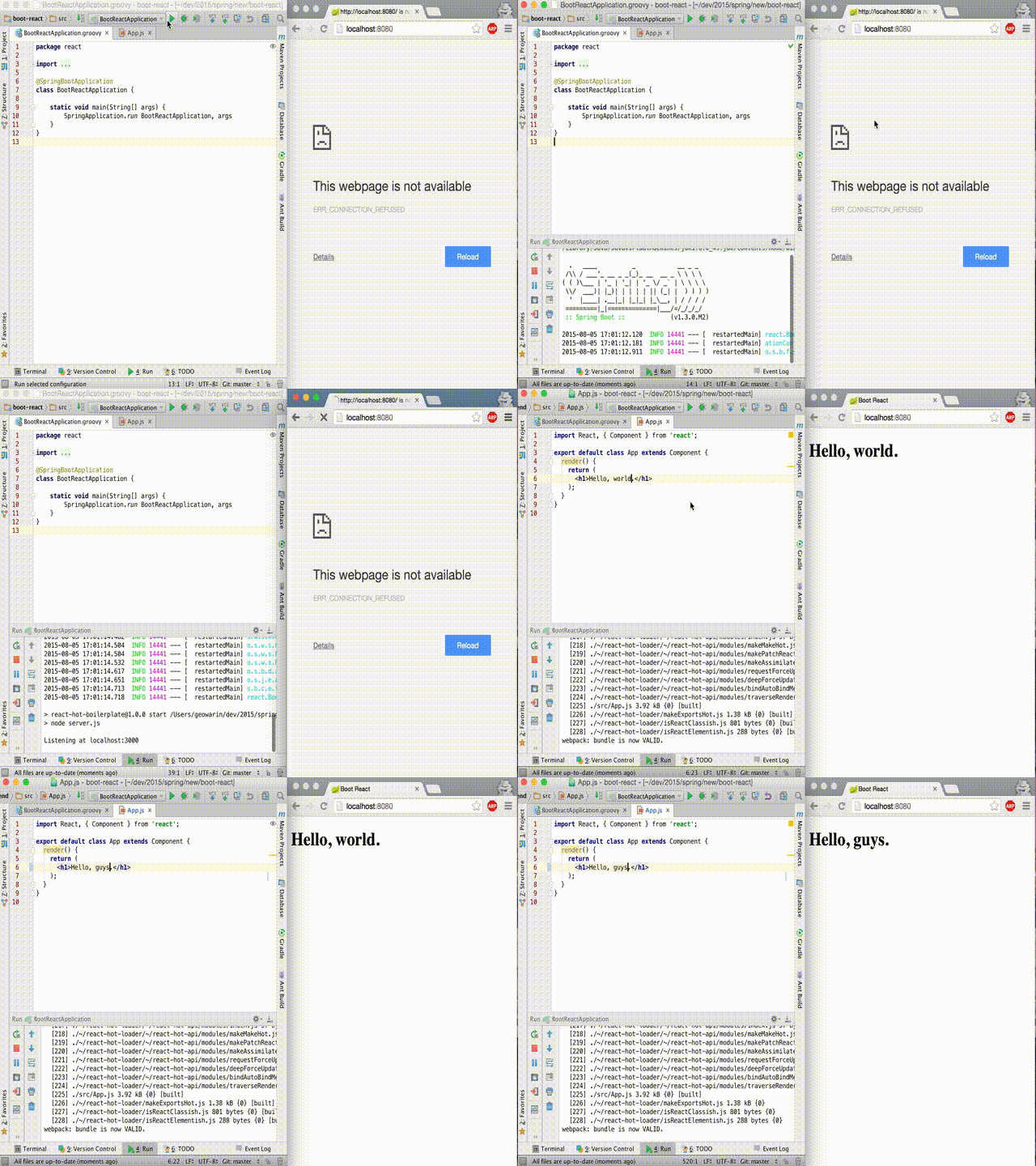 Hot hot reload
What do you think? Care to comment and help me make something better? Your feedback is welcome!
The project is available on github. Pull requests and issues are gladly accepted.
[转] Spring Boot and React hot loader的更多相关文章
- Jhipster 一个Spring Boot + Angular/React 全栈框架
Jhipster 一个Spring Boot + Angular/React 全栈框架: https://www.jhipster.tech/
- JHipster - Generate your Spring Boot + Angular/React applications!
JHipster - Generate your Spring Boot + Angular/React applications!https://www.jhipster.tech/
- 无意间做了个 web 版的 JVM 监控端(前后端分离 React+Spring Boot)
之前写了JConsole.VisualVM 依赖的 JMX 技术,然后放出了一个用纯 JMX 实现的 web 版本的 JConsole 的截图,今天源码来了. 本来就是为了更多的了解 JMX,第一步就 ...
- spring boot 实战:我们的第一款开源软件
在信息爆炸时代,如何避免持续性信息过剩,使自己变得专注而不是被纷繁的信息所累?每天会看到各种各样的新闻,各种新潮的技术层出不穷,如何筛选出自己所关心的? 各位看官会想,我们是来看开源软件的,你给我扯什 ...
- spring boot源码分析之SpringApplication
spring boot提供了sample程序,学习spring boot之前先跑一个最简单的示例: /* * Copyright 2012-2016 the original author or au ...
- Spring boot 内存优化
转自:https://dzone.com/articles/spring-boot-memory-performance It has sometimes been suggested that Sp ...
- Spring Boot 启动原理分析
https://yq.aliyun.com/articles/6056 转 在spring boot里,很吸引人的一个特性是可以直接把应用打包成为一个jar/war,然后这个jar/war是可以直接启 ...
- Configure swagger with spring boot
If you haven’t starting working with spring boot yet, you will quickly find that it pulls out all th ...
- Spring Boot Memory Performance
The Performance Zone is brought to you in partnership with New Relic. Quickly learn how to use Docke ...
随机推荐
- WPFDispatcher示例
Dispatcher 类提供用于管理线程工作项队列的服务. 效果演示: <Window x:Class="WPF之Dispatcher对象.MainWindow" xmlns ...
- 我们说的oc是动态运行时语言是什么意思?
1.KVC和KVO区别,分别在什么情况下使用? 答:KVC(Key-Value-Coding) KVO(Key-Value-Observing)理解KVC与KVO(键-值-编码与键-值-监看) 当通 ...
- rust尝鲜
官网 http://www.rust-lang.org/ 下载链接 http://static.rust-lang.org/dist/rust-0.10-i686-unknown-linux-gnu. ...
- windows server 2003 服务器
服务器基本知识:可通过我的电脑属性里面查看服务器的系统. 设置固定Ip:本地连接(控制面板-网络连接)使用下面的Ip地址.通过ipconfig/all,查看DNS和ip. 远程访问服务器:我的电脑属性 ...
- list.h
#ifndef LISTHHHHHHH #define LISTHHHHHHH #include "common.h" /* stolen from kernel */ typed ...
- Strongly connected
hdu4635:http://acm.hdu.edu.cn/showproblem.php?pid=4635 题意:给你一个有向图,然后问你最多可以加多少条边,是的原图不是一个强连通图. 题解:这一题 ...
- PYTHON文本处理指南之日志LOG解析
处理特定字段的内容,并指指定条件输出. 注意代码中用一个方法列表,并且将方法参数延后传递. GOOGLE作过PYTHON代码的水平,就是不一样呀. 希望能学到这种通用的技巧. 只是,英文PDF看起来有 ...
- 【POJ3691】 DNA repair (AC自动机+DP)
DNA repair Time Limit: 2000MS Memory Limit: 65536KB 64bit IO Format: %I64d & %I64u Description B ...
- C++ Virtual详解(注意函数被隐藏的问题)
Virtual是C++ OO机制中很重要的一个关键字.只要是学过C++的人都知道在类Base中加了Virtual关键字的函数就是虚拟函数(例如函数print),于是在Base的派生类Derived中就 ...
- ANDROID 中UID与PID的作用与区别
PID:为Process Identifier, PID就是各进程的身份标识,程序一运行系统就会自动分配给进程一个独一无二的PID.进程中止后PID被系统回收,可能会被继续分配给新运行的程序,但是在a ...