
(五)Struts2 标签
所有的学习我们必须先搭建好Struts2的环境(1、导入对应的jar包,2、web.xml,3、struts.xml)
第一节:Struts2 标签简介
Struts2 自己封装了一套标签,比JSTL 强大,而且与Struts2 中的其他功能无缝结合。
当然Strust2 标签的内容很多,随着版本的升级,标签和属性越来越多。我们要掌握好核心标签及了解其他标签。
根据功能可以分为:数据标签,控制标签,界面标签,其他标签。
第二节:Struts2 数据标签
Property 标签:输出OGNL 表达式的值;
Set 标签:设置变量;
Bean 标签:定义javaBean 对象;
Date 标签:日期标签;
Debug 标签:调试标签;
Url&a 标签:超链接标签;
Include 标签:动态包含标签;
 struts.xml
 1 <?xml version="1.0" encoding="UTF-8" ?>

 <!DOCTYPE struts PUBLIC

     "-//Apache Software Foundation//DTD Struts Configuration 2.0//EN"

     "http://struts.apache.org/dtds/struts-2.0.dtd">

 <struts>

   <package name="manage" namespace="/" extends="struts-default">

   </package>

 </struts>
 Student.java
 1 package com.wishwzp.model;

 public class Student {

     private int id;

     private String name;

     private int age;

     public Student() {

         super();

         // TODO Auto-generated constructor stub

     }

     public Student(int id, String name, int age) {

         super();

         this.id = id;

         this.name = name;

         this.age = age;

     }

     public int getId() {

         return id;

     }

     public void setId(int id) {

         this.id = id;

     }

     public String getName() {

         return name;

     }

     public void setName(String name) {

         this.name = name;

     }

     public int getAge() {

         return age;

     }

     public void setAge(int age) {

         this.age = age;

     }

 }
 dataTag.jsp
 1 <%@ page language="java" contentType="text/html; charset=UTF-8"

     pageEncoding="UTF-8"%>

 <!DOCTYPE html PUBLIC "-//W3C//DTD HTML 4.01 Transitional//EN" "http://www.w3.org/TR/html4/loose.dtd">

 <html>

 <head>

 <meta http-equiv="Content-Type" content="text/html; charset=UTF-8">

 <title>Insert title here</title>

 </head>

 <body>

 <h>数据标签</h>

 <hr/>

 <a href="data/property.jsp" target="_blank">property标签</a><br/>

 <a href="data/set.jsp" target="_blank">set标签</a><br/>

 <a href="data/bean.jsp" target="_blank">bean标签</a><br/>

 <a href="data/date.jsp" target="_blank">date标签</a><br/>

 <a href="data/debug.jsp" target="_blank">debug标签</a><br/>

 <a href="data/url_a.jsp" target="_blank">url_a标签</a><br/>

 <a href="data/include.jsp" target="_blank">include标签</a><br/>

 </body>

 </html>
页面结果:
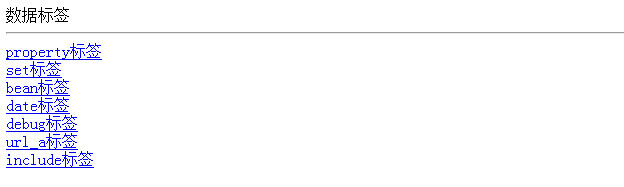
上面的是一个主的页面,会跳转到以下几个页面的。(一下页面都会在WebContent下的data文件夹中)
Property 标签:输出OGNL 表达式的值;
 <%@ page language="java" contentType="text/html; charset=UTF-8"

     pageEncoding="UTF-8"%>

 <!DOCTYPE html PUBLIC "-//W3C//DTD HTML 4.01 Transitional//EN" "http://www.w3.org/TR/html4/loose.dtd">

 <%@taglib prefix="s" uri="/struts-tags" %>

 <html>

 <head>

 <meta http-equiv="Content-Type" content="text/html; charset=UTF-8">

 <title>Insert title here</title>

 <%

     request.setAttribute("name","<font color=red>张三</font>");

 %>

 </head>

 <body>

 <s:property value="#request.name" /><br/>

 <s:property value="#request.name2" default="某某人"/><br/>

 <s:property value="#request.name" default="某某人" escapeHtml="false"/><br/>

 </body>

 </html>
property.jsp
结果:

Set 标签:设置变量;
 <%@ page language="java" contentType="text/html; charset=UTF-8"

     pageEncoding="UTF-8"%>

 <!DOCTYPE html PUBLIC "-//W3C//DTD HTML 4.01 Transitional//EN" "http://www.w3.org/TR/html4/loose.dtd">

 <%@taglib prefix="s" uri="/struts-tags" %>

 <html>

 <head>

 <meta http-equiv="Content-Type" content="text/html; charset=UTF-8">

 <title>Insert title here</title>

 </head>

 <body>

 <s:set var="i" value="1"></s:set>

 <s:property value="#i" /><br/>

 <s:set var="a"  value="'action范围的值'" scope="action"></s:set>

 <s:set var="p"  value="'page范围的值'" scope="page"></s:set>

 <s:set var="r"  value="'request范围的值'" scope="request"></s:set>

 <s:set var="s"  value="'session范围的值'" scope="session"></s:set>

 <s:set var="app"  value="'application范围的值'" scope="application"></s:set>

 <s:property value="#a" /><br/>

 <s:property value="#attr.p"/><br/>

 <s:property value="#request.r"/><br/>

 <s:property value="#session.s"/><br/>

 <s:property value="#application.app"/><br/>

 </body>

 </html>
set.jsp
结果:

Bean 标签:定义javaBean 对象;
 <%@ page language="java" contentType="text/html; charset=UTF-8"

     pageEncoding="UTF-8"%>

 <!DOCTYPE html PUBLIC "-//W3C//DTD HTML 4.01 Transitional//EN" "http://www.w3.org/TR/html4/loose.dtd">

 <%@taglib prefix="s" uri="/struts-tags" %>

 <html>

 <head>

 <meta http-equiv="Content-Type" content="text/html; charset=UTF-8">

 <title>Insert title here</title>

 </head>

 <body>

 <s:bean name="com.wishwzp.model.Student" var="student">

     <s:param name="name" value="'张三'"></s:param>

     <s:param name="age" value="10"></s:param>

 </s:bean>

 <s:property value="#student.name"/>

 <s:property value="#student.age"/>

 </body>

 </html>
bean.jsp
结果:

Date 标签:日期标签;
 <%@ page language="java" contentType="text/html; charset=UTF-8"

     pageEncoding="UTF-8"%>

 <%@ page import="java.util.*" %>

 <!DOCTYPE html PUBLIC "-//W3C//DTD HTML 4.01 Transitional//EN" "http://www.w3.org/TR/html4/loose.dtd">

 <%@taglib prefix="s" uri="/struts-tags" %>

 <html>

 <head>

 <meta http-equiv="Content-Type" content="text/html; charset=UTF-8">

 <title>Insert title here</title>

 <%

     request.setAttribute("date",new Date());

 %>

 </head>

 <body>

 ${date }<br/>

 当前日期:<s:date name="#request.date" format="yyyy-MM-dd"/>

 </body>

 </html>
date.jsp
结果:

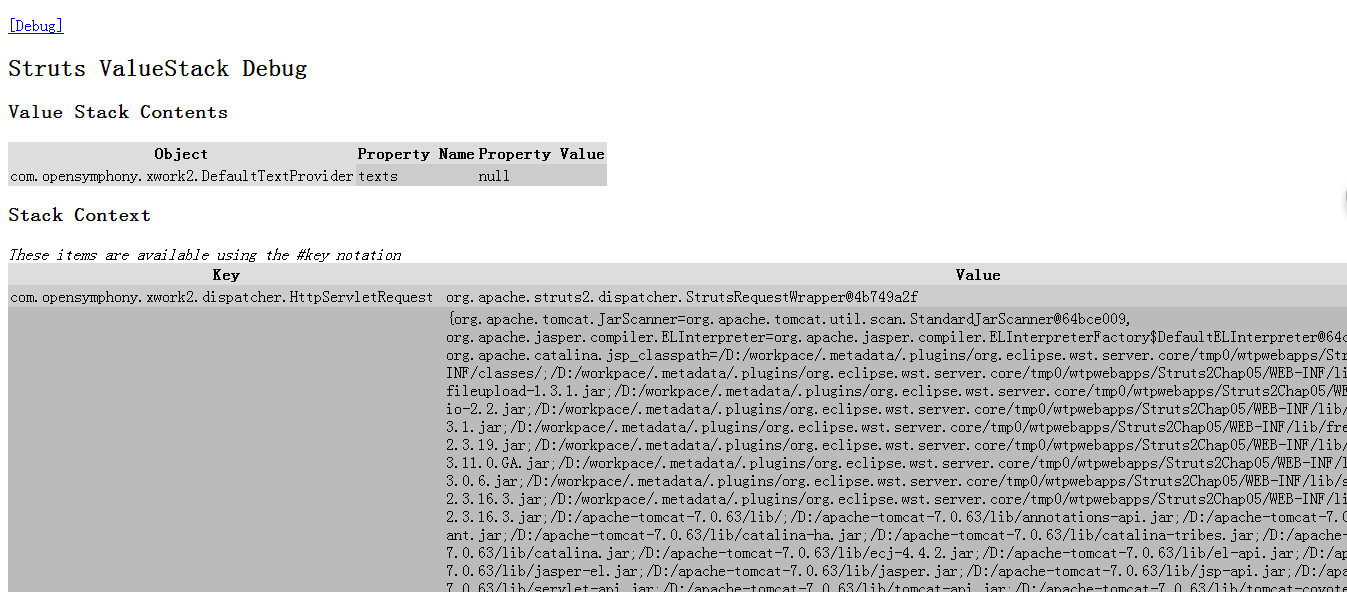
Debug 标签:调试标签;
 <%@ page language="java" contentType="text/html; charset=UTF-8"

     pageEncoding="UTF-8"%>

 <!DOCTYPE html PUBLIC "-//W3C//DTD HTML 4.01 Transitional//EN" "http://www.w3.org/TR/html4/loose.dtd">

 <%@taglib prefix="s" uri="/struts-tags" %>

 <html>

 <head>

 <meta http-equiv="Content-Type" content="text/html; charset=UTF-8">

 <title>Insert title here</title>

 </head>

 <body>

 <s:debug></s:debug>

 </body>

 </html>
debug.jsp
结果:

Url&a 标签:超链接标签;
 <%@ page language="java" contentType="text/html; charset=UTF-8"

     pageEncoding="UTF-8"%>

 <!DOCTYPE html PUBLIC "-//W3C//DTD HTML 4.01 Transitional//EN" "http://www.w3.org/TR/html4/loose.dtd">

 <%@taglib prefix="s" uri="/struts-tags" %>

 <html>

 <head>

 <meta http-equiv="Content-Type" content="text/html; charset=UTF-8">

 <title>Insert title here</title>

 </head>

 <body>

 <s:url action="hello" namespace="/foreground" id="h">

     <s:param name="name" value="'struts2'"></s:param>

 </s:url>

 <s:a href="%{h}">超链接</s:a>

 <s:a action="hello" namespace="/foreground">

     <s:param name="name" value="'struts2'"></s:param>

     超链接2

 </s:a>

 </body>

 </html>
url_a.jsp
结果:

Include 标签:动态包含标签;
 <%@ page language="java" contentType="text/html; charset=UTF-8"

     pageEncoding="UTF-8"%>

 <!DOCTYPE html PUBLIC "-//W3C//DTD HTML 4.01 Transitional//EN" "http://www.w3.org/TR/html4/loose.dtd">

 <%@taglib prefix="s" uri="/struts-tags" %>

 <html>

 <head>

 <meta http-equiv="Content-Type" content="text/html; charset=UTF-8">

 <title>Insert title here</title>

 </head>

 <body>

 <s:include value="head.html"></s:include>

 </body>

 </html>
include.jsp
 <!DOCTYPE html PUBLIC "-//W3C//DTD HTML 4.01 Transitional//EN" "http://www.w3.org/TR/html4/loose.dtd">

 <html>

 <head>

 <meta http-equiv="Content-Type" content="text/html; charset=UTF-8">

 <title>Insert title here</title>

 </head>

 <body>

 头部

 </body>

 </html>
head.html
结果:

第三节:Struts2 控制标签
Ifelse 标签:条件判断标签;
Iterator 标签:遍历标签;
Append 标签:叠加标签;
Generator 标签:分隔标签;
Merge 标签:组合标签;
Sort 标签:排序标签;
Subset 标签:截取标签;
MyComparator.java
 package com.wishwzp.comparator;

 import java.util.Comparator;

 import com.wishwzp.model.Student;

 public class MyComparator implements Comparator<Student>{

     public int compare(Student s1, Student s2) {

         if(s1.getAge()>s2.getAge()){

             return 1;

         }else if(s1.getAge()<s2.getAge()){

             return -1;

         }

         return 0;

     }

 }
controlTag.jsp
 <%@ page language="java" contentType="text/html; charset=UTF-8"

     pageEncoding="UTF-8"%>

 <!DOCTYPE html PUBLIC "-//W3C//DTD HTML 4.01 Transitional//EN" "http://www.w3.org/TR/html4/loose.dtd">

 <html>

 <head>

 <meta http-equiv="Content-Type" content="text/html; charset=UTF-8">

 <title>Insert title here</title>

 </head>

 <body>

 <h>控制标签</h>

 <hr/>

 <a href="control/ifelse.jsp" target="_blank">ifelse标签</a><br/>

 <a href="control/iterator.jsp" target="_blank">iterator标签</a><br/>

 <a href="control/append.jsp" target="_blank">append标签</a><br/>

 <a href="control/generator.jsp" target="_blank">generator标签</a><br/>

 <a href="control/merge.jsp" target="_blank">merge标签</a><br/>

 <a href="control/sort.jsp" target="_blank">sort标签</a><br/>

 <a href="control/subset.jsp" target="_blank">subset标签</a><br/>

 </body>

 </html>
上面的是一个主的页面,会跳转到以下几个页面的。(一下页面都会在WebContent下的control文件夹中)
结果:

Ifelse 标签:条件判断标签;
ifelse.jsp
 <%@ page language="java" contentType="text/html; charset=UTF-8"

     pageEncoding="UTF-8"%>

 <!DOCTYPE html PUBLIC "-//W3C//DTD HTML 4.01 Transitional//EN" "http://www.w3.org/TR/html4/loose.dtd">

 <%@taglib prefix="s" uri="/struts-tags" %>

 <html>

 <head>

 <meta http-equiv="Content-Type" content="text/html; charset=UTF-8">

 <title>Insert title here</title>

 <%

     int age=11;

     request.setAttribute("age",age);

 %>

 </head>

 <body>

 <s:if test="#request.age<20">

     年龄小于20岁

 </s:if>

 <s:elseif test="#request.age==20">

     年龄等于20岁

 </s:elseif>

 <s:else>

     年龄大于20岁

 </s:else>

 </body>

 </html>
结果:

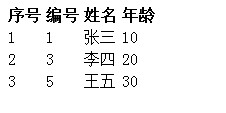
Iterator 标签:遍历标签;
iterator.jsp
 <%@ page language="java" contentType="text/html; charset=UTF-8"

     pageEncoding="UTF-8"%>

 <%@ page import="com.wishwzp.model.Student" %>

 <%@ page import="java.util.*" %>

 <!DOCTYPE html PUBLIC "-//W3C//DTD HTML 4.01 Transitional//EN" "http://www.w3.org/TR/html4/loose.dtd">

 <%@taglib prefix="s" uri="/struts-tags" %>

 <html>

 <head>

 <meta http-equiv="Content-Type" content="text/html; charset=UTF-8">

 <title>Insert title here</title>

 <%

     List<Student> studentList=new ArrayList<Student>();

     studentList.add(new Student(1,"张三",10));

     studentList.add(new Student(3,"李四",20));

     studentList.add(new Student(5,"王五",30));

     request.setAttribute("studentList",studentList);

 %>

 </head>

 <body>

 <table>

     <tr>

         <th>序号</th>

         <th>编号</th>

         <th>姓名</th>

         <th>年龄</th>

     </tr>

     <s:iterator value="#request.studentList" status="status">

     <tr>

         <td><s:property value="#status.index+1"/></td>

         <td><s:property value="id"/></td>

         <td><s:property value="name"/></td>

         <td><s:property value="age"/></td>

     </tr>

     </s:iterator>

 </table>

 </body>

 </html>
结果:
Append 标签:叠加标签;
append.jsp
 <%@ page language="java" contentType="text/html; charset=UTF-8"

     pageEncoding="UTF-8"%>

 <%@ page import="com.wishwzp.model.Student" %>

 <%@ page import="java.util.*" %>

 <!DOCTYPE html PUBLIC "-//W3C//DTD HTML 4.01 Transitional//EN" "http://www.w3.org/TR/html4/loose.dtd">

 <%@taglib prefix="s" uri="/struts-tags" %>

 <html>

 <head>

 <meta http-equiv="Content-Type" content="text/html; charset=UTF-8">

 <title>Insert title here</title>

 <%

     List<Student> studentList1=new ArrayList<Student>();

     List<Student> studentList2=new ArrayList<Student>();

     studentList1.add(new Student(1,"张三",10));

     studentList1.add(new Student(3,"李四",20));

     studentList2.add(new Student(5,"王五",30));

     studentList2.add(new Student(7,"赵六",40));

     request.setAttribute("studentList1",studentList1);

     request.setAttribute("studentList2",studentList2);

 %>

 </head>

 <body>

 <!-- 把studentList1和studentList2叠加到studentList3中 -->

 <s:append var="studentList3">

     <s:param value="#request.studentList1"></s:param>

     <s:param value="#request.studentList2"></s:param>

 </s:append>

 <table>

     <tr>

         <th>序号</th>

         <th>编号</th>

         <th>姓名</th>

         <th>年龄</th>

     </tr>

     <s:iterator value="studentList3" status="status">

     <tr>

         <td><s:property value="#status.index+1"/></td>

         <td><s:property value="id"/></td>

         <td><s:property value="name"/></td>

         <td><s:property value="age"/></td>

     </tr>

     </s:iterator>

 </table>

 </body>

 </html>
结果:

Generator 标签:分隔标签;
generator.jsp
 <%@ page language="java" contentType="text/html; charset=UTF-8"

     pageEncoding="UTF-8"%>

 <!DOCTYPE html PUBLIC "-//W3C//DTD HTML 4.01 Transitional//EN" "http://www.w3.org/TR/html4/loose.dtd">

 <%@taglib prefix="s" uri="/struts-tags" %>

 <html>

 <head>

 <meta http-equiv="Content-Type" content="text/html; charset=UTF-8">

 <title>Insert title here</title>

 </head>

 <body>

 <s:generator separator="," val="'张三,李四,王五'" var="nameList"></s:generator>

 <s:iterator value="#nameList">

     <s:property/>

 </s:iterator>

 </table>

 </body>

 </html>
结果:

Merge 标签:组合标签;
merge.jsp
 <%@ page language="java" contentType="text/html; charset=UTF-8"

     pageEncoding="UTF-8"%>

 <%@ page import="com.wishwzp.model.Student" %>

 <%@ page import="java.util.*" %>

 <!DOCTYPE html PUBLIC "-//W3C//DTD HTML 4.01 Transitional//EN" "http://www.w3.org/TR/html4/loose.dtd">

 <%@taglib prefix="s" uri="/struts-tags" %>

 <html>

 <head>

 <meta http-equiv="Content-Type" content="text/html; charset=UTF-8">

 <title>Insert title here</title>

 <%

     List<Student> studentList1=new ArrayList<Student>();

     List<Student> studentList2=new ArrayList<Student>();

     studentList1.add(new Student(1,"张三",10));

     studentList1.add(new Student(3,"李四",20));

     studentList2.add(new Student(5,"王五",30));

     studentList2.add(new Student(7,"赵六",40));

     request.setAttribute("studentList1",studentList1);

     request.setAttribute("studentList2",studentList2);

 %>

 </head>

 <body>

 <s:merge var="studentList3">

     <s:param value="#request.studentList1"></s:param>

     <s:param value="#request.studentList2"></s:param>

 </s:merge>

 <table>

     <tr>

         <th>序号</th>

         <th>编号</th>

         <th>姓名</th>

         <th>年龄</th>

     </tr>

     <s:iterator value="studentList3" status="status">

     <tr>

         <td><s:property value="#status.index+1"/></td>

         <td><s:property value="id"/></td>

         <td><s:property value="name"/></td>

         <td><s:property value="age"/></td>

     </tr>

     </s:iterator>

 </table>

 </body>

 </html>
结果:

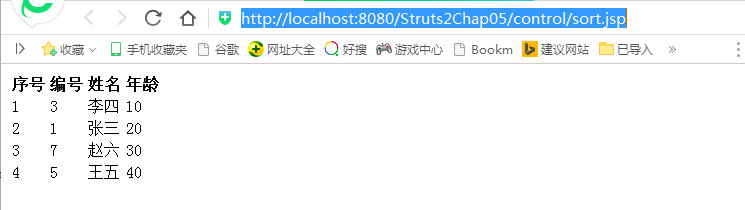
Sort 标签:排序标签;
sort.jsp
 <%@ page language="java" contentType="text/html; charset=UTF-8"

     pageEncoding="UTF-8"%>

 <%@ page import="com.wishwzp.model.Student" %>

 <%@ page import="java.util.*" %>

 <!DOCTYPE html PUBLIC "-//W3C//DTD HTML 4.01 Transitional//EN" "http://www.w3.org/TR/html4/loose.dtd">

 <%@taglib prefix="s" uri="/struts-tags" %>

 <html>

 <head>

 <meta http-equiv="Content-Type" content="text/html; charset=UTF-8">

 <title>Insert title here</title>

 <%

     List<Student> studentList1=new ArrayList<Student>();

     studentList1.add(new Student(1,"张三",20));

     studentList1.add(new Student(3,"李四",10));

     studentList1.add(new Student(5,"王五",40));

     studentList1.add(new Student(7,"赵六",30));

     request.setAttribute("studentList1",studentList1);

 %>

 </head>

 <body>

 <s:bean id="myComparator" name="com.wishwzp.comparator.MyComparator"></s:bean>

 <table>

     <tr>

         <th>序号</th>

         <th>编号</th>

         <th>姓名</th>

         <th>年龄</th>

     </tr>

     <s:sort comparator="#myComparator" source="#request.studentList1" >

     <s:iterator status="status">

     <tr>

         <td><s:property value="#status.index+1"/></td>

         <td><s:property value="id"/></td>

         <td><s:property value="name"/></td>

         <td><s:property value="age"/></td>

     </tr>

     </s:iterator>

     </s:sort>

 </table>

 </body>

 </html>
结果:
Subset 标签:截取标签;
subset.jsp
 <%@ page language="java" contentType="text/html; charset=UTF-8"

     pageEncoding="UTF-8"%>

 <%@ page import="com.wishwzp.model.Student" %>

 <%@ page import="java.util.*" %>

 <!DOCTYPE html PUBLIC "-//W3C//DTD HTML 4.01 Transitional//EN" "http://www.w3.org/TR/html4/loose.dtd">

 <%@taglib prefix="s" uri="/struts-tags" %>

 <html>

 <head>

 <meta http-equiv="Content-Type" content="text/html; charset=UTF-8">

 <title>Insert title here</title>

 <%

     List<Student> studentList1=new ArrayList<Student>();

     studentList1.add(new Student(1,"张三",20));

     studentList1.add(new Student(3,"李四",10));

     studentList1.add(new Student(5,"王五",40));

     studentList1.add(new Student(7,"赵六",30));

     request.setAttribute("studentList1",studentList1);

 %>

 </head>

 <body>

 <table>

     <tr>

         <th>序号</th>

         <th>编号</th>

         <th>姓名</th>

         <th>年龄</th>

     </tr>

     <s:subset source="#request.studentList1" count="2" start="2">

     <s:iterator status="status">

     <tr>

         <td><s:property value="#status.index+1"/></td>

         <td><s:property value="id"/></td>

         <td><s:property value="name"/></td>

         <td><s:property value="age"/></td>

     </tr>

     </s:iterator>

     </s:subset>

 </table>

 </body>

 </html>
结果:

第四节:Strut2 界面标签
Form 标签:表单提交标签;
Text 标签:文本标签;
Radios 标签:单选标签;
Checkboxlist 标签:复选框标签;
Select 标签:下拉框标签;
 struts.xml
 1 <?xml version="1.0" encoding="UTF-8" ?>

 <!DOCTYPE struts PUBLIC

     "-//Apache Software Foundation//DTD Struts Configuration 2.0//EN"

     "http://struts.apache.org/dtds/struts-2.0.dtd">

 <struts>

   <package name="manage" namespace="/" extends="struts-default">

   </package>

 </struts>
 uiTag.jsp
 1 <%@ page language="java" contentType="text/html; charset=UTF-8"

     pageEncoding="UTF-8"%>

 <!DOCTYPE html PUBLIC "-//W3C//DTD HTML 4.01 Transitional//EN" "http://www.w3.org/TR/html4/loose.dtd">

 <html>

 <head>

 <meta http-equiv="Content-Type" content="text/html; charset=UTF-8">

 <title>Insert title here</title>

 </head>

 <body>

 <h>界面标签</h>

 <hr/>

 <a href="ui/form.jsp" target="_blank">form标签</a><br/>

 <a href="ui/text.jsp" target="_blank">文本标签</a><br/>

 <a href="ui/radio.jsp" target="_blank">单选标签</a><br/>

 <a href="ui/checkbox.jsp" target="_blank">复选框标签</a><br/>

 <a href="ui/select.jsp" target="_blank">下拉框标签</a><br/>

 </body>

 </html>
上面的是一个主的页面,会跳转到以下几个页面的。(一下页面都会在WebContent下的ui文件夹中)
结果:

Form 标签:表单提交标签;
form.jsp
 <%@ page language="java" contentType="text/html; charset=UTF-8"

     pageEncoding="UTF-8"%>

 <!DOCTYPE html PUBLIC "-//W3C//DTD HTML 4.01 Transitional//EN" "http://www.w3.org/TR/html4/loose.dtd">

 <%@taglib prefix="s" uri="/struts-tags" %>

 <html>

 <head>

 <meta http-equiv="Content-Type" content="text/html; charset=UTF-8">

 <title>Insert title here</title>

 </head>

 <body>

 <s:form action="hello" method="post" namespace="/foreground">

 </s:form>

 </body>

 </html>
Text 标签:文本标签;
text.jsp
 <%@ page language="java" contentType="text/html; charset=UTF-8"

     pageEncoding="UTF-8"%>

 <!DOCTYPE html PUBLIC "-//W3C//DTD HTML 4.01 Transitional//EN" "http://www.w3.org/TR/html4/loose.dtd">

 <%@taglib prefix="s" uri="/struts-tags" %>

 <html>

 <head>

 <meta http-equiv="Content-Type" content="text/html; charset=UTF-8">

 <title>Insert title here</title>

 </head>

 <body>

 用户名:<s:textfield name="userName"></s:textfield><br/>

 密码:<s:password name="password"></s:password><br/>

 备注:<s:textarea name="desc"></s:textarea><br/>

 </body>

 </html>
结果:

Radios 标签:单选标签;
radios.jsp
 <%@ page language="java" contentType="text/html; charset=UTF-8"

     pageEncoding="UTF-8"%>

 <!DOCTYPE html PUBLIC "-//W3C//DTD HTML 4.01 Transitional//EN" "http://www.w3.org/TR/html4/loose.dtd">

 <%@taglib prefix="s" uri="/struts-tags" %>

 <html>

 <head>

 <meta http-equiv="Content-Type" content="text/html; charset=UTF-8">

 <title>Insert title here</title>

 </head>

 <body>

 性别:<s:radio list="#{0: '男 ', 1:'女 '}" name="sex" value="0" />

 </body>

 </html>
结果:

Checkboxlist 标签:复选框标签;
checkbox.jsp
 <%@ page language="java" contentType="text/html; charset=UTF-8"

     pageEncoding="UTF-8"%>

 <!DOCTYPE html PUBLIC "-//W3C//DTD HTML 4.01 Transitional//EN" "http://www.w3.org/TR/html4/loose.dtd">

 <%@taglib prefix="s" uri="/struts-tags" %>

 <html>

 <head>

 <meta http-equiv="Content-Type" content="text/html; charset=UTF-8">

 <title>Insert title here</title>

 </head>

 <body>

 爱好:<s:checkboxlist list="#{0: '游泳', 1:'唱歌 ',2:'跳舞'}" name="hobby" value="1" />

 </body>

 </html>
结果:

Select 标签:下拉框标签;
select.jsp
 <%@ page language="java" contentType="text/html; charset=UTF-8"

     pageEncoding="UTF-8"%>

 <!DOCTYPE html PUBLIC "-//W3C//DTD HTML 4.01 Transitional//EN" "http://www.w3.org/TR/html4/loose.dtd">

 <%@taglib prefix="s" uri="/struts-tags" %>

 <html>

 <head>

 <meta http-equiv="Content-Type" content="text/html; charset=UTF-8">

 <title>Insert title here</title>

 </head>

 <body>

 爱好:<s:select list="#{0: '游泳', 1:'唱歌 ',2:'跳舞'}" name="hobby" value="1" multiple="true"/>

 </body>

 </html>
结果:

第五节:其他标签
Updownselect 标签;
Optiontransferselect 标签;
otherTag.jsp
 <%@ page language="java" contentType="text/html; charset=UTF-8"

     pageEncoding="UTF-8"%>

 <!DOCTYPE html PUBLIC "-//W3C//DTD HTML 4.01 Transitional//EN" "http://www.w3.org/TR/html4/loose.dtd">

 <html>

 <head>

 <meta http-equiv="Content-Type" content="text/html; charset=UTF-8">

 <title>Insert title here</title>

 </head>

 <body>

 <h>其他标签</h>

 <hr/>

 <a href="other/updownselect.jsp" target="_blank">updownselect标签</a><br/>

 <a href="other/optiontransferselect.jsp" target="_blank">optiontransferselect标签</a><br/>

 </body>

 </html>
上面的是一个主的页面,会跳转到以下几个页面的。(一下页面都会在WebContent下的ui文件夹中)
结果:

Updownselect 标签;
updownselect.jsp
 <%@ page language="java" contentType="text/html; charset=UTF-8"

     pageEncoding="UTF-8"%>

 <!DOCTYPE html PUBLIC "-//W3C//DTD HTML 4.01 Transitional//EN" "http://www.w3.org/TR/html4/loose.dtd">

 <%@taglib prefix="s" uri="/struts-tags" %>

 <html>

 <head>

 <meta http-equiv="Content-Type" content="text/html; charset=UTF-8">

 <title>Insert title here</title>

 </head>

 <body>

 <s:updownselect

     list="#{0:'游泳', 1:'唱歌', 2:'跳舞'}"

     name="hobby"

     headerKey="-1"

     headerValue="请选择"

     emptyOption="true"

     allowMoveUp="true"

     allowMoveDown="true"

     allowSelectAll="true"

     moveUpLabel="向上"

     moveDownLabel="向下"

     selectAllLabel="全选" />

 </body>

 </html>
结果:

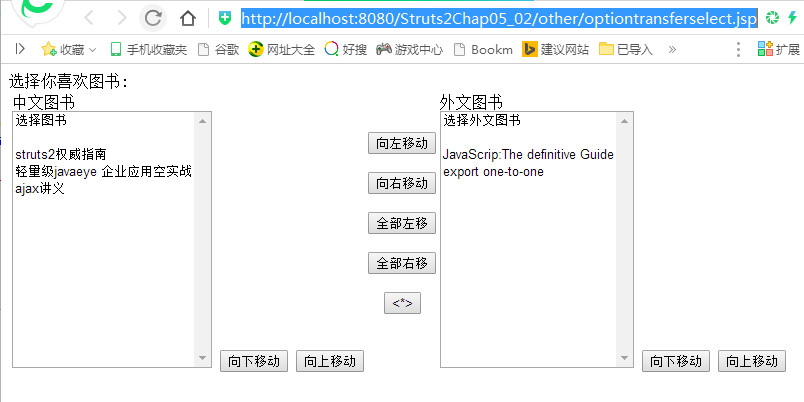
Optiontransferselect 标签;
optiontransferselect.jsp
 <%@ page language="java" contentType="text/html; charset=UTF-8"

     pageEncoding="UTF-8"%>

 <!DOCTYPE html PUBLIC "-//W3C//DTD HTML 4.01 Transitional//EN" "http://www.w3.org/TR/html4/loose.dtd">

 <%@taglib prefix="s" uri="/struts-tags" %>

 <html>

 <head>

 <meta http-equiv="Content-Type" content="text/html; charset=UTF-8">

 <title>Insert title here</title>

 </head>

 <body>

 <s:optiontransferselect label="选择你喜欢图书"

               name="cnbook" leftTitle="中文图书"  list="{'struts2权威指南','轻量级javaeye 企业应用空实战','ajax讲义'}"

               doubleName="enBook"  rightTitle="外文图书" doubleList="{'JavaScrip:The definitive Guide','export one-to-one'}"  multiple="true"

               addToLeftLabel="向左移动" addToRightLabel="向右移动" addAllToRightLabel="全部右移" addAllToLeftLabel="全部左移"

                allowSelectAll="true" headerKey="cnKey" headerValue="选择图书" emptyOption="true"   doubleHeaderKey="enKey"

                doubleHeaderValue="选择外文图书" doubleMultiple="true" doubleEmptyOption="true"  leftDownLabel="向下移动"

        rightDownLabel="向下移动"

        leftUpLabel="向上移动"

        rightUpLabel="向上移动" >

    </s:optiontransferselect>

 </body>

 </html>
结果:
(五)Struts2 标签的更多相关文章
- JavaWeb框架_Struts2_(五)----->Struts2的标签库
1. Struts2的标签库 1.1 Struts2标签库概述 Struts2的标签库可以分为以下3类:用户界面标签.非用户界面标签.AJAX标签; 2.1.1 Struts2标签库的分类和使用 1 ...
- struts2(五) s标签和国际化
坚持就是胜利. --WH 一.s标签 在struts-2.3.15.1/docs/WW/docs/tag-reference.html下,就有着struts2所有标签的参考文献,只能看看其中比较常用的 ...
- struts2标签(五)
标签体系结构 jsp出现目的是为了取代servlet,结果逻辑代码,数据库代码都放到了jsp页面中. 为了解决jsp中代码过多的问题,struts2标签分为普通标签和UI标签. 使用struts2标签 ...
- JSTL标签,EL表达式,OGNL表达式,struts2标签 汇总
一下纯属个人总结摘抄,总结一起方便查看,解决疑问,有遗漏或错误,还请指出. 1,JSTL标签总结: a).JSTL标签有什么用? JSTL是由JCP(Java Commu ...
- struts2标签详解
struts2标签讲解 要使用Struts2的标签,只需要在JSP页面添加如下一行定义即可:<%@ taglib prefix="s" uri="/struts-t ...
- struts2标签库----数据标签详解
上篇文章我们介绍struts2标签库中的控制标签的基本使用和部分原理,本篇文章接着了解下标签库中有关数据标签的使用和原理.主要涉及以下数据标签: action标签:用于在视图页面跳转到一个Action ...
- ognl,jstl,struts2标签中符号#,$,%的用法
STRUTS2标签操作Map <s:iterator value="sundayMap"> <td colspan="7" ...
- struts2标签使用详解
Struts2常用标签总结一 介绍1.Struts2的作用 Struts2标签库提供了主题.模板支持,极大地简化了视图页面的编写,而且,struts2的主题.模板都提供了很好的扩展性.实现了更好的代码 ...
- struts2标签(转)
Struts2 标签库讲解 要使用Struts2的标签,只需要在JSP页面添加如下一行定义即可: <%@ taglib prefix="s" uri="/str ...
随机推荐
- [C# 网络编程系列]专题九:实现类似QQ的即时通信程序
转自:http://www.cnblogs.com/zhili/archive/2012/09/23/2666987.html 引言: 前面专题中介绍了UDP.TCP和P2P编程,并且通过一些小的示例 ...
- [leetcode]二分查找总结
Search for a Range 1.最简单的想法,用最普通的二分查找,找到target,然后向左右扩张,大量的重复的target,就会出现O(n)效率. class Solution { pub ...
- 怎样在Yii中显示静态页
在web应用中,我们经产更需要显示静态页,如“关于我们”等,这些文件通常是静态页,通常有如下几种处理方法: 1.把独立的html文件存在Web服务器能直接访问的目录下.这种方案的缺点是很难维护网页布局 ...
- iOS/mac开发的一些知名个人博客
王巍的博客:王巍目前在日本横滨任职于LINE.工作内容主要进行Unity3D开发,8小时之外经常进行iOS/Mac开发.他的陈列柜中已有多款应用,其中番茄工作法工具非常棒. http://onevca ...
- CUDA8.0+VS2013的安装和配置
首先声明,本文借鉴自:http://blog.csdn.net/u011314529/article/details/51505029 所以,可参考链接的博文.但原文有个瑕疵就是,cublas.lib ...
- jQuery获取鼠标事件源(万能)
//任意位置 $(document).ready(function(){ $(document).click(function(){ $("#id_").hide(); }); } ...
- ajax 小案例
ajax 异步提交数据,实现无刷新提交表单 ajax.html <!DOCTYPE html> <html> <head> <meta charset=&qu ...
- spring beans源码解读之--XmlBeanFactory
导读: XmlBeanFactory继承自DefaultListableBeanFactory,扩展了从xml文档中读取bean definition的能力.从本质上讲,XmlBeanFactory等 ...
- PureMVC(JS版)源码解析(三):Observer类
上一篇博客中,我们讲到了Notification类(消息类),Notification(消息)是连接观察者(observer)和通知者(notifier)之间的桥梁.这一篇博客,主要是在代 ...
- sum() over() 函数的使用
over不能单独使用,要和分析函数:rank(),dense_rank(),row_number(),sum()等一起使用. over函数的参数:over(partition by columnnam ...