
sparkSessiontest
记事本内容:
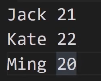
打印结构:
方法1:

object SparkSessionTest {

  case class Person(name:String,age:Int)

  def main(args: Array[String]): Unit = {

    val sparkSession=SparkSession.builder().appName("SparkSessionTest")

      .master("local[*]")

      .getOrCreate()

    val sparkContext=sparkSession.sparkContext

    val rdd=sparkContext.textFile("D:\\temp\\person.txt")

    val rowRdd=rdd.map(_.split(" ")).map(row=>Person(row(0),row(1).toInt))

    import sparkSession.implicits._

    rowRdd.toDF

    sparkSession.stop()

  }

}
方法2:

val sparkContext=sparkSession.sparkContext

val rdd=sparkContext.textFile("D:\\temp\\person.txt")

val schemaFiled="name,age"

val schemaString=schemaFiled.split(",")

val schema =StructType(

  List(

    StructField(schemaString(0),StringType,nullable = true),

    StructField(schemaString(1),IntegerType,nullable = true)

  )

)

val rowRdd= rdd.map(_.split("")).map(p=>Row(p(0),p(1).toInt))

val df=sparkSession.createDataFrame(rowRdd,schema)

df.show()
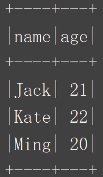
结果展示:
parquet的优势
支持列存储+嵌套数据格式+适配多个计算框架
节省表扫描时间和反序列的时间
压缩技术稳定出色,节省存储空间
Spark操作 Parquet文件比操作CSV等普通文件的速度更快
加载数据:sparkSession.read.parquet(“/nginx/20200110.parquet”)
写入数据:df.write.mode(SaveMode.Overwrite).parquet(“/path/to”)
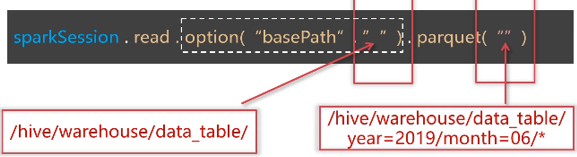
分区文件
加载批量数据:
Df.show()//只显示前20条数据

Df.show(3)//只显示前3条数据

df.show( false)//每列可以显示多于20个字符

dt show(3, false)
Df.select (“字段1”,”字段2”).show()

Df.select(col(“”) as(“别名1”),col(“字段2”)+1).show()
df.first()//获取第一行数据,返回RoW

df.head( 3)//获取前3行数据,返回 Array Row]

df.take (3)//获取前3行数据,返回 Array[Row]

df.takeaslist(3//获取前3行数据,返回List[Row]

df.limit(3).show()//返回新的 Data Frame,不是 Action操作
Df.where(“age>21”).show()

Df.filter(“age>21”).show()

Df.where(col(“age”)>21).show()

Ds.where($”age”>21).show()
Df.where(“age=21”).show

Df.where(col(“age”)===21).show

Df.where(col(“age”)=!=21).show
Val  ageFilter_1 =col(“age”)>21

Val  agefilter_2=col(“age”)<25

Val  ageFilter_3=agefilter_1.or(ageFilter_2)

Df.where(col(“name”)===”jack”).where(ageFilter_3)
Val ageFilter_1 =col(“age”)>21

Val ageFilter_2=col(“age”)<25

Val ageFilter_3 =ageFilter_1.ll(ageFilter_2)

Df.where(col(“name”)===”jack”)

.where(ageFitler_3)

.show
//按照身份统计人数
Df.groupBy(col(“province”))

.count

.show
按照城市,手机运营商分组统计人数并按人数排序
//方法1
Df.groupby(col(“city”),col(“”op_phone“”))

.count

.withColumnRenamed(“count”,”num”)

.orderBy(col(“num”).desc)

.show
//方法2

Ds.groupBy($”city”,$”op_phone”)

.count

.withColumnRenamed(“count”,”num”)

.sort($”num”.desc)

.show
按年统计注册用户最高的积分,以及平均积分
Df.groupBy(year(col(“add_time”)))

.agg(max(col(“total_mark”).as(“max_mark”)),

Avg(col(“total_mark”).as(“avg_mark”))

)

.show


sparkSessiontest的更多相关文章
- RDD&Dataset&DataFrame
Dataset创建 object DatasetCreation { def main(args: Array[String]): Unit = { val spark = SparkSession ...
随机推荐
- redis 持久化RDB、AOF
1.redis持久化简介 Redis是一种高级key-value数据库.它跟memcached类似,不过数据可以持久化,而且支持的数据类型很丰富.有字符串,链表,集合和有序集合.支持在服务器端计算集合 ...
- Effective Python读书笔记
有些位置可能翻译理解的不到位,各位看官如有疑问,欢迎留言赐教. Pythonic Thinking 大家经常用Pythonic来形容python语法风格的编程方式:简单优美,没有之一:通过import ...
- 【ES】Java High Level REST Client 使用示例(增加修改)
ES提供了多种编程语言的链接方式,有Java API,PHP API,.NET API 官网可以详细了解 https://www.elastic.co/guide/en/elasticsearch/c ...
- WEB应用之httpd基础入门(二)
前文我们聊了下httpd的一些基础设置,聊了下httpd的配置文件格式,长连接.mpm的配置以及访问控制基于文件路径和URL管控,回顾请参考https://www.cnblogs.com/qiuhom ...
- Spring Cloud 系列之 Netflix Hystrix 服务监控
Actuator Hystrix 除了可以实现服务容错之外,还提供了近乎实时的监控功能,将服务执行结果和运行指标,请求数量成功数量等等这些状态通过 Actuator 进行收集,然后访问 /actuat ...
- angualrjs 总结 随记(一)
$apply方法的作用 $apply方法是用来触发脏检查,它在控制器里监听一个变量,每当这个变量的值改变的时候,它会去与最初的值做一次比较,然后HTML页面就会及时更新该变量的值(将最新的值赋值到ht ...
- 原创 记录一次线上Mysql慢查询问题排查过程
背景 前段时间收到运维反馈,线上Mysql数据库凌晨时候出现慢查询的报警,并把原始sql发了过来: --去除了业务含义的sql update test_user set a=1 where id=1; ...
- Angularjs优点
数据双向绑定,前后台的更改都可以随时生效, 提供mvc开发模式模式,剥离前端各部分代码,使代码便于维护管理. 简化了你写DOM操作
- 启动/关闭oracle服务
写一个脚本就可以很方便的打开服务和关闭服务,但是记住要以管理员的身份运行哦! 首先建立两个文件:启动.txt 和关闭.txt [在下面代码里启动的服务名称可能版本不一样,有可能名字不一样,自己对照看看 ...
- 洛谷1972 HH的项链 树状数组查询区间内不同的数的数量
题目链接:https://www.luogu.com.cn/problem/P1972 题意大致是:给定一个序列长度为n,给出m个查询区间,要求响应是区间内不同的数的个数.为此我们考虑到树状数组的区间 ...