
Enjoy the pain about Moloch
这echo出来的啥子嘛?
意思是小姐姐有自虐倾向?
可若是moloch有汉化包或翻译文件,
小姐姐至于这么“享受”install的过程吗?

过程都走过了,那就记录一下吧:
1.找个Ubuntu镜像,阿里云镜像不一定合适,
可能需要换清华大学开源软件镜像站,
选择你的ubuntu版本,替换镜像(配置文件是 /etc/apt/sources.list),
同时关闭防火墙:sudo ufw disable;
2.网络有网自然好,
若是没网则需走代理:export http_proxy=http://127.0.0.1:8000;
sudo apt-get update(或修改/etc/apt/apt.conf);
3.装ssh、git、lrzsz、nodejs@10+ 、npm@5+等;
(如:sudo apt-get install openssh-server;)
4.从github上拉代码:git clone https://github.com/aol/moloch;
5.安装响应依赖编译:./easybutton-build.sh --install,
编译的过程较痛苦,部分依赖包比较大下载安装容易超时,
编不过去的语句可手动执行,
(如:cd public ; wget -N https://github.com/gchq/CyberChef/releases/download/v9.16.2/CyberChef_v9.16.2.zip);
6.由于moloch性能要求较高,
可另找一台电脑或服务器(简称服务器)下载及安装JDK:
wget http://iso.epoint.com.cn/JDK/jdk-8u65-linux-x64.rpm;rpm -ivh jdk-8u65-linux-x64.rpm;
此依赖根据linux的环境安装;
7.在服务器上下载及安装elasticsearch:
wget https://artifacts.elastic.co/downloads/elasticsearch/elasticsearch-5.6.6.rpm;
rpm -ivh elasticsearch-5.6.6.rpm;
此依赖根据linux的环境安装;
8.修改配置文件/etc/elasticsearch/elasticsearch.yml 中的network.host:
服务器的IP(network.host:199.199.199.199);
9.启动elasticsearch 服务;
重载修改过的配置文件:systemctl daemon-reload
开机启动elasticsearch:systemctl enable elasticsearch.service
启动elasticsearch:systemctl start elasticsearch.service
10. 监听服务端口(9200)是否已经启动:
netstat -nlp |grep LISTEN
11.检查elasticsearch是否正常启动:
浏览器输入:http://199.199.199.199:9200/_cat;
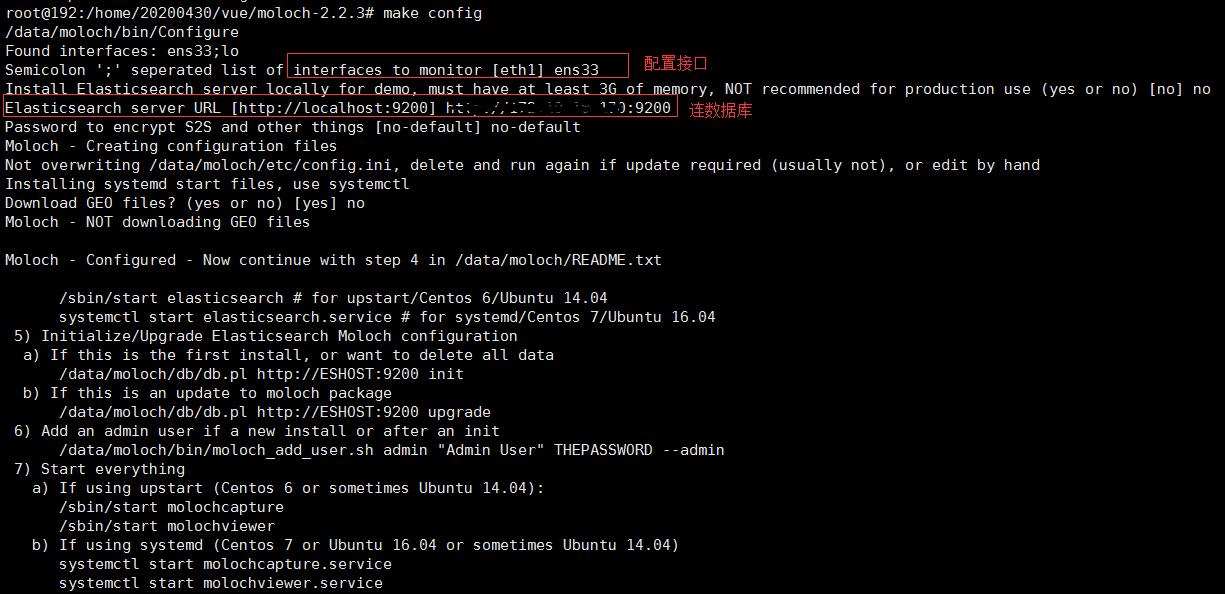
12.连ES数据库配置初始化Moloch:
/data/moloch/bin/Configure;
配置监听端口(如:ens33),若是多个端口可用分号隔开;
连ES数据库,配置数据库的ip和port;
(或修改文件/data/moloch/etc/config.ini,elasticsearch=http://199.199.199.199:9200)
13.初始化、升级 Elasticsearch Moloch配置:
第一次安装初始化、或删所有数据:/data/moloch/db/db.pl http://localhost:9200 init;
升级moloch 数据包:/data/moloch/db/db.pl http://localhost:9200 upgrade;
14.进行配置 make config
15.添加账户(如:新增admin账户,密码是moloch):
/data/moloch/bin/moloch_add_user.sh admin "admin" moloch --admin ;
16.开启所有服务
开机启动Capture:systemctl enable molochcapture.service;
启动Capture:systemctl start molochcapture.service;
开机启动Viewer:systemctl enable molochviewer.service;
启动Viewer:systemctl start molochviewer.service;

17. 登陆Moloch:http://192.168.18.196:8005
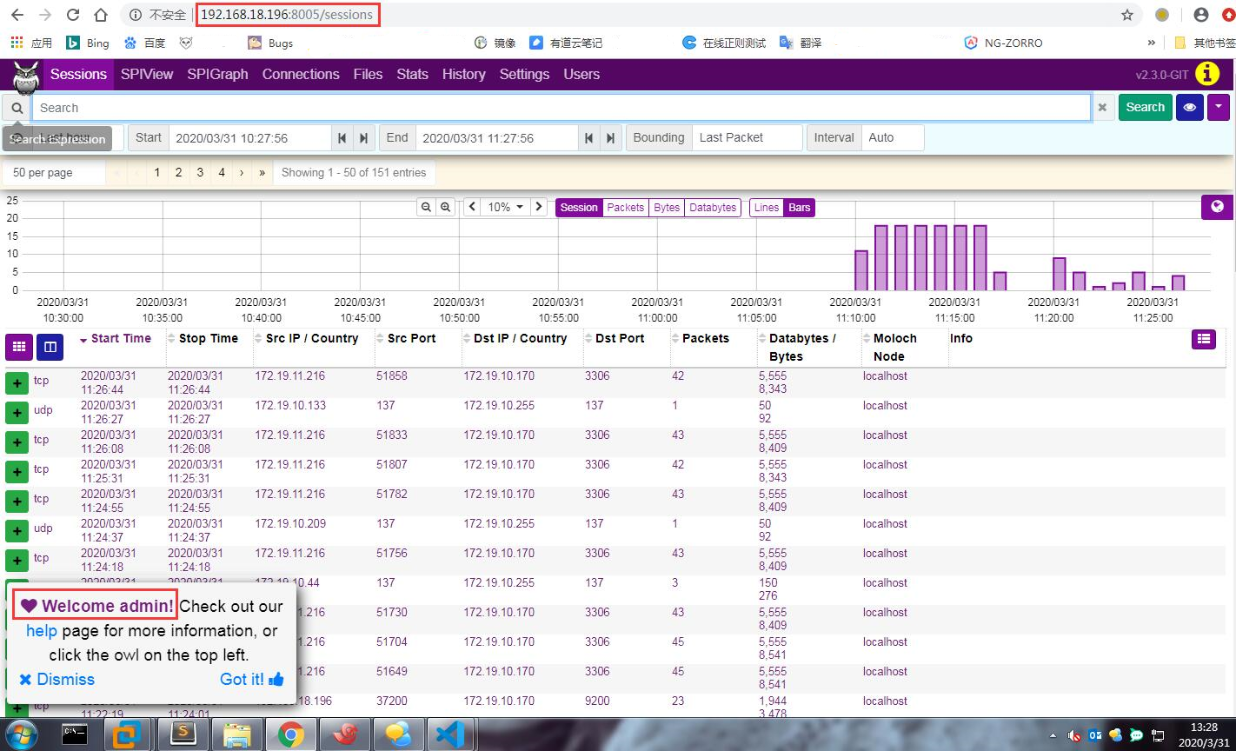
18.Perfect!!!start working~ ^_^ ~
Enjoy the pain about Moloch的更多相关文章
- Nothing to say
1. This moment will nap, you will have a dream; but this moment study, you will interpret a dream.此刻 ...
- Your pain
Your pain is the breaking of the shell that encloses your understanding. 你的痛苦是你那包裹知识的皮壳的破裂.
- HDU 4630 No Pain No Game 线段树 和 hdu3333有共同点
No Pain No Game Time Limit: 4000/2000 MS (Java/Others) Memory Limit: 65536/32768 K (Java/Others)T ...
- Moloch
http://www.oschina.net/p/moloch maltego http://www.oschina.net/p/maltego
- Pain for friend
For a guy who has experienced his fair share of mysteries,on mystery,I still can't figure out is why ...
- etymon word write alb pain high alt increase large agency ag lose weight fat assist out~3
1● alb 2● write =====>rait 1● alg 2● pain 痛,疼痛 1● alt 2● high 高 1 ...
- enjoy dollar vs cash dollar
當 enJoy 卡 客 戶 憑 enJoy 卡 於 enJoy 卡 「 特 約 商 戶 」 簽 賬 消 費 , 累 積 之 enJoy Dollars 及 Cash Dollars 可 在 同 一 交 ...
- 41 Pain and Pain Management 疼痛与疼痛管理
Pain and Pain Management 疼痛与疼痛管理 ①Years ago,doctors often said that pain was a normal part of life.I ...
- HDU 4630 No Pain No Game(2013多校3 1010题 离线处理+树状数组求最值)
No Pain No Game Time Limit: 4000/2000 MS (Java/Others) Memory Limit: 65536/32768 K (Java/Others)T ...
随机推荐
- apache虚拟主机配置-域名/IP和端口两种配置
由于百度上有非常详细的资料,我这里就转载而已:https://jingyan.baidu.com/article/4f7d5712d48a191a201927e0.html
- linux--配置开发环境 --Apache篇
现在我的的linux服务器上一般都是使用:Apache 和 Nginx 这两种配置. 你现在安装好了,启动了,也无法通过你服务器绑定的网址访问你的网站. 这是你可以通过这个命令查看一下你的80端口: ...
- javascript SDK开发之webpack中eslint的配置
eslint的好处就不多说了.代码检查,代码报错, 智能提示,让开发人员更规范的撸代码等等. 1.安装依赖 npm install --save-dev eslint eslint-friendly- ...
- 细数阿里云在使用 Docker 过程中踩过的那些坑
昨天下午道哥在微信上丢给我一条新闻,看看,我们阿里云支持 Docker 企业版了.我打开一看,果然,阿里云发布了飞天敏捷版,开始支持企业级的 Docker 容器. 美国中部时间4月19日,阿里云在容器 ...
- RxJava2源码解析(二)
title: RxJava2源码解析(二) categories: 源码解析 tags: 源码解析 rxJava2 前言 本篇主要解析RxJava的线程切换的原理实现 subscribeOn 首先, ...
- WeChatSampleBuilder V2.0 使用教程(网页版+桌面版)
为了方便开发者可以快速搭建一个最小化所需模块的 Senparc.Weixin SDK Sample 项目,我们于 2018 年 11 月发布了首个 WeChatSampleBuilder 的版本,受到 ...
- Onedrive File Open Problem
在用Onenote 2016写笔记时,同步到Onedrive后就变成了Internet快捷方式,而且直接打开时会出现提示: 原因 用Onenote客户端在Onedrive上创建的笔记本是一种特殊文件, ...
- 数学--数论--HDU 6128 Inverse of sum (公式推导论)
Description 给nn个小于pp的非负整数a1,-,na1,-,n,问有多少对(i,j)(1≤i<j≤n)(i,j)(1≤i<j≤n)模pp在意义下满足1ai+aj≡1ai+1aj ...
- js数组中返回具有某个属性具有特定值的对象
const drDataArr = [{ date: 0, type: '心率', value: 82 },{ date: 1, type: '心率', value: 80 },{ date: 2, ...
- Redux在项目中的文件结构
React + Redux 今天我们来唠唠在React一般项目中,使用Redux进行状态管理的时候,相对的如何存放reducer.action.api之类文件的结构与使用时机吧.本章默认看官们已经 ...