
面试总被问分布式ID怎么办? 滴滴(Tinyid)甩给他
整理了一些Java方面的架构、面试资料(微服务、集群、分布式、中间件等),有需要的小伙伴可以关注公众号【程序员内点事】,无套路自行领取
引言
接着《一口气说出 9种 分布式ID生成方式,面试官有点懵了》来继续详细的介绍分布式ID生成器,大家比较感兴趣的美团(Leaf)、滴滴(Tinyid)、百度(uid-generator)三个开源项目,美团(Leaf)已经讲完,详见《9种分布式ID生成之美团(Leaf)实战》,今天结合实战搞一下滴滴开源的(Tinyid)。
Tinyid介绍
Tinyid是滴滴开发的一款分布式ID系统,Tinyid是在美团(Leaf)的leaf-segment算法基础上升级而来,不仅支持了数据库多主节点模式,还提供了tinyid-client客户端的接入方式,使用起来更加方便。但和美团(Leaf)不同的是,Tinyid只支持号段一种模式不支持雪花模式。
Tinyid的特性
- 全局唯一的long型ID
- 趋势递增的id
- 提供 http 和 java-client 方式接入
- 支持批量获取ID
- 支持生成1,3,5,7,9...序列的ID
- 支持多个db的配置
适用场景:只关心ID是数字,趋势递增的系统,可以容忍ID不连续,可以容忍ID的浪费
不适用场景:像类似于订单ID的业务,因生成的ID大部分是连续的,容易被扫库、或者推算出订单量等信息
Tinyid原理
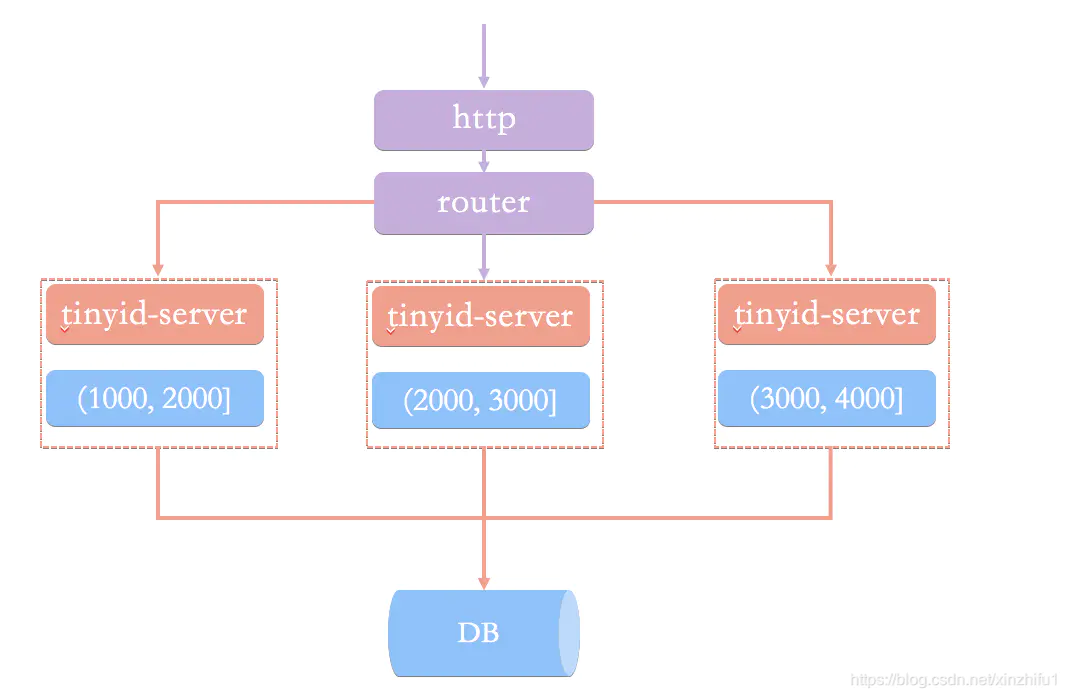
Tinyid是基于号段模式实现,再简单啰嗦一下号段模式的原理:就是从数据库批量的获取自增ID,每次从数据库取出一个号段范围,例如 (1,1000] 代表1000个ID,业务服务将号段在本地生成1~1000的自增ID并加载到内存.。
Tinyid会将可用号段加载到内存中,并在内存中生成ID,可用号段在首次获取ID时加载,如当前号段使用达到一定比例时,系统会异步的去加载下一个可用号段,以此保证内存中始终有可用号段,以便在发号服务宕机后一段时间内还有可用ID。
原理图大致如下图:
Tinyid实现
Tinyid的GitHub地址 : https://github.com/didi/tinyid.git
Tinyid提供了两种调用方式,一种基于Tinyid-server提供的http方式,另一种Tinyid-client客户端方式。
不管使用哪种方式调用,搭建Tinyid都必须提前建表tiny_id_info、tiny_id_token。
CREATE TABLE `tiny_id_info` (

  `id` bigint(20) unsigned NOT NULL AUTO_INCREMENT COMMENT '自增主键',

  `biz_type` varchar(63) NOT NULL DEFAULT '' COMMENT '业务类型,唯一',

  `begin_id` bigint(20) NOT NULL DEFAULT '0' COMMENT '开始id,仅记录初始值,无其他含义。初始化时begin_id和max_id应相同',

  `max_id` bigint(20) NOT NULL DEFAULT '0' COMMENT '当前最大id',

  `step` int(11) DEFAULT '0' COMMENT '步长',

  `delta` int(11) NOT NULL DEFAULT '1' COMMENT '每次id增量',

  `remainder` int(11) NOT NULL DEFAULT '0' COMMENT '余数',

  `create_time` timestamp NOT NULL DEFAULT '2010-01-01 00:00:00' COMMENT '创建时间',

  `update_time` timestamp NOT NULL DEFAULT '2010-01-01 00:00:00' COMMENT '更新时间',

  `version` bigint(20) NOT NULL DEFAULT '0' COMMENT '版本号',

  PRIMARY KEY (`id`),

  UNIQUE KEY `uniq_biz_type` (`biz_type`)

) ENGINE=InnoDB AUTO_INCREMENT=1 DEFAULT CHARSET=utf8 COMMENT 'id信息表';

CREATE TABLE `tiny_id_token` (

  `id` int(11) unsigned NOT NULL AUTO_INCREMENT COMMENT '自增id',

  `token` varchar(255) NOT NULL DEFAULT '' COMMENT 'token',

  `biz_type` varchar(63) NOT NULL DEFAULT '' COMMENT '此token可访问的业务类型标识',

  `remark` varchar(255) NOT NULL DEFAULT '' COMMENT '备注',

  `create_time` timestamp NOT NULL DEFAULT '2010-01-01 00:00:00' COMMENT '创建时间',

  `update_time` timestamp NOT NULL DEFAULT '2010-01-01 00:00:00' COMMENT '更新时间',

  PRIMARY KEY (`id`)

) ENGINE=InnoDB AUTO_INCREMENT=1 DEFAULT CHARSET=utf8 COMMENT 'token信息表';

INSERT INTO `tiny_id_info` (`id`, `biz_type`, `begin_id`, `max_id`, `step`, `delta`, `remainder`, `create_time`, `update_time`, `version`)

VALUES

	(1, 'test', 1, 1, 100000, 1, 0, '2018-07-21 23:52:58', '2018-07-22 23:19:27', 1);

INSERT INTO `tiny_id_info` (`id`, `biz_type`, `begin_id`, `max_id`, `step`, `delta`, `remainder`, `create_time`, `update_time`, `version`)

VALUES

	(2, 'test_odd', 1, 1, 100000, 2, 1, '2018-07-21 23:52:58', '2018-07-23 00:39:24', 3);

INSERT INTO `tiny_id_token` (`id`, `token`, `biz_type`, `remark`, `create_time`, `update_time`)

VALUES

	(1, '0f673adf80504e2eaa552f5d791b644c', 'test', '1', '2017-12-14 16:36:46', '2017-12-14 16:36:48');

INSERT INTO `tiny_id_token` (`id`, `token`, `biz_type`, `remark`, `create_time`, `update_time`)

VALUES

	(2, '0f673adf80504e2eaa552f5d791b644c', 'test_odd', '1', '2017-12-14 16:36:46', '2017-12-14 16:36:48');
tiny_id_info表是具体业务方号段信息数据表

max_id :号段的最大值
step:步长,即为号段的长度
biz_type:业务类型
号段获取对max_id字段做一次update操作,update max_id= max_id + step,更新成功则说明新号段获取成功,新的号段范围是(max_id ,max_id +step]。
tiny_id_token是一个权限表,表示当前token可以操作哪些业务的号段信息。

修改tinyid-server中 \offline\application.properties 文件配置数据库,由于tinyid支持数据库多master模式,可以配置多个数据库信息。启动 TinyIdServerApplication 测试一下。
datasource.tinyid.primary.driver-class-name=com.mysql.jdbc.Driver

datasource.tinyid.primary.url=jdbc:mysql://127.0.0.1:3306/xin-master?autoReconnect=true&useUnicode=true&characterEncoding=UTF-8

datasource.tinyid.primary.username=junkang

datasource.tinyid.primary.password=junkang

datasource.tinyid.primary.testOnBorrow=false

datasource.tinyid.primary.maxActive=10

datasource.tinyid.secondary.driver-class-name=com.mysql.jdbc.Driver

datasource.tinyid.secondary.url=jdbc:mysql://localhost:3306/db2?autoReconnect=true&useUnicode=true&characterEncoding=UTF-8

datasource.tinyid.secondary.username=root

datasource.tinyid.secondary.password=123456

datasource.tinyid.secondary.testOnBorrow=false

datasource.tinyid.secondary.maxActive=10
1、Http方式
tinyid 内部一共提供了四个http接口来获取ID和号段。
package com.xiaoju.uemc.tinyid.server.controller;

/**

 * @author du_imba

 */

@RestController

@RequestMapping("/id/")

public class IdContronller {

    private static final Logger logger = LoggerFactory.getLogger(IdContronller.class);

    @Autowired

    private IdGeneratorFactoryServer idGeneratorFactoryServer;

    @Autowired

    private SegmentIdService segmentIdService;

    @Autowired

    private TinyIdTokenService tinyIdTokenService;

    @Value("${batch.size.max}")

    private Integer batchSizeMax;

    @RequestMapping("nextId")

    public Response<List<Long>> nextId(String bizType, Integer batchSize, String token) {

        Response<List<Long>> response = new Response<>();

        try {

            IdGenerator idGenerator = idGeneratorFactoryServer.getIdGenerator(bizType);

            List<Long> ids = idGenerator.nextId(newBatchSize);

            response.setData(ids);

        } catch (Exception e) {

            response.setCode(ErrorCode.SYS_ERR.getCode());

            response.setMessage(e.getMessage());

            logger.error("nextId error", e);

        }

        return response;

    }

    @RequestMapping("nextIdSimple")

    public String nextIdSimple(String bizType, Integer batchSize, String token) {

        String response = "";

        try {

            IdGenerator idGenerator = idGeneratorFactoryServer.getIdGenerator(bizType);

            if (newBatchSize == 1) {

                Long id = idGenerator.nextId();

                response = id + "";

            } else {

                List<Long> idList = idGenerator.nextId(newBatchSize);

                StringBuilder sb = new StringBuilder();

                for (Long id : idList) {

                    sb.append(id).append(",");

                }

                response = sb.deleteCharAt(sb.length() - 1).toString();

            }

        } catch (Exception e) {

            logger.error("nextIdSimple error", e);

        }

        return response;

    }

    @RequestMapping("nextSegmentId")

    public Response<SegmentId> nextSegmentId(String bizType, String token) {

        try {

            SegmentId segmentId = segmentIdService.getNextSegmentId(bizType);

            response.setData(segmentId);

        } catch (Exception e) {

            response.setCode(ErrorCode.SYS_ERR.getCode());

            response.setMessage(e.getMessage());

            logger.error("nextSegmentId error", e);

        }

        return response;

    }

    @RequestMapping("nextSegmentIdSimple")

    public String nextSegmentIdSimple(String bizType, String token) {

        String response = "";

        try {

            SegmentId segmentId = segmentIdService.getNextSegmentId(bizType);

            response = segmentId.getCurrentId() + "," + segmentId.getLoadingId() + "," + segmentId.getMaxId()

                    + "," + segmentId.getDelta() + "," + segmentId.getRemainder();

        } catch (Exception e) {

            logger.error("nextSegmentIdSimple error", e);

        }

        return response;

    }

}
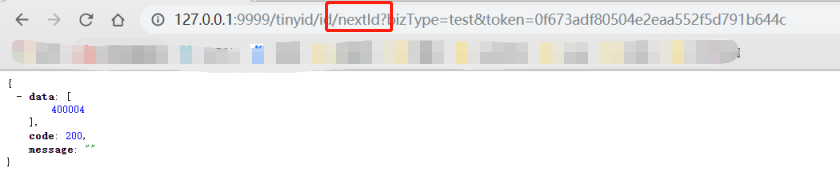
nextId、nextIdSimple都是获取下一个ID,nextSegmentIdSimple、getNextSegmentId是获取下一个可用号段。区别在于接口是否有返回状态。
nextId:

'http://localhost:9999/tinyid/id/nextId?bizType=test&token=0f673adf80504e2eaa552f5d791b644c'

response :

{

	"data": [2],

	"code": 200,

	"message": ""

}

nextId Simple:

'http://localhost:9999/tinyid/id/nextIdSimple?bizType=test&token=0f673adf80504e2eaa552f5d791b644c'

response: 3

2、Tinyid-client客户端
如果不想通过http方式,Tinyid-client客户端也是一种不错的选择。
引用 tinyid-server 包
<dependency>

    <groupId>com.xiaoju.uemc.tinyid</groupId>

    <artifactId>tinyid-client</artifactId>

    <version>${tinyid.version}</version>

</dependency>
启动 tinyid-server 项目打包后得到 tinyid-server-0.1.0-SNAPSHOT.jar ,设置版本 ${tinyid.version}为0.1.0-SNAPSHOT。
在我们的项目 application.properties 中配置 tinyid-server 服务的请求地址 和 用户身份token
tinyid.server=127.0.0.1:9999

tinyid.token=0f673adf80504e2eaa552f5d791b644c```
在Java代码调用TinyId也很简单,只需要一行代码。
  // 根据业务类型 获取单个ID

  Long id = TinyId.nextId("test");

  // 根据业务类型 批量获取10个ID

  List<Long> ids = TinyId.nextId("test", 10);
Tinyid整个项目的源码实现也是比较简单,像与数据库交互更直接用jdbcTemplate实现
@Override

    public TinyIdInfo queryByBizType(String bizType) {

        String sql = "select id, biz_type, begin_id, max_id," +

                " step, delta, remainder, create_time, update_time, version" +

                " from tiny_id_info where biz_type = ?";

        List<TinyIdInfo> list = jdbcTemplate.query(sql, new Object[]{bizType}, new TinyIdInfoRowMapper());

        if(list == null || list.isEmpty()) {

            return null;

        }

        return list.get(0);

    }
总结
两种方式推荐使用Tinyid-client,这种方式ID为本地生成,号段长度(step)越长,支持的qps就越大,如果将号段设置足够大,则qps可达1000w+。而且tinyid-client 对 tinyid-server 访问变的低频,减轻了server端的压力。
整理了一些Java方面的架构、面试资料(微服务、集群、分布式、中间件等),有需要的小伙伴可以关注公众号【程序员内点事】,无套路自行领取
面试总被问分布式ID怎么办? 滴滴(Tinyid)甩给他的更多相关文章
- 面试刷题31:分布式ID设计方案
面试中关于分布式的问题很多.(分布式事务,基本理论CAP,BASE,分布式锁)先来一个简单的. 简单说一下分布式ID的设计方案? 首先要明确在分布式环境下,分布式id的基本要求. 1, 全局唯一,在分 ...
- 面试总被问到HTTP缓存机制及原理?看完你就彻底明白了
前言 Http 缓存机制作为 web 性能优化的重要手段,对于从事 Web 开发的同学们来说,应该是知识体系库中的一个基础环节,同时对于有志成为前端架构师的同学来说是必备的知识技能. 但是对于很多前端 ...
- 面试被问分布式事务(2PC、3PC、TCC),这样解释没毛病!
整理了一些Java方面的架构.面试资料(微服务.集群.分布式.中间件等),有需要的小伙伴可以关注公众号[程序员内点事],无套路自行领取 更多优选 一口气说出 9种 分布式ID生成方式,面试官有点懵了 ...
- 9种分布式ID生成之 美团(Leaf)实战
整理了一些Java方面的架构.面试资料(微服务.集群.分布式.中间件等),有需要的小伙伴可以关注公众号[程序员内点事],无套路自行领取 更多优选 一口气说出 9种 分布式ID生成方式,面试官有点懵了 ...
- 一口气说出 9种 分布式ID生成方式,面试官有点懵了
整理了一些Java方面的架构.面试资料(微服务.集群.分布式.中间件等),有需要的小伙伴可以关注公众号[程序员内点事],无套路自行领取 本文作者:程序员内点事 原文链接:https://mp.weix ...
- 面试总问的jvm调优到底是要干什么?
1. 压力测试的理解,xxx的性能10w/s,对你有意义么? 没有那家卖瓜的会说自己家的不甜,同样,没有哪个开源项目愿意告诉你在对它条件最苛刻的时候压力情况是多少,一般官网号称给你看的性能指标都是在最 ...
- 一口气说出9种分布式ID生成方式,面试官有点懵
一.为什么要用分布式ID? 在说分布式ID的具体实现之前,我们来简单分析一下为什么用分布式ID?分布式ID应该满足哪些特征? 1.1.什么是分布式ID? 拿MySQL数据库举个栗子:在我们业务数据量不 ...
- 面试连环炮系列(十一):说说你们的分布式ID设计方案
说说你们的分布式ID设计方案 我们采用Snowflake算法,生成一个64bit的数字,64bit被划分成多个段,分别表示时间戳.机器编码.序号. 41位的时间序列(精确到毫秒,41位的长度可以使用6 ...
- 美团分布式ID生成框架Leaf源码分析及优化改进
本文主要是对美团的分布式ID框架Leaf的原理进行介绍,针对Leaf原项目中的一些issue,对Leaf项目进行功能增强,问题修复及优化改进,改进后的项目地址在这里: Leaf项目改进计划 https ...
随机推荐
- python后端面试第八部分:制作简历和如何面试--长期维护
############### 就业指导 ################ 这里面有套路,你懂了这个套路,你会找到更好的工作,你会更快的找到工作, ,如何制作简历,五颗星 ,如何投递简历 ...
- fedoar29配置漏洞平台webgoat
fedoar29配置漏洞平台webgoat 该环境基于java环境,故需要配置相应的java版本 查看java版本 1 java -version 结果如下: 123 openjdk version ...
- [LC] 165. Compare Version Numbers
Compare two version numbers version1 and version2.If version1 > version2 return 1; if version1 &l ...
- SQL语言:DDL,DML,DCL,DQL,TCL
DDL(Data Definition Language)数据库定义语言 statements are used to define the database structure or schema. ...
- HDU-1425-sort(计数排序以及快速排序和堆排序的变种)
计数排序 Accepted 1425 483MS 5276K 997 B G++ #include "bits/stdc++.h" using namespace std; typ ...
- 关于安装python第三方库
安装python库的两种方式: 一)在线安装: 1)pip install 模块名 2)使用国内源安装:pip install 国内源地址 模块名 3)pycharm中setting-interpre ...
- IOUtils和FileUtils的学习笔记
pom文件导入依赖import org.apache.commons.io.FileUtils; <dependency> <groupId>commons-io</gr ...
- ibator使用
一.ibator是一个ibatis的代码生成工具,它能根据数据表自动生成javabean.sqlmap. ibator的官方地址是 http://ibatis.apache.org/ibator.ht ...
- ES6的模块暴露与模块引入
ES6的模块暴露和引入可以让我们实现模块化编程,以下列出ES6的几种模块暴露与引入的方式与区别. 1.ES6一共有三种模块暴露方法 多行暴露 模块1:module1.js //多行暴露 export ...
- Memcached笔记——(二)XMemcached&Spring集成
今天研究Memcached的Java的Client,使用XMemcached 1.3.5,做个简单的测试,并介绍如何与Spring集成. 相关链接: Memcached笔记--(一)安装&常规 ...