
7.11 如何应用Varnish

动态数据缓存
Step 1 修改devault.vcl文件
# This is a basic VCL configuration file for varnish.  See the vcl()

# man page for details on VCL syntax and semantics.

#

# Default backend definition.  Set this to point to your content

# server.

#

import std;

 backend b1 {

     .host = "127.0.0.1";

     .port = "";

     .connect_timeout = 1s;

     .first_byte_timeout = 5s;

     .between_bytes_timeout = 2s;

 }

 backend b2{

    .host = "127.0.0.1";

    .port = "";

    .connect_timeout = 1s;

    .first_byte_timeout = 5s;

    .between_bytes_timeout = 2s;

}

 director d1 round-robin {

#    .retries = ;

    {

        .backend = b1;

#        .weight = ;

    }

    {

        .backend = b2;

#        .weight = ;

    }

}

# ac1 purgeallow {

#    "127.0.0.1";

# }

#

# Below is a commented-out copy of the default VCL logic.  If you

# redefine any of these subroutines, the built-in logic will be

# appended to your code.

 sub vcl_recv {

    set req.backend=d1;

    if(!req.backend.healthy){

        set req.grace = 30m;

    }else{

        set req.grace = 5s;

    }

     if(req.request == "PURGE"){

        # if(!client.ip ~ purgeallow){

        #    error  "not allowed.";

        # }

        return(lookup);

     }

     if(req.request == "GET" && req.url ~ "\.(css|htm|html|js|jpg|png|gif|swf|flv|ico|jpeg)$"){

    #    set req.backend=b1;

        unset req.http.cookie;

     }

     if(req.request == "GET" && req.url ~ "(?!)\.jsp($|\?)"){

    #    set req.backend=b2;

        return(pass);

     }

     if (req.restarts == ) {

        if (req.http.x-forwarded-for) {

            set req.http.X-Forwarded-For =

            req.http.X-Forwarded-For + ", " + client.ip;

        } else {

            set req.http.X-Forwarded-For = client.ip;

        }

     }

     # 缓存动态数据部分

     if ((req.url ~ "^.*/toIndex$") || (req.url ~ "^.*/toGoodsDesc/.*")) {

         return(lookup);

     }

     if (req.request != "GET" &&

       req.request != "HEAD" &&

       req.request != "PUT" &&

       req.request != "POST" &&

       req.request != "TRACE" &&

       req.request != "OPTIONS" &&

       req.request != "DELETE") {

         /* Non-RFC2616 or CONNECT which is weird. */

         return (pipe);

     }

     if (req.request != "GET" && req.request != "HEAD") {

         /* We only deal with GET and HEAD by default */

         return (pass);

     }

     if (req.http.Authorization || req.http.Cookie) {

         /* Not cacheable by default */

         return (pass);

     }

     return (lookup);

 }

 sub vcl_pipe {

#     # Note that only the first request to the backend will have

#     # X-Forwarded-For set.  If you use X-Forwarded-For and want to

#     # have it set for all requests, make sure to have:

#     # set bereq.http.connection = "close";

#     # here.  It is not set by default as it might break some broken web

#     # applications, like IIS with NTLM authentication.

     return (pipe);

 }

#

 sub vcl_pass {

     return (pass);

 }

#

 sub vcl_hash {

     hash_data(req.url);

     /*

     if (req.http.host) {

         hash_data(req.http.host);

     } else {

         hash_data(server.ip);

     }

     */

     return (hash);

 }

#

 sub vcl_hit {

     return (deliver);

 }

#

 sub vcl_miss {

     std.log("url miss! the url="+req.url);

     return (fetch);

 }

#

 sub vcl_fetch {

     set beresp.grace = 50m;

    if (beresp.status == ){

        set beresp.saintmode = 10s;

        return (restart);

    }

    # 缓存动态数据部分

    if (req.request == "GET" && req.url ~ "\.(jpg|png|gif|swf|flv|ico|jpeg)$") {

        set beresp.ttl = 1d;

    }
   # 缓存动态数据部分

    if (req.request == "GET" && req.url ~ "\.(css|js|htm|html)$") {

        set beresp.ttl = 1d;

    }
   # 缓存动态数据部分

    if (req.url ~ "^.*/toIndex$") {

         set beresp.ttl = 3m;

        return(deliver);

    }
   # 缓存动态数据部分

    if (req.url ~ "^.*/toGoodsDesc/.*") {

         set beresp.ttl = 1d;

        return(deliver);

    }

     if (beresp.ttl <= 0s ||

         beresp.http.Set-Cookie ||

         beresp.http.Vary == "*") {

#         /*

#          * Mark as "Hit-For-Pass" for the next 2 minutes

#          */

         set beresp.ttl =  s;

         return (hit_for_pass);

     }

     if (beresp.http.Pragma ~ "no-cache" ||

        beresp.http.Cache-Control ~ "no-cache" ||

        beresp.http.Cache-Control ~ "private") {

        return(deliver);

     }

     if (beresp.status ==  || beresp.status == ) {

        error ;

     }

     return (deliver);

 }

#

 sub vcl_deliver {

    if (obj.hits > ) {

        set resp.http.X-Cache = "cached";

    } else {

        set resp.http.X-Cache = "uncached";

    }

    unset resp.http.X-Powered-By;

    unset resp.http.Server;

     return (deliver);

 }

#

# sub vcl_error {

#     set obj.http.Content-Type = "text/html; charset=utf-8";

#     set obj.http.Retry-After = "";

#     synthetic {"

# <?xml version="1.0" encoding="utf-8"?>

# <!DOCTYPE html PUBLIC "-//W3C//DTD XHTML 1.0 Strict//EN"

#  "http://www.w3.org/TR/xhtml1/DTD/xhtml1-strict.dtd">

# <html>

#   <head>

#     <title>"} + obj.status + " " + obj.response + {"</title>

#   </head>

#   <body>

#     <h1>Error "} + obj.status + " " + obj.response + {"</h1>

#     <p>"} + obj.response + {"</p>

#     <h3>Guru Meditation:</h3>

#     <p>XID: "} + req.xid + {"</p>

#     <hr>

#     <p>Varnish cache server</p>

#   </body>

# </html>

# "};

#     return (deliver);

# }

#

 sub vcl_init {

     return (ok);

 }

#

 sub vcl_fini {

     return (ok);

 }
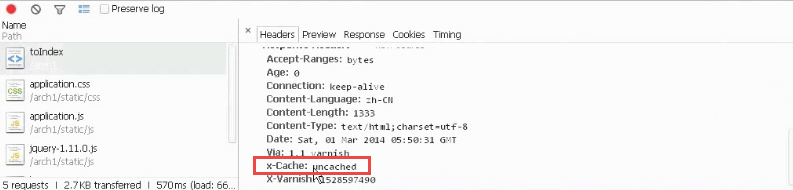
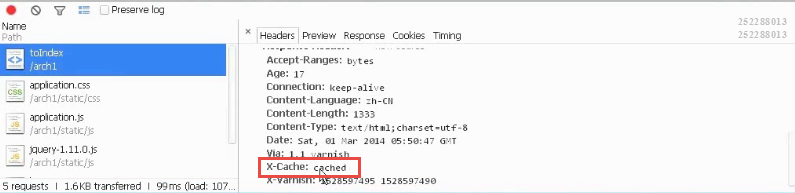
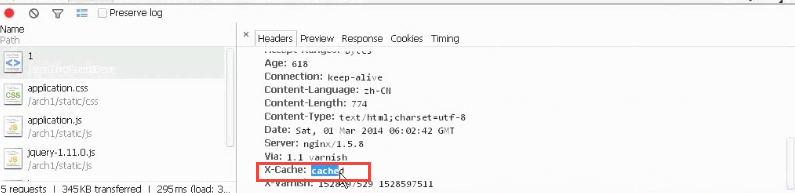
检测
第一次请求
第二次请求
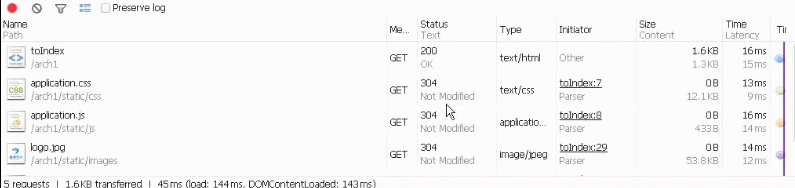
304 Not Modifed (浏览器缓存)
Nginx + Varnish + 基本业务
Step 1 ,修改配置.nginx.conf 文件
user  root;

worker_processes  ;

error_log  logs/error.log crit;

#error_log  logs/error.log  notice;

#error_log  logs/error.log  info;

pid        logs/nginx.pid;

events {

        use epoll;

    worker_connections  ;

}

http {

    include       mime.types;

    include               ccproxy.conf;

    default_type  application/octet-stream;

    log_format  main  '$remote_addr - $remote_user [$time_local] "$request" '

                      '$status $body_bytes_sent "$http_referer" '

                      '"$http_user_agent" "$http_x_forwarded_for"';

    access_log  logs/access.log  main;

        server_names_hash_bucket_size ;

        client_body_buffer_size 128k;

        client_header_buffer_size 8k;

        client_max_body_size 50m;

        client_header_timeout 1m;

        large_client_header_buffers  8k;

        send_timeout 3m;

        sendfile        on;

    tcp_nopush     on;

        tcp_nodelay on;

    #keepalive_timeout  ;

    keepalive_timeout  ;

    gzip  on;

        gzip_min_length 1k;

        gzip_buffers  16k;

        gzip_http_version 1.1;

        gzip_comp_level ;

        gzip_types text/plain application/x-javascript text/css application/xml;

        gzip_vary on;

        upstream cctest1.com{

                server 127.0.0.1:;

                server 172.0.0.1:;

        }

        upstream cctest2.com {

                server 127.0.0.1:;

        }

    server {

        listen       ;

        server_name  ccserver1;

        #charset koi8-r;

        access_log  logs/host.access.log  main;

        index index.html index.htm index.jsp;

        root /usr/tomcat-8.0.-RC5-/webapps/ROOT;

        #location ~* ^/architecture1web/.*\.(jpg|jpeg|gif|png|swf|ico)$ {

        #       root /usr/tomcat-8.0.-RC5-/webapps;

        #}

        #location ~* ^/architecture1web/.*\.(html|htm|js|css)$ {

        #       root /usr/tomcat-8.0.-RC5-/webapps;

        #}

        #location ~* .*\.(jpg|jpeg|gif|png|swf|ico)$ {

        #       if (-f $request_filename){

        #               break;

        #       }

        #}

        #location ~* .*\.(html|htm|js|css)$ {

        #       # express id;

        #}

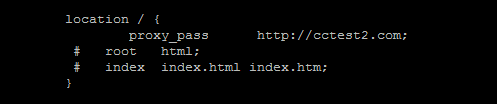
        location / {

                proxy_pass      http://cctest2.com;

         #   root   html;

         #   index  index.html index.htm;

        }

        #error_page                /.html;

        # redirect server error pages to the static page /50x.html

        #

        error_page        /50x.html;

        location = /50x.html {

                        internal;

            root  errors/html;

        }

        # proxy the PHP scripts to Apache listening on 127.0.0.1:

        #

        #location ~ \.php$ {

        #    proxy_pass   http://127.0.0.1;

        #}

        # pass the PHP scripts to FastCGI server listening on 127.0.0.1:

        #

        #location ~ \.php$ {

        #    root           html;

        #    fastcgi_pass   127.0.0.1:;

        #    fastcgi_index  index.php;

        #    fastcgi_param  SCRIPT_FILENAME  /scripts$fastcgi_script_name;

        #    include        fastcgi_params;

        #}

        # deny access to .htaccess files, if Apache's document root

        # concurs with nginx's one

        #

        #location ~ /\.ht {

        #    deny  all;

        #}

    }

    # another virtual host using mix of IP-, name-, and port-based configuration

    #

    #server {

    #    listen       ;

    #    listen       somename:;

    #    server_name  somename  alias  another.alias;

    #    location / {

    #        root   html;

    #        index  index.html index.htm;

    #    }

    #}

    # HTTPS server

    #

    #server {

    #    listen        ssl;

    #    server_name  localhost;

    #    ssl_certificate      cert.pem;

    #    ssl_certificate_key  cert.key;

    #    ssl_session_cache    shared:SSL:1m;

    #    ssl_session_timeout  5m;

    #    ssl_ciphers  HIGH:!aNULL:!MD5;

    #    ssl_prefer_server_ciphers  on;

    #    location / {

    #        root   html;

    #        index  index.html index.htm;

    #    }

    #}

}
修改部分

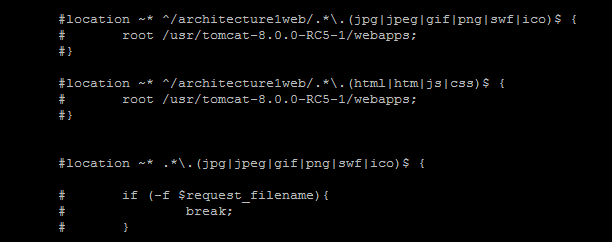
运行检查
7.11 如何应用Varnish的更多相关文章
- 地区sql
/*Navicat MySQL Data Transfer Source Server : localhostSource Server Version : 50136Source Host : lo ...
- Nginx+Varnish 实现动静分离,为服务器分流,降低服务器负载
相必大家在看加快网站响应速度方面的文章时,都提过这么一条:动静分离.那怎样实现动静分离呢,这里笔者就亲自搭建相关服务实现动静分离. 动静分离是一种架构,就是把静态文件,比如JS.CSS.图片甚至有些静 ...
- Varnish缓存服务器的搭建配置手册
Varnish缓存服务器的搭建配置手册 1.Varnish官方环境依赖提示 Installing Varnish Cache is as simple as enabling our package ...
- CDN调度器HAProxy、Nginx、Varnish
http://www.ttlsa.com/web/the-cdn-scheduler-nginx-haproxy-varnish/ CDN功能如下:1.将全网IP分为若干个IP段组,分组的依据通常是运 ...
- Nginx+Varnish
Nginx+Varnish 实现动静分离,为服务器分流,降低服务器负载 相必大家在看加快网站响应速度方面的文章时,都提过这么一条:动静分离.那怎样实现动静分离呢,这里笔者就亲自搭建相关服务实现动静分离 ...
- 轻量级别的Cache和反向代理软件---Varnish
1.Varnish描述 1.1 Varnish的结构与特点 Varnish是一个轻量级别的Cache和反向代理软件,先进的设计理念和成熟的设计框架是Varnish的主要特点: 基于内存进行缓存,重启后 ...
- 项目实战5—企业级缓存系统varnish应用与实战
企业级缓存系统varnish应用与实战 环境背景:随着公司业务快速发展,公司的电子商务平台已经聚集了很多的忠实粉丝,公司也拿到了投资,这时老板想通过一场类似双十一的活动,进行一场大的促销,届时会有非常 ...
- varnish学习以及CDN的原理
一.varnish学习Web Page Cache: squid --> varnish 程序的运行具有局部性特征: 时间局部性:一个数据被访问过之后,可能很快会被再次访问到: 空间局部性:一个 ...
- varnish实践
一.实验环境: 1.软件版本: 系统版本:CentOS Linux release 7.4.1708 (Core) php版本:PHP 7.2 nginx版本:nginx-1.12.2 数据库版本:M ...
随机推荐
- 匈牙利命名法、Camel命名法与Pascal命名法
Camel命名法:即骆驼式命名法,首字母小写,采用该命名法的名称看起来就像骆驼的驼峰一样高低起伏.Camel命名法有两种形式: 1.混合使用大小写字母,例如runFast 2.单词之间加下划线,例如r ...
- spring boot 中容器 Jetty、Tomcat、Undertow
spring boot 中依赖tomcat <dependency> <groupId>org.springframework.boot</groupId> < ...
- Linux--info命令 ,help命令,man命令(帮助)
Info和man命令一样都是帮助类文件 Info文件不仅包含信息,而且还包含连接到其他info文件的链接. 如何使用info显示希望的内容 * 如何操纵Info系统 * 如何显示Info的帮助信息. ...
- LeetCode 876. Middle of the Linked List(获得链表中心结点)
题意:获得链表中心结点.当有两个中心结点时,返回第二个. 分析:快慢指针. /** * Definition for singly-linked list. * struct ListNode { * ...
- 6(计算机网络) 交换机与VLAN
拓扑结构是怎么形成的? 我们常见到的办公室大多是一排排的桌子,每个桌子都有网口,一排十几个座位就有十几个网口,一个楼层就会有几十个甚至上百个网口.如果算上所有楼层,这个场景自然比你宿舍里的复杂多了.具 ...
- Python - ORM(数据库相关)
1. 概念 目标:类/对象操作 -> SQL语句 -> DB API -> 再在数据库中执行.ORM做前两部,因为ORM本身无法操作数据库.参考:https://baike.baid ...
- java编程,通过代理服务器访问外网的FTP
有些时候我们的网络不能直接连接到外网, 需要使用http或是https或是socket代理来连接到外网, 这里是java使用代理连接到外网的一些方法, 希望对你的程序有用.方法一:使用系统属性来完成代 ...
- Xcode忽略编译警告
关于本文: 1.说明让Xcode忽略编译警告的目的 2.关于编译警告的开启与关闭的实现 3.顺便借此机会宣传下理解编译原理的大大好处 临时有事,后面更新.
- django-文件上传Media url的配置
一:问题 当开启一个项目的时候,通常会遇到文件(图片,音频等)上传的需要,最常见的比如图片的上传,用户头像,后台管理添加图片,而图片的在是数据库中的存储主要是以该文件的相对路径,在django中可以使 ...
- AngularJS 官方启动文档
参考:https://angular.io/guide/quickstart 中文:http://www.angularjs.net.cn/