
Python基础知识(day1)
day1
1.编码
ASCII码 1字节8位 2^8 = 256 位
万国码 unicode 4字节32位 #浪费空间
UTF-8 对unicode进行压缩
2.注释
单行注释
score  = input('请输入成绩: ')

#整数化成绩

score_int = int(score)

#判断等级
多行注释
"""

1.循环打印"人生苦短,我用python"

"""
3.输入、输出
输入
#默认input字符型

score = input ("提示输入:")

#类型转换

score = int(score)
输出
#print输出

print('Hello World!')
4.变量
变量无类型,数据有类型
缩进为灵魂
变量命名驼峰式或下划线式,推荐下划线式
5.if条件语句
if-else,缩进为灵魂
多个判断条件可用if-elif-else
score  = input('请输入成绩: ')

#整数化成绩

score_int = int(score)

#判断等级

if score_int > 90:

    print('你的成绩为 ', score_int, '分,等级为: '+'A')

elif score_int > 80:

    print('你的成绩为 ', score_int, '分,等级为: '+'B')

elif score_int > 70:

    print('你的成绩为 ', score_int, '分,等级为: '+'C')

else:

    print('你的成绩为 ', score_int, '分,等级为: '+'D')
6.while循环
- debug模式,打断点,每一步执行
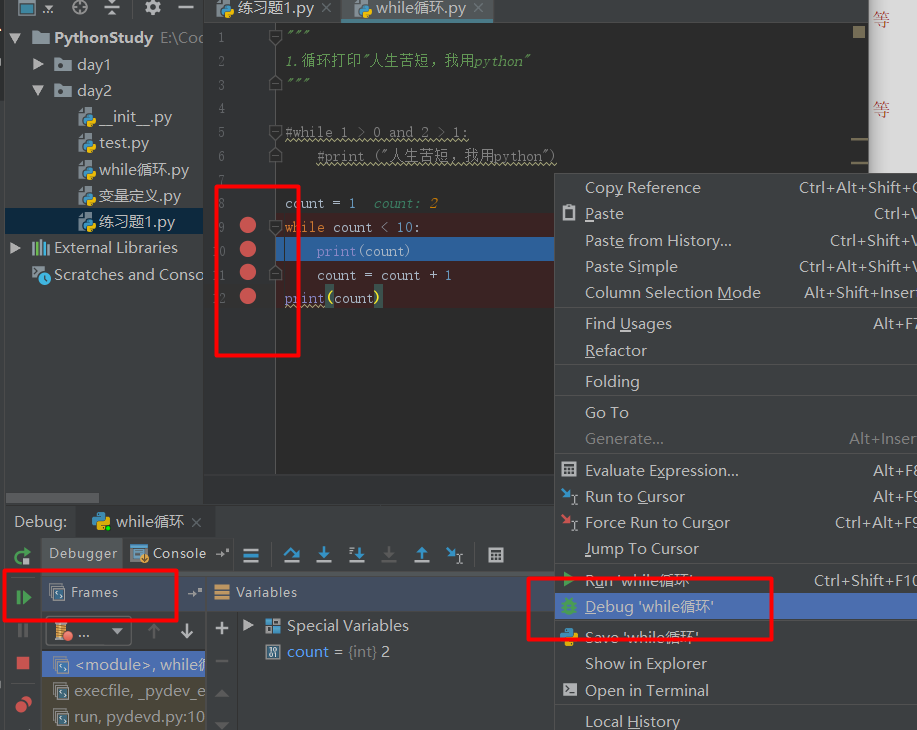
循环结束条件,否则进入死循环
"""

1.循环打印"人生苦短,我用python"

"""

#while 1 > 0 and 2 > 1:

    #print ("人生苦短,我用python")

count = 1

while count < 10:

    print(count)

    count = count + 1

print(count)
跳出本次循环
#方法一,pass

count = 1

while count < 10:

    if count == 7:

      pass

    else:

        print(count)

    count = count + 1

print(count)

#方法二,if !=

count = 1

while count < 10:

    if count != 7:

        print(count)

    count = count + 1

print(count)
break跳出当前循环
while True:

    print(666)

    break #中止当前循环

print('结束')

#通过break实现1~10

count = 1

while True:

    print(count)

    if count == 10:

        break

    count = count + 1

print('The End!')
continue跳出本次循环
#continue 跳出本次循环

count = 1

while count <= 10:

    if count == 7:

        count = count + 1

        continue

    print(count)

    count = count + 1

print('The End!')
while-else(极少使用)
#while-else

count = 1

while count <= 10:

    print(count)

    if count == 10:

        break

    count = count + 1

else:

    print('不再满足while条件执行或条件为false!')

print('The End!')
7.其他
- 快速注释 ctrl+?
Python基础知识(day1)的更多相关文章
- 9-Python基础知识-day1
Python基础知识-day1 Python 2 和Python 3 的区别: Python2 源码不标准,混乱,重复代码多:#-*-encoding:utf8 -*- 解决python2显示中文的问 ...
- Python开发【第二篇】:Python基础知识
Python基础知识 一.初识基本数据类型 类型: int(整型) 在32位机器上,整数的位数为32位,取值范围为-2**31-2**31-1,即-2147483648-2147483647 在64位 ...
- python基础知识(二)
以下内容,作为python基础知识的补充,主要涉及基础数据类型的创建及特性,以及新数据类型Bytes类型的引入介绍
- python 基础知识(一)
python 基础知识(一) 一.python发展介绍 Python的创始人为Guido van Rossum.1989年圣诞节期间,在阿姆斯特丹,Guido为了打发圣诞节的无趣,决心开发一个新的脚本 ...
- python基础知识讲解——@classmethod和@staticmethod的作用
python基础知识讲解——@classmethod和@staticmethod的作用 在类的成员函数中,可以添加@classmethod和@staticmethod修饰符,这两者有一定的差异,简单来 ...
- python爬虫主要就是五个模块:爬虫启动入口模块,URL管理器存放已经爬虫的URL和待爬虫URL列表,html下载器,html解析器,html输出器 同时可以掌握到urllib2的使用、bs4(BeautifulSoup)页面解析器、re正则表达式、urlparse、python基础知识回顾(set集合操作)等相关内容。
本次python爬虫百步百科,里面详细分析了爬虫的步骤,对每一步代码都有详细的注释说明,可通过本案例掌握python爬虫的特点: 1.爬虫调度入口(crawler_main.py) # coding: ...
- python 爬虫与数据可视化--python基础知识
摘要:偶然机会接触到python语音,感觉语法简单.功能强大,刚好朋友分享了一个网课<python 爬虫与数据可视化>,于是在工作与闲暇时间学习起来,并做如下课程笔记整理,整体大概分为4个 ...
- python基础知识小结-运维笔记
接触python已有一段时间了,下面针对python基础知识的使用做一完整梳理:1)避免‘\n’等特殊字符的两种方式: a)利用转义字符‘\’ b)利用原始字符‘r’ print r'c:\now' ...
- Python基础知识(五)
# -*- coding: utf-8 -*-# @Time : 2018-12-25 19:31# @Author : 三斤春药# @Email : zhou_wanchun@qq.com# @Fi ...
- Python基础知识(Basic knowledge)
Python基础知识(Basic knowledge) 1.认识Python&基础环境搭建 2.Python基础(上) 3.Python基础(中) 4.Python基础(下) 5.Python ...
随机推荐
- 关于jQuery中toggle参数callback函数提前执行问题
通过 jQuery,您可以使用 toggle() 方法来切换 hide() 和 show() 方法. 显示被隐藏的元素,并隐藏已显示的元素: $(selector).toggle(speed,call ...
- day34-进程
#进程是程序的运行,程序不运行不产生进程. #1.进程的并行与并发: # 并行:是指两者同时执行,比如赛跑,两人都在不停的往前跑.(资源够用,比如三个线程,四核的cpu) # 并发:是指资源有限的情况 ...
- PAT甲级——1058 A+B in Hogwarts
1058 A+B in Hogwarts If you are a fan of Harry Potter, you would know the world of magic has its own ...
- PXE自动部署工具
1.工具介绍1.1::本工具主要以图形界面的方式帮助使用者快速部署PXE安装Linux的基础环境环境,(如不需要可忽略相关操作)并且支持自动配置静态IP地址和为H3C设备划分VLAN. 1.2::对于 ...
- [LC] 277. Find the Celebrity
Suppose you are at a party with n people (labeled from 0 to n - 1) and among them, there may exist o ...
- Derby数据库的使用
一. Derby数据库平台的搭建 ● JDK 1.6版本及之后的版本为Java平台提供了一个数据库管理系统,简称Derby数据库. ● 连接Derby数据库需要有关的类,这些类以jar文件的形 ...
- miracle|
N-COUNT 奇迹;出人意料的事If you say that a good event is a miracle, you mean that it is very surprising and ...
- python中sort和sorted排序的相关方法
Python list内置sort()方法用来排序,也可以用python内置的全局sorted()方法来对可迭代的序列排序生成新的序列. 1)排序基础 简单的升序排序是非常容易的.只需要调用sorte ...
- JS实现select去除option的使用注意事项
网上讲JS动态添加option和删除option的文章很多,在此推荐一篇: http://www.jb51.net/article/35205.htm 我使用的是如下方法: function remo ...
- git使用的简要介绍
GIT """ 什么是git:版本控制器 - 控制的对象是开发的项目代码 代码开发时间轴:需求1 > 版本库1 > 需求2 > 版本库2 > 版本 ...