
jQuery实现购物车商品数量及总价的计算
记录一下项目中遇到的计算购物车商品数量和总价的jQuery代码,重点在于选择器以及.text()命令的使用。
先上效果图,点击加减,商品数量以及总价会发生相应变化。
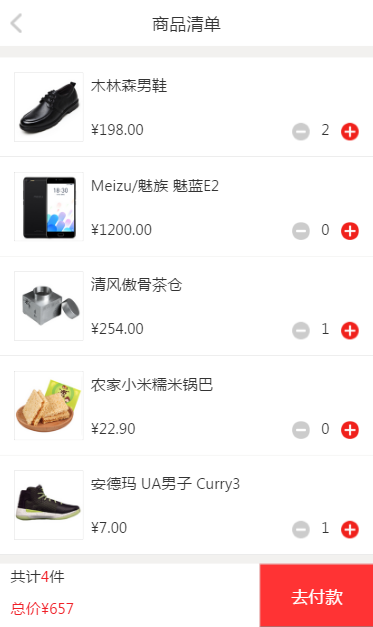
html代码:
<div class="addGoods">

      <div class="goods_list">

          <ul>

            <li><img class="goods_img" src="../img/goods1.png"><p>木林森男鞋</p>

            <div class="goods_bottom">¥<span class="goods_price">198.00</span><div class="num"><img class="minus" src="../img/minus.png" /><span>0</span><img class="plus" src="../img/plus.png"></div></div></li>

            <li><img class="goods_img" src="../img/goods2.png"><p>Meizu/魅族 魅蓝E2</p>

            <div class="goods_bottom">¥<span class="goods_price">1200.00</span><div class="num"><img class="minus" src="../img/minus.png" /><span>0</span><img class="plus" src="../img/plus.png"></div></div></li>

            <li><img class="goods_img" src="../img/goods3.png"><p>清风傲骨茶仓</p>

            <div class="goods_bottom">¥<span class="goods_price">254.00</span><div class="num"><img class="minus" src="../img/minus.png" /><span>0</span><img class="plus" src="../img/plus.png"></div></div></li>

            <li><img class="goods_img" src="../img/goods4.png"><p>农家小米糯米锅巴</p>

            <div class="goods_bottom">¥<span class="goods_price">22.90</span><div class="num"><img class="minus" src="../img/minus.png" /><span>0</span><img class="plus" src="../img/plus.png"></div></div></li>

            <li><img class="goods_img" src="../img/goods5.png"><p>安德玛 UA男子 Curry3</p>

            <div class="goods_bottom">¥<span  class="goods_price">7.00</span><div class="num"><img class="minus" src="../img/minus.png" /><span>0</span><img class="plus" src="../img/plus.png"></div></div></li>

          </ul>

          <div class="pay">共计<span class="totalNum">0</span>件

          <p>总价¥<span class="totalPrice">0</span></p><button type="submit">去付款</button></div>

      </div>
</div>
列表部分CSS代码:
.goods_list ul li{

    background-color: #FFF;

    border-bottom: 1px solid #CCC;

    height: 260px;

    padding: 40px;

}

.goods_img{

    float: left;

    border: 1px solid #CCC;

    margin-right: 20px;

    width: 180px;

    height: 180px;

}

.goods_bottom{

    padding-top: 52px;

}

.goods_bottom .price{

    color: #F02028;

}

.goods_list .num{

    float: right;

}

.goods_list .num span{

    padding: 0 30px;

}

.pay {

    padding-left: 30px;

    background-color: #FFF;

    width: 100%;

    height: 166px;

    position: fixed;bottom:;

}

.pay .totalNum{

    color: #F02028;

}

.pay p{

    color: #F02028;

}

.pay button{

    position: fixed;bottom:;right:;

    width: 300px;

    height: 166px;

    background-color: #FF3334;

    color: #FFF;

    font-size: 45px;

}
点击按钮后,需要改变的地方有三处,列表里加减中间的数字,底部的totalNum和totalPrice。
jQuery代码:
$(document).ready(function(){
//点击增加按钮触发事件

    $(".plus").click(function(){

        var num = $(this).parent().children("span");
//单品数量增加

        num.text(parseInt(num.text())+1);
//商品总数增加

        var totalNum = parseInt($(".totalNum").text());
        totalNum++

        $(".totalNum").text(totalNum);
//计算总价

        var goods_price = parseInt($(this).parent().parent().children(".goods_price").text());

        $(".totalPrice").text(parseInt($(".totalPrice").text())+goods_price);

    });


//点击减少按钮触发事件

     $(".minus").click(function(){

        var num = $(this).parent().children("span");

        if(parseInt(num.text())){

        num.text(parseInt(num.text())-1);

        var totalNum = parseInt($(".totalNum").text());

        totalNum--

        $(".totalNum").text(totalNum);

        var goods_price = parseInt($(this).parent().parent().children(".goods_price").text());

        $(".totalPrice").text(parseInt($(".totalPrice").text())-goods_price);

    } else{

        num.text("0");

    }

    });

 });
值得注意的有以下几点:
1. .parent()函数用于选取每个匹配元素的父元素,并以jQuery对象的形式返回;.parent()函数用于选取每个匹配元素的子元素, .find 和 .children() 方法类似,不过后者只沿着 DOM 树向下遍历单一层级。
2. text()函数用于返回或设置当前jQuery对象所匹配的DOM元素内的text内容,且该值为字符串类型,所以要用parseInt()转换为整数类型才可以进行计算。
3. 需要添加单品数量小于0时的处理,防止出现负数。
PS:选择器用得过于繁琐,存在改进空间。
jQuery实现购物车商品数量及总价的计算的更多相关文章
- Flutter实战视频-移动电商-63.购物车_详细页显示购物车商品数量
63.购物车_详细页显示购物车商品数量 购物车的图标嵌套在statck组件里面 外层套了一个stack组件 数量我们需要用Provide 返回一个container来做样式 气泡效果,中间是个数字外面 ...
- 【SSH网上商城项目实战28】使用Ajax技术局部更新商品数量和总价
转自: https://blog.csdn.net/eson_15/article/details/51487323 昨天把项目部署了一下,玩了玩,今天完善了一下购物车中修改商品数量就能局部 ...
- 【ecshop】调用购物车商品数量
1 打开 includes/lib_insert.php 在最后位置添加如下代码: /** * 调用购物车商品数目 */ function insert_cart_mes_num() { $sql = ...
- django-获取购物车商品数量-redis
视图函数views.py中 from django_redis import get_redis_connection # 连接redis class IndexView(View): '''首页'' ...
- 利用 jQuery 操作页面元素的方法,实现电商网站购物车页面商品数量的增加和减少操作,要求单项价格和总价随着数量的改变而改变
查看本章节 查看作业目录 需求说明: 利用 jQuery 操作页面元素的方法,实现电商网站购物车页面商品数量的增加和减少操作,要求单项价格和总价随着数量的改变而改变 当用户单击"+" ...
- 069——VUE中vuex之使用getters高效获取购物车商品总价
<!DOCTYPE html> <html lang="en"> <head> <meta charset="UTF-8&quo ...
- jQuery实现购物车多物品数量的加减+总价计算
<!DOCTYPE html PUBLIC "-//W3C//DTD XHTML 1.0 Transitional//EN" "http://www.w3. ...
- jQuery实现购物车多物品数量的加减+总价+删除计算
<?php session_start(); ?> <!DOCTYPE html PUBLIC "-//W3C//DTD XHTML 1.0 Transitional//E ...
- 仿淘宝购物车demo---增加和减少商品数量
在上一篇博客中,小编简单的介绍了如何使用listview来实现购物车,但是仅仅是简单的实现了列表的功能,随之而来一个新的问题,买商品的时候,我们可能不止想买一件商品,想买多个,或许有因为某种原因点错了 ...
随机推荐
- 【比较】遗传算法GA和遗传编程GP有什么不同?
遗传算法GA 本质上有一个固定的长度,这意味着所产生的功能有限的复杂性 通常会产生无效状态,因此需要以非破坏性方式处理这些状态 通常依赖于运算符优先级(例如,在我们的例子中,乘法发生在减法之前),这可 ...
- 【比较】粒子群算法PSO 和 遗传算法GA 的相同点和不同点
目录 PSO和GA的相同点 PSO和GA不同点 粒子群算法(PSO)和遗传算法(GA)都是优化算法,都力图在自然特性的基础上模拟个体种群的适应性,它们都采用一定的变换规则通过搜索空间求解. PSO和G ...
- java新学者(二)
一.构造方法的特点 创建新的对象 A a =new A (); 二.抽象类和抽象方法的特点是什么? .抽象类使用abstract修饰: .抽象类不能实例化,即不能使用new关键字来实例化对象: .含有 ...
- Hbase-二级索引 Hbase+Hbase-indexer+solr (CDH)
最近一段时间工作涉及到hbase sql查询和可视化展示的工作,hbase作为列存储,数据单一为二进制数组,本身就不擅长sql查询:而且有hive来作为补充作为sql查询和存储,但是皮皮虾需要低延迟的 ...
- charles 抓包iOS模拟器 HTTPS请求
参考: https://www.jianshu.com/p/3bfae9ede35e https://www.jianshu.com/p/171046d9f4f9 https://www.jiansh ...
- 16-3 update语句
--打开和关闭查询窗口:ctrl+R --更新语句: --update 表名 set 列=新值,列2=新值2,... where 条件 --update语句,如果不加where条件,那么表示对表中所有 ...
- DQN(Deep Q-learning)入门教程(零)之教程介绍
简介 DQN入门系列地址:https://www.cnblogs.com/xiaohuiduan/category/1770037.html 本来呢,在上一个系列数据挖掘入门系列博客中,我是准备写数据 ...
- Unity实现写入json文件
using System.Collections; using System.Collections.Generic; using UnityEngine; using LitJson; using ...
- python时间戳和时间字符串的转换
# -*- coding: utf-8 -*-# date=2020/3/27import timeimport uuid def getTimestamp_1770(): now_1770 = ro ...
- Ant标签详解--基础操作
Ant的一些核心概念: build.xml:构建文件是以XML 文件来描述的,默认构建文件名为build.xml. project:每个构建文件包含一个工程. property:属性,一 ...