
django之创建第2个项目
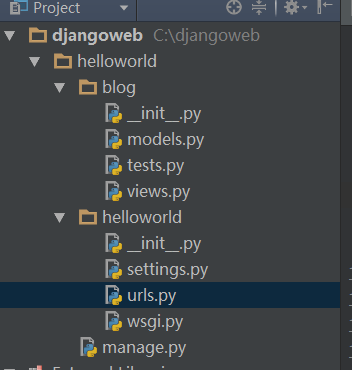
如上为项目结构
1、创建项目helloworld
2、把目录切换到django/helloworld目录下创建blog站点
3、需要修改的信息如下:
1)修改blog站点的views.py
# Create your views here.

#coding:utf-8

from django.http import HttpResponse

def index(request):

    return HttpResponse("hello,Django")
2)修改setting.py文件
# Django settings for helloworld project.

DEBUG = True

TEMPLATE_DEBUG = DEBUG

ADMINS = (

    # ('Your Name', 'your_email@example.com'),

)

MANAGERS = ADMINS

DATABASES = {

    'default': {

        'ENGINE': 'django.db.backends.', # Add 'postgresql_psycopg2', 'mysql', 'sqlite3' or 'oracle'.

        'NAME': '',                      # Or path to database file if using sqlite3.

        # The following settings are not used with sqlite3:

        'USER': '',

        'PASSWORD': '',

        'HOST': '',                      # Empty for localhost through domain sockets or '127.0.0.1' for localhost through TCP.

        'PORT': '',                      # Set to empty string for default.

    }

}

# Hosts/domain names that are valid for this site; required if DEBUG is False

# See https://docs.djangoproject.com/en/1.5/ref/settings/#allowed-hosts

ALLOWED_HOSTS = []

# Local time zone for this installation. Choices can be found here:

# http://en.wikipedia.org/wiki/List_of_tz_zones_by_name

# although not all choices may be available on all operating systems.

# In a Windows environment this must be set to your system time zone.

TIME_ZONE = 'Asia/Shanghai'

# Language code for this installation. All choices can be found here:

# http://www.i18nguy.com/unicode/language-identifiers.html

LANGUAGE_CODE = 'zh-cn'

SITE_ID = 1

# If you set this to False, Django will make some optimizations so as not

# to load the internationalization machinery.

USE_I18N = True

# If you set this to False, Django will not format dates, numbers and

# calendars according to the current locale.

USE_L10N = True

# If you set this to False, Django will not use timezone-aware datetimes.

USE_TZ = True

# Absolute filesystem path to the directory that will hold user-uploaded files.

# Example: "/var/www/example.com/media/"

MEDIA_ROOT = ''

# URL that handles the media served from MEDIA_ROOT. Make sure to use a

# trailing slash.

# Examples: "http://example.com/media/", "http://media.example.com/"

MEDIA_URL = ''

# Absolute path to the directory static files should be collected to.

# Don't put anything in this directory yourself; store your static files

# in apps' "static/" subdirectories and in STATICFILES_DIRS.

# Example: "/var/www/example.com/static/"

STATIC_ROOT = ''

# URL prefix for static files.

# Example: "http://example.com/static/", "http://static.example.com/"

STATIC_URL = '/static/'

# Additional locations of static files

STATICFILES_DIRS = (

    # Put strings here, like "/home/html/static" or "C:/www/django/static".

    # Always use forward slashes, even on Windows.

    # Don't forget to use absolute paths, not relative paths.

)

# List of finder classes that know how to find static files in

# various locations.

STATICFILES_FINDERS = (

    'django.contrib.staticfiles.finders.FileSystemFinder',

    'django.contrib.staticfiles.finders.AppDirectoriesFinder',

#    'django.contrib.staticfiles.finders.DefaultStorageFinder',

)

# Make this unique, and don't share it with anybody.

SECRET_KEY = 'q-$_k0g=jx3!n-#a&ul@if1rpd5_rc_l)j3pw4x84hd=hma_@+'

# List of callables that know how to import templates from various sources.

TEMPLATE_LOADERS = (

    'django.template.loaders.filesystem.Loader',

    'django.template.loaders.app_directories.Loader',

#     'django.template.loaders.eggs.Loader',

)

MIDDLEWARE_CLASSES = (

    'django.middleware.common.CommonMiddleware',

    'django.contrib.sessions.middleware.SessionMiddleware',

    'django.middleware.csrf.CsrfViewMiddleware',

    'django.contrib.auth.middleware.AuthenticationMiddleware',

    'django.contrib.messages.middleware.MessageMiddleware',

    # Uncomment the next line for simple clickjacking protection:

    # 'django.middleware.clickjacking.XFrameOptionsMiddleware',

)

ROOT_URLCONF = 'helloworld.urls'

# Python dotted path to the WSGI application used by Django's runserver.

WSGI_APPLICATION = 'helloworld.wsgi.application'

TEMPLATE_DIRS = (

    # Put strings here, like "/home/html/django_templates" or "C:/www/django/templates".

    # Always use forward slashes, even on Windows.

    # Don't forget to use absolute paths, not relative paths.

)

INSTALLED_APPS = (

    'django.contrib.auth',

    'django.contrib.contenttypes',

    'django.contrib.sessions',

    'django.contrib.sites',

    'django.contrib.messages',

    'django.contrib.staticfiles',

    # Uncomment the next line to enable the admin:

    # 'django.contrib.admin',

    # Uncomment the next line to enable admin documentation:

    # 'django.contrib.admindocs',

    'blog',

)

SESSION_SERIALIZER = 'django.contrib.sessions.serializers.JSONSerializer'

# A sample logging configuration. The only tangible logging

# performed by this configuration is to send an email to

# the site admins on every HTTP 500 error when DEBUG=False.

# See http://docs.djangoproject.com/en/dev/topics/logging for

# more details on how to customize your logging configuration.

LOGGING = {

    'version': 1,

    'disable_existing_loggers': False,

    'filters': {

        'require_debug_false': {

            '()': 'django.utils.log.RequireDebugFalse'

        }

    },

    'handlers': {

        'mail_admins': {

            'level': 'ERROR',

            'filters': ['require_debug_false'],

            'class': 'django.utils.log.AdminEmailHandler'

        }

    },

    'loggers': {

        'django.request': {

            'handlers': ['mail_admins'],

            'level': 'ERROR',

            'propagate': True,

        },

    }

}
3)修改urls.py文件
from django.conf.urls import patterns, include, url

#注意这里不需要导入index所在的包,但是最新的版本可能需要导入才行

# Uncomment the next two lines to enable the admin:

# from django.contrib import admin

# admin.autodiscovhelloworlder()

urlpatterns = patterns('',

    # Examples:

    # url(r'^$', 'helloworld.views.home', name='home'),

    # url(r'^helloworld/', include('helloworld.foo.urls')),

    # Uncomment the admin/doc line below to enable admin documentation:

    # url(r'^admin/doc/', include('django.contrib.admindocs.urls')),

    # Uncomment the next line to enable the admin:

    # url(r'^admin/', include(admin.site.urls)),

    #url(r'^$', 'blog.views.index'),

    url(r'^blog/index/$', 'blog.views.index'),

)
输出结果:

django之创建第2个项目的更多相关文章
- django之创建第12个项目-加载图片
百度云盘:django之创建第12个项目-加载图片 1.setting配置 #静态文件相关配置 # URL prefix for static files. # Example: "http ...
- django之创建第11个项目-页面整合
目的:将如下众多html页面整合到一个index.html页面中. 百度云盘:django之创建第11个项目-页面整合 用下面的方式实现: <!DOCTYPE html> <head ...
- django之创建第10-1个项目-图片上传并记录上传时间
1.百度云盘:django之创建第10-1个项目-图片上传并记录上传时间 2.主要修改的配置文件有3个,forms.views和models3个文件以及html 3.forms.py文件修改 #cod ...
- django之创建第10个项目-图片上传方式1
1.upload.HTMl <html xmlns="http://www.w3.org/1999/xhtml" xml:lang="en" lang=& ...
- django之创建第9个项目-管理后台admin
django之创建第9个项目-管理后台admin配置 1.配置setting文件INSTALLED_APPS = ( 'django.contrib.auth', 'django.cont ...
- django之创建第8-3个项目-数据库数据提取之高级操作
1.配置test2.html <!DOCTYPE html> <html lang="en"> <head> <meta charset= ...
- django之创建第8-1个项目-数据库之增删改查/数据库数据显示在html页面
1.为test.DB数据库预先创建下面数据 1 张三 16 2015-01-02 12 李四 17 2015-01-04 13 王五 14 ...
- django之创建第8个项目-数据库配置及同步研究
1.sqlitestudio-2.1.5数据库可视化工具--百度云盘下载 2.编写C:\djangoweb\helloworld\blog\models.py文件 # Create your mode ...
- django之创建第7-4个项目-配置views文件实现url传值
即:怎么实现url?name=xiaodeng&age=28等类似传值处理 1.配置views文件 # Create your views here. #coding:utf-8 from d ...
- django之创建第7-3个项目-在站点blog下单独创建urls.py文件
1.在站点blog下单独创建urls.py文件 # -*- coding: UTF-8 -*- from django.conf.urls import patterns, include, url ...
随机推荐
- Set a Room Mailbox to Show Details of a Meeting in its Calendar – Office 365
You may notice that meetings with a ‘Room’ mailbox will by default only show a “Busy” status. Many, ...
- AsyncHttpClient的连接池使用逻辑
AsyncHttpClient的连接池结构很简单, NettyConnectionsPool内部重要的几个变量如下 // 连接池, 通过 host 区分不同的池 private final Concu ...
- VNC XEN 双鼠标问题 以及 使用 virt-manager 工具创建的 Xen 虚拟机配置文件不在 /etc/xen/ 目录中了
0.本人用的是Ubuntu 12.04,在其中安装xen 4.1,用的是virt-manager安装虚拟机 1.VNC XEN 双鼠标问题,在配置文件中加入: 找到:(usb 1),在之后加入: (u ...
- SCRIPT5009: “Sys”未定义 部署.net ajax 解决方案
今天在部署asp.net ajax 的时候发现部署服务器的时候,ajax刷新不正确,开始以为是System.Web.Extensions没有引用到本地,baidu一圈发现(最近google上不了郁闷~ ...
- 领扣-5 最长回文子串 Longest Palindromic Substring MD
Markdown版本笔记 我的GitHub首页 我的博客 我的微信 我的邮箱 MyAndroidBlogs baiqiantao baiqiantao bqt20094 baiqiantao@sina ...
- RxJava RxPermissions 动态权限 简介 原理 案例 MD
Markdown版本笔记 我的GitHub首页 我的博客 我的微信 我的邮箱 MyAndroidBlogs baiqiantao baiqiantao bqt20094 baiqiantao@sina ...
- Java怎么转义Ӓ这种字符
import org.apache.commons.lang.StringEscapeUtils; public class EscapeHtml { /** * @param args */ pub ...
- 利用wsdl2java工具生成webservice的客户端代码
1.JDK环境 2.下载apache-cxf发布包:http://cxf.apache.org/download.html 目前最新版本为3.2.6, 解压后如下: 解压发布包,设置CXF_HOME ...
- Linux下简单线程池的实现
大多数的网络服务器,包括Web服务器都具有一个特点,就是单位时间内必须处理数目巨大的连接请求,但是处理时间却是比较短的.在传统的多线程服务器模型中是这样实现的:一旦有个服务请求到达,就创建一个新的服务 ...
- 学界 | Yann LeCun新作,中日韩文本分类到底要用哪种编码?
https://www.wxwenku.com/d/102093756 AI科技评论按:前几天,Yann LeCun与其学生 张翔在arXiv上发表了一篇新作「Which Encoding is th ...