
新建maven指定jdk版本-eclipse新建maven项目报错The superclass "javax.servlet.http.HttpServlet" was not found on the Java Build Path的解决方案
具体表现为:
使用Eclipse+Maven建立了一个Javaweb工程,JSP页面顶端出现“红色”的报错信息:The superclass "javax.servlet.http.HttpServlet" was not found on the Java Build Path。
解决方法:
在pom.xml中的 <build></build>中 添加:
    <plugins>

        <!-- 编码和编译和JDK版本 -->

        <plugin>

            <groupId>org.apache.maven.plugins</groupId>

            <artifactId>maven-compiler-plugin</artifactId>

            <version>2.3.2</version>

            <configuration>

                <source>1.8</source>

                <target>1.8</target>

                <encoding>utf8</encoding>

            </configuration>

        </plugin>

    </plugins>
然后Maven > Update project即可
如果报错:
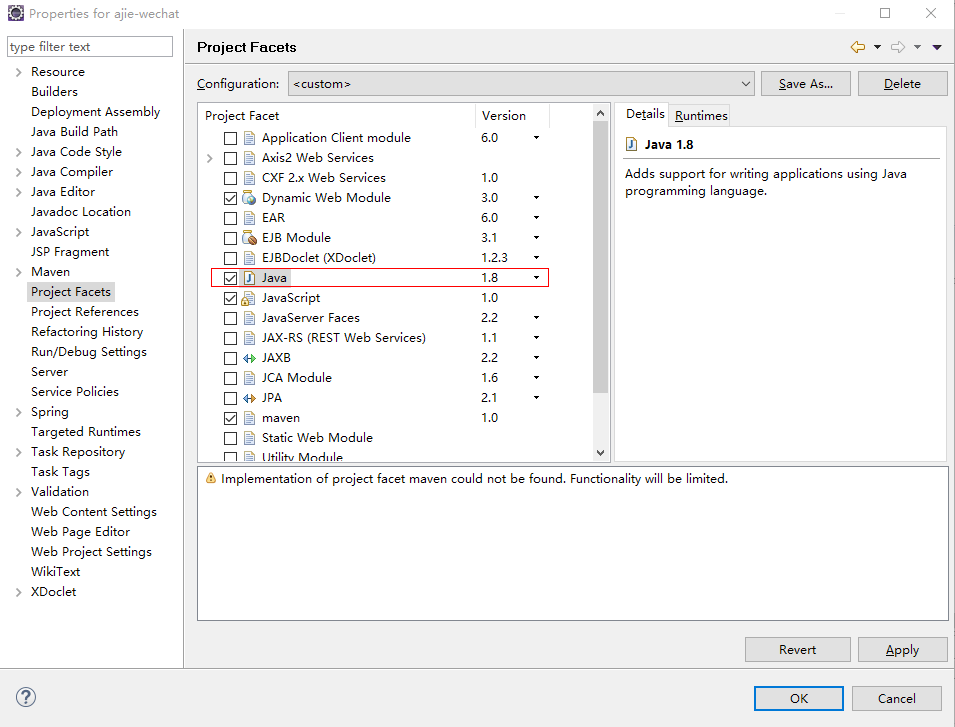
Java compiler level does not match the version of the installed Java project facet. xxx Unknown Faceted Project Problem (Java Version Mismatch)
可以:项目--properties---project Facets设置java文件的版本为 1.8(自己对应上面步骤的jdk)
新建maven指定jdk版本-eclipse新建maven项目报错The superclass "javax.servlet.http.HttpServlet" was not found on the Java Build Path的解决方案的更多相关文章
- eclipse中web工程新建jsp文件报错:The superclass "javax.servlet.http.HttpServlet" was not found on the Java Build Path
web工程中新建jsp文件提示:The superclass "javax.servlet.http.HttpServlet" was not found on the Java ...
- 新建jsp报错“The superclass "javax.servlet.http.HttpServlet" was not found on the Java Build Path”
今天新建jsp文件时,就报错“Visual Page Editor has experimental support for Windows 64-bit”,然后刚好stackoverflow上面有这 ...
- [IDE - Eclipse] JSP报错:The superclass “javax.servlet.http.HttpServlet” was not found on the Java Build Path
是因为Eclipse的Web项目不自动引入相关jar包. Right Click on the Project ❯ Properties ❯ Project Facets. You would be ...
- 使用maven创建项目时报错The superclass "javax.servlet.http.HttpServlet" was not found on the Java Build Path
Description Resource Path Location Type The superclass "javax.servlet.http.HttpServlet" wa ...
- java eclipse maven The superclass "javax.servlet.http.HttpServlet" was not found on the Java Build Path 解决方法
在eclipse 中使用maven 创建java web项目,启动服务器遇到提示:The superclass "javax.servlet.http.HttpServlet" w ...
- Eclipse中新建Maven Web项目报错:The superclass "javax.servlet.http.HttpServlet" was not found on the Java Build Path
在maven web项目中的index.jsp中的错误信息如下: The superclass "javax.servlet.http.HttpServlet" was not f ...
- maven新建web项目提示The superclass "javax.servlet.http.HttpServlet" was not found on the Java Build Path
maven新建web项目提示The superclass "javax.servlet.http.HttpServlet" was not found on the Java Bu ...
- maven项目The superclass "javax.servlet.http.HttpServlet" was not found on the Java Build Path
用Eclipse创建了一个maven web程序,使用tomcat8.5作为服务器,可以正常启动,但是却报如下错误 The superclass "javax.servlet.http.Ht ...
- 新建 jsp异常,The superclass "javax.servlet.http.HttpServlet" was not found on the Java Build Path
新项目,新建jsp页面的时候报异常: Multiple annotations found at this line: - The superclass "javax.servlet.htt ...
随机推荐
- 1. 感知机原理(Perceptron)
1. 感知机原理(Perceptron) 2. 感知机(Perceptron)基本形式和对偶形式实现 3. 支持向量机(SVM)拉格朗日对偶性(KKT) 4. 支持向量机(SVM)原理 5. 支持向量 ...
- andriod创建用户界面(1)
一.UI知识Activity 将UI放在一个Activity上面,可以在Activity的onCreate方法中添加UI. @Override public void onCreate(Bundle ...
- Android 仿微信的朋友圈发布(1)
想自己做一个APP,然后等做到类似发布朋友圈的,微博状态的时候,遇到问题了,完全不知道咋下手. 什么访问相册,列出照片,选择照片进行回传,完全不懂,咋办,自己写?自己写是不可能自己写的,打屎都不可能自 ...
- swift @AUTOCLOSURE 和 ?? ||
* {-webkit-tap-highlight-color: rgba(0,0,0,0);}html {-webkit-text-size-adjust: none;}body {font-fami ...
- [openssl]openssl特定版本安装
卸载旧版本 OpenSSL1. apt-get purge openssl2. rm -rf /etc/ssl #删除配置文件编译与安装 OpenSSLprefix 是安装目录,openssldir ...
- mysql archive存储引擎导入数据报duplicate key
DROP TABLE IF EXISTS `test`;CREATE TABLE `test` ( `id` int(10) unsigned NOT NULL AUTO_INCREMENT, `ve ...
- WebRTC源码分析(一):安卓相机采集实现分析
WebRTC 的代码量不小,一次性看明白不太现实,在本系列中,我将试图搞清楚三个问题: 客户端之间如何建立连接? 客户端之间如何实现数据传输? 音视频数据的采集.预览.编码.传输.解码.渲染完整流程. ...
- Vue 获取自定义属性的值
在jquery中,如果要获取 data-*** 的值可以通过 $('目标元素').data('属性名') 来获取. 在Vue中如何获取该值呢? 1.换个思路,作为参数传递. 如下代码: <but ...
- fresco中设置占位/加载失败的图片 无效
在xml中设置 placeholderImage 属性无效.代码如下: <com.facebook.drawee.view.SimpleDraweeView android:id=" ...
- 自然语言交流系统 phxnet团队 创新实训 项目博客 (十三)
对我们项目中的关键技术实现进行总结: 一.3DMax关键技术实现 1.一下的关于3DMax中对于人物的设计和操作均需要在对3DMax基础知识熟练掌握的情况下进行的. 2. 骨骼架设:首先对导入到3DM ...