
spring Cloud 定时任务 @Scheduled
本文主要记录:如何使用spring的@Scheduled注解实现定时作业,基于spring cloud
1)pom.xml 文件引入相关依赖、spring-maven插件
<?xml version="1.0" encoding="UTF-8"?>

<project xmlns="http://maven.apache.org/POM/4.0.0"

         xmlns:xsi="http://www.w3.org/2001/XMLSchema-instance"

         xsi:schemaLocation="http://maven.apache.org/POM/4.0.0 http://maven.apache.org/xsd/maven-4.0.0.xsd">

    <modelVersion>4.0.0</modelVersion>

    <groupId>com.vip.qa</groupId>

    <artifactId>springboot-demo</artifactId>

    <version>1.0-SNAPSHOT</version>

    <packaging>jar</packaging>

    <parent>

        <groupId>org.springframework.boot</groupId>

        <artifactId>spring-boot-starter-parent</artifactId>

        <version>1.5.2.RELEASE</version>

        <relativePath/>

    </parent>

    <properties>

        <project.build.sourceEncoding>UTF-8</project.build.sourceEncoding>

        <java.version>1.8</java.version>

    </properties>

    <dependencies>

        <dependency>

            <groupId>org.springframework.boot</groupId>

            <artifactId>spring-boot-starter-web</artifactId>

        </dependency>

    </dependencies>

    <build>

        <plugins>

            <plugin>

                <groupId>org.springframework.boot</groupId>

                <artifactId>spring-boot-maven-plugin</artifactId>

            </plugin>

        </plugins>

    </build>

</project>
2)定时任务类
@Component:类注册成bean
@Scheduled:定时任务,可选固定时间、cron表达式等类型
cron表达式 每位的意义:Seconds Minutes Hours DayofMonth Month DayofWeek
package com.vip.qa.vop.service;

import org.slf4j.Logger;

import org.slf4j.LoggerFactory;

import org.springframework.scheduling.annotation.Scheduled;

import org.springframework.stereotype.Component;

import java.text.SimpleDateFormat;

import java.util.Date;

/**

 * Created by danny.yao on 2017/10/19.

 */

@Component

public class ScheduledTasks {

    private static final Logger logger = LoggerFactory.getLogger(ScheduledTasks.class);

    private static final SimpleDateFormat formate = new SimpleDateFormat("yyyy-MM-dd HH:mm:ss");

    @Scheduled(fixedRate = 5000)

    public void scheduledDemo(){

        logger.info("scheduled - fixedRate - print time every 5 seconds:{}", formate.format(new Date()) );

    }

    /**

     "0/5 * *  * * ?"   每5秒触发

     "0 0 12 * * ?"    每天中午十二点触发

     "0 15 10 ? * *"    每天早上10:15触发

     "0 15 10 * * ?"    每天早上10:15触发

     "0 15 10 * * ? *"    每天早上10:15触发

     "0 15 10 * * ? 2005"    2005年的每天早上10:15触发

     "0 * 14 * * ?"    每天从下午2点开始到2点59分每分钟一次触发

     "0 0/5 14 * * ?"    每天从下午2点开始到2:55分结束每5分钟一次触发

     "0 0/5 14,18 * * ?"    每天的下午2点至2:55和6点至6点55分两个时间段内每5分钟一次触发

     "0 0-5 14 * * ?"    每天14:00至14:05每分钟一次触发

     "0 10,44 14 ? 3 WED"    三月的每周三的14:10和14:44触发

     "0 15 10 ? * MON-FRI"    每个周一、周二、周三、周四、周五的10:15触发

     */

    @Scheduled(cron="0/10 * *  * * ?")

    public void scheduledCronDemo(){

        logger.info("scheduled - cron - print time every 10 seconds:{}", formate.format(new Date()) );

    }

}
3)应用程序入口类Application
@SpringBootApplication:等于原来的 (默认属性)@Configuration + @EnableAutoConfiguration + @ComponentScan
@EnableScheduling:启用定时任务
package com.vip.qa.vop;

import org.springframework.boot.SpringApplication;

import org.springframework.boot.autoconfigure.SpringBootApplication;

import org.springframework.scheduling.annotation.EnableScheduling;

/**

 * Created by danny.yao on 2017/10/19.

 */

@SpringBootApplication

@EnableScheduling

public class Application {

    public static void main(String[] args){

        SpringApplication.run(Application.class, args);

    }

}
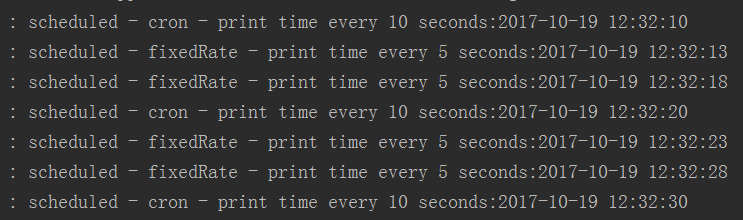
4)运行入口类,可以看到结果
spring Cloud 定时任务 @Scheduled的更多相关文章
- Spring Boot 定时任务 @Scheduled
项目开发中经常需要执行一些定时任务,比如在每天凌晨,需要从 implala 数据库拉取产品功能活跃数据,分析处理后存入到 MySQL 数据库中.类似这样的需求还有许多,那么怎么去实现定时任务呢,有以下 ...
- spring cloud 定时任务
项目中,因为使用了第三方支付(支付宝和微信支付),支付完毕后,第三方支付平台一般会采用异步回调通知的方式,通知商户支付结果,然后商户根据通知内容,变更商户项目支付订单的状态.一般来说,为了防止商户项目 ...
- spring 配置定时任务Scheduled
一:在spring配置的xml文件添加3条命名空间 xmlns:task="http://www.springframework.org/schema/task" xsi:sche ...
- Spring中定时任务@Scheduled的一点小小研究
最近做一个公众号项目,微信公众号会要求服务端找微信请求一个access_token,获取的过程: access_token是公众号的全局唯一接口调用凭据,公众号调用各接口时都需使用access_tok ...
- Spring Task定时任务Scheduled
Spring的任务调度,采用注解的形式 Spring中@Scheduled的用法. spring的配置文件如下,先扫描到任务的类,打开spirng任务的标签 <beans xmlns=" ...
- Spring的定时任务@Scheduled(cron = "0 0 1 * * *")
指定某个方法在特定时间执行,如: cron="0 0 1 1 * ?" 即这个方法每月1号凌晨1点执行一次 关于这个注解的解释网上一大堆 但是今天遇到个问题,明明加了注解@Sche ...
- 【spring boot】使用定时任务@Scheduled 报错:Encountered invalid @Scheduled method 'dealShelf': Cron expression must consist of 6 fields (found 7 in "0 30 14 * * ? *")
在spring boot中使用使用定时任务@Scheduled 报错: org.springframework.beans.factory.BeanCreationException: Error c ...
- spring 定时任务@Scheduled
1.配置文件 <?xml version="1.0" encoding="UTF-8"?> <beans xmlns="http:/ ...
- spring boot 学习(八)定时任务 @Scheduled
SpringBoot 定时任务 @Scheduled 前言 有时候,我们有这样的需求,需要在每天的某个固定时间或者每隔一段时间让应用去执行某一个任务.一般情况下,可以使用多线程来实现这个功能:在 Sp ...
随机推荐
- hive 创建orc表
orc表 创建具备ACID及Transactions的表 这里的表需要具备下面几个条件: 1. 必须以 ORC 格式存储 2. 必须分 bucket,且不能 sort 3. 必须显式声明tran ...
- 【转】每天一个linux命令(9):touch 命令
原文网址:http://www.cnblogs.com/peida/archive/2012/10/30/2745714.html linux的touch命令不常用,一般在使用make的时候可能会用到 ...
- phper必知必会(一)
1.http返回状态 200:成功,服务器已经成功处理了请求,并正常返回了提供请求的网页 301:永久移动,服务器会将请求转移到新的服务器地址 302:临时移动 401:未授权请求,请求需要身份移动 ...
- Python mysql backup
http://www.linuxidc.com/Linux/2015-02/113057.htm ------------- #!/usr/bin/python#################### ...
- 阿里云服务器挖矿wipefs处理
查看指定日志修改过的文件: [root@iZbp12v0moqn078lm0t0l5Z 2018-04-26]# find /data/www/manage -ctime 0 -exec ls -l ...
- linux 重新设置memsql密码
先登陆服务器,找到自己的my.cnf文件,通常会在 /etc目录下(如果不在,可以用find / -name my.cnf命令找一下),然后使用 vi my.cnf 命令编辑该文件(建议先备份),在[ ...
- 杂项:Mantis
ylbtech-杂项:Mantis 缺陷管理平台Mantis,也做MantisBT,全称Mantis Bug Tracker.Mantis是一个基于PHP技术的轻量级的开源缺陷跟踪系统,以Web操作的 ...
- JAVA多线程创建与退出过程
Java多个线程,什么时候被创建,什么时候退出? java程序的入口是什么? java主线程main结束后,是否程序就结束了?C中的(windows,linux)main函数执行完,整个进程结束,其子 ...
- 关于安卓苹果手机安装证书抓https的关键步骤
苹果有关键步骤!!!
- Notepad++ 删除空白行的方法(转)
Notepad++ 是我特别喜欢的一款编程工具.在安装后就可以轻松使用了.Notepad++ 上提供了很多方便的插件以实现更多的扩展,当然自身已经比较强大好用了.如果你遇到文本中间有大量的空白行的话, ...