
spring Cloud 定时任务 @Scheduled
本文主要记录:如何使用spring的@Scheduled注解实现定时作业,基于spring cloud
1)pom.xml 文件引入相关依赖、spring-maven插件
<?xml version="1.0" encoding="UTF-8"?>

<project xmlns="http://maven.apache.org/POM/4.0.0"

         xmlns:xsi="http://www.w3.org/2001/XMLSchema-instance"

         xsi:schemaLocation="http://maven.apache.org/POM/4.0.0 http://maven.apache.org/xsd/maven-4.0.0.xsd">

    <modelVersion>4.0.0</modelVersion>

    <groupId>com.vip.qa</groupId>

    <artifactId>springboot-demo</artifactId>

    <version>1.0-SNAPSHOT</version>

    <packaging>jar</packaging>

    <parent>

        <groupId>org.springframework.boot</groupId>

        <artifactId>spring-boot-starter-parent</artifactId>

        <version>1.5.2.RELEASE</version>

        <relativePath/>

    </parent>

    <properties>

        <project.build.sourceEncoding>UTF-8</project.build.sourceEncoding>

        <java.version>1.8</java.version>

    </properties>

    <dependencies>

        <dependency>

            <groupId>org.springframework.boot</groupId>

            <artifactId>spring-boot-starter-web</artifactId>

        </dependency>

    </dependencies>

    <build>

        <plugins>

            <plugin>

                <groupId>org.springframework.boot</groupId>

                <artifactId>spring-boot-maven-plugin</artifactId>

            </plugin>

        </plugins>

    </build>

</project>
2)定时任务类
@Component:类注册成bean
@Scheduled:定时任务,可选固定时间、cron表达式等类型
cron表达式 每位的意义:Seconds Minutes Hours DayofMonth Month DayofWeek
package com.vip.qa.vop.service;

import org.slf4j.Logger;

import org.slf4j.LoggerFactory;

import org.springframework.scheduling.annotation.Scheduled;

import org.springframework.stereotype.Component;

import java.text.SimpleDateFormat;

import java.util.Date;

/**

 * Created by danny.yao on 2017/10/19.

 */

@Component

public class ScheduledTasks {

    private static final Logger logger = LoggerFactory.getLogger(ScheduledTasks.class);

    private static final SimpleDateFormat formate = new SimpleDateFormat("yyyy-MM-dd HH:mm:ss");

    @Scheduled(fixedRate = 5000)

    public void scheduledDemo(){

        logger.info("scheduled - fixedRate - print time every 5 seconds:{}", formate.format(new Date()) );

    }

    /**

     "0/5 * *  * * ?"   每5秒触发

     "0 0 12 * * ?"    每天中午十二点触发

     "0 15 10 ? * *"    每天早上10:15触发

     "0 15 10 * * ?"    每天早上10:15触发

     "0 15 10 * * ? *"    每天早上10:15触发

     "0 15 10 * * ? 2005"    2005年的每天早上10:15触发

     "0 * 14 * * ?"    每天从下午2点开始到2点59分每分钟一次触发

     "0 0/5 14 * * ?"    每天从下午2点开始到2:55分结束每5分钟一次触发

     "0 0/5 14,18 * * ?"    每天的下午2点至2:55和6点至6点55分两个时间段内每5分钟一次触发

     "0 0-5 14 * * ?"    每天14:00至14:05每分钟一次触发

     "0 10,44 14 ? 3 WED"    三月的每周三的14:10和14:44触发

     "0 15 10 ? * MON-FRI"    每个周一、周二、周三、周四、周五的10:15触发

     */

    @Scheduled(cron="0/10 * *  * * ?")

    public void scheduledCronDemo(){

        logger.info("scheduled - cron - print time every 10 seconds:{}", formate.format(new Date()) );

    }

}
3)应用程序入口类Application
@SpringBootApplication:等于原来的 (默认属性)@Configuration + @EnableAutoConfiguration + @ComponentScan
@EnableScheduling:启用定时任务
package com.vip.qa.vop;

import org.springframework.boot.SpringApplication;

import org.springframework.boot.autoconfigure.SpringBootApplication;

import org.springframework.scheduling.annotation.EnableScheduling;

/**

 * Created by danny.yao on 2017/10/19.

 */

@SpringBootApplication

@EnableScheduling

public class Application {

    public static void main(String[] args){

        SpringApplication.run(Application.class, args);

    }

}
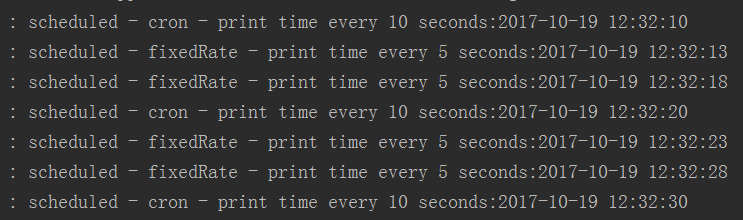
4)运行入口类,可以看到结果
spring Cloud 定时任务 @Scheduled的更多相关文章
- Spring Boot 定时任务 @Scheduled
项目开发中经常需要执行一些定时任务,比如在每天凌晨,需要从 implala 数据库拉取产品功能活跃数据,分析处理后存入到 MySQL 数据库中.类似这样的需求还有许多,那么怎么去实现定时任务呢,有以下 ...
- spring cloud 定时任务
项目中,因为使用了第三方支付(支付宝和微信支付),支付完毕后,第三方支付平台一般会采用异步回调通知的方式,通知商户支付结果,然后商户根据通知内容,变更商户项目支付订单的状态.一般来说,为了防止商户项目 ...
- spring 配置定时任务Scheduled
一:在spring配置的xml文件添加3条命名空间 xmlns:task="http://www.springframework.org/schema/task" xsi:sche ...
- Spring中定时任务@Scheduled的一点小小研究
最近做一个公众号项目,微信公众号会要求服务端找微信请求一个access_token,获取的过程: access_token是公众号的全局唯一接口调用凭据,公众号调用各接口时都需使用access_tok ...
- Spring Task定时任务Scheduled
Spring的任务调度,采用注解的形式 Spring中@Scheduled的用法. spring的配置文件如下,先扫描到任务的类,打开spirng任务的标签 <beans xmlns=" ...
- Spring的定时任务@Scheduled(cron = "0 0 1 * * *")
指定某个方法在特定时间执行,如: cron="0 0 1 1 * ?" 即这个方法每月1号凌晨1点执行一次 关于这个注解的解释网上一大堆 但是今天遇到个问题,明明加了注解@Sche ...
- 【spring boot】使用定时任务@Scheduled 报错:Encountered invalid @Scheduled method 'dealShelf': Cron expression must consist of 6 fields (found 7 in "0 30 14 * * ? *")
在spring boot中使用使用定时任务@Scheduled 报错: org.springframework.beans.factory.BeanCreationException: Error c ...
- spring 定时任务@Scheduled
1.配置文件 <?xml version="1.0" encoding="UTF-8"?> <beans xmlns="http:/ ...
- spring boot 学习(八)定时任务 @Scheduled
SpringBoot 定时任务 @Scheduled 前言 有时候,我们有这样的需求,需要在每天的某个固定时间或者每隔一段时间让应用去执行某一个任务.一般情况下,可以使用多线程来实现这个功能:在 Sp ...
随机推荐
- POJ1733 Parity game
题意 Language:Default Parity game Time Limit: 1000MS Memory Limit: 65536K Total Submissions: 13833 Acc ...
- LG1801 【黑匣子_NOI导刊2010提高(06)】
看到各路dalao用平衡树的做法,表示本人不才,并不会. 然而我会优先队列_huaji_,并且发现用堆解题的dalao们并没有基于在线的做法 于是我的showtime到了 评测结果:https://w ...
- 树莓派挂载和卸载U盘或移动硬盘
通常我们在 /mnt 或 /media 目录下新建一个目录udisk作为挂载点 sudo mkdir /mnt/udisk 1.手动挂载: 挂载命令: sudo mount -o uid=pi,gid ...
- var_dump() 格式化输出 | 显示不全
PHP 使用‘var_dump($var)’时 没有格式化输出,显得乱糟糟的.原因是没有启用‘XDebug’扩展 [php.ini] ; XDEBUG Extension zend_extension ...
- ActiveMQ默认协议和IO模型优化
在ActiveMQ的官方网站上,列出了目前ActiveMQ中支持的所有消息协议,它们是:AMQP.MQTT.OpenWire.REST.Stomp.XMPP: 不同的协议需要设置不同的网络监听端口,这 ...
- JUC线程池之 线程池的5种状态:Running, SHUTDOWN, STOP, TIDYING, TERMINATED
线程池有5种状态:Running, SHUTDOWN, STOP, TIDYING, TERMINATED. 线程池状态定义代码如下: private final AtomicInteger ctl ...
- js的模块化规范
js的模块化规范常见的有:AMD,CMD,commonJS,UMD,es6 前期在没有模块化的时候,js文件十分庞大,于是就按功能抽离划分为多个js文件. 但是在html页面通过script的方式加载 ...
- github for windows 使用
先在github上申请账号,已有略过. 下载github for windows安装,可以提前安装.NET FRAMEWORK 4.0,否则它会在线下载安装.NET 4. 安装后登录账号,不要急着CL ...
- vmware linux NAT CON
NAT上网 vmware设置nat上网: 1.设置本地可提供上网网卡为共享方式到vmware 8(NAT)如下图: 2.设置本地虚拟网卡vmware8 IP地址如下图: 3.设置vmware网络设置启 ...
- SpringMVC 实现返回一段数据 & 实现自动发送json格式数据 - AJAX
实现返回一段数据 - AJAX 当页面通过AJAX来访问Controller时,期望得到的不是一个页面而是一段数据,此时可以使用如下方法,直接向相应中写入数据: /** * 直接向响应中写出数据,通常 ...