
Graylog安装配置
ES集群健康检测:curl -sXGET http://localhost:9200/_cluster/health?pretty=true | grep "status" | awk -F '[ "]+' '{print $4}' | grep -c "green"
ES节点健康检测:curl -sXGET localhost:9200/_cat/health |awk -F ' ' '{print $4}'
-s --silent 静默模式,就是不显示错误和进度
--------------------------------------------------------------------------------------
https://github.com/mobz/elasticsearch-head
https://github.com/lmenezes/elasticsearch-kopf
--------------------------------------------------------------------------------------
注:新版graylog需要 jdk 1.8以上版本支持
ES集群索引数据重置方法:
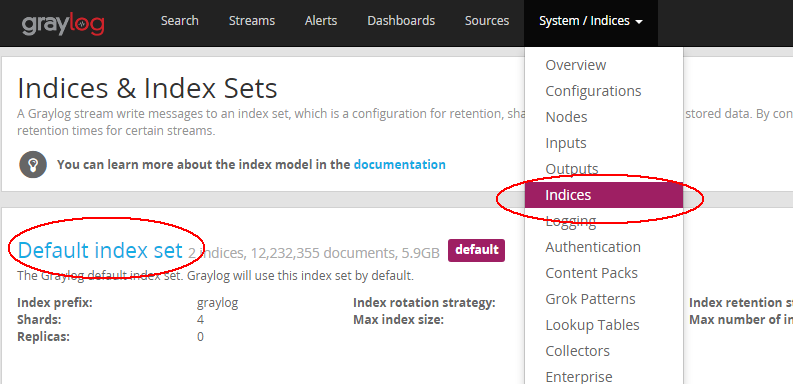
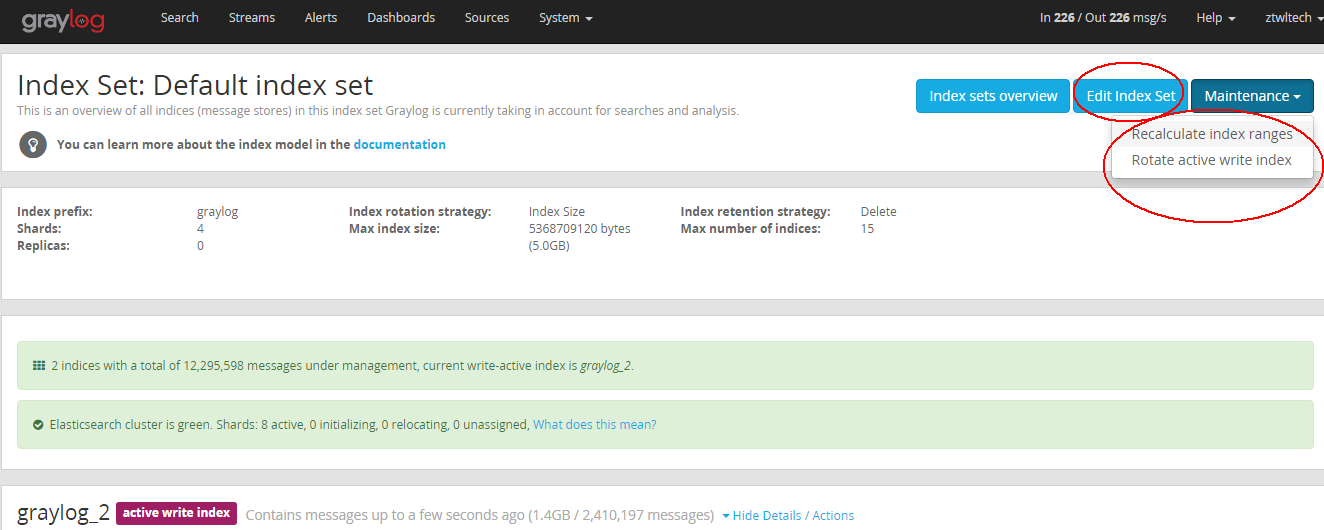
--------------------------------------------------------------------------------------------
ELASTICSEARCH 服务监控
Elasticsearch 服务本身通过 API 提供了丰富的监控信息,您可以直接调用接口获取监控数据:
- 集群健康状态: http://<任意节点私网IP>:9200/_cluster/health?pretty=true
- 各节点统计信息: http://<任意节点私网IP>:9200/_nodes/stats?pretty=true
- 索引统计信息: http://<任意节点私网IP>:9200/_stats?pretty=true
此外,Elasticsearch 服务内置了 kopf 插件(一个 Elasticsearch 的 web 管理界面),可以通过 http://<任意节点私网IP>:9200/_plugin/kopf 在浏览器上查看更详细的统计信息。
--------------------------------------------------------------------------
graylog以及es内存大小调整:
graylog: vim /etc/sysconfig/graylog-server GRAYLOG_SERVER_JAVA_OPTS=""
es: vim /etc/sysconfig/elasticsearch ES_HEAP_SIZE=3g
---------------------------------------------------------------------------
shards 代表索引分片,es可以把一个完整的索引分成多个分片,这样的好处是可以把一个大的索引拆分成多个,分布到不同的节点上。构成分布式搜索。分片的数量只能在索引创建前指定,并且索引创建后不能更改。
replicas 代表索引副本,es可以设置多个索引的副本,副本的作用一是提高系统的容错性,当个某个节点某个分片损坏或丢失时可以从副本中恢复。二是提高es的查询效率,es会自动对搜索请求进行负载均衡。
当配置ES集群时,只需要更改graylog配置文件的:
elasticsearch_discovery_zen_ping_unicast_hosts = 192.168.0.200:9300, 192.168.0.201:9300
-----------------------------------------------------------------------------------------------------
Elasticsearch存储的索引数据比较多占用空间比较大,清理方法: (默认存放在/var/lib/elasticsearch/graylog2/nodes/0/indices)
# curl -XDELETE 'http://localhost:9200/index_name/'
例如:# curl -XDELETE 'http://192.168.0.200:9200/graylog_0/'
新版的graylog已经将graylog-server与graylog-web二部分合二为一了,统称graylog-server
# Email transport
transport_email_enabled = true
transport_email_hostname = smtp.tech.com
transport_email_port = 465
transport_email_use_auth = true
transport_email_use_tls = true
transport_email_use_ssl = true
transport_email_auth_username = wjoyxt@tech.com 也可能是 wjoyxt
transport_email_auth_password = wjoyxt666
transport_email_subject_prefix = [graylog2]
transport_email_from_email = wjoyxt@tech.com 注意与alert中的sender邮箱保持一致
transport_email_web_interface_url = http://外网IP或域名:9000
改成外网IP或域名的目的是为了在收到的报警邮件中可以不通过VPN的情况下直接访问相应的只包含警报关键字的日志信息的汇总链接,当然了也可以连接VPN使用内网IP地址访问


-------------------------------------------------------------------------------------------
当使用HTTP Alarm Callback时,可以直接调用短信接口进行告警处理

--------------------------------------------------------------------------------------------
Graylog是一个开源的 log 收容器,主要有两个部分集合而成 server 与 web interface,两个都是由 Java 写的,Server 的部份可以收容 syslog over TCP/UDP, 同时他也有自己的格式 GELF (Graylog Extended Log Format),背后的储存是搭配 mongodb,而搜寻引擎则由 elasticsearch 提供。另外的 web interface 也是 Java 写成的(早期好像是 Ruby on Rails),主要的功能就是提供一个漂亮的搜寻与分析的界面
ElasticSearch是一个基于Lucene的搜索服务器。它提供了一个分布式多用户能力的全文搜索引擎,基于RESTful web接口。Elasticsearch是用Java开发的,并作为Apache许可条款下的开放源码发布,是第二流行的企业搜索引擎。设计用于云计算中,能够达到实时搜索,稳定,可靠,快速,安装使用方便
具体安装文档可查看官网手册: http://docs.graylog.org 可使用有道网页翻译书签: http://fanyi.youdao.com/web2/
端口说明:
Elasticsearch默认tcp通信端口是9300,HTTP API接口是9200
Graylog-server:9000/api Graylog-web:9000
一、graylog体系结构
测试环境最小化单一安装结构图示:

生产环境集群扩展模式结构如下:
最前端要加一层负载均衡系统,graylog-server的主从角色是在配置文件里面进行设置,然后mongodb数据库集群里面进行指定区分的

二、首先安装配置Elasticsearch (Mongodb安装部分此处略,需要注意的是mongodb的bind_ip处的设置,而且graylog会自动创建相应的数据库和用户)
1、前往官网进行下载安装elasticsearch
# wget https://download.elasticsearch.org/elasticsearch/release/org/elasticsearch/distribution/rpm/elasticsearch/2.0.0/elasticsearch-2.0.0.rpm
# yum install elasticsearch-2.0.0.rpm -y
2、或者使用官方yum源进行安装
rpm --import https://packages.elastic.co/GPG-KEY-elasticsearch
Add the following in your /etc/yum.repos.d/ directory in a file with a .repo suffix, for exampleelasticsearch.repo,(注意2.x或者1.x 只有两位)
[elasticsearch-2.x]

name=Elasticsearch repository for 2.x packages

baseurl=http://packages.elastic.co/elasticsearch/2.x/centos

gpgcheck=1
gpgkey=http://packages.elastic.co/GPG-KEY-elasticsearch

enabled=1
yum install elasticsearch
2、vim /etc/elasticsearch/elasticsearch.yml
network.bind_host: 10.1.1.33  #绑定实际的服务器IP地址
cluster.name: graylog2        #与/etc/graylog/server/server.conf 中的elasticsearch_cluster_name 集群名称相同
node.name: "node-xx"
discovery.zen.ping.multicast.enabled: false

discovery.zen.ping.unicast.hosts: ["es-node-1.example.org:9300" , "es-node-2.example.org:9300"]
script.disable_dynamic: true  #出于安全考虑,禁用动态脚本功能防止可能的远程代码执行
3、使用curl命令操作elasticsearch
curl -i -XGET 'localhost:9200/' #安装完成后的验证
curl -XGET localhost:9200/_cat/nodes #查看当前存活的各elasticsearch节点
curl -XGET localhost:9200/_cat/master
curl -XGET localhost:9200/_cat/health
健康度检查分为绿色、黄色或红色。绿色代表一切正常,集群功能齐全,黄色意味着所有的数据都是可用的,但是某些复制没有被分配,红色则代表因为某些原因,某些数据不可用
需要注意的是如果单机上安装多个elasticsearch实例的话,elasticsearch的服务端口号会依次自动累加,例如第二套elasticsearch的为9201和9301。
curl更多操作方法参考资料 http://blog.csdn.net/iloveyin/article/details/48312767
三、安装graylog-server和graylog-web (jdk rpm包安装时注意采用默认的安装方式,/usr/bin/java)
$ sudo rpm -Uvh https://packages.graylog2.org/repo/packages/graylog-1.2-repository-el6_latest.rpm
$ sudo yum install graylog-server graylog-web
$vim /etc/graylog/server/server.conf
[root@syslog ~]# cat /etc/graylog/server/server.conf |grep -v grep|grep -v ^#|grep -v ^$

is_master = true

node_id_file = /etc/graylog/server/node-id

password_secret = qdp0CjlUtrQUlqtgvjSiG0tI3aA4jX7wYGlR10FD8mmkm8WLQ1j0UnaTL3nCocYu7lFB7zRa6GdEe8x5ZVHBemzwXLJufOMO

root_password_sha2 = 4bbdd5a829dba09d7a7ff4c1367be7d36a017b4267d728d31bd264f63debeaa6

root_email = "wjoyxt@126.com"

root_timezone = +:

plugin_dir = /usr/share/graylog-server/plugin

rest_listen_uri = http://10.1.1.43:12900/

rotation_strategy = count

elasticsearch_max_docs_per_index =

elasticsearch_max_number_of_indices =

retention_strategy = delete

elasticsearch_shards =

elasticsearch_replicas =

elasticsearch_index_prefix = graylog2

allow_leading_wildcard_searches = false

allow_highlighting = false

elasticsearch_discovery_zen_ping_multicast_enabled = false

elasticsearch_discovery_zen_ping_unicast_hosts = 10.1.1.43:,10.1.1.33:

elasticsearch_analyzer = standard

output_batch_size =

output_flush_interval =

output_fault_count_threshold =

output_fault_penalty_seconds =

processbuffer_processors =

outputbuffer_processors =

processor_wait_strategy = blocking

ring_size =

inputbuffer_ring_size =

inputbuffer_processors =

inputbuffer_wait_strategy = blocking

message_journal_enabled = true

message_journal_dir = /var/lib/graylog-server/journal

dead_letters_enabled = false

lb_recognition_period_seconds =

mongodb_useauth = false

mongodb_uri = mongodb://localhost/graylog2

mongodb_max_connections =

mongodb_threads_allowed_to_block_multiplier =

transport_email_enabled = true

transport_email_hostname = 127.0.0.1

transport_email_port =

transport_email_use_auth = false

transport_email_use_tls = false

transport_email_use_ssl = false

transport_email_auth_username =

transport_email_auth_password =

transport_email_subject_prefix =

transport_email_from_email =

transport_email_web_interface_url = http://10.1.1.43:9000
password_secret = qdp0CjlUtrQUlqtgvjSiG0tI3aA4jX7wYGlR10FD8mmkm8WLQ1j0UnaTL3nCocYu7lFB7zRa6GdEe8x5ZVHBemzwXLJufOMO
#以上项必须与/etc/graylog/web/web.conf中的application.secret相同
root_password_sha2 = 0f3bb51e4955b2872351934b82c293db8cc1770b96bf9047b184a26ae25bcb5c #此处即登陆graylog-web:9000界面的密码,现在设置的是wjoyxt
#如果没有shasum命令的话,使用yum install perl-Digest-SHA进行安装
elasticsearch_cluster_name = graylog2  #定义一个集群名称

elasticsearch_discovery_zen_ping_multicast_enabled = false  # Disable multicast

elasticsearch_discovery_zen_ping_unicast_hosts = es-node-1.example.org:9300,es-node-2.example.org:9300 # List of Elasticsearch nodes to connect to
mongodb_useauth = false       #默认为false,可不必添加。当为false时,则不必配置mongodb相关的 mongodb_user、mongodb_password

# Email transport 邮件报警相关设置
transport_email_use_auth = false
transport_email_use_tls = false
transport_email_use_ssl = false
transport_email_auth_username =
transport_email_auth_password =
transport_email_subject_prefix =
transport_email_from_email =
transport_email_web_interface_url = http://外网IP:9000  #此处指向可通过外网访问到graylog-web的域名或IP
$vim /etc/graylog/web/web.conf
graylog2-server.uris="http://0.0.0.0:12900"
application.secret="qdp0CjlUtrQUlqtgvjSiG0tI3aA4jX7wYGlR10FD8mmkm8WLQ1j0UnaTL3nCocYu7lFB7zRa6GdEe8x5ZVHBemzwXLJufOMO"
timezone="Asia/Shanghai"
四、客户端配置:日志收集graylog-collector (帮助文档链接 http://docs.graylog.org/en/1.2/pages/collector.html)
Graylog收集器是一个轻量级的Java应用程序,允许您将数据从日志文件转发给一个Graylog集群.
前提:You need to have Java >= 7 installed to run the collector
目前官方只提供了RHEL7的repo,对于centos 6版本的话从以下链接下载zip包
https://github.com/Graylog2/collector#binary-download (另外此链接包含一个graylog-collector配置例子,可以进行参考)
这是一个最小的配置收集日志的例子/var/log/syslog文件并将它们发送给Graylog服务器:
server-url = "http://10.0.0.1:9000/api"  (新版)

inputs {

  syslog {

    type = "file"

    path = "/var/log/syslog"

  }

}

outputs {

  graylog-server {

    type = "gelf"

    host = "10.0.0.1"

    port = 12201   #此端口是graylog-server服务器上建立Inputs时对应的日志数据采集端口

  }

}
附加另一个使用正则表达式和分流输出的例子:
server-url = "http://10.1.1.43:12900"

collector-id = "file:/usr/local/graylog-collector/config/collector-id"

inputs {

  ylygw-servlet {

    type = "file"

    path-glob-root = "/home/admin/logs"

    path-glob-pattern = "*/*.log"

    outputs = "ylygw-tcp"

  }

  ylygw-out {

    type = "file"

    path = "/yly/tomcat7.yly9090/logs/catalina.out"

    outputs = "ylygw-tcp"

  }

  nginx-access {

    type = "file"

    path = "/usr/local/nginx/logs/shop_acc.log"

    outputs = "nginx-access"

  }

  nginx-error {

    type = "file"

    path = "/usr/local/nginx/logs/shop_error.log"

    outputs = "nginx-error"

  }

}

outputs {

  ylygw-tcp {

    type = "gelf"

    host = "10.1.1.43"

    port =

    client-queue-size =

    client-connect-timeout =

    client-reconnect-delay =

    client-tcp-no-delay = true

    client-send-buffer-size =

  }

  nginx-access {

    type = "gelf"

    host = "10.1.1.43"

    port =

    client-queue-size =

    client-connect-timeout =

    client-reconnect-delay =

    client-tcp-no-delay = true

    client-send-buffer-size =

  }

  nginx-error {

    type = "gelf"

    host = "10.1.1.43"

    port =

    client-queue-size =

    client-connect-timeout =

    client-reconnect-delay =

    client-tcp-no-delay = true

    client-send-buffer-size =

  }

}
graylog-collector启动方法:
  $ cd graylog-collector-0.4.1/
  $ bin/graylog-collector run -f collector.conf
五、流和报警设置
Graylog Streem (graylog 流) 是一个路由消息分类并且实时处理的机制。 你可以自定义规则指导Graylog哪个消息路由到哪个streem
首先需要自定义一个字段即为某一类消息打上标签,打开graylog web管理页面,System->Input ,在已建好的 Input 右边的 More actions->Add static fields , 然后输入字段名称和标签名称标识。完成后则可以在Search时通过左下角的 Fields 查看到新建的字段值,勾选该字段后,则新建字段后的所有流消息都会被打上相应的标签。
之后可以开始创建streem和相应的匹配规则,一般情况下 alert condition 采用 Message count condition

Editing Alarm Callback
Sender
graylog@wjoyxt.org
E-Mail Subject
${stream.title}: 日志警报 来自 Graylog 日志系统
E-Mail Body(optional)
##########

警报描述: ${check_result.resultDescription}

日期: ${check_result.triggeredAt}

Stream ID: ${stream.id}

Stream title: ${stream.title}

Stream 描述: ${stream.description}

${if stream_url}Stream URL: ${stream_url}${end}

##########

${if backlog}Last messages accounting for this alert:

${foreach backlog message}${message}

${end}${else}以上地址仅允许北京办公地点访问

以上数据由某某机房Graylog日志系统提供

${end}
或
##########

警报标题描述:       ${stream.description}

警报触发信息描述:${check_result.resultDescription}

${if stream_url}报警日志信息查询链接:${stream_url}${end}

##########

${if backlog}Last messages accounting for this alert:

${foreach backlog message}${message}

${end}${else}

${end}
配置rsyslog远程发送日志:
vim /etc/rsyslog.conf
*.* @10.1.1.33:5140
@@为tcp协议传输 @为udp协议
FAQ:
关于登陆web界面后图形上显示的时间不对的问题,graylog-server默认使用UTC时区时间,目前解决方法只能在新建用户时,选择TimeZone: Shanghai。然后用新用户代替admin用户。
graylog.conf
is_master = true

node_id_file = /etc/graylog/server/node-id

password_secret = iLxgl1vsC6iA4MJXJbMQ5mAKAPh5qIoCEdHeQdEVQFJ8wZz8XRznS7CVgSTGgS2nc0qwPr65gxop3GcfvajprKa3zqs44Hc8

root_password_sha2 = 72d7c50d4e1e267df628ec2ee9eabee0f31cb17a29f3eb41e0a04ede5134c37f

root_email = "wjoyxt@wjoyxt.com"

root_timezone = +08:00

plugin_dir = /usr/share/graylog-server/plugin

rest_listen_uri = http://0.0.0.0:9000/api/

web_listen_uri = http://0.0.0.0:9000/

rotation_strategy = count

elasticsearch_max_docs_per_index = 20000000

elasticsearch_max_number_of_indices = 20

retention_strategy = delete

elasticsearch_shards = 3

elasticsearch_replicas = 0

elasticsearch_index_prefix = graylog

allow_leading_wildcard_searches = false

allow_highlighting = false

elasticsearch_cluster_name = es-0nqimfw0

elasticsearch_hosts = http://192.168.0.250:9200, http://192.168.0.251:9200, http://192.168.0.252:9200

elasticsearch_network_host = 192.168.0.200

elasticsearch_network_bind_host = 192.168.0.200

elasticsearch_analyzer = standard

output_batch_size = 500

output_flush_interval = 1

output_fault_count_threshold = 5

output_fault_penalty_seconds = 30

processbuffer_processors = 5

outputbuffer_processors = 3

processor_wait_strategy = blocking

ring_size = 65536

inputbuffer_ring_size = 65536

inputbuffer_processors = 2

inputbuffer_wait_strategy = blocking

message_journal_enabled = true

message_journal_dir = /var/lib/graylog-server/journal

lb_recognition_period_seconds = 3

mongodb_uri = mongodb://localhost/graylog

mongodb_max_connections = 1000

mongodb_threads_allowed_to_block_multiplier = 5

transport_email_enabled = true

transport_email_hostname = smtp.126.com

transport_email_port = 465

transport_email_use_auth = true

transport_email_use_tls = true

transport_email_use_ssl = true

transport_email_auth_username = wjoyxt

transport_email_auth_password = wjoyxt888

transport_email_subject_prefix = [graylog2]

transport_email_from_email = wjoyxt@wjoyxt.com

transport_email_web_interface_url = http://graylog.wjoyxt.com:9000

content_packs_dir = /usr/share/graylog-server/contentpacks

content_packs_auto_load = grok-patterns.json

proxied_requests_thread_pool_size = 32
Graylog安装配置的更多相关文章
- Graylog2日志服务安装配置
软件版本: mongodb-org-3.2.10 jdk-1.8.0 (推荐rpm包,不然要修改Graylog启动脚本定义的JAVA命令路径) elasticsearch-2.4.1 (Graylog ...
- Graylog安装操作
Graylog安装操作 实验环境centos7.5系统 mem:4-8G disk:50G 关闭selinux以及firewalld 一.准备环境 1.1.java环境 下载java的j ...
- Hive安装配置指北(含Hive Metastore详解)
个人主页: http://www.linbingdong.com 本文介绍Hive安装配置的整个过程,包括MySQL.Hive及Metastore的安装配置,并分析了Metastore三种配置方式的区 ...
- Hive on Spark安装配置详解(都是坑啊)
个人主页:http://www.linbingdong.com 简书地址:http://www.jianshu.com/p/a7f75b868568 简介 本文主要记录如何安装配置Hive on Sp ...
- ADFS3.0与SharePoint2013安装配置(原创)
现在越来越多的企业使用ADFS作为单点登录,我希望今天的内容能帮助大家了解如何配置ADFS和SharePoint 2013.安装配置SharePoint2013这块就不做具体描述了,今天主要讲一下怎么 ...
- Hadoop的学习--安装配置与使用
安装配置 系统:Ubuntu14.04 java:1.7.0_75 相关资料 官网 下载地址 官网文档 安装 我们需要关闭掉防火墙,命令如下: sudo ufw disable 下载2.6.5的版本, ...
- redis的安装配置
主要讲下redis的安装配置,以及以服务的方式启动redis 1.下载最新版本的redis-3.0.7 到http://redis.io/download中下载最新版的redis-3.0.7 下载后 ...
- Windows环境下的NodeJS+NPM+Bower安装配置
npm作为一个NodeJS的模块管理,之前我由于没有系统地看资料所以导致安装配置模块的时候走了一大段弯路,所以现在很有必要列出来记录下.我们要先配置npm的全局模块的存放路径以及cache的路径,例如 ...
- ubuntu kylin 14.04安装配置MongoDB v2.6.1(转)
1.获取最新版本 https://fastdl.mongodb.org/linux/mongodb-linux-x86_64-2.6.1.tgz 2.解压并进入bin目录 tar zxvf mongo ...
随机推荐
- php生成迷宫和迷宫寻址算法实例
较之前的终于有所改善.生成迷宫的算法和寻址算法其实是一样.只是一个用了遍历一个用了递归.参考了网上的Mike Gold的算法. <?php //zairwolf z@cot8.com heade ...
- jmeter ---模拟http请求/发送gzip数据
jmeter中get请求gzip数据的方法: 在jmeter线程组中添加“http信息头管理器”,并添加名称:Accept-Encoding值: gzip,deflate注:HTTP信息头Accept ...
- 【unittest】unittest单元模块做assert
我在Windows上开发Python用的版本是2.7,在Ubuntu上开发的版本是2.6,而在Python的unittest模块中,有几个方法是在2.7才有的,它们是: Method Checks t ...
- 锁定“嵌入式AI”应用 中科创达启动第二轮成长
Thundersoft|中科创达软件股份有限公司 http://www.thundersoft.com/index.php 原文:http://tech.hexun.com/2017-08-29/1 ...
- 跟我一起学Makefile
概述 什么是makefile?或许很多Winodws程序员都不知道这个东西,因为那些Windows IDE都为你做了这个工作,但我觉得要做一个好的和professional的程序员,makefile还 ...
- 【textarea】在JSP上添加textarea-文本域 调试使用
<body> <form name="dataEventDisplay"> <table border="2" bordercol ...
- appium+python自动化42-微信公众号
前言 本篇介绍如何在微信公众号上自动化测试,以操作我的个人公众号:yoyoketang为例,没关注的,先微信关注了,再跟着操作 环境准备: python 3.6 appium 1.7以上版本 微信6. ...
- Java堆外内存之六:堆外内存溢出问题排查
一.堆外内存组成 通常JVM的参数我们会配置 -Xms 堆初始内存 -Xmx 堆最大内存 -XX:+UseG1GC/CMS 垃圾回收器 -XX:+DisableExplicitGC 禁止显示GC -X ...
- 1115 Counting Nodes in a BST (30 分)
1115 Counting Nodes in a BST (30 分) A Binary Search Tree (BST) is recursively defined as a binary tr ...
- 关于DELL服务器如果采购散件,进行服务器升级的相关说明
拿DELL服务器内存来说明这个情况,其他硬盘等等是 一样的: 1.DELL服务器的内存散件,从购买之日起,质保期是一年: 2.但是如果你把内存插到能兼容这个内存的服务器上去使用,请注意我的字眼,是能兼 ...