
RabbitMQ文档翻译——Work queues
原文链接:https://www.rabbitmq.com/tutorials/tutorial-two-java.html
Work Queues
(using the Java Client)
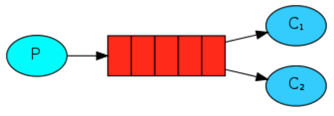
In the first tutorial we wrote programs to send and receive messages from a named queue.In this one we'll create a Work Queue that will be used to distribute time-consuming tasks among multiple workers.
在上一篇教程中,我们写的程序从一个指定的队列发送和接收消息。本篇,我们将创建一个用于多个角色之间分配耗时的任务,工作队列(Work Queue)。
The main idea behind Work Queues(aka: Task Queues) is to avoid doing a resource-intensive task immediately and having to wait for it to complete. Instead we schedule the task to be done later. We encapsulate a task as a message and send it to a queue. A worker process running in the background will pop the tasks and eventually execute the job. When you run many workers the tasks will be shared between them.
工作队列(又名:任务队列)背后的主要思想是避免立即做一个资源密集型任务(一下子完成多个任务,即完成一个任务集),不必等待它完成。相反我们安排的每一个任务都将在稍后完成。一个在后台执行的worker进程将弹出任务,并最终执行任务。当你执行很多worker的任务时将在他们之间共享。
This concept is especially useful in web applications where it's impossible to handle a complex task during a short HTTP request window.
这一概念在web应用程序中是非常有用的,它不可能在很短的HTTP请求窗口处理一个复杂的任务。
Preparation
In the previous part of this tutorial we sent a message containing "Hello World!". Now we'll be sending strings that stand for complex tasks. We don't have a real-world task, like images to be resized or pdf files to be rendered, so let's fake it by just pretending we're busy - by using theThread.sleep() function. We'll take the number of dots in the string as its complexity; every dot will account for one second of "work". For example, a fake task described by Hello... will take three seconds.
在之前的教程中我们发送一个包含“Hello World!”的消息。现在我们将发送多个字符串来代表一个复杂的任务。我们没有一个现实的工作,比如图像的调整大小或者pdf文件的渲染,所以我们使当前线程睡眠(Thread.sleep())来假装我们很忙的样子。我们将把字符串中的点的数量作为它的复杂性,每一个点将占一秒钟的“工作”。比如说,一个假的任务是"Hello…"将需要三秒。
We will slightly modify the Send.java code from our previous example, to allow arbitrary messages to be sent from the command line. This program will schedule tasks to our work queue, so let's name it NewTask.java:
下面我们稍稍的修改一下之前例子中的Send.java的代码,允许任意的消息从命令行被发送出去。这个程序将为我们的任务安排工作队列,所以添加一个新类:NewTask.java:
String message = getMessage(argv);

channel.basicPublish("", "hello", null, message.getBytes());

System.out.println(" [x] Sent '" + message + "'");
Some help to get the message from the command line argument:
从命令行参数中获得一些帮助信息:
private static String getMessage(String[] strings){

    if (strings.length < 1)

        return "Hello World!";

    return joinStrings(strings, " ");

}

private static String joinStrings(String[] strings, String delimiter) {

    int length = strings.length;

    if (length == 0) return "";

    StringBuilder words = new StringBuilder(strings[0]);

    for (int i = 1; i < length; i++) {

        words.append(delimiter).append(strings[i]);

    }

    return words.toString();

}
Our old Recv.java program also requires some changes: it needs to fake a second of work for every dot in the message body.It will handle delivered messages and perform the task, so let's call it Worker.java:
我们之前的那个Recv.java程序也需要一些修改:它需要假装的在消息体中每执行一个'.'就休息一秒钟。它将处理传递的信息并执行任务,所以就叫它Worker.java程序吧:
final Consumer consumer = new DefaultConsumer(channel) {

  @Override

  public void handleDelivery(String consumerTag, Envelope envelope, AMQP.BasicProperties properties, byte[] body) throws IOException {

    String message = new String(body, "UTF-8");

    System.out.println(" [x] Received '" + message + "'");

    try {

      doWork(message);

    } finally {

      System.out.println(" [x] Done");

    }

  }

};

boolean autoAck = true; // acknowledgment is covered below

channel.basicConsume(TASK_QUEUE_NAME, autoAck, consumer);
Our fake task to simulate execution time:
我们用一个假任务来模拟一段时间的执行:
private static void doWork(String task) throws InterruptedException {

    for (char ch: task.toCharArray()) {

        if (ch == '.') Thread.sleep(1000);

    }

}
Compile them as in tutorial one (with the jar files in the working directory):
下面来编译它们(和在工作目录中的这个jar文件):
$ javac -cp rabbitmq-client.jar NewTask.java Worker.java
RabbitMQ文档翻译——Work queues的更多相关文章
- (转)[Erlang 0080] RabbitMQ :VHost,Exchanges, Queues,Bindings and Channels
和RabbitMQ这个项目的缘分好奇怪,很长一段时间内是只关注源代码,真的是Erlang开源项目中的典范;现在要在项目中应用RabbitMQ,从新的视角切入,全新的感觉.仿佛旧情人换了新衣,虽是熟稔却 ...
- RabbitMQ :VHost,Exchanges, Queues,Bindings and Channels
和RabbitMQ这个项目的缘分好奇怪,很长一段时间内是只关注源代码,真的是Erlang开源项目中的典范;现在要在项目中应用RabbitMQ,从新的视角切入,全新的感觉.仿佛旧情人换了新衣,虽是熟稔却 ...
- Pythonpika PhpAmqpLib rabbitmq服务中queues被清空的异常处理 无模式数据库对数据结构的定义和控制
/** * Declares queue, creates if needed * * @param string $queue * @param bool $passive * @param boo ...
- Rabbitmq(3) work queues
轮询分发:每个消费者处理的消息是一样的 公平分发:能者多劳 *****公平分发 生产者 package com.aynu.bootamqp.service; import com.aynu.boota ...
- RabbitMQ文档翻译——Hello World!(下)
Receiving That's it for our sender. Our receiver is pushed messages from RabbitMQ, so unlike the sen ...
- RabbitMQ文档翻译——Hello World!(上)
文章主要翻译自RabbitMQ官方文档,主要是为了练习英语翻译,顺便学习一下RabbitMQ
- RabbitMQ(二) -- Work Queues
RabbitMQ(一) -- Work Queues RabbitMQ使用Work Queues的主要目的是为了避免资源使用密集的任务,它不同于定时任务处理的方式,而是把任务封装为消息添加到队列中.而 ...
- [译]RabbitMQ教程C#版 - 工作队列
先决条件 本教程假定RabbitMQ已经安装,并运行在localhost标准端口(5672).如果你使用不同的主机.端口或证书,则需要调整连接设置. 从哪里获得帮助 如果您在阅读本教程时遇到困难,可以 ...
- 译:3.RabbitMQ Java Client 之 Publish/Subscribe(发布和订阅)
在上篇 RabbitMQ 之Work Queues (工作队列)教程中,我们创建了一个工作队列,工作队列背后的假设是每个任务都交付给一个工作者. 在这一部分,我们将做一些完全不同的事情 - 我们将向多 ...
随机推荐
- [aaronyang] nodejs学习-mongodb[1]
1.资源提供与安装(ayjs.net) 学习说明:nodejs还是在非windows环境下操作好,所以一切还是 当前时间:2014年12月06日aaronyang 官网地址:www.mongodb.o ...
- windbg分析执行在64位环境下的32位程序的dump
windbg命令例如以下 1. .load wow64exts 2. !sw 3. ~* kvnf
- 【转载并整理】mysql排序
由于oracle中有排序函数,可以使用over的语句方便排序,但是mysql中没有 这里碰到几个mysql的概念:用户变量.系统变量.if语句.函数GROUP_CONCAT 1. 可以使用定义变量(@ ...
- ICDAR2015 数据处理及训练
训练数据处理: 天池ICPR2018和MSRA_TD500两个数据集: 1)天池ICPR的数据集为网络图像,都是一些淘宝商家上传到淘宝的一些商品介绍图像,其标签方式参考了ICDAR2015的数据标签格 ...
- Android系统版本与API级别对照表
对照表 API Level 最初Android版本 Linux内核版本 首次发布日期 后续Android版本 28 9 Unknown 2018-07-02(Beta 3) - 27 8.1 4.10 ...
- MSSQL2005:“超时时间已到。在操作完成之前超时时间已过或服务器未响应”
1.今天在整合项目中有这样一个需求,就是要改变以存在表字段的文本的大小,如把char(15)改成varchar(50). 2.此时以存在表已有1885742条数据,在直接下面进行调用 ALTER TA ...
- Office 2010 安装程序包的语言不受系统支持
主要看了这篇文章之后让我有了处理思路. 最后我直接用压缩文件进行安装,没有时行解压.这样就不会出现找不到什么文件的问题了.所以语言不受系统支持问题也就解决了. 原文内容: 前几天,有位好友跟我说他的 ...
- PHP数组排序sort、asort与ksort用法
分享下PHP数组排序之sort.asort与ksort用法,实例中简单示范了sort.asort与ksort的用法,并备有注释加以详细说明. PHP数组排序中sort.asort与ksort的用法. ...
- mysql把主键定义为自动增长标识符类型
分享下mysql中如何把主键定义为自动增长标识符类型. 1.把主键定义为自动增长标识符类型在mysql中,如果把表的主键设为auto_increment类型,数据库就会自动为主键赋值.例如: )); ...
- 《图说VR入门》——DK2入门及其资源汇总
本文章由cartzhang编写,转载请注明出处. 全部权利保留. 文章链接:http://blog.csdn.net/cartzhang/article/details/53174895 作者:car ...