
一套完整的中小级别的企业级监控prometheus
一 相信有很多博客都已经详细的说明了prometheus的作用以及相关的作用以及原理,这里不在赘述,仅仅从部署和配置2个方面来记录一下,为公司产品组搭建的prometheus告警平台的过程以及踩过的坑,废话不多说,直接开始搭建部署,需要在一台服务器上面搭建prometheus+grafana+alertmanager+pushgateway,其余被监控的节点部署node_exporter,也可以在prometheus服务端部署node_exporter
1.1 部署prometheus,并且使用systemctl进行管控
安装版本:prometheus-2.6.1
百度云下载:https://pan.baidu.com/s/1w16lQZKw8PCHqlRuSK2i7A
提取码:lw1q
之后将包解压到: /usr/local/prometheus目录下面,建议使用ansible脚本进行部署
这里附上安装管理的管理文件以及目录地址/usr/lib/systemd/system/prometheus.service
[Unit]

  Description=https://prometheus.io

  [Service]

  Restart=on-failure

  ExecStart=/usr/local/prometheus/prometheus --config.file=/usr/local/prometheus/prometheus.yml

  [Install]

  WantedBy=multi-user.target
1.2 整理后的prometheus配置文件,添加新的监控节点job_name和机器的节点,并且节点需要安装相应的node_exporter
# my global config

global:

  scrape_interval:     15s # Set the scrape interval to every 15 seconds. Default is every 1 minute.

  evaluation_interval: 15s # Evaluate rules every 15 seconds. The default is every 1 minute.

  # scrape_timeout is set to the global default (10s).

# Alertmanager configuration

alerting:

  alertmanagers:

  - static_configs:

    - targets:

      - 172.16.5.3:9093

# Load rules once and periodically evaluate them according to the global 'evaluation_interval'.

rule_files:

   - "rules/first_rules.yml"

   - "rules/second_rules.yml"

# A scrape configuration containing exactly one endpoint to scrape:

# Here it's Prometheus itself.

scrape_configs:

  # The job name is added as a label `job=<job_name>` to any timeseries scraped from this config.

  - job_name: 'prometheus'

    static_configs:

    - targets: ['localhost:9090','172.16.5.3:9100']- job_name: 'pushgateway'

    scrape_interval: 5s

    static_configs:

    - targets: ['172.16.5.3:9091']

      labels:

        instance: pushgateway
1.3 对服务器的基础监控项如如下所示
#cat second_rules.yml
groups:

- name: 实例存活告警规则

  rules:

  - alert: 实例存活告警

    expr: up{job="prometheus"} == 0 or up{job="Linux-host"} == 0

    for: 1m

    labels:

      user: prometheus

      severity: emergency

      team: HTY

    annotations:

      summary: "Instance {{ $labels.instance }} is down"

      description: "Instance {{ $labels.instance }} of job {{ $labels.job }} has been down for more than 1 minutes."

      value: "{{ $value }}"

- name: 内存告警规则

  rules:

  - alert: "内存使用率告警"

    expr: (node_memory_MemTotal_bytes - (node_memory_MemFree_bytes+node_memory_Buffers_bytes+node_memory_Cached_bytes )) / node_memory_MemTotal_bytes * 100 > 30

    for: 1m

    labels:

      team: C3

      user: prometheus

      severity: warning

    annotations:

      summary: "服务器: {{$labels.alertname}} 内存报警"

      description: "{{ $labels.alertname }} 内存资源利用率大于30%!(当前值: {{ $value }}%)"

      value: "{{ $value }}"

- name: 内存告警规则2

  rules:

  - alert: "内存使用率告警2"

    expr: (node_memory_MemTotal_bytes - (node_memory_MemFree_bytes+node_memory_Buffers_bytes+node_memory_Cached_bytes )) / node_memory_MemTotal_bytes * 100 > 50

    for: 1m

    labels:

      team: C3

      user: prometheus

      severity: critical

    annotations:

      summary: "服务器: {{$labels.alertname}} 内存报警"

      description: "{{ $labels.alertname }} 内存资源利用率大于50%!(当前值: {{ $value }}%)"

      value: "{{ $value }}"

- name: CPU报警规则

  rules:

  - alert: CPU使用率告警

    expr: 100 - (avg by (instance)(irate(node_cpu_seconds_total{mode="idle"}[1m]) )) * 100 > 70

    for: 1m

    labels:

      user: prometheus

      severity: warning

    annotations:

      summary: "服务器: {{$labels.alertname}} CPU报警"

      description: "服务器: CPU使用超过70%!(当前值: {{ $value }}%)"

      value: "{{ $value }}"

- name: 磁盘报警规则

  rules:

  - alert: 磁盘使用率告警

    expr: (node_filesystem_size_bytes - node_filesystem_avail_bytes) / node_filesystem_size_bytes * 100 > 80

    for: 1m

    labels:

      user: prometheus

      severity: warning

    annotations:

      summary: "服务器: {{$labels.alertname}} 磁盘报警"

      description: "服务器:{{$labels.alertname}},磁盘设备: 使用超过80%!(挂载点: {{ $labels.mountpoint }} 当前值: {{ $value }}%)"

      value: "{{ $value }}"
2 安装以及配置alertmanager
global:

  # 企业微信告警配置

  resolve_timeout: 5m

  wechat_api_url: 'https://qyapi.weixin.qq.com/cgi-bin/'

  wechat_api_corp_id: 'ww41a2b13ef47aac58'

  wechat_api_secret: 'xxxxx'

  # qq邮箱告警配置

  smtp_from: xxx@qq.com

  smtp_auth_username: xx@qq.com

  smtp_auth_password: xxxx #需要从qq邮箱上面获取

  smtp_require_tls: false

  smtp_smarthost: 'smtp.qq.com:465'

templates:

  - "/usr/local/alertmanager/template/*.tmpl"

route:

  receiver: 'default-receiver'

  group_wait: 10s

  group_interval: 30s

  repeat_interval: 1m

  group_by: ['team']

  routes:

  - group_by: ['test']

    group_wait: 10s

    group_interval: 30s

    repeat_interval: 1m

    receiver: 'wechat'

    match:

      team: test1

receivers:

- name: 'wechat'

  wechat_configs:

  - send_resolved: true

    message: '{{ template "wechat.default.message" .}}'

    to_party: 'xxxx'

    agent_id: "xxx"需要从企业微信上面获取

    api_secret: 'xxxxxxxx'

- name: 'default-receiver'

  email_configs:

  - to: 'xxxxxx@qq.com'

    send_resolved: true

    # html: '{{ template "wechat.default.message" .}}'

inhibit_rules:

  - source_match:

      severity: 'critical'

    target_match:

      severity: 'warning'

    equal: ['env','team','instance','type','group','job','alertname']
获取企业微信的方式参考这个链接:https://www.cnblogs.com/miaocbin/p/13706164.html
获取qq邮箱参考这个链接:https://blog.csdn.net/knight_zhou/article/details/105137581
3 附上模版信息
{{ define "wechat.default.message" }}

{{- if gt (len .Alerts.Firing) 0 -}}

{{- range $index, $alert := .Alerts -}}

{{- if eq $index 0 }}

========= 监控报警 =========

告警状态:{{   .Status }}

告警级别:{{ .Labels.severity }}

告警类型:{{ $alert.Labels.alertname }}

故障主机: {{ $alert.Labels.instance }}

告警主题: {{ $alert.Annotations.summary }}

告警详情: {{ $alert.Annotations.message }}{{ $alert.Annotations.description}};

触发阀值:{{ .Annotations.value }}

故障时间: {{ ($alert.StartsAt.Add 28800e9).Format "2006-01-02 15:04:05" }}

========= = end =  =========

{{- end }}

{{- end }}

{{- end }}

{{- if gt (len .Alerts.Resolved) 0 -}}

{{- range $index, $alert := .Alerts -}}

{{- if eq $index 0 }}

========= 异常恢复 =========

告警类型:{{ .Labels.alertname }}

告警状态:{{   .Status }}

告警主题: {{ $alert.Annotations.summary }}

告警详情: {{ $alert.Annotations.message }}{{ $alert.Annotations.description}};

故障时间: {{ ($alert.StartsAt.Add 28800e9).Format "2006-01-02 15:04:05" }}

恢复时间: {{ ($alert.EndsAt.Add 28800e9).Format "2006-01-02 15:04:05" }}

{{- if gt (len $alert.Labels.instance) 0 }}

实例信息: {{ $alert.Labels.instance }}

{{- end }}

========= = end =  =========

{{- end }}

{{- end }}

{{- end }}

{{- end }}
4. 安装以及部署grafana,推荐安装最新版的prometheus,然后使用插件,附上一个比较简洁的grafana看板
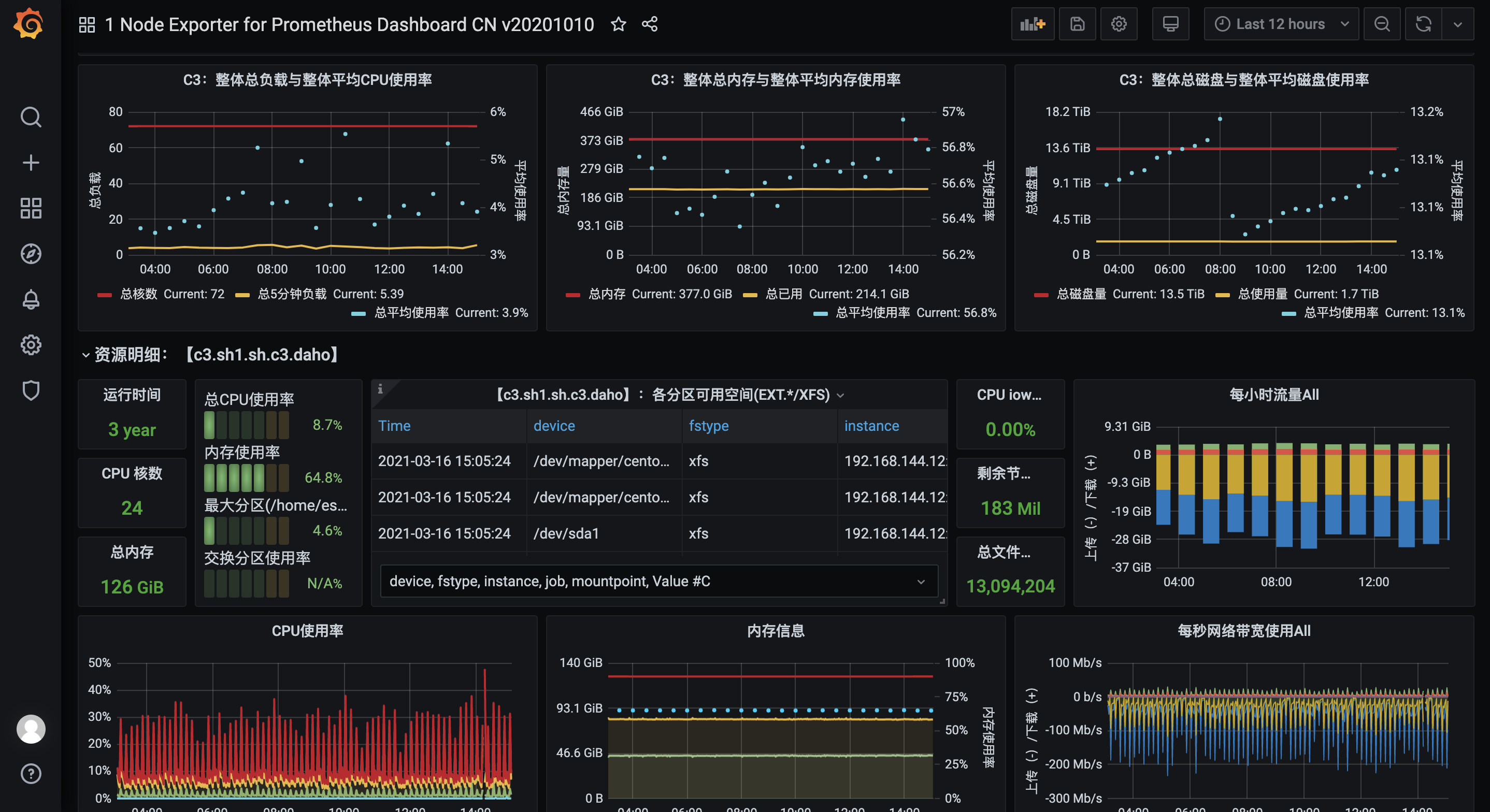
直接倒入模板,倒入步骤参考这便博客:https://www.cnblogs.com/wukc/p/14231042.html
一套完整的中小级别的企业级监控prometheus的更多相关文章
- Web自动化框架之五一套完整demo的点点滴滴(excel功能案例参数化+业务功能分层设计+mysql数据存储封装+截图+日志+测试报告+对接缺陷管理系统+自动编译部署环境+自动验证false、error案例)
标题很大,想说的很多,不知道从那开始~~直接步入正题吧 个人也是由于公司的人员的现状和项目的特殊情况,今年年中后开始折腾web自动化这块:整这个原因很简单,就是想能让自己偷点懒.也让减轻一点同事的苦力 ...
- Egret是一套完整的HTML5游戏开发解决方案
Egret是一套完整的HTML5游戏开发解决方案.Egret中包含多个工具以及项目.Egret Engine是一个基于TypeScript语言开发的HTML5游戏引擎,该项目在BSD许可证下发布.使用 ...
- 基于springboot+bootstrap+mysql+redis搭建一套完整的权限架构【六】【引入bootstrap前端框架】
https://blog.csdn.net/linzhefeng89/article/details/78752658 基于springboot+bootstrap+mysql+redis搭建一套完整 ...
- 一套完整的VI包含哪些元素
VI设计,即视觉识别系统,企业VI设计是企业品牌建设的重中之重.最近很多人都在问,一套完整的企业VI设计都包括哪些内容?笔者站在一个高级设计师的角度,来简单谈一谈VI设计包括哪些内容.文中指出,一套完 ...
- EasyRTMP+EasyDSS实现一套完整的紧急视频回传直播与存储回放方案
需求来源 紧急视频回传云端:即拍即传.云端存储.紧急录像.云拍云录!这些需求现在可能对于我们来说比较远,大部分也是在行业中才会用到,但相信在不就的将来肯定会落地到每个人的手中,因为这是一个自我保护.自 ...
- 分享Node.js + Koa2 + MySQL + Vue.js 实战开发一套完整个人博客项目网站
这是个什么的项目? 使用 Node.js + Koa2 + MySQL + Vue.js 实战开发一套完整个人博客项目网站. 博客线上地址:www.boblog.com Github地址:https: ...
- 部署一套完整的Kubernetes高可用集群(二进制,v1.18版)
一.前置知识点 1.1 生产环境可部署Kubernetes集群的两种方式 目前生产部署Kubernetes集群主要有两种方式: kubeadm Kubeadm是一个K8s部署工具,提供kubeadm ...
- 部署一套完整的Kubernetes高可用集群(二进制,最新版v1.18)下
七.高可用架构(扩容多Master架构) Kubernetes作为容器集群系统,通过健康检查+重启策略实现了Pod故障自我修复能力,通过调度算法实现将Pod分布式部署,并保持预期副本数,根据Node失 ...
- Linux实战教学笔记34:企业级监控Nagios实践(上)
一,Nagios监控简介 生活中大家应该对监控已司空见惯了,例如:餐馆门前的监控探头,小区里的视频监控,城市道路告诉监控探头等,这些监控的目的大家都很清楚,无须多说.那么,企业工作中为什么要部署监控系 ...
- 互联网企业级监控系统 OpenFalcon
Open-Falcon 人性化的互联网企业级监控系统,Open-Falcon 整体可以分为两部分,即绘图组件.告警组件.其中: 安装绘图组件 负责数据的采集.收集.存储.归档.采样.查询.展示(Das ...
随机推荐
- 如何通过OpenHarmony系统中集成的ffmpeg库和NAPI机制,实现更多的多媒体功能?
简介 OpenAtom OpenHarmony(以下简称"OpenHarmony")作为"开源"世界的"连接器",不断为智能社会的发展提供源 ...
- C 多维数组、特殊字符和字符串函数详解
C 多维数组 数组,也称为单维数组.这些非常棒,是您在 C 语言编程中会经常使用的东西.然而,如果您想要将数据存储为表格形式,例如带有行和列的表格,则需要熟悉多维数组. 二维数组 二维数组也称为矩阵, ...
- C# Log4net详细说明
1.概述 log4net是.Net下一个非常优秀的开源日志记录组件.log4net记录日志的功能非常强大.它可以将日志分不同的等级,以不同的格式,输出到不同的媒介.本文主要是介绍如何在Visual S ...
- 【FAQ】HarmonyOS SDK 闭源开放能力 —Push Kit(2)
1.问题描述: 开发服务端推送,客户端能收到离线推送,但是推送收到的通知只能从手机顶部下拉看到,无法收到一个顶部的弹框.请问是什么原因? 解决方案: 可能原因一: 消息提醒的方式与消息类别有关,比如: ...
- VS 在 Release 模式下使用断点调试程序
修改方法: 项目属性 --> c/c++ --> 常规 --> 调试信息格式 选择程序数据库 (默认:无) 项目属性 --> c/c++ --> 优化 --> 优化 ...
- 算法小白刷了一周 LeetCode 后的思考
Hi,我是 itchao 我自己工作有 2 两年多的前端开发经验,但是数据结构与算法一直不好,基本就是一个算法小白的水平. 听说大公司面试都要手写算法题,最近为了以后能去更好的公司,然后其实心里比较着 ...
- android 找不到设备
前言 当我们安装android studio的时候,测试的时候,你可能找不到设备. 我遇到的有两种情况,一种是本身就需要安装插件,如一些低端机或者有些小米机. 还有一种情况需要去触发一下,有些华为手机 ...
- requests模块发送post请求,flask开启服务接收请求,python
request模块部分 import requests import json if __name__ == '__main__': url = 'http://127.0.0.1:5000' dat ...
- DC-1渗透靶场实战速通版
"感谢您阅读本篇博客!如果您觉得本文对您有所帮助或启发,请不吝点赞和分享给更多的朋友.您的支持是我持续创作的动力,也欢迎留言交流,让我们一起探讨技术,共同成长!谢谢!" 文章为速通 ...
- 剑指offer21(Java)-调整数组顺序使奇数位于偶数前面(简单)
题目: 输入一个整数数组,实现一个函数来调整该数组中数字的顺序,使得所有奇数在数组的前半部分,所有偶数在数组的后半部分. 示例: 输入:nums = [1,2,3,4]输出:[1,3,2,4] 注:[ ...