
ansible-playbook应用
Target             #定义playbook的远程主机组

Variable           #定义piaybook使用的变量

Task               #定义远程主机上执行的任务列表

Handler            #定义task执行完成以后需要调用的任务,例如配置文件被改动,则启动handler任务重启相关联的服务。
Target常见参数如下:
hosts               #定义远程主机组

user                #执行该任务的用户

sudo                #设置为yes的时候,执行任务的时候用root权限

sudo user           #指定普通用户

connection          #默认基于SSH连接客户端

gather_facts        #获取远程主机facts基础信息
Variable常用参数如下:
vars               #定义格式

vars files         #指定变量文件

vars prompt        #用户交互模式自定义变量

setup              #模块去远程主机的值
Task常用参数如下:
name               #任务显示名称也即屏幕显示信息

action             #定义执行的动作

copy               #复制本地文件到远程主机

template           #复制本地文件到远程主机,乐意引用表里

service            #定义服务的状态
ansible-playbook应用案例:
1)远程主机安装nginx web服务,playbook代码如下(注意空格/格式):
固定格式:- hosts:all表示去所有机器执行, remote_user表示使用远程主机那个用户来执行,connection表示客户端连接方式(默认就是SSH 22端口,可以不写).
tasks:任务集, -name:任务名称, yum:调用YUM模块, shell:调用shell模块。
- hosts all

  remote_user: root

  connection: ssh

  gather_facts: no

  tasks:

      - name: precious pcre-devel openssl-devel make gcc-c++ install.

        yum: name=prce-devel,openssl-devel,make,gcc-c++ state=installed

      - name: precious nginx WEB server install process.

        shell: cd /usr/src/;wget -c http://nginx.org/download/nginx-1.16.0.tar.gz;tar xf nginx-1.16.0.tar.gz;cd nginx-1.16.0;make;make install
- hosts nginx

  remote_user: root

  tasks:

      - name:nginx server install 2020-04-03

        file: path=/usr/local/nginx/ state=directory

        notify:

            - nginx install

            - nginx start

  handlers:

      - name: nginx install

        shell: cd /data/sh/;/bin/bash auto_install_nginx.sh

      - name: nginx start

        shell: /usr/local/nginx/sbin/nginx
3)检测远程主机内核配置文件是否更新,如果更新则执行命令sysctl -p使内核参数生效,playbook代码如下:
-hosts: 192.168.1.100,192.168.1.101

 remote_user: root

 tasks:

     - name: Linux Kernet config 2020

       copy: src=/data/sh/sysctl.conf dest=/etc/

       notify:

           - source sysctl

  handlers:

      - name: source sysctl

       shell: sysctl -p
4)检测远程主机nginx服务配置文件被修改,则重启nginx服务:
- hosts: all

  remote_user: root

  tasks:

      - name: nginx web server .conf

        shell: sed -i 's/80/8888/g' /usr/local/nginx/conf/nginx.conf;grep "8888" /usr/local/nginx/conf/nginx.conf

        notify:

            - nginx reload

  handlers:

      - name: nginx reload

       shell: /usr/local/nginx/sbin/nginx -s reload
5) 基于列表items多个值创建用户,通过{{}}双大括号 来定义列表变量, with_items选项传入变量的值:
使用user模块的方法:
状态state=present创建的意思:
- hosts: all

  remote_user: root

  tasks:

      - name: Linux ststem Add User list.

        user: name={{item}} state=present

        with_itmes:

            - docker1

            - docekr2

            - docker3

            - docker4
使用shell模块的方法:创建100个用户
- hosts: all

  remote_user: root

  tasks:

      - name: Linux system Add User list.

        shell: for i in `seq 1 100`;do useradd docker$i;echo 123|passwd --stdin docker$i;done

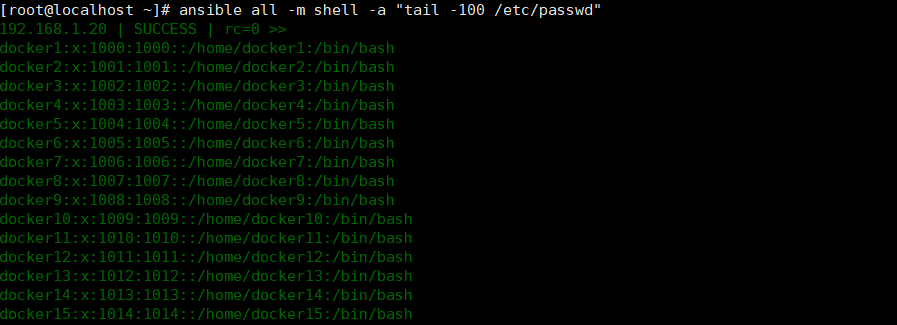
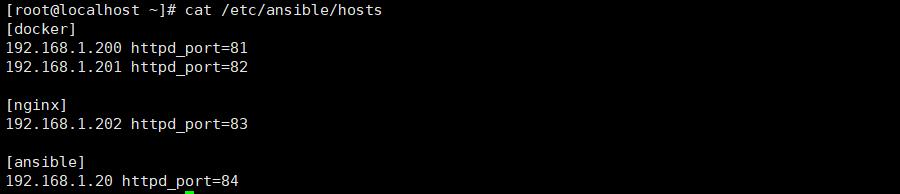
6) ansible playbook可以自定义template模板文件,模板文件主要用于服务器需求不一致的情况,需要独立定义的,例如两台服务器安装了nginx,安装完毕之后讲服务器A的HTTP的端口改成81,服务器B的HTTP端口改成82,基于tempalte模块轻松实现,方法步骤如下:
1,ansbile hosts文件指定不同服务器不同的httpd port端口,代码如下:
vim /etc/ansible/hosts

[web]

192.168.1.200 httpd_port=81

192.168.1.201 httpd_port=82
2, ansible端创建nginx.conf.j1(自定义命名)模板文件, cp nginx.conf.j1 nginx.conf.j2,并修改listen 80为listen {{httpd_port}},nginx其它配置想不变, 代码如下:
worker_processes  1;

events {

    worker_connections  1024;

}

http {

    include       mime.types;

    default_type  application/octet-stream;

    sendfile        on;

    keepalive_timeout  65;

    server {

        listen       {{httpd_port}};

        server_name  localhost;

        location / {

            root   html;

            index  index.html index.htm;

        }

        error_page   500 502 503 504  /50x.html;

        location = /50x.html {

            root   html;

        }

    }

}
3, ansible playbook剧本yaml文件创建,(template调用hosts文件中得变量)代码如下:
- hosts: all

  remote_user: root

  tasks:

      - name: nginx server install 2020

        file: path=/usr/local/nginx/ state=directory

        notify:

            - nginx install

            - nginx config

   handlers:

       - name: nginx install

         shell: cd /usr/src/;wget -c http:/nginx.org/download/nginx-1.16.0.tar.gz;tar xf nginx-1.16.0.tar.gz;cd nginx-1.16.0;make;make install

       - name: nginx config

         template: src=/data/sh/nginx.j1 dest=/usr/local/nginx/conf/nginx.conf
- hosts: all

  remote_user: root

  tasks:

      - name: Nginx server Install 2020

        shell: if [ -d /usr/local/nginx/ ];then exit 127;fi

        notify:

            - nginx install

            - nginx config

            - nginx start

  handlers:

      - name: nginx install

        shell: cd /usr/src;wget -c http://nginx.org/download/nginx-1.16.0.tar.gz;tar xf nginx-1.16.0.tar.gz;cd nginx-1.16.0;./configure --prefix=/usr/local/nginx;make;make install

      - name: nginx config

        template: src=/data/sh/nginx.conf.j1 dest=/usr/local/nginx/conf/nginx.conf

      - name: nginx start

        shell: /usr/local/nginx/sbin/nginx
执行:
ansible-playbook web.yaml

ansible all -m shell -a "cat /usr/local/nginx/conf/nginx.conf;netstat -nutlp"

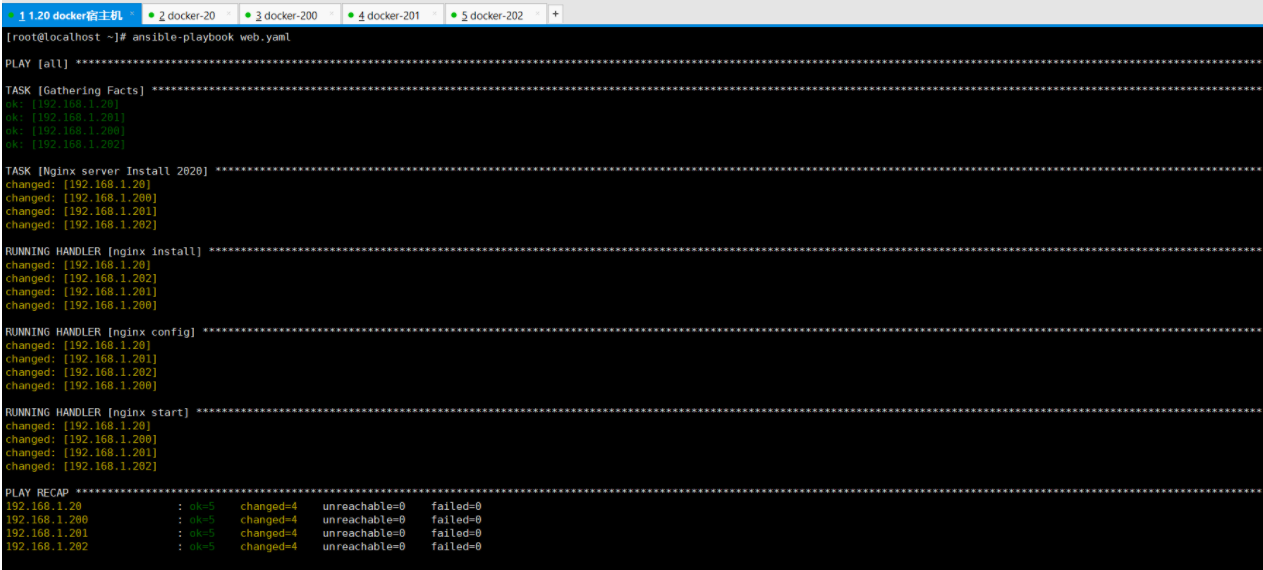
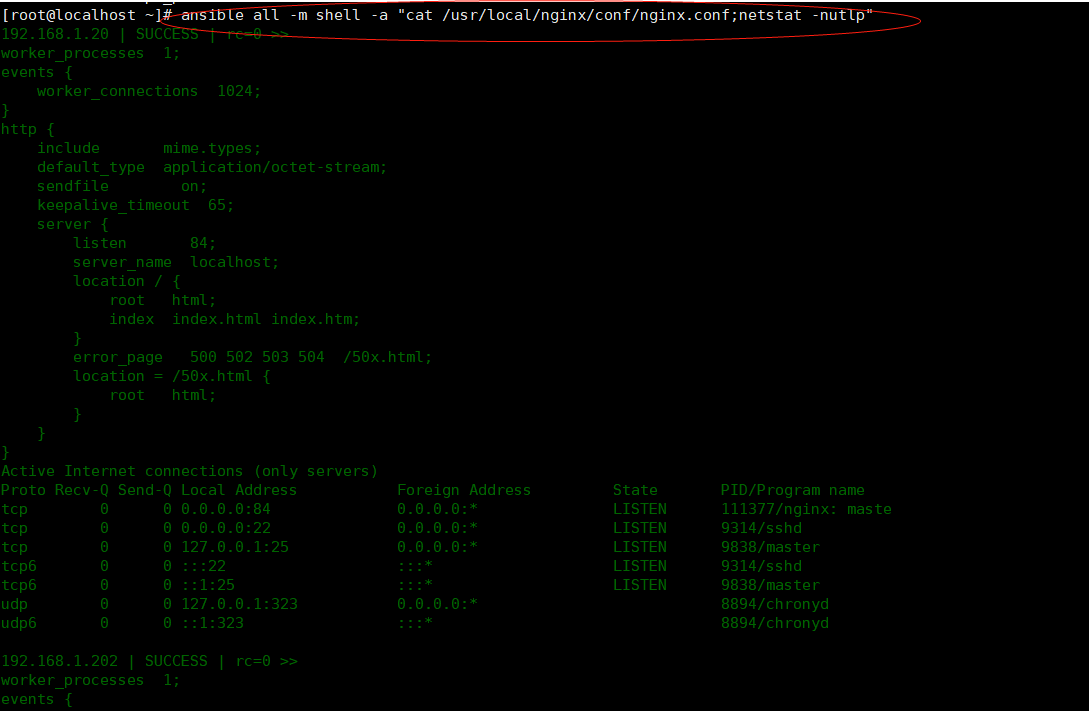
6) ansible playbook剧本中调用shell脚本,有两种方法如下:
使用copy模块:
使用copy 模块拷贝到对方远程机器:(src源地址 dest目标地址 mode授予权限)
- hosts: all

  remote_user: root

  ganther_facts: no

  tasks:

      - name: nginx server install 2020

        copy: src=/data/sh/auto_install_nginx.sh dest=/tmp/ mode=645

      - name: Exec auto install nginx SHELL.

        shell: cd /tmp/;/bin/bash auto_install_nginx.sh
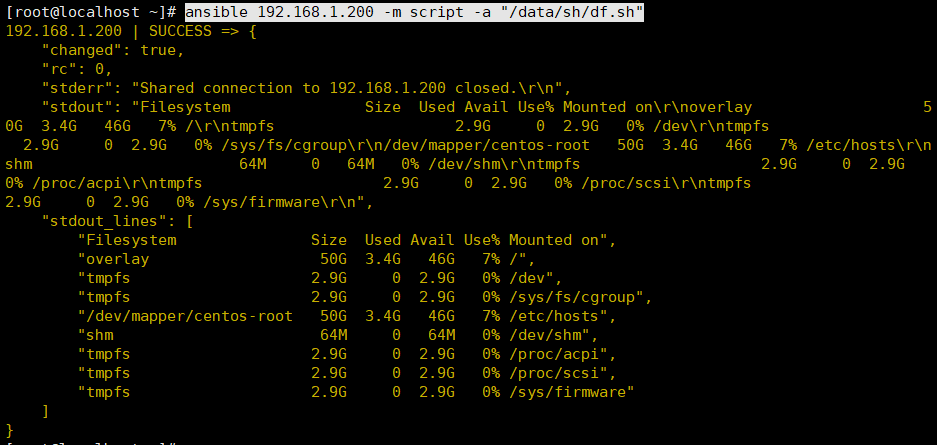
使用script模块: ansible-doc script查看帮助:(需先再ansible本机创建脚本:/data/sh/df.sh)
ansible 192.168.1.200 -m script -a "/data/sh/df.sh"
7) 在剧本中定义变量:
vars:
- nginx_ver:1.16.0
- nginx_url:http://nginx.org/download
调用变量时 使用{{}}双大括号:
- hosts: all

  remote_user: root

  gather_facts: no

  vars:

      - nginx_ver: 1.16.0

      - nginx_url: http://nginx.org/download

  tasks:

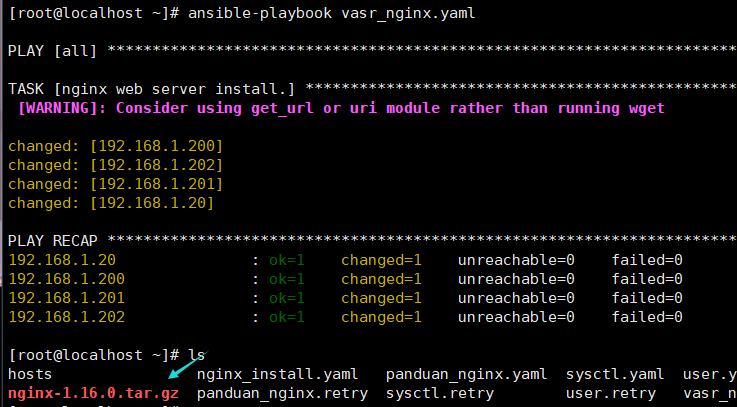
      - name: nginx web server install.

        shell: wget -c {{nginx_url}}/nginx-{{nginx_ver}}.tar.gz
ansible-playbook应用的更多相关文章
- Ansible playbook API 开发 调用测试
Ansible是Agentless的轻量级批量配置管理工具,由于出现的比较晚(13年)基于Ansible进行开发的相关文档较少,因此,这里通过一些小的实验,结合现有资料以及源码,探索一下Ansible ...
- ansible playbook实践(四)-如何调试写好的playbook文件
有时,我们写了一个长长,功能很强悍的yaml文件,但是,我们有可能会担心,写的yaml文件是否正确,是否有漏洞危机,毕竟是要修改线上的机器,那么,有可能我们可以从以下几个检查维度来进行,确保在大规模应 ...
- ansible playbook批量改ssh配置文件,远程用户Permission denied
最近手里的数百台服务器需要改/etc/ssh/sshd_config的参数,禁止root直接登陆,也就是说 [root@t0 ~]# cat /etc/ssh/sshd_config | grep R ...
- ansible笔记(11):初识ansible playbook(二)
ansible笔记():初识ansible playbook(二) 有前文作为基础,如下示例是非常容易理解的: --- - hosts: test211 remote_user: root tasks ...
- ansible笔记(10):初识ansible playbook
ansible笔记():初识ansible playbook 假设,我们想要在test70主机上安装nginx并启动,我们可以在ansible主机中执行如下3条命令 ansible test70 -m ...
- Ansible playbook 批量修改服务器密码 先普通后root用户
fsckzy Ansible playbook 批量修改服务器密码 客户的需求:修改所有服务器密码,密码规则为Rfv5%+主机名后3位 背景:服务器有CentOS6.7,SuSE9.10.11,r ...
- 写Ansible playbook添加zabbix被监控的对象
本主题达到的效果是能通过编写Ansible Playbook,创建zabbix主机组,把被监控的对象加入到zabbix监控系统中,同时链接到对象的模板. 1.准备工作 在zabbix服务器上面,我们需 ...
- Ansible playbook基础组件介绍
本节内容: ansible playbook介绍 ansible playbook基础组件 playbook中使用变量 一.ansible playbook介绍 playbook是由一个或多个“pla ...
- ansible playbook基本操作
一.ansible playbook简单使用 相当于是把模块写入到配置文件里面 vim /etc/ansible/test.yml //写入如下内容: --- - hosts: 127.0.0.1 r ...
- ansible入门四(Ansible playbook基础组件介绍)
本节内容: ansible playbook介绍 ansible playbook基础组件 playbook中使用变量 一.ansible playbook介绍 playbook是由一个或多个“pla ...
随机推荐
- Nacos服务发现与注册源码剖析
为什么要看源码: 1.提升技术功底:学习源码里的优秀设计思想,比如一些疑难问题的解决思路,还有一些优秀的设计模式,整体提升自己的技术功底2.深度掌握技术框架:源码看多了,对于一个新技术或框架的掌握速度 ...
- OpenCV计算机视觉学习(14)——浅谈常见图像后缀(png, jpg, bmp)的区别(opencv读取语义分割mask的坑)
如果需要处理的原图及代码,请移步小编的GitHub地址 传送门:请点击我 如果点击有误:https://github.com/LeBron-Jian/ComputerVisionPractice 本来 ...
- 落地微服务架构v2.0
网关+服务治理 将服务注册到Consul中,需要首先系统该插件. Ocelot:网关组件,腾讯和微软都在使用. 可以使用dotnet run命令启动.NET Core项目,启动时可以在命令时传递监听的 ...
- 我真的,AI框架的编程范式怎么理解?
我给领导汇报AI框架用函数式编程好,没讲明白,说函数式就是写函数那样方便,都被领导吊飞了,啥玩意,写啥不是写函数,狗屁不通! 网上搜说用tensorflow那就是用声明式编程,用pytorch就是命令 ...
- 我真的想知道,AI编译器中的IR是什么?
随着深度学习的不断发展,AI 模型结构在快速演化,底层计算硬件技术更是层出不穷,对于广大开发者来说不仅要考虑如何在复杂多变的场景下有效的将算力发挥出来,还要应对 AI 框架的持续迭代. AI 编译器就 ...
- Vue详解----一篇带你从头领悟到尾,享受飞升的感觉
脚手架文件结构 """ ├── node_modules ├── public │ ├── favicon.ico: 页签图标 │ └── index.html: 主页面 ...
- EasyExcel中使用表头模板示例
解决方案 在EasyExcel的官方示例中,使用模板导出Excel,其结果仍然还会重新打印表头.不满足使用表头模板的需求.在参考源码后,找到如下解决方案. String templateFileNam ...
- 2021-09-27 Core初步实战
中间件Progarm的定义添加Logging public static IHostBuilder CreateHostBuilder(string[] args) => Host.Create ...
- Linux-基本常用命令2
cat 查看文件内容 cat -n 查看文件内容并且显示行数 more 用vi的形式查看文件内容 less 类似于vim查看文件内容 echo 输出内容到控制台 echo -e 支持反斜线控制 ...
- 【overcome error】dereferencing pointer to incomplete type
@ 目录 前言 解决 代码情况 分析问题 尾声 前言 这个问题是我在学习数据结构链栈部分遇到的,英文报错如题所示,中文意思是:取消引用不完整类型的指针,在百度一圈也没明白,(百度搜索,看一个和全看基本 ...