
【framework】RootWindowContainer简介
1 前言
RootWindowContainer 是窗口容器的根容器,子容器是 DisplayContent。关于其父类及祖父类的介绍,见→WindowContainer简介、ConfigurationContainer简介。
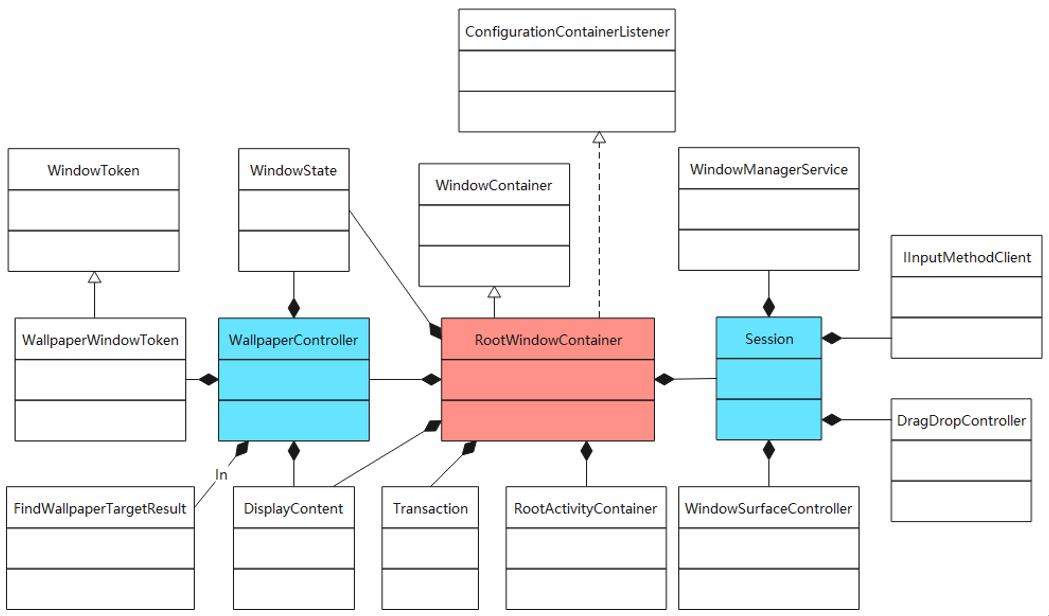
本文主要介绍 WallpaperController 和 RootWindowContainer。
2 源码
2.1 WallpaperController
源码地址→/frameworks/base/services/core/java/com/android/server/wm/WallpaperController.java
(1)主要属性
private WindowManagerService mService

private final DisplayContent mDisplayContent

private final ArrayList<WallpaperWindowToken> mWallpaperTokens = new ArrayList<>()

private WindowState mWallpaperTarget = null

private WindowState mPrevWallpaperTarget = null

private WindowState mWaitingOnWallpaper

private WindowState mTmpTopWallpaper

WindowState mDeferredHideWallpaper = null

private float mLastWallpaperX = -1

private float mLastWallpaperY = -1

private float mLastWallpaperXStep = -1

private float mLastWallpaperYStep = -1

private int mLastWallpaperDisplayOffsetX = Integer.MIN_VALUE

private int mLastWallpaperDisplayOffsetY = Integer.MIN_VALUE

private long mLastWallpaperTimeoutTime

private final FindWallpaperTargetResult mFindResults = new FindWallpaperTargetResult()
(2)内部类
final private static class FindWallpaperTargetResult {

	WindowState topWallpaper = null;

    WindowState wallpaperTarget = null;

	boolean useTopWallpaperAsTarget = false;

    boolean resetTopWallpaper = false

    //topWallpaper = win

	void setTopWallpaper(WindowState win)

    //wallpaperTarget = win

	void setWallpaperTarget(WindowState win)

    //useTopWallpaperAsTarget = topWallpaperAsTarget

	void setUseTopWallpaperAsTarget(boolean topWallpaperAsTarget)

	void reset()

}
(3)函数
private final ToBooleanFunction<WindowState> mFindWallpaperTargetFunction = w -> {

	//mFindResults.setTopWallpaper(w)

	//mFindResults.setWallpaperTarget(w)

}
(4)Wallpaper 相关
//return mWallpaperTarget

WindowState getWallpaperTarget()

//return win == mWallpaperTarget

boolean isWallpaperTarget(WindowState win)

//return mWallpaperTarget != null && mWallpaperTarget.mLayer >= win.mBaseLayer

boolean isBelowWallpaperTarget(WindowState win)

//return isWallpaperVisible(mWallpaperTarget)

boolean isWallpaperVisible()

//mWallpaperTokens.get(i).updateWallpaperVisibility(isWallpaperVisible(mWallpaperTarget))

void updateWallpaperVisibility()

//hideWallpapers(mDeferredHideWallpaper)

void hideDeferredWallpapersIfNeeded()

//mDeferredHideWallpaper = winGoingAway

void hideWallpapers(final WindowState winGoingAway)

boolean updateWallpaperOffset(WindowState wallpaperWin, int dw, int dh, boolean sync)

void setWindowWallpaperPosition(WindowState window, float x, float y, float xStep, float yStep)

void setWindowWallpaperDisplayOffset(WindowState window, int x, int y)

//mWallpaperTokens.get(i).sendWindowWallpaperCommand(action, x, y, z, extras, sync)

Bundle sendWindowWallpaperCommand(WindowState window, String action, int x, int y, int z, Bundle extras, boolean sync)

//mLastWallpaperTimeoutTime = 0

void clearLastWallpaperTimeoutTime()

//mWaitingOnWallpaper = null; mService.mGlobalLock.notifyAll()

void wallpaperCommandComplete(IBinder window)

//mWaitingOnWallpaper = null; mService.mGlobalLock.notifyAll()

void wallpaperOffsetsComplete(IBinder window)

void adjustWallpaperWindows()

void adjustWallpaperWindowsForAppTransitionIfNeeded(ArraySet<AppWindowToken> openingApps, ArraySet<AppWindowToken> changingApps)

//mWallpaperTokens.add(token)

void addWallpaperToken(WallpaperWindowToken token)

//return canScreenshotWallpaper(getTopVisibleWallpaper())

boolean canScreenshotWallpaper()

Bitmap screenshotWallpaperLocked()
(5)动画
//mWallpaperTokens.get(i).startAnimation(a)

void startWallpaperAnimation(Animation a)

boolean isWallpaperTargetAnimating()

//mService.getRecentsAnimationController().startAnimation()

boolean processWallpaperDrawPendingTimeout()
2.2 RootWindowContainer
源码地址→/frameworks/base/services/core/java/com/android/server/wm/RootWindowContainer.java
(1)类定义
//DisplayContent 为子节点

class RootWindowContainer extends WindowContainer<DisplayContent> implements ConfigurationContainerListener
(2)实现接口
public interface ConfigurationContainerListener {

    void onRequestedOverrideConfigurationChanged(Configuration overrideConfiguration);

}
(3)主要属性
private RootActivityContainer mRootActivityContainer

private Object mLastWindowFreezeSource = null

private Session mHoldScreen = null

private float mScreenBrightness = -1

private long mUserActivityTimeout = -1

WindowState mHoldScreenWindow = null

WindowState mObscuringWindow = null

final WallpaperController mWallpaperController

//mHandler = new MyHandler(service.mH.getLooper())

private final Handler mHandler

private int mTopFocusedDisplayId = INVALID_DISPLAY

//key为pid

final HashMap<Integer, AppWindowToken> mTopFocusedAppByProcess = new HashMap<>();

//事务

private final SurfaceControl.Transaction mDisplayTransaction = new SurfaceControl.Transaction()
(4)消费者
//关闭系统对话框,w 为 WindowState 类型

private final Consumer<WindowState> mCloseSystemDialogsConsumer = w -> {

	if (w.mHasSurface) {

		...

		w.mClient.closeSystemDialogs(mCloseSystemDialogsReason);

		...

	}

};

//移除窗口,w 为 WindowState 类型

private static final Consumer<WindowState> sRemoveReplacedWindowsConsumer = w -> {

	final AppWindowToken aToken = w.mAppToken;

	if (aToken != null) {

		aToken.removeReplacedWindowIfNeeded(w);

	}

};
Consumer 类如下。
public interface Consumer<T> {

    void accept(T t);

    default Consumer<T> andThen(Consumer<? super T> after) {

        Objects.requireNonNull(after);

        return (T t) -> { accept(t); after.accept(t); };

    }

}
(5)Handler
private final class MyHandler extends Handler {

    ...

	public void handleMessage(Message msg) {

		switch (msg.what) {

            //设置屏幕亮度

			case SET_SCREEN_BRIGHTNESS_OVERRIDE:

				mService.mPowerManagerInternal.setScreenBrightnessOverrideFromWindowManager(msg.arg1);

				break;

            //设置屏幕休眠时间

			case SET_USER_ACTIVITY_TIMEOUT:

				mService.mPowerManagerInternal.setUserActivityTimeoutOverrideFromWindowManager((Long) msg.obj);

				break;

			...

		}

	}

}
(6)Window 相关
//mChildren.get(i).findFocusedWindow()

WindowState computeFocusedWindow()

void getWindowsByName(ArrayList<WindowState> output, String name)

//mChildren.get(i).getAppWindowToken(binder)

AppWindowToken getAppWindowToken(IBinder binder)
(7)Display 相关
//displaysInFocusOrder.put(i, mChildren.get(i).getDisplayId())

void getDisplaysInFocusOrder(SparseIntArray displaysInFocusOrder)

//mChildren.get(i).getDisplayId() == displayId ? mChildren.get(i) : null

DisplayContent getDisplayContent(int displayId)

//new DisplayContent(display, mService, mWallpaperController, controller)

DisplayContent createDisplayContent(final Display display, DisplayWindowController controller)

//mChildren.get(i).getWindowToken(token.token) == token ? mChildren.get(i) : null

DisplayContent getWindowTokenDisplay(WindowToken token)

//getDisplayContent(displayId).onOverrideConfigurationChanged(newConfiguration)

int[] setDisplayOverrideConfigurationIfNeeded(Configuration newConfiguration, int displayId)
(8)Surface 相关
//mChildren.get(i).destroyLeakedSurfaces()

//mWmService.mActivityManager.killPids(pids, "Free memory", secure)

//winAnimator.destroySurface()

//winAnimator.mWin.mAppToken.getController().removeStartingWindow()

//winAnimator.mWin.mClient.dispatchGetNewSurface()

boolean reclaimSomeSurfaceMemory(WindowStateAnimator winAnimator, String operation, boolean secure)

//performSurfacePlacementNoTrace(recoveringMemory

void performSurfacePlacement(boolean recoveringMemory)

//mWmService.updateFocusedWindowLocked(UPDATE_FOCUS_WILL_PLACE_SURFACES, false)

//mChildren.get(i).setExitingTokensHasVisible(false)

//applySurfaceChangesTransaction(recoveringMemory)

//mWmService.enableScreenIfNeededLocked()

//mWmService.scheduleAnimationLocked()

void performSurfacePlacementNoTrace(boolean recoveringMemory)
(9)Layout 相关
//mChildren.get(i).isLayoutNeeded()

boolean isLayoutNeeded()

//final int pendingChanges = animator.getPendingLayoutChanges(mChildren.get(i).getDisplayId())

//return pendingChanges != 0

boolean hasPendingLayoutChanges(WindowAnimator animator)

boolean copyAnimToLayoutParams()
(10)输入法
//mChildren.get(i).mInputMethodWindow

WindowState getCurrentInputMethodWindow()
(11)forAllWindows
//forAllWindows: w.mWinAnimator.setSecureLocked(disabled)

void setSecureSurfaceState(int userId, boolean disabled)

//w.setHiddenWhileSuspended(suspended)

void updateHiddenWhileSuspendedState(final ArraySet<String> packages, final boolean suspended)

//forAllWindows: w.updateAppOpsState()

void updateAppOpsState()

//forAllWindows(mCloseSystemDialogsConsumer, false)

void closeSystemDialogs(String reason)

//forAllWindows(sRemoveReplacedWindowsConsumer, true)

void removeReplacedWindows()
(12)forAllDisplays
void forAllDisplays(Consumer<DisplayContent> callback) {

	for (int i = mChildren.size() - 1; i >= 0; --i) {

		callback.accept(mChildren.get(i));

	}

}
(13)forAllDisplayPolicies
void forAllDisplayPolicies(Consumer<DisplayPolicy> callback) {

	for (int i = mChildren.size() - 1; i >= 0; --i) {

		callback.accept(mChildren.get(i).getDisplayPolicy());

	}

}
(14)其他方法
//mChildren.get(i).getStack(windowingMode, activityType)

TaskStack getStack(int windowingMode, int activityType)

//win = getWindow((w) -> w.mSession.mPid == pid && w.isVisibleLw()), return win != null

boolean canShowStrictModeViolation(int pid)

boolean handleNotObscuredLocked(WindowState w, boolean obscured, boolean syswin)
声明:本文转自【framework】RootWindowContainer简介
【framework】RootWindowContainer简介的更多相关文章
- 实体框架(Entity Framework)简介
实体框架(Entity Framework)简介 简称EF,与ADO.NET关系 ADO.NET Entity Framework 是微软以 ADO.NET 为基础所发展出来的对象关系对应 (O/R ...
- iOS - 系统经常使用框架(framework)的简介
系统框架(framework)的简介 ImageIO - 该框架的接口可用于导入或导出图像数据及图像元数据 CoreTelephony - 获取IMSI号,SIM卡背面的号码是SIM卡的电子串号, ...
- .NET Entity Framework入门简介及简单操作
Entity Framework是微软借鉴ORM思想开发自己的一个ORM框架. ORM就是将数据库表与实体对象(相当于三层中的Model类)相互映射的一种思想. 最大的优点就是非常方便的跨数据库平台. ...
- Spring Framework体系结构简介
说明:以下转自Spring官方文档,用的版本为4.3.11版本. 一.引用官方文档 2.2.1核心集装箱 所述核心容器由以下部分组成spring-core, spring-beans,spring-c ...
- 2、ASP.NET MVC入门到精通——Entity Framework入门
实体框架(Entity Framework)简介 简称EF 与ADO.NET关系 ADO.NET Entity Framework 是微软以 ADO.NET 为基础所发展出来的对象关系对应 (O/R ...
- C# 泛型简介
摘要:本文讨论泛型处理的问题空间.它们的实现方式.该编程模型的好处,以及独特的创新(例如,约束.一般方法和委托以及一般继承).此外,本文还讨论 .NET Framework 如何利用泛型. 下载 Ge ...
- Robot Framework测试框架学习笔记
一.Robot Framework框架简介 Robot Framework是一种基于Python的可扩展关键字驱动自动化测试框架,通常用于端到端的可接收测试和可接收测试驱动的开发.可以 ...
- 实体框架(Entity Framework)
实体框架(Entity Framework) 实体框架(Entity Framework)简介 ADO.NET Entity Framework 是微软以 ADO.NET 为基础所发展出来的对象关系对 ...
- 七、Framework类库
1.Framework类库简介 .Net Framework类库包含Framework类库(Framework Class Library,FCL).FCL是一组DLL程序集的统称,其中含有数千个类型 ...
- 小试---EF5.0简介
简介 实体框架Entity Framework 是 ADO.NET 中的一组支持开发面向数据的软件应用程序的技术.是微软的一个ORM框架.简单的说就是把关系型数据库映射成面向对象模型. 一篇更加详细的 ...
随机推荐
- PC 网页 布局图
- 百度网盘(百度云)SVIP超级会员共享账号每日更新(2023.11.22)
一.百度网盘SVIP超级会员共享账号 可能很多人不懂这个共享账号是什么意思,小编在这里给大家做一下解答. 我们多知道百度网盘很大的用处就是类似U盘,不同的人把文件上传到百度网盘,别人可以直接下载,避免 ...
- [转帖]Oracle 创建和查看DBLink 的方法
https://www.cnblogs.com/zhouzangood/articles/4612441.html 1.如果需要创建全局 DBLink,则需要先确定用户有创建 dblink 的权限: ...
- 阿里的AIGC数据库工具: Chat2DB的学习与使用
阿里的AIGC数据库工具: Chat2DB的学习与使用 背景 今天陪家中老人去完医院后, 继续回来学习时发现 阿里巴巴的 chat2DB已经发布的 2.0.1的版本. 想着下载下来试试. 主要也是备忘 ...
- iptables 命令学习
iptables 命令学习 摘要 Linux 早起版本使用netfilter进行数据包过滤. 最新的版本开始改用 ebpf的方式进行内核编程式的包过滤. netfilter 可以理解为内核态的一个处理 ...
- buildkit的简单学习与使用
下载 需要注意本文学习了很多如下网站的内容: https://zhuanlan.zhihu.com/p/366671300 # 第一步下载资源 https://github.com/moby/buil ...
- React Hooks 指北
前言 这篇文章旨在总结 React Hooks 的使用技巧以及在使用过程中需要注意的问题,其中会附加一些问题产生的原因以及解决方式.但是请注意,文章中所给出的解决方式并不一定完全适用,解决问题的方案有 ...
- 【实践篇】最全的【DDD领域建模】小白学习手册(文末附资料)
导读 DDD领域建模被各个大小厂商提起并应用,而每个人都有自己的理解,本文就是针对小白,系统地讲解DDD到底是什么,解决了什么问题,及一些建议和实践.本文主要是思想的一种碰撞和分享,希望能对朋友们有所 ...
- vue中$once的使用
$once 可以给组件实例绑定一个自定义事件,但该事件只能被触发一次,触发之后随即被移除 $once的简单使用 <template> <div> <button @cli ...
- scss常用语法
在线编译 https://wow.techbrood.com/fiddle/11143 群组选择器的嵌套[编译前] .container { h1, h2, h3 {margin-bottom: .8 ...