
【ElasticSearch】03 部署
Windows集群部署:
把包解压成三个节点 【kibana-7.16.3-windows-x86_64.zip】
- Node-1001

- Node-1002

- Node-1003
修改集群的配置信息
- Node-1001\config\elasticsearch.yml

- Node-1002\config\elasticsearch.yml

- Node-1003\config\elasticsearch.yml
配置信息:
============================== Node-1001 ==========================

# 集群名称一致

cluster.name: Cloud9-WIN-ES-CAT

#节点名称,集群内要唯一

node.name: node-1001

node.master: true

node.data: true

# ip 地址

network.host: localhost

# http 端口

http.port: 1001

# tcp 监听端口

transport.tcp.port: 9301

# 跨域配置

http.cors.enabled: true

http.cors.allow-origin: "*"

============================== Node-1002 ==========================

# 集群名称一致

cluster.name: Cloud9-WIN-ES-CAT

#节点名称,集群内要唯一

node.name: node-1002

node.master: true

node.data: true

# 候选主节点

discovery.seed_hosts: ["localhost:9301"]

discovery.zen.fd.ping_timeout: 1m

discovery.zen.fd.ping_retries: 5

# ip 地址

network.host: localhost

# http 端口

http.port: 1002

# tcp 监听端口

transport.tcp.port: 9302

# 跨域配置

http.cors.enabled: true

http.cors.allow-origin: "*"

============================== Node-1003 ==========================

# 集群名称一致

cluster.name: Cloud9-WIN-ES-CAT

#节点名称,集群内要唯一

node.name: node-1003

node.master: true

node.data: true

#候选主节点的地址,在开启服务后可以被选为主节点

discovery.seed_hosts: ["localhost:9301", "localhost:9302"]

discovery.zen.fd.ping_timeout: 1m

discovery.zen.fd.ping_retries: 5

# ip 地址

network.host: localhost

# http 端口

http.port: 1003

# tcp 监听端口

transport.tcp.port: 9303

# 跨域配置

http.cors.enabled: true

http.cors.allow-origin: "*"
(可选)编写辅助启动脚本【start-cluster.cmd】:
@echo off

start %CD%\Node-1001\bin\elasticsearch.bat

start %CD%\Node-1002\bin\elasticsearch.bat

start %CD%\Node-1003\bin\elasticsearch.bat
(可选)编写辅助清除脚本【clear-nodes.cmd】:
@ECHO OFF

RD /S /Q %CD%\Node-1001\data\nodes

RD /S /Q %CD%\Node-1002\data\nodes

RD /S /Q %CD%\Node-1003\data\nodes
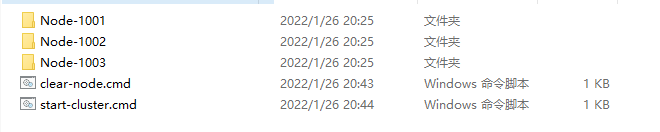
启动之前,删除data目录下的nodes目录
然后依次启动
bin\elasticsearch.bat
请求节点地址,查看节点运行状态【GET请求】
http://localhost:1001/_cluster/health

http://localhost:1002/_cluster/health

http://localhost:1003/_cluster/health
响应这些信息表示正常
{

    "cluster_name": "Cloud9-WIN-ES-CAT",

    "status": "green",

    "timed_out": false,

    "number_of_nodes": 1,

    "number_of_data_nodes": 1,

    "active_primary_shards": 3,

    "active_shards": 3,

    "relocating_shards": 0,

    "initializing_shards": 0,

    "unassigned_shards": 0,

    "delayed_unassigned_shards": 0,

    "number_of_pending_tasks": 0,

    "number_of_in_flight_fetch": 0,

    "task_max_waiting_in_queue_millis": 0,

    "active_shards_percent_as_number": 100.0

}
或者是查看cat/nodes?v查看集群状态
http://localhost:1001/_cat/nodes?v

http://localhost:1002/_cat/nodes?v

http://localhost:1003/_cat/nodes?v
响应的信息:
ip        heap.percent ram.percent cpu load_1m load_5m load_15m node.role   master name

127.0.0.1           20          97  19                          cdfhilmrstw -      node-1003

127.0.0.1           21          97  19                          cdfhilmrstw -      node-1002

127.0.0.1           16          97  19                          cdfhilmrstw *      node-1001
# 测试集群是否是相互通信的?
# 在1001节点创建一个sample索引
PUT http://localhost:1001/sample
# 然后去1002节点和1003节点上面查看sample索引信息
# 如果其他节点能够找到1001节点的索引,说明集群是相互通信的
GET http://localhost:1003/sample

GET http://localhost:1002/sample
Linux集群部署:
首先提供集群服务环境 (每台虚拟机最少提供2G内存,内存过低将导致服务无法集群通信)
192.168.177.128

192.168.177.129

192.168.177.130
每台机器都需要有ES的包
elasticsearch-7.16.0-linux-x86_64.tar.gz
解压包到/opt/module目录下面
mkdir -p /opt/module/

tar -zxvf elasticsearch-7.16.0-linux-x86_64.tar.gz -C /opt/module/
# (可选)变更目录名称
mv /opt/module/elasticsearch-7.16.0 /opt/module/es
# 创建elasticsearch用户, 设置密码123456
useradd user-es

passwd user-es
# 权限赋予
chown -R user-es:user-es /opt/module/elasticsearch-7.16.0/
# 编辑集群参数
mv /opt/module/elasticsearch-7.16.0/config/elasticsearch.yml /opt/module/elasticsearch-7.16.0/config/elasticsearch.yml.bak

vim /opt/module/elasticsearch-7.16.0/config/elasticsearch.yml

= = = = = 1号节点 192.168.177.128 = = = = =

# 集群名称

cluster.name: cluster-es

# 节点名称,每个节点的名称不能重复

node.name: node-1

# ip地址,每个节点的地址不能重复

network.host: 192.168.177.128

# 是否具有资格主节点

node.master: true

node.data: true

http.port: 9200

# head 插件需要这打开这两个配置

http.cors.allow-origin: "*"

http.cors.enabled: true

http.max_content_length: 200mb

# es7.x 之后新增的配置,初始化一个新的集群时需要此配置来选举 master

cluster.initial_master_nodes: ["node-1"]

# es7.x 之后新增的配置,节点发现

discovery.seed_hosts: ["192.168.177.128:9300","192.168.177.129:9300","192.168.177.130:9300"]

gateway.recover_after_nodes: 2

network.tcp.keep_alive: true

network.tcp.no_delay: true

transport.tcp.compress: true

# 集群内同时启动的数据任务个数,默认是 2 个

cluster.routing.allocation.cluster_concurrent_rebalance: 16

# 添加或删除节点及负载均衡时并发恢复的线程个数,默认 4 个

cluster.routing.allocation.node_concurrent_recoveries: 16

# 初始化数据恢复时,并发恢复线程的个数,默认 4 个

cluster.routing.allocation.node_initial_primaries_recoveries: 16

= = = = = 2号节点 192.168.177.129 = = = = =

# 集群名称

cluster.name: cluster-es

# 节点名称,每个节点的名称不能重复

node.name: node-2

# ip地址,每个节点的地址不能重复

network.host: 192.168.177.129

# 是否具有资格主节点

node.master: true

node.data: true

http.port: 9200

# head 插件需要这打开这两个配置

http.cors.allow-origin: "*"

http.cors.enabled: true

http.max_content_length: 200mb

# es7.x 之后新增的配置,初始化一个新的集群时需要此配置来选举 master

cluster.initial_master_nodes: ["node-1"]

# es7.x 之后新增的配置,节点发现

discovery.seed_hosts: ["192.168.177.128:9300","192.168.177.129:9300","192.168.177.130:9300"]

gateway.recover_after_nodes: 2

network.tcp.keep_alive: true

network.tcp.no_delay: true

transport.tcp.compress: true

# 集群内同时启动的数据任务个数,默认是 2 个

cluster.routing.allocation.cluster_concurrent_rebalance: 16

# 添加或删除节点及负载均衡时并发恢复的线程个数,默认 4 个

cluster.routing.allocation.node_concurrent_recoveries: 16

# 初始化数据恢复时,并发恢复线程的个数,默认 4 个

cluster.routing.allocation.node_initial_primaries_recoveries: 16

= = = = = 3号节点 192.168.177.130 = = = = =

# 集群名称

cluster.name: cluster-es

# 节点名称,每个节点的名称不能重复

node.name: node-3

# ip地址,每个节点的地址不能重复

network.host: 192.168.177.130

# 是否具有资格主节点

node.master: true

node.data: true

http.port: 9200

# head 插件需要这打开这两个配置

http.cors.allow-origin: "*"

http.cors.enabled: true

http.max_content_length: 200mb

# es7.x 之后新增的配置,初始化一个新的集群时需要此配置来选举 master

cluster.initial_master_nodes: ["node-1"]

# es7.x 之后新增的配置,节点发现

discovery.seed_hosts: ["192.168.177.128:9300","192.168.177.129:9300","192.168.177.130:9300"]

gateway.recover_after_nodes: 2

network.tcp.keep_alive: true

network.tcp.no_delay: true

transport.tcp.compress: true

# 集群内同时启动的数据任务个数,默认是 2 个

cluster.routing.allocation.cluster_concurrent_rebalance: 16

# 添加或删除节点及负载均衡时并发恢复的线程个数,默认 4 个

cluster.routing.allocation.node_concurrent_recoveries: 16

# 初始化数据恢复时,并发恢复线程的个数,默认 4 个

cluster.routing.allocation.node_initial_primaries_recoveries: 16
# 解除进程限制
vim /etc/security/limits.conf

= = = = = 配置参数 = = = =

# 每个进程可以打开的文件数的限制

user-es soft nofile 65536

user-es hard nofile 65536

vim /etc/security/limits.d/20-nproc.conf

= = = = = 配置参数 = = = =

# 每个进程可以打开的文件数的限制

user-es soft nofile 65536

user-es hard nofile 65536

# 操作系统级别对每个用户创建的进程数的限制

* hard nproc 4096

# 注:* 带表 Linux 所有用户名称

vim /etc/sysctl.conf

= = = = = 配置参数 = = = =

# 在文件中增加下面内容

# 一个进程可以拥有的 VMA(虚拟内存区域)的数量,默认值为 65536

vm.max_map_count=655360
# 重新加载
sysctl -p
# 关闭防火墙
systemctl stop firewalld
# 切换ES用户,启动elasticsearch集群
su user-es
# 清空遗留的节点数据
# 所有节点都执行一遍
rm -rf /opt/module/elasticsearch-7.16.0/data/nodes
# 启动elasticsearch
/opt/module/elasticsearch-7.16.0/bin/elasticsearch -d
# 访问
http://192.168.177.128:9200/_cat/nodes?v

http://192.168.177.129:9200/_cat/nodes?v

http://192.168.177.130:9200/_cat/nodes?v
# 如果每个地址访问都是下面一样的内容,则集群部署成功
ip              heap.percent ram.percent cpu load_1m load_5m load_15m node.role   master name

192.168.177.128           32          94   2    0.28    0.62     0.32 cdfhilmrstw *      node-1

192.168.177.129           25          95   7    0.19    0.65     0.37 cdfhilmrstw -      node-2

192.168.177.130           20          94   0    0.24    0.58     0.31 cdfhilmrstw -      node-3
【ElasticSearch】03 部署的更多相关文章
- ELK日志监控平台安装部署简介--Elasticsearch安装部署
最近由于工作需要,需要搭建一个ELK日志监控平台,本次采用Filebeat(采集数据)+Elasticsearch(建立索引)+Kibana(展示)架构,实现日志搜索展示功能. 一.安装环境描述: 1 ...
- 【分布式搜索引擎】Elasticsearch如何部署以及优化查询性能
一.Elasticsearch生产集群如何部署 (1)es生产集群部署5台机器,若每台机器是6核64G的,那么集群总内存是320G (2)假如我们es集群的日增量数据大概是2000万条,每天日增量数据 ...
- ElasticSearch安装部署,基本配置(Ubuntu14.04)
ElasticSearch部署文档(Ubuntu 14.04) 安装java sudo add-apt-repository ppa:webupd8team/java sudo apt-get upd ...
- elasticSearch的部署和使用
部署服务 docker run启动elastic服务 docker pull elasticsearch:6.7.2 docker run -d -p 9200:9200 -p 9300:9300 - ...
- MatrixOne从入门到实践03——部署MatrixOne
MatrixOne从入门到实践--部署MatrixOne 前两章节我们简单介绍了MatrixOne和源码编译了MatrixOne.本章节将使用不同的部署方式,来部署MatrixOne的服务. 注意:不 ...
- ElasticSearch 单点部署
1.下载指定的ES版本(7.17.3) https://www.elastic.co/downloads/past-releases/elasticsearch-7-17-3 2.单点部署elasti ...
- ElasticSearch安装部署
官网:http://www.elasticsearch.org ElasticSearch is an open-source and distributed search engine which ...
- elastic-search单机部署以及中文分词IKAnalyzer安装
前提条件 elasticsearch使用版本5.6.3,需要jdk版本1.8,低于该版本不能使用 下载 https://artifacts.elastic.co/downloads/elasticse ...
- Docker笔记四:Elasticsearch实例部署
在运行或启动elasticsearch容器前,先在宿主机上执行 sysctl -w vm.max_map_count=262144: 解决" max virtual memory areas ...
- elasticsearch单机部署多个节点
cp -r elasticsearch-2.4.4 elasticsearch-2.4.4-2 mv elasticsearch-2.4.4 elasticsearch-2.4.4-1 总共cp了三个 ...
随机推荐
- uniapp 组件使用
组件使用情况:页面出现多个相似的页面这个时候我们就可以把公共的页面进行封装,避免冗余的代码 1. compoents 目录下新建组件,名称随意[案例就叫 newsList]2. 开始封装需要多次使用的 ...
- 系统镜像烧写及U-Boot编译
1 系统镜像烧写 1.1 工具介绍 烧写软件:使用NXP的MfgTool2工具烧写,工具路径:[正点原子]阿尔法Linux开发板(A盘)-基础资料\05.开发工具\04.正点原子MFG_TOOL出厂固 ...
- item2 报错 a session ended very soon after starting. check that the command in profile default
周末修改了阿里云 ecs 实例密码,再次用item2 远程连接服务器时,报一下的错误: 原因 每次使用ssh 远程新的连接,都会在 ~/.ssh/known_hosts 文件上生成 ssh 秘钥对,更 ...
- Windows下cmd命令行ssh连接Linux服务器
1.window+R键进入运行 2.输入cmd,运行命令行工具 3.使用,命令ssh连接服务器 ssh -t 用户名@ip地址 -p 22 例如: 输入密码,显示连接成功
- ABC346
D 枚举是哪一位相同,情况为 \(00\) 还是 \(11\),然后用前缀和和后缀和求一下即可. \(pre_{j,i}\) 表示第一位为 \(j\),前 \(i\) 位的每两个相同的字符均不相同的情 ...
- 极限科技旗下软件产品 INFINI Easysearch 通过统信 UOS 认证
近日,极限数据 (北京) 科技有限公司(以下简称:极限科技)旗下的软件 INFINI Easysearch 搜索引擎软件 V1.0 通过统信 UOS 服务器操作系统 V20 认证. 此次兼容适配基于统 ...
- C# .NET HttpWebRequest 按每个(单个)请求跳过证书校验
C# .NET HttpWebRequest 按每个(单个)请求跳过证书校验 自签名证书 HTTPS TLS . 使用.NET 4.5 新加的属性 HttpWebRequest.ServerCerti ...
- Redis的特点什么是?
a.支持多种数据结构,如 string(字符串). list(双向链表).dict(hash表).set(集合).zset(排序set).hyperloglog(基数估算) b.支持持久化操作,可以进 ...
- kettle从入门到精通 第六十九课 ETL之kettle kettle cdc mysql,轻松实现实时增量同步
1.之前kettle cdc mysql的时候使用的方案是canal+kafka+kettle,今天我们一起学习下使用kettle的插件Debezium直接cdc mysql. 注:CDC (Chan ...
- JavaScript中如何终止forEach循环&跳出for(双层)循环?
在JavaScript中,forEach方法是用于遍历数组的,通常没有直接终止循环的机制.然而,我们可以使用一些技巧来模拟终止forEach循环.以下是几种常见的方法 1.使用return语句:在fo ...