
UICollectionView横向分页
效果图:
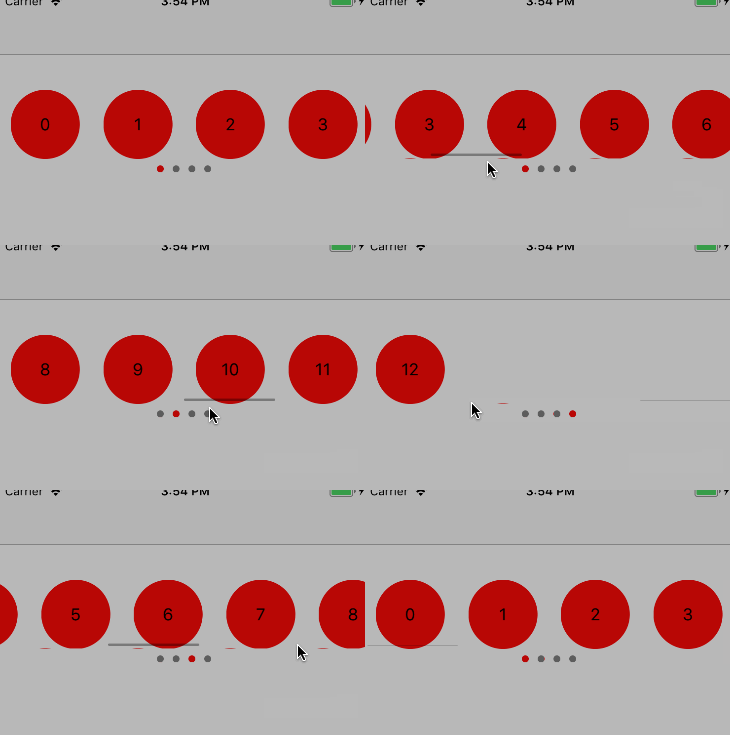
代码:
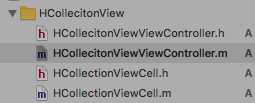
HCollectionViewCell.h
#import <UIKit/UIKit.h>

@interface HCollectionViewCell : UICollectionViewCell

@property(nonatomic,copy)NSString *str;

@end
HCollectionViewCell.m
#import "HCollectionViewCell.h"

@interface HCollectionViewCell()

@property(nonatomic,strong)UILabel *label;

@end

@implementation HCollectionViewCell

-(instancetype)initWithFrame:(CGRect)frame{

    self = [super initWithFrame:frame];

    if(self){

        float width = frame.size.width > frame.size.height ? frame.size.height : frame.size.width;

        self.label = [[UILabel alloc]initWithFrame:CGRectMake(0, 0, width, width)];

        self.label.textAlignment = NSTextAlignmentCenter;

        self.label.layer.cornerRadius = width/2;

        self.label.clipsToBounds = YES;

        self.label.backgroundColor = [UIColor redColor];

        self.label.center = self.contentView.center;

        [self.contentView addSubview:self.label];

    }

    return self;

}

-(void)setStr:(NSString *)str{

    _str = str;

    if(str == nil){

        self.label.text = @"";

        self.label.hidden = YES;

    }else{

        self.label.text = str;

        self.label.hidden = NO;

    }

}

@end
HCollecitonViewViewController.m
#import "HCollecitonViewViewController.h"

#import "HCollectionViewCell.h"

@interface HCollecitonViewViewController ()<UICollectionViewDelegate,UICollectionViewDataSource>

@property(nonatomic,strong)UICollectionView *collecitonView;

@property(nonatomic,strong)NSMutableArray *dataArr;

@property(nonatomic,strong)UIPageControl *pageControl;

@end

@implementation HCollecitonViewViewController

#define Identifier @"cell"

#define HCount 4//横向排列个数

-(NSMutableArray *)dataArr{

    if(!_dataArr){

        _dataArr = [NSMutableArray array];

        for(int i=0;i<13;i++){

            [_dataArr addObject:[NSString stringWithFormat:@"%d",i]];

        }

    }

    return _dataArr;

}

- (void)viewDidLoad {

    [super viewDidLoad];

     UICollectionViewFlowLayout *layout = [[UICollectionViewFlowLayout alloc] init];

    layout.minimumLineSpacing = 0;

    layout.itemSize = CGSizeMake(CGRectGetWidth(self.view.frame)/4.0f, 70);

    //横向滚动

    layout.scrollDirection = UICollectionViewScrollDirectionHorizontal;

    self.collecitonView = [[UICollectionView alloc]initWithFrame:CGRectMake(0, 100, CGRectGetWidth(self.view.frame), 70) collectionViewLayout:layout];

    self.collecitonView.backgroundColor = [UIColor whiteColor];

    self.collecitonView.delegate = self;

    self.collecitonView.dataSource = self;

    [self.view addSubview:self.collecitonView];

    [self.collecitonView registerClass:[HCollectionViewCell class] forCellWithReuseIdentifier:Identifier];

    self.collecitonView.pagingEnabled = YES;

    self.pageControl = [[UIPageControl alloc]initWithFrame:CGRectMake(0, CGRectGetMaxY(self.collecitonView.frame), CGRectGetWidth(self.view.frame), 20)];

    self.pageControl.numberOfPages =  (self.dataArr.count+HCount-1)/HCount;

    self.pageControl.pageIndicatorTintColor = [UIColor grayColor];

    self.pageControl.currentPageIndicatorTintColor = [UIColor redColor];

    [self.view addSubview:self.pageControl];

}

#pragma mark UICollectionViewDelegate,UICollectionViewDataSource

-(NSInteger)collectionView:(UICollectionView *)collectionView numberOfItemsInSection:(NSInteger)section{

    return  self.pageControl.numberOfPages * HCount ;

}

- (__kindof UICollectionViewCell *)collectionView:(UICollectionView *)collectionView cellForItemAtIndexPath:(NSIndexPath *)indexPath{

    HCollectionViewCell *cell = [collectionView dequeueReusableCellWithReuseIdentifier:Identifier forIndexPath:indexPath];

    if(indexPath.row < self.dataArr.count){

        cell.str = self.dataArr[indexPath.row];

    }else{

        cell.str = nil;

    }

    return cell;

}

-(void)scrollViewDidEndDecelerating:(UIScrollView *)scrollView{

    int x = scrollView.contentOffset.x/CGRectGetWidth(self.collecitonView.frame);

    self.pageControl.currentPage = x;

}

@end
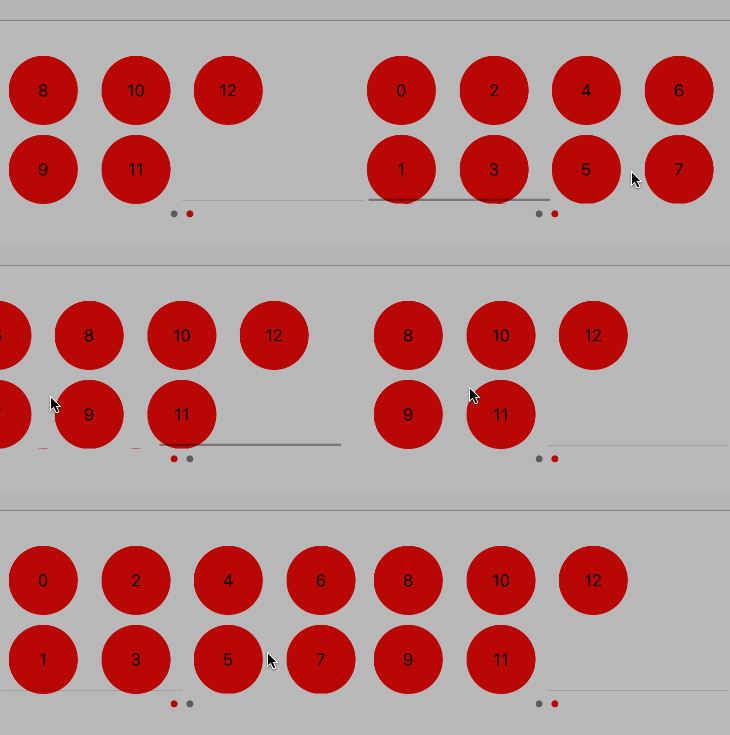
如果希望双排分页,请试着改变HCollectionViewCell的高度以及HCount改成8,效果图如下:
UICollectionView横向分页的更多相关文章
- iOS开发 横向分页样式 可左右滑动或点击头部栏按钮进行页面切换
iOS开发 横向分页样式 可左右滑动或点击头部栏按钮进行页面切换 不多说直接上效果图和代码 1.设置RootViewController为一个导航试图控制器 // Copyright © 2016年 ...
- iOS使用XZMRefresh实现UITableView或UICollectionView横向刷新
https://blog.csdn.net/u013285730/article/details/50615551?utm_source=blogxgwz6 XZMRefresh The easies ...
- iOS8 UICollectionView横向滑动demo
在iOS8中,scrollView和加载在它上面的点击事件会有冲突,所以做一个横向滑动的界面最好的选择就是UICollectionView. 这个效果可以用苹果公司提供的官方demo修改而来,下载地址 ...
- UIScrollView 和 UICollectionView 分页效果
UIScrollView 和 UICollectionView 分页效果 UIScrollView可以滚动显示宽度或高度大于其bounds的内容.有些时候,需要有分页效果.每一页有统一的大小,相邻无缝 ...
- C# 插入、删除Excel分页符
引言 对Excel表格设置分页对我们预览.打印文档时是很方便的,特别是一些包含很多复杂数据的.不规则的表格,为保证打印时每一页的排版美观性或者数据的前后连接的完整性,此时的分页符就发挥了极大的作用.因 ...
- iOS UI基础-19.0 UICollectionView
直接上代码,说明请看注释吧 1.继承三个代理 UICollectionViewDataSource,UICollectionViewDelegate,UICollectionViewDelegateF ...
- Android 使用RecyclerView实现多行水平分页的GridView效果和ViewPager效果
前些天看到有人在论坛上问这种效果怎么实现,没写过也没用过这个功能,网上查了一下,大多是使用ViewPager+GridView或者HorizontalScrollView+GridView实现,不过貌 ...
- Grid++Report 报表开发工具
Grid++Report 报表开发工具 版本 更新日期 大小 下载 说明 Grid++Repoert6.0.0.6 2015/08/08 16.0M [下载] 锐浪报表工具最新版本,新增功能说 ...
- Grid++Report支持CS/BS模式的表报插件
Grid++Report 可用于开发桌面C/S报表与WEB报表(B/S报表),C/S报表开发适用于VB.NET.C#.VB.VC.Delphi等.WEB报表开发适用于ASP.ASP.NET.JSP/J ...
随机推荐
- 2 salt-masterless架构
minion无master的使用用法 需要更改minion配置文件的三个配置项 [root@linux-node2 ~]# vim /etc/salt/minion file_client: loca ...
- [UFLDL] *Train and Optimize
Deep learning:三十七(Deep learning中的优化方法) Deep learning:四十一(Dropout简单理解) Deep learning:四十三(用Hessian Fre ...
- 百度网盘上下载文件,调用api接口的请求方式和参数
REST api 功能:下载单个文件. Download接口支持HTTP协议标准range定义,通过指定range的取值可以实现断点下载功能. 例如: 如果在request消息中指定“Range: b ...
- 创建预编译头 Debug 正常 Release Link Error:预编译头已存在,使用第一个 PCH
创建预编译头 Debug 正常 Release Link Error Main.obj : error LNK2005: ___@@_PchSym_@00@UmfilkilqUdrmzkkUkilqU ...
- MSDN2001 快捷方式丢失的处理方法
1. C:\Windows\hh.exe,右键 - 发送快捷方式到桌面 2. 给快捷方式改名为:MSDN2001 3. 右键快捷方式 - 属性- 快捷方式选项卡中的目标填写: C:\Windows\ ...
- 9月16日,base 福州,2018MAD技术论坛邀您一起探讨最前沿AR技术!
“ 人工智能新一波浪潮带动了语音.AR等技术的快速发展,随着智能手机和智能设备的普及,人机交互的方式也变得越来越自然. 9月16日,由网龙网络公司.msup联合主办的MAD技术论坛将在福州举行.本次论 ...
- JSP+Servlet+JavaBean实现数据库的增删改查
基本思想:JSP文件显示页面,使用form或href超链接传值到Servlet中方法,在Servlet方法中调用Dao层的类对象,实现对数据库里的数据的增删改查,之后重新返回到JSP输出操作完的结果. ...
- MySQL之更新型触发器
DELIMITER || CREATE TRIGGER tri_video_class AFTER UPDATE ON 数据库名.表名称 FOR EACH ROW begin IF((old.stat ...
- 单周期CPU设计的理论基础
写在前面:本博客内容为本人老师原创,严禁任何形式的转载!本博客只允许放在博客园(.cnblogs.com),如果您在其他网站看到这篇博文,请通过下面这个唯一的合法链接转到原文! 本博客全网唯一合法UR ...
- 在U盘上安装GRUB2直接引导ISO
本文的内容来源于 http://maxmars.net/blog/2012/10/02/boot-multiple-iso-from-usb-using-linux/ 以下所有命令都在 root 用户 ...