
Gradle 同步 已经开始 Gradle sync started
Gradle 同步 已经开始
Gradle sync started
作者:韩梦飞沙
Author:han_meng_fei_sha
邮箱:313134555@qq.com
E-mail: 313134555 @qq.com
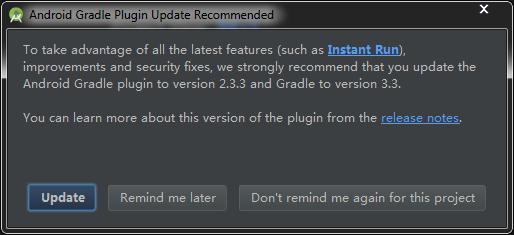
安卓 Gradle插件更新 介绍
介绍 recommended
为了利用所有最新的特性(例如即时运行),
改进和安全补丁,
我们强烈建议你将Android升级版的插件升级到2.3.3版本,升级到3.3版。
To take advantage of all the latest features (such as Instant Run),
improvements and security fixes,
we strongly recommend that you update the Android Gradle plugin to version 2.3.3 and Gradle to version 3.3.
您可以从发布说明中了解到这个插件的更多信息。
You can learn more about this version of the plugin from the release notes.
改进 improvement
项目project
结构structure
捕获captures
构建变体 build variants
模块module
要做:todo:
当前文件current file
基于范围 scope based
默认变更列表 default changelist
gradle构建完成了3 s 848 ms(2分钟前) gradle build finished in 3s 848ms(2 minutes ago)
最喜欢的 favorites
安卓系统监控 android monitor
版本控制 version control
消息 messages
终端 terminal
回车换行 utf-8 git 网页 环境:<没有环境> CRLF utf-8 git wang_ye context :<no context>
事件日志 event log
gradle 控制台 gradle console
安卓系统模型 android model
使用setjavascript-tenabled可以将XSS漏洞引入到您的应用程序中,请仔细检查。
Using `setJavaScriptEnabled` can introduce XSS vulnerabilities into your application, review carefully.
执行任务:[:应用:生成调试源:应用:虚伪的安卓Jar:应用:准备调试单元测试依赖,:应用:生成调试安卓测试源]
Executing tasks: [:app:generateDebugSources, :app:mockableAndroidJar, :app:prepareDebugUnitTestDependencies, :app:generateDebugAndroidTestSources]
需求的配置是一个潜伏的特性。
Configuration on demand is an incubating feature.
NDK丢失了一个“平台”目录。
NDK is missing a "platforms" directory.
如果您正在使用NDK,请验证NDK。dir被设置为一个有效的NDK目录。它目前被设置为D:android sdk ndk包。
If you are using NDK, verify the ndk.dir is set to a valid NDK directory. It is currently set to D:\Android-sdk\ndk-bundle.
如果你没有使用NDK,你可以从安卓 ndk 产地 或 本地设置NDK变量。用于删除此警告的属性。
If you are not using NDK, unset the NDK variable from ANDROID_NDK_HOME or local.properties to remove this warning.
增量java编译是一个潜伏的特性。
Incremental java compilation is an incubating feature.
:应用.预先构建 最新的
:app:preBuild UP-TO-DATE
:应用.预先调试构建 最新的
:app:preDebugBuild UP-TO-DATE
:应用.检查调试清单
:app:checkDebugManifest
应用:预先发布构建 最新的
:app:preReleaseBuild UP-TO-DATE
应用 准备com安卓支持约束约束布局102库
:app:prepareComAndroidSupportConstraintConstraintLayout102Library
应用 准备调试依赖
:app:prepareDebugDependencies
应用:编译调试Aidl最新的
:app:compileDebugAidl UP-TO-DATE
应用:编译调试呈现脚本 最新的
:app:compileDebugRenderscript UP-TO-DATE
应用:生成调试构建配置 最新的
:app:generateDebugBuildConfig UP-TO-DATE
app:生成最新的调试资源值
:app:generateDebugResValues UP-TO-DATE
应用:生成最新的调试资源
:app:generateDebugResources UP-TO-DATE
应用:合并最新的调试资源
:app:mergeDebugResources UP-TO-DATE
应用:进行调试清单
:app:processDebugManifest
应用:进行调试资源
:app:processDebugResources
应用:生成调试资源
:app:generateDebugSources
应用:最新的虚伪的安卓jar
:app:mockableAndroidJar UP-TO-DATE
应用:预调试单元测试构建最新版本
:app:preDebugUnitTestBuild UP-TO-DATE
应用:准备调试单元测试依赖项
:app:prepareDebugUnitTestDependencies
应用:预先调试Android测试构建最新版本
:app:preDebugAndroidTestBuild UP-TO-DATE
应用:准备Com安卓支持测试浓缩咖啡核心222库
:app:prepareComAndroidSupportTestEspressoEspressoCore222Library
应用:准备Com安卓支持测试浓缩咖啡闲置资源222库
:app:prepareComAndroidSupportTestEspressoEspressoIdlingResource222Library
应用:准备Com安卓支持测试接触仪器Api发布05库
:app:prepareComAndroidSupportTestExposedInstrumentationApiPublish05Library
应用:准备Com安卓支持测试规则05库
:app:prepareComAndroidSupportTestRules05Library
应用:准备Com安卓支持测试运行05库
:app:prepareComAndroidSupportTestRunner05Library
应用:准备Com安卓支持测试依赖
:app:prepareDebugAndroidTestDependencies
应用:编译调试安卓测试Aidl 最近
:app:compileDebugAndroidTestAidl UP-TO-DATE
应用:进程调试安卓测试清单 最新
:app:processDebugAndroidTestManifest UP-TO-DATE
应用:编译调试安卓测试渲染脚本
:app:compileDebugAndroidTestRenderscript UP-TO-DATE
应用:生成调试安卓测试构建配置最新版本
:app:generateDebugAndroidTestBuildConfig UP-TO-DATE
app:生成调试安卓测试的最新资源值
:app:generateDebugAndroidTestResValues UP-TO-DATE
应用:生成调试安卓测试资源 最新的
:app:generateDebugAndroidTestResources UP-TO-DATE
应用:合并调试安卓测试资源
:app:mergeDebugAndroidTestResources UP-TO-DATE
应用:程序调试安卓测试资源的最新版本
:app:processDebugAndroidTestResources UP-TO-DATE
应用:生成调试安卓测试源的最新版本
:app:generateDebugAndroidTestSources UP-TO-DATE
构建成功
BUILD SUCCESSFUL
总共时间:3.555 秒
Total time: 3.555 secs
信息:在控制台中看到完整的输出
Information:See complete output in console
公司 Corporation
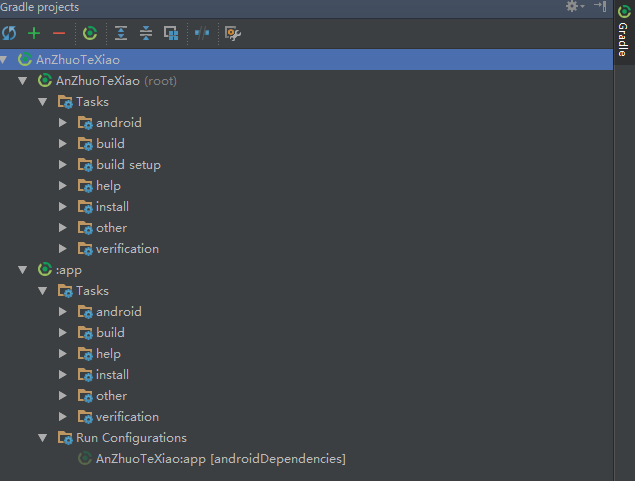
任务
安卓
构建
构建安装
帮助
安装
其他
验证 verification
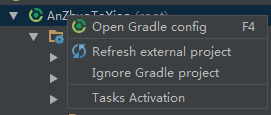
打开 gradle配置
刷新 外部的项目
忽略 gradle项目
任务 激活
外部 external
激活 activation

封面,覆盖;代替 cover
编辑运行配置
移除运行配置
执行 在同步前
执行 在同步前
分配快捷方式 assign shortcut
Gradle 同步 已经开始 Gradle sync started的更多相关文章
- Gradle 同步时报错,Could not find com.android.support.constraint:constraint-layout:1.0.0-alpha8的解决方法
Error:Could not find com.android.support.constraint:constraint-layout:1.0.0-alpha8. 原因: SDK 中可能是没有安装 ...
- Gradle之Android Gradle Plugin 主要流程分析(二)
[Android 修炼手册]Gradle 篇 -- Android Gradle Plugin 主要流程分析 预备知识 理解 gradle 的基本开发 了解 gradle task 和 plugin ...
- The Android Gradle Plugin and Gradle version-compatibility
http://tools.android.com/tech-docs/new-build-system/version-compatibility Version Compatibility Post ...
- Android(java)学习笔记127:Android Studio新建工程中的build.gradle、settings.gradle
随着信息化的快速发展,IT项目变得越来越复杂,通常都是由多个子系统共同协作完成.对于这种多系统.多项目的情况,很多构建工具都已经提供了不错的支持,像maven.ant.Gradle除了借鉴了ant或者 ...
- Chapter 5. The Gradle Wrapper 关于gradle wrapper
Most tools require installation on your computer before you can use them. If the installation is eas ...
- Chapter 4. Using the Gradle Command-Line 使用gradle命令行
This chapter introduces the basics of the Gradle command-line. You run a build using the gradle comm ...
- Gradle笔记——关于Gradle 1.12
到目前为止,Gradle已经出到2.1版本了,从1.12这个版本开始看,主要是因为我使用Gradle是Android开发所需要.公司里面是采用Android Studio来进行Android项目的开发 ...
- 多个 gradle 文件夹 \.gradle\wrapper\dists\ 设置gradle不是每次都下载
韩梦飞沙 韩亚飞 313134555@qq.com yue31313 han_meng_fei_sha 设置gradle不是每次都下载 \.gradle\wrapper\dists\ ==== ...
- Android(java)学习笔记67:Android Studio新建工程中的build.gradle、settings.gradle
随着信息化的快速发展,IT项目变得越来越复杂,通常都是由多个子系统共同协作完成.对于这种多系统.多项目的情况,很多构建工具都已经提供了不错的支持,像maven.ant.Gradle除了借鉴了ant或者 ...
随机推荐
- 用C++的 new 代替 C 的 malloc 进行内存分配
例子: (int*)malloc(100*sizeof(int)) 是先取得int类型的字节宽度,然后乘100计算后得到400,然后调用malloc,并将400传递给函数,分配400字节的内存空间,但 ...
- python 历险记(四)— python 中常用的 json 操作
目录 引言 基础知识 什么是 JSON? JSON 的语法 JSON 对象有哪些特点? JSON 数组有哪些特点? 什么是编码和解码? 常用的 json 操作有哪些? json 操作需要什么库? 如何 ...
- springboot系列十、springboot整合redis、多redis数据源配置
一.简介 Redis 的数据库的整合在 java 里面提供的官方工具包:jedis,所以即便你现在使用的是 SpringBoot,那么也继续使用此开发包. 二.redidTemplate操作 在 Sp ...
- Python3学习笔记18-访问限制
在Class内部,可以有属性和方法,而外部代码可以通过直接调用实例变量的方法来操作数据,这样,就隐藏了内部的复杂逻辑. 但是,从Student类的定义来看,外部代码还是可以自由地修改一个实例的name ...
- 将本地光盘做成yum源
环境:vmware 1.将centos6.5光盘挂载在虚拟机上 2.将光盘挂载在/mnt/cdrom目录下 root# mkdir /mnt/cdrom root # mount /mnt/cdro ...
- mongodb数据库集群及sharding分片配置
复制集群的配置 1.安装mongodb数据库 在主节点和从节点上都安装mongodb # rpm -ivh mongo-10gen-2.4.6-mongodb_1.x86_64.rpm mongo-1 ...
- 转载:Java高并发,如何解决,什么方式解决
原文:https://www.cnblogs.com/lr393993507/p/5909804.html 对于我们开发的网站,如果网站的访问量非常大的话,那么我们就需要考虑相关的并发访问问题了.而并 ...
- 关于Java源文件中public类的问题
结论: 一个Java源文件中最多只能有一个public类,当有一个public类时,源文件名必须与之一致,否则无法编译: 如果源文件中没有一个public类,则文件名与类中没有一致性要求: 至于mai ...
- PYTHON-文件处理-练习
## 一.实现用户注册功能# 思路:# 用户输入用户名.密码# 将用户输入的内容按照固定的格式,比如:egon:123,存入文件# 可以往一个文件中重复注册新的用户名和密码# 附加:# 1.对输入的用 ...
- Laravel Eloquent 数据查询结果中日期的格式化
两种情况: 使用 Model 的查询 例如: $item = App\Models\Apple::first(); $date = $item->created_at->format('Y ...