
hystrix dashboard Unable to connect to Command Metric Stream解决办法
spring cloud 在初次使用 hystrix dashboard仪表盘的时候很容易出现hystrix dashboard Unable to connect to Command Metric Stream错误
如下图:
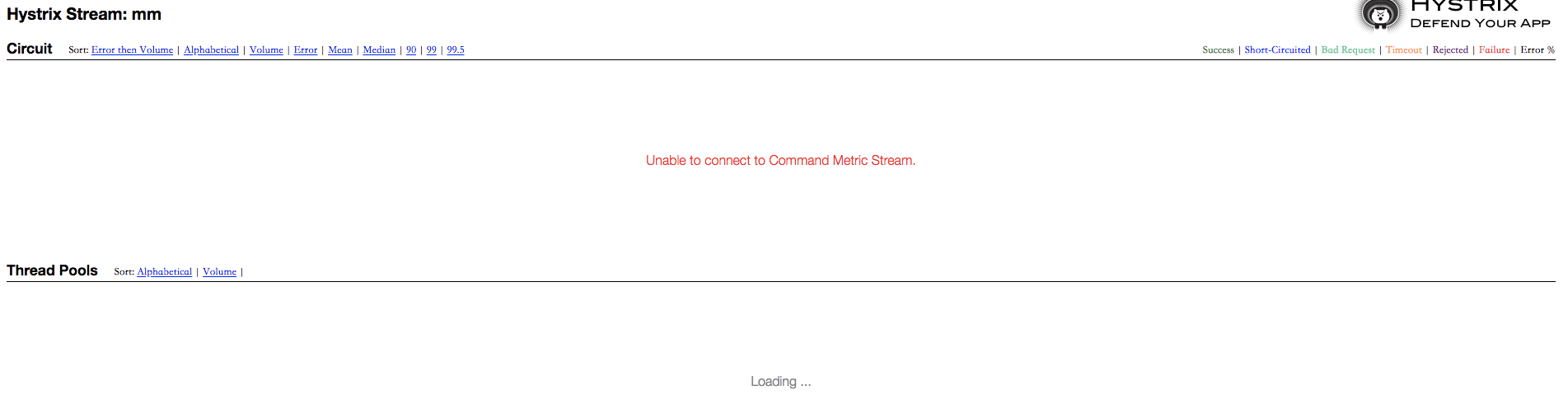
首先查看依赖时候添加全
        <dependency>

            <groupId>org.springframework.cloud</groupId>

            <artifactId>spring-cloud-starter-netflix-hystrix-dashboard</artifactId>

        </dependency>

        <dependency>

            <groupId>org.springframework.cloud</groupId>

            <artifactId>spring-cloud-starter-netflix-hystrix</artifactId>

        </dependency>

        <dependency>

            <groupId>org.springframework.boot</groupId>

            <artifactId>spring-boot-starter-actuator</artifactId>

        </dependency>
其次启动程序注解是否添加
@EnableCircuitBreaker
@EnableHystrixDashboard
如果都没问题那么检查下springboot 版本如果是2.0则需要添加 ServletRegistrationBean 因为springboot的默认路径不是 "/hystrix.stream",只要在自己的项目里配置上下面的servlet就可以了
    @Bean

    public ServletRegistrationBean getServlet() {

        HystrixMetricsStreamServlet streamServlet = new HystrixMetricsStreamServlet();

        ServletRegistrationBean registrationBean = new ServletRegistrationBean(streamServlet);

        registrationBean.setLoadOnStartup(1);

        registrationBean.addUrlMappings("/hystrix.stream");

        registrationBean.setName("HystrixMetricsStreamServlet");

        return registrationBean;

    }
修改完成重启服务问题便会解决
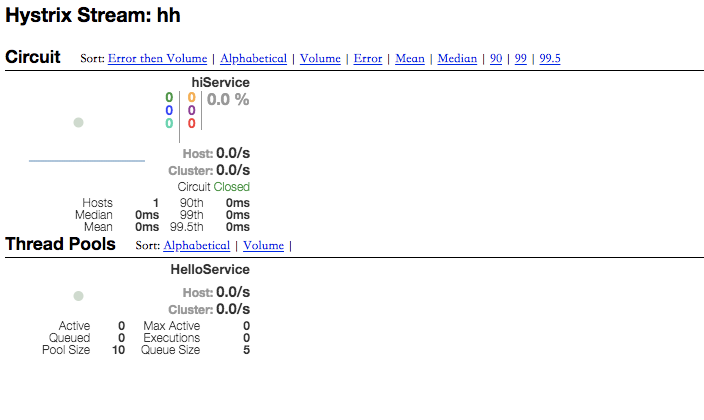
分析:
首先,查看源码中 类 HystrixStreamEndpoint 从中可以看到 new EndpointServlet(HystrixMetricsStreamServlet.class)
package org.springframework.cloud.netflix.hystrix;

import com.netflix.hystrix.contrib.metrics.eventstream.HystrixMetricsStreamServlet;

import java.util.Map;

import java.util.function.Supplier;

import org.springframework.boot.actuate.endpoint.web.EndpointServlet;

import org.springframework.boot.actuate.endpoint.web.annotation.ServletEndpoint;

@ServletEndpoint(

    id = "hystrix.stream"

)

public class HystrixStreamEndpoint implements Supplier<EndpointServlet> {

    private final Map<String, String> initParameters;

    public HystrixStreamEndpoint(Map<String, String> initParameters) {

        this.initParameters = initParameters;

    }

    public EndpointServlet get() {

        return (new EndpointServlet(HystrixMetricsStreamServlet.class)).withInitParameters(this.initParameters);

    }

}
然后,我们再查看 HystrixMetricsStreamServlet 这个类 在方法的注释中我们可以看到
有提示 “Adding the following to web.xml”
而在springboot中是采用bean的形式配置就可以解决问题了
package com.netflix.hystrix.contrib.metrics.eventstream;

import com.netflix.config.DynamicIntProperty;

import com.netflix.config.DynamicPropertyFactory;

import com.netflix.hystrix.contrib.sample.stream.HystrixSampleSseServlet;

import com.netflix.hystrix.metric.consumer.HystrixDashboardStream;

import com.netflix.hystrix.serial.SerialHystrixDashboardData;

import rx.Observable;

import rx.functions.Func1;

import java.util.concurrent.atomic.AtomicInteger;

/**

 * Streams Hystrix metrics in text/event-stream format.

 * <p>

 * Install by:

 * <p>

 * 1) Including hystrix-metrics-event-stream-*.jar in your classpath.

 * <p>

 * 2) Adding the following to web.xml:

 * <pre>{@code

 * <servlet>

 *  <description></description>

 *  <display-name>HystrixMetricsStreamServlet</display-name>

 *  <servlet-name>HystrixMetricsStreamServlet</servlet-name>

 *  <servlet-class>com.netflix.hystrix.contrib.metrics.eventstream.HystrixMetricsStreamServlet</servlet-class>

 * </servlet>

 * <servlet-mapping>

 *  <servlet-name>HystrixMetricsStreamServlet</servlet-name>

 *  <url-pattern>/hystrix.stream</url-pattern>

 * </servlet-mapping>

 * } </pre>

 */

public class HystrixMetricsStreamServlet extends HystrixSampleSseServlet {

    private static final long serialVersionUID = -7548505095303313237L;

    /* used to track number of connections and throttle */

    private static AtomicInteger concurrentConnections = new AtomicInteger(0);

    private static DynamicIntProperty maxConcurrentConnections =

            DynamicPropertyFactory.getInstance().getIntProperty("hystrix.config.stream.maxConcurrentConnections", 5);

    public HystrixMetricsStreamServlet() {

        this(HystrixDashboardStream.getInstance().observe(), DEFAULT_PAUSE_POLLER_THREAD_DELAY_IN_MS);

    }

    /* package-private */ HystrixMetricsStreamServlet(Observable<HystrixDashboardStream.DashboardData> sampleStream, int pausePollerThreadDelayInMs) {

        super(sampleStream.concatMap(new Func1<HystrixDashboardStream.DashboardData, Observable<String>>() {

            @Override

            public Observable<String> call(HystrixDashboardStream.DashboardData dashboardData) {

                return Observable.from(SerialHystrixDashboardData.toMultipleJsonStrings(dashboardData));

            }

        }), pausePollerThreadDelayInMs);

    }

    @Override

    protected int getMaxNumberConcurrentConnectionsAllowed() {

        return maxConcurrentConnections.get();

    }

    @Override

    protected int getNumberCurrentConnections() {

        return concurrentConnections.get();

    }

    @Override

    protected int incrementAndGetCurrentConcurrentConnections() {

        return concurrentConnections.incrementAndGet();

    }

    @Override

    protected void decrementCurrentConcurrentConnections() {

        concurrentConnections.decrementAndGet();

    }

}
hystrix dashboard Unable to connect to Command Metric Stream解决办法的更多相关文章
- springboot1.4下hystrix dashboard Unable to connect to Command Metric Stream解决办法
搜索了好多资料,最后查看了官网.但是还是解决了.和大家分享下喜悦心情 在 此项目properties中添加如下信息 修改完信息后再浏览器输入:http://localhost:9875/hystrix ...
- 【spring cloud】spring cloud2.X spring boot2.0.4调用feign配置Hystrix Dashboard 和 集成Turbine 【解决:Hystrix仪表盘Unable to connect to Command Metric Stream】【解决:Hystrix仪表盘Loading...】
环境: <java.version>1.8</java.version><spring-boot.version>2.0.4.RELEASE</spring- ...
- Hystrix dashboard - Unable to connect to Command Metric Stream.
在使用boot 2.0.*以上版本 + cloud Finchley.RELEASE 查看仪表盘的时候会报错 Unable to connect to Command Metric Stream &l ...
- SpringCloud-Hystrix Dashboard 之 Unable to connect to Command Metric Stream
实践hystrix dashboard仪表盘的时候,不管是按照书上的还是网上的,都提示Unable to connect to Command Metric Stream. 查了好久发现,如果使用sp ...
- 升级10.11后使用CocoaPod出现-bash: pod: command not found 解决办法-备
升级10.11后,运行pod命令出现: -bash: pod: command not found 解决办法: sudo gem install -n /usr/local/bin cocoapods ...
- 服务器发送邮件出现Could not connect to SMTP host错误 解决办法
服务器发送邮件出现Could not connect to SMTP host错误 解决办法 功夫不负有心人,最后了解到,除了google的smtp服务器收到请求“smtp”会接受,其他服务器比如qq ...
- Unable to connect to your virtual device!解决方法
使用Genymotion安卓模拟器的用户,很多朋友在启动安卓系统的时候就弹出了以下英文,不知道如何处理,今天电脑知识网小编来教您处理Genymotion安卓模拟器启动出错的问题. Error Unab ...
- Unable to execute dex: java.nio.BufferOverflowException.解决办法
异常提示: [2014-01-16 09:27:35 - Dex Loader] Unable to execute dex: java.nio.BufferOverflowException. Ch ...
- Unable to find the ncurses libraries的解决办法
我们在更新CentOS或者Ubuntu的内核时,执行make menuconfig可能看如这样的错误: *** Unable to find the ncurses libraries or the* ...
随机推荐
- mysql 架构 ~ PXC5.7.20安装尝试
简介:今天来尝试下 pxc 5.7.20安装1 环境安装 yum install -y git scons gcc gcc-c++ openssl check cmake bison boost- ...
- Java读取Excel转换成JSON字符串进而转换成Java对象
Jar包
- host-only
https://www.cnblogs.com/yaox/p/6635312.html
- Sql Server 2008 数据库18456错误怎么解决?
可以windows连接,以前都可以,昨天突然就不可以用SQL连接,报18456错误. 1.以windows验证模式进入数据库管理器. 2.右击sa,选择属性: 在常规选项卡中,重新填写密码和确认密码( ...
- 搭建Modelsim SE仿真环境-使用do文件仿真
本章我们介绍仿真环境搭建是基于Modelsim SE的.Modelsim有很多版本,比如说Modelsim-Altera,但是笔者还是建议大家使用Modelsim-SE,Modelsim-Altera ...
- Python算法:推导、递归和规约
Python算法:推导.递归和规约 注:本节中我给定下面三个重要词汇的中文翻译分别是:Induction(推导).Recursion(递归)和Reduction(规约) 本节主要介绍算法设计的三个核心 ...
- Mysql被攻击
日志: show global variables like '%general%'; set global general_log=on; 默认Path:/var/run/mysqld/mysqld ...
- React-Native 之 网络请求 fetch
前言 学习本系列内容需要具备一定 HTML 开发基础,没有基础的朋友可以先转至 HTML快速入门(一) 学习 本人接触 React Native 时间并不是特别长,所以对其中的内容和性质了解可能会有所 ...
- Cookie/Session机制详解(转载)
原文链接:http://blog.csdn.net/fangaoxin/article/details/6952954 会话(Session)跟踪是Web程序中常用的技术,用来跟踪用户的整个会话.常用 ...
- python风流史
python的创始人为吉多·范罗苏姆(Guido van Rossum).1989年的圣诞节期间,吉多·范罗苏姆(中文名字:龟叔)为了在阿姆斯特丹打发时间,决心开发一个新的脚本解释程序,作为ABC语言 ...