
Python3+Selenium环境配置
一、所需工具
1、Python3.6安装包
2、Selenium安装包(selenium-server-standalone-3.8),如果是Python3的话可以不用下载selenium压缩包,Python3有自带的,直接输入命令安装即可
3、Chromedriver驱动(Chromedriver2.3)
4、Firefox驱动(geckodriver0.18)
5、Chrome浏览器(chrome v.59)
6、Firefox浏览器(Firefox v.54)
7、Pycharm
二、工具安装
1、安装Python,安装完设置环境变量(将Python安装路径放入path下)
2、selenium安装:cmd首先进入E:\Python\Scripts目录下,然后输入pip install -U selenium,等待安装完成即可
3、pip安装:将pip工具包解压到指定盘,cmd命令进入该盘下,输入命令python setup.py install;再切换到E:\Python\Scripts 目录下输入E:\Python\Scripts > easy_install pip
4、setuptools安装:将setuptools工具包解压到指定盘里,进入cmd,执行python ez_install.py即可
5、将下载好的Chromedriver和geckodriver驱动放到Python安装路径下
注意:Chromedriver和geckodriver驱动一定要和电脑上的浏览器版本对应,否则代码运行会报错
Chromedriver和chrome浏览器对应版本

代码:
from selenium import webdriver
import time
# browser=webdriver.Chrome()
browser=webdriver.Firefox()
url='http://www.baidu.com'
#通过get方法获取当前url打印
print("now access %s" %(url))
browser.get(url)
time.sleep(2)
browser.find_element_by_xpath("//input[@id='kw']").send_keys('Selenium')
browser.find_element_by_id('su').click()
# browser.find_element_by_css_selector("input[value$='下']")
time.sleep(3)
print("成功搜索")
browser.quit()
以上代码如果能正常运行说明环境配置成功
PS:以下三个问题是安装过程中常遇到的坑
遇到第一个坑:'geckodriver' executable needs to be in PATH
1.如果启动浏览器过程中报如下错误
Traceback (most recent call last):
File "<stdin>", line 1, in <module>
File "D:\test\python3\lib\site-packages\selenium\webdriver\firefox\webdriver.py", line 145, in __init__
self.service.start()
File "D:\test\python3\lib\site-packages\selenium\webdriver\common\service.py", line 81, in start
os.path.basename(self.path), self.start_error_message)
selenium.common.exceptions.WebDriverException: Message: 'geckodriver' executable needs to be in PATH.
2.这个是因为最新的selenium3.0启动firefox需要geckodriver.exe这个驱动文件。
3.下载之后,配置到环境变量path下(可以直接放python根目录)
遇到第二坑:Expected browser binary location, but unable to find binary in default location
1.如果启动浏览器过程中报如下错误
Traceback (most recent call last):
File "<stdin>", line 1, in <module>
File "D:\test\python3\lib\site-packages\selenium\webdriver\firefox\webdriver.py", line 155, in __init__
keep_alive=True)
File "D:\test\python3\lib\site-packages\selenium\webdriver\remote\webdriver.py", line 92, in __init__
self.start_session(desired_capabilities, browser_profile)
File "D:\test\python3\lib\site-packages\selenium\webdriver\remote\webdriver.py", line 179, in start_session
response = self.execute(Command.NEW_SESSION, capabilities)
File "D:\test\python3\lib\site-packages\selenium\webdriver\remote\webdriver.py", line 238, in execute
self.error_handler.check_response(response)
File "D:\test\python3\lib\site-packages\selenium\webdriver\remote\errorhandler.py", line 193, in check_response
raise exception_class(message, screen, stacktrace)
selenium.common.exceptions.WebDriverException: Message: Expected browser binary location, but unable to find binary in default location, no 'moz:firefoxOptions.binary' capability provided, and no binary flag set on the command line
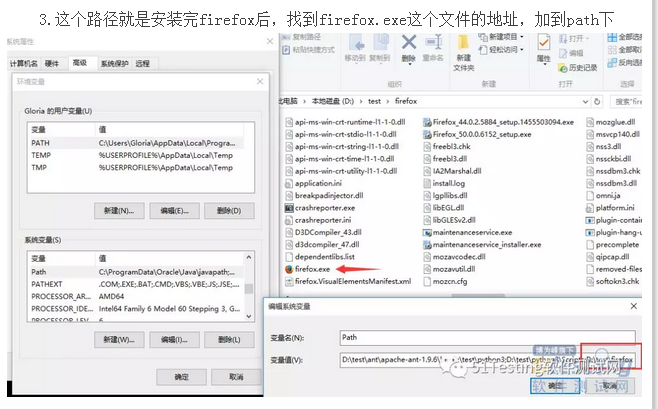
2.这个是因为firefox.exe这个文件也需要配置到环境变量path下
3.这个路径就是安装完firefox后,找到firefox.exe这个文件的地址,加到path下
遇到第三坑:Unsupported Marionette protocol version 2, required 3
1.如果启动浏览器过程中出现如下错误
Traceback (most recent call last):
File "<stdin>", line 1, in <module>
File "D:\test\python3\lib\site-packages\selenium\webdriver\firefox\webdriver.py", line 155, in __init__
keep_alive=True)
File "D:\test\python3\lib\site-packages\selenium\webdriver\remote\webdriver.py", line 92, in __init__
self.start_session(desired_capabilities, browser_profile)
File "D:\test\python3\lib\site-packages\selenium\webdriver\remote\webdriver.py", line 179, in start_session
response = self.execute(Command.NEW_SESSION, capabilities)
File "D:\test\python3\lib\site-packages\selenium\webdriver\remote\webdriver.py", line 238, in execute
self.error_handler.check_response(response)
File "D:\test\python3\lib\site-packages\selenium\webdriver\remote\errorhandler.py", line 193, in check_response
raise exception_class(message, screen, stacktrace)
selenium.common.exceptions.WebDriverException: Message: Unsupported Marionette protocol version 2, required 3
2.这个错误原因是firefox版本过低了,最新的selenium3.0版本支持firefox47以上的版本,升级版本就可以了
Python3+Selenium环境配置的更多相关文章
- Python - Win10系统下Python3.x环境配置
Win10系统下Python3.x环境配置 https://blog.csdn.net/qq_41952474/article/details/82630551
- C# selenium环境配置
1.下载C#selenium selenium官网: http://www.seleniumhq.org/download/ 下载后解压: 打开net35后,将里面的dll文件添 ...
- python+selenium环境配置及浏览器调用
最近在学习python自动化,从项目角度和技术基础角度出发,我选择了python+selenium+appium的模式开始我的自动化测试之旅: 一.python安装 二.python IDE使用简介 ...
- selenium环境配置和八大元素定位
一.环境配置 1.selenium下载安装 安装一:pip install selenium(多数会超时安装失败) 安装二:pip install -i https://pypi.tuna.tsing ...
- Python3爬虫环境配置
一.包管理工具Anaconda安装 1.安装直接在官网下载最新版本的 https://www.continuum.io/downloads 2.配置环境变量PATH:C:\Users\Administ ...
- Python+Selenium 环境配置之Firefox,IE,Chrome几种浏览器运行
Selenium(Webdriver)支持Firefox,IE,Chrome等多个浏览器.很多人可能装环境时遇到很多问题,下面简单聊聊如何配置测试这几个浏览器以及相关通过简单的实例来测试. 1.Fir ...
- 【Selenium】idea的selenium环境配置
1.maven配置 下载地址:http://maven.apache.org/download.cgi# 下载内容:apache-maven-3.5.0-bin.zip 环境变量:M2_HOME:E: ...
- Java - Selenium 环境配置
1. 安装Java JDK - 文件自己下 2. 配置环境变量-重要! 我的电脑-属性-高级-环境变量 添加 CLASSPATH 值 .;%JAVA_HOME%\lib;%JAVA_HOME%\li ...
- python+selenium 环境配置
配置环境: python:3.5 selenium:3.3.0 安装方式:python pip install -u selenium windows: 10 firefox:52 因为firefox ...
随机推荐
- rsync用于数据迁移/备份的几个细节
上周我们的一个GitLab服务频繁出现web页面卡死问题,得重启虚拟机才可恢复,但重启之后没多久又会卡死.后来发现是虚拟机的磁盘大小超过了2T,而虚拟机管理那层的文件系统是ext3,最大单文件只能支持 ...
- Go Revel - Deployment(部署)
##概览 下面列出了部署的一些方法: 1.本地构建程序并拷贝至服务器 2.在服务器上获取更新代码,然后构建并运行 3.使用`Heroku`来管理部署 使用交互式的命令行会话来进行部署 - 通常需要一种 ...
- 第三百九十六节,Django+Xadmin打造上线标准的在线教育平台—其他插件使用说,自定义列表页上传插件
第三百九十六节,Django+Xadmin打造上线标准的在线教育平台—其他插件使用说,自定义列表页上传插件 设置后台列表页面字段统计 在当前APP里的adminx.py文件里的数据表管理器里设置 ag ...
- Git -- 自定义git样式
在安装Git一节中,我们已经配置了user.name和user.email,实际上,Git还有很多可配置项. 比如,让Git显示颜色,会让命令输出看起来更醒目: $ git config --glob ...
- 修改git用户密码
第一步:登录git服务器: 第二步:切换到git用户 su git 第三步:登录GitLab的Rails控制台(GitLab使用RoR语言开发), gitlab-rails console produ ...
- docker_File 执行报错总结
编写dockerfile [root@linux-node1 ~/dk]# cat Dockerfile # this is a docker File FROM centos MAINTAINER ...
- 创建sequence和触发器出现权限不足
解决方式: 已sysdba登陆后,进行授权 grant create any sequence to [用户]创建sequence权限不足解决方法 grant create trigger to [用 ...
- [Laravel] 12 - WEB API : cache implement
前言 Ref: https://www.imooc.com/video/2873 服务端如何为客户端(app)的首页提供数据接口, 本篇用此作为例子演示接口的实现. 单例模式 一.三大原则 单例实现 ...
- trace-cmd使用方法
使用trace-cmd有的时候没有来得及使用ctrl+c, 导致出现多个trace.dat.cpu*, 可以使用下面的办法来手动合并trace.dat If a crash happened on a ...
- OSG使用模板缓存
参考帖子: https://blog.csdn.net/csxiaoshui/article/details/23457273 osg::Geometry *lineStripGeometry = n ...