
ASP.NET Core 2.0 Preview 1 中贴心的新特性
西雅图时间5月10日,微软在 Build 2017 大会上发布了 ASP.NET Core 2.0 Preview 1 ( 详见 Announcing ASP.NET 2.0.0-Preview1 and Updates for .NET Web Developers )。
以下是我关注的、并且经过自己实际验证的贴心的新特性:
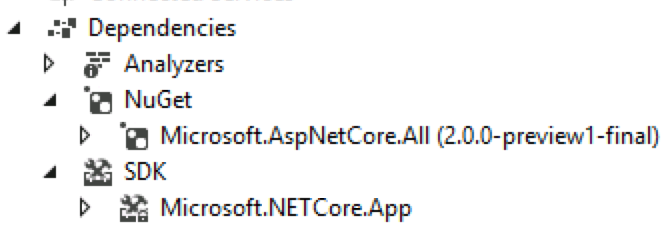
1)Microsoft.AspNetCore.All —— 1包携10包,省力又省心
使用 ASP.NET Core 2.0 只需要安装一个 NuGet 组合包 —— Microsoft.AspNetCore.All,发布时会自动排除没有用到的包。
2)WebHost.CreateDefaultBuilder() —— 1行替10行,配置更简洁
ASP.NET Core 2.0 中的 Prgram.cs :
public class Program

{

    public static void Main(string[] args)

    {

        BuildWebHost(args).Run();

    }

    public static IWebHost BuildWebHost(string[] args) =>

        WebHost.CreateDefaultBuilder(args)

            .UseStartup<Startup>()

            .Build();

}
上面的 1 行 WebHost.CreateDefaultBuilder(args) 取代了 ASP.NET Core 1.x 中的 10+ 行代码(Program.cs + Startup.cs)。
ASP.NET Core 1.x 中的 Program.cs :
public class Program

{

    public static void Main(string[] args)

    {

        var host = new WebHostBuilder()

            .UseKestrel()

            .UseContentRoot(Directory.GetCurrentDirectory())

            .UseIISIntegration()

            .UseStartup<Startup>()

            .Build();

        host.Run();

    }

}
ASP.NET Core 1.x 中的 Startup.cs:
public class Startup

{

    public Startup(IHostingEnvironment env)

    {

        var builder = new ConfigurationBuilder()

            .SetBasePath(env.ContentRootPath)

            .AddJsonFile("appsettings.json", optional: false, reloadOnChange: true)

            .AddJsonFile($"appsettings.{env.EnvironmentName}.json", optional: true)

            .AddEnvironmentVariables();

        Configuration = builder.Build();

    }

    public IConfigurationRoot Configuration { get; }

    public void Configure(IApplicationBuilder app, IHostingEnvironment env, ILoggerFactory loggerFactory)

    {

        loggerFactory.AddConsole(Configuration.GetSection("Logging"));

        loggerFactory.AddDebug();

    }

}
对应的 ASP.NET Core 2.0 中的 Startup.cs :
public class Startup

{

    public Startup(IConfiguration configuration)

    {

        Configuration = configuration;

    }

    public IConfiguration Configuration { get; }

    public void Configure(IApplicationBuilder app, IHostingEnvironment env)

    {

    }

}
3)LoggerFactory.AddFilter(IDictionary<string, LogLevel> filter)
ASP.NET Core 2.0 中通过代码配置日志过滤(Program.cs):
public class Program

{

    public static void Main(string[] args)

    {

        BuildWebHost(args).Run();

    }

    public static IWebHost BuildWebHost(string[] args) =>

        WebHost.CreateDefaultBuilder(args)

            .ConfigureLogging(factory =>

            {

                factory.UseConfiguration(null);

                factory.AddFilter(

                    new Dictionary<string, LogLevel>

                    {

                        { "Micrsoft",  LogLevel.Debug }

                    });

                factory.AddConsole();

            })

            .UseStartup<Startup>()

            .Build();

}
或者
public static class Program

{

    public static void Main(string[] args)

    {

        var host = new WebHostBuilder()

            .ConfigureLogging(factory =>

            {

                factory.AddConsole();

                factory.AddFilter("Console", level => level >= LogLevel.Information);

            })

            //...

    }

}
ASP.NET Core 1.x 中(Startup.cs):
loggerFactory.WithFilter(new FilterLoggerSettings

{

    { "Microsoft", LogLevel.Debug }

});
4)appsettings.json 中日志配置的变化
ASP.NET Core 2.0 中的日志配置如下,可直接在配置文件中根据 logging provider 配置对应的日志级别:
{

  "Logging": {

    "IncludeScopes": false,

    "Debug": {

      "LogLevel": {

        "Default": "Warning"

      }

    },

    "Console": {

      "LogLevel": {

        "Default": "Warning"

      }

    }

  }

}
ASP.NET Core 1.x 中除了在配置文件中进行配置,还需要在代码中进行配置。
appsettings.json
{

  "Logging": {

    "IncludeScopes": false,

    "LogLevel": {

      "Default": "Warning"

    }

  }

}
Startup.cs
loggerFactory.AddConsole(Configuration.GetSection("Logging"));
5)Razor Pages
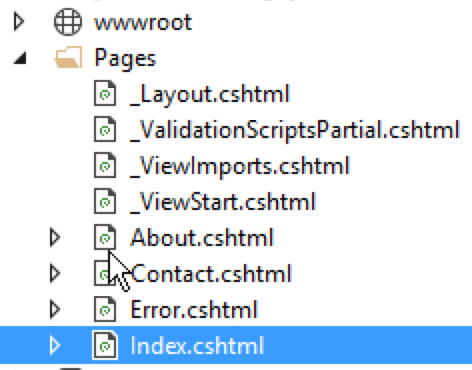
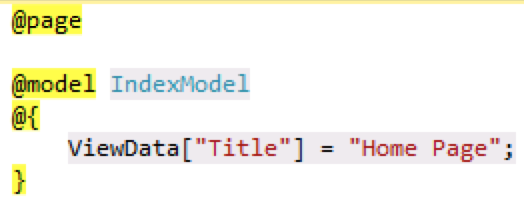
通过 Razor Pages ,只需 View,无需 Controller ,就可以直接访问 。
比如下面的Index.cshtml,直接就可以通过 http://localhost:5000/index 访问
ASP.NET Core 2.0 Preview 1 中贴心的新特性的更多相关文章
- 【译】.NET Core 3.0 Preview 3中关于ASP.NET Core的更新内容
.NET Core 3.0 Preview 3已经推出,它包含了一系列关于ASP.NET Core的新的更新. 下面是该预览版的更新列表: Razor组件改进: 单项目模板 新的Razer扩展 E ...
- .NET Core 3.0 Preview 6中对ASP.NET Core和Blazor的更新
我们都知道在6月12日的时候微软发布了.NET Core 3.0的第6个预览版.针对.NET Core 3.0的发布我们国内的微软MVP-汪宇杰还发布的官翻版的博文进行了详细的介绍.具体的可以关注&q ...
- asp.net core 1.1 项目升级至 asp.net core 2.0 preview 2 与正式版
这两天把一个 asp.net core 1.1 的项目迁移到了 asp.net core 2.0 preview 2 ,在这篇随笔中记录一下. 如果项目在有 global.json 文件,需要删除或修 ...
- 从ASP.NET Core 3.0 preview 特性,了解CLR的Garbage Collection
前言 在阅读这篇文章:Announcing Net Core 3 Preview3的时候,我看到了这样一个特性: Docker and cgroup memory Limits We conclude ...
- 探索ASP.Net Core 3.0系列四:在ASP.NET Core 3.0的应用中启动时运行异步任务
前言:在本文中,我将介绍ASP.NET Core 3.0 WebHost的微小更改如何使使用IHostedService在应用程序启动时更轻松地运行异步任务. 翻译 :Andrew Lock ht ...
- Asp.Net Core 2.0实现HttpResponse中繁切换
随笔背景:因为项目中有个简单的功能是需要实现中文简体到繁体的切换,数据库中存储的源数据都是中文简体的,为了省事就想着通过HttpHeader的方式来控制Api返回对应的繁体数据. 实现方式:通过Asp ...
- 在ASP.NET Core 2.0 web项目中使用EntityFrameworkCore
一.安装EFCode包 EFCore需要根据不同的数据库选择不同的数据库提供程序database provider,各数据库的包地址:https://docs.microsoft.com/zh-cn/ ...
- ASP.NET Core 3.0 自动挡换手动挡:在 Middleware 中执行 Controller Action
最近由于发现奇怪的 System.Data.SqlClient 性能问题(详见之前的博文),被迫提前了向 .NET Core 3.0 的升级工作(3.0 Preview 5 中问题已被修复).郁闷的是 ...
- ASP.NET Core 3.0中使用动态控制器路由
原文:Dynamic controller routing in ASP.NET Core 3.0 作者:Filip W 译文:https://www.cnblogs.com/lwqlun/p/114 ...
随机推荐
- SpringCloud分布式事务TCC实现
可以参考 http://www.txlcn.org/ 的实现方式
- nginx启动常遇到的问题
问题1: nginx: [emerg] open() "/opt/soft/nginx/mime.types" failed (2: No such file or directo ...
- GitHub下载安装以及开源项目
Git for Windows安装与使用 http://cioworld.org/freedom/content/git-windows 下载Git-1.8.3-preview20130601.exe ...
- iOS 自动移除KVO观察者
对NSObject写一个分类: #import <Foundation/Foundation.h> @interface NSObject (FMObserverHelper) - (vo ...
- JDK自带的运行监控工具JConsole观察分析Java程序的运行
原文地址:https://blog.csdn.net/libaolin198706231987/article/details/55057149 一.JConsole是什么 从Java 5开始 引入了 ...
- sringboot项目在tomcat上的部署
sringboot项目在tomcat上的部署原文链接: https://blog.csdn.net/zhaoyahui_666/article/details/78283559#comments 20 ...
- 7-6-有向图强连通分量的Kosaraju算法-图-第7章-《数据结构》课本源码-严蔚敏吴伟民版
课本源码部分 第7章 图 - 有向图强连通分量的Kosaraju算法 ——<数据结构>-严蔚敏.吴伟民版 源码使用说明 链接☛☛☛ <数据结构-C语言版>(严 ...
- pandas DataFrame(3)-轴
和numpy数组(5)-二维数组的轴一样,pandas DataFrame也有轴的概念,决定了方法是对行应用还是对列应用: 以下面这个数据为例说明: 这个数据是5个车站10天内的客流数据: rider ...
- 4. OpenAI GPT算法原理解析
1. 语言模型 2. Attention Is All You Need(Transformer)算法原理解析 3. ELMo算法原理解析 4. OpenAI GPT算法原理解析 5. BERT算法原 ...
- Paxos算法1-算法形成理论[转载]
地址 http://blog.csdn.net/chen77716/article/details/6166675 中文wiki http://zh.wikipedia.org/zh-cn/Paxos ...