
spring4.0之九:websocket简单应用
Spring 4.0的一个最大更新是增加了websocket的支持。websocket提供了一个在web应用中的高效、双向的通讯,需要考虑到客户端(浏览器)和服务器之间的高频和低延时消息交换。一般的应用场景有:在线交易、游戏、协作、数据可视化等。
使用websocket需要考虑的浏览器的支持(IE<10不支持),目前主流的浏览器都能很好的支持websocket。
websocket协议中有一些子协议,可以从更高的层次实现编程模型,就像我们使用HTTP而不是TCP一样。这些子协议有STOMP,WAMP等。
本教程只考虑websocket的简单实用,包含Spring对JSR-356的支持及Spring WebSocket API。
1、Java API for WebSocket(JSR-356)
Java API for WebSocket已经是Java EE 7的一部分。它定义了两类endpoit(都是EndPoint类的子类),使用注解标识@ClientEndpoint和@ServerEndpoint。
1.1 Servlet容器扫描初始化
通过Spring初始化一个endpoint,只需配置一个SpringConfigurator在类上的@ServerEndpoint注解上。
/*

 * Copyright 2002-2013 the original author or authors.

 *

 * Licensed under the Apache License, Version 2.0 (the "License");

 * you may not use this file except in compliance with the License.

 * You may obtain a copy of the License at

 *

 *      http://www.apache.org/licenses/LICENSE-2.0

 *

 * Unless required by applicable law or agreed to in writing, software

 * distributed under the License is distributed on an "AS IS" BASIS,

 * WITHOUT WARRANTIES OR CONDITIONS OF ANY KIND, either express or implied.

 * See the License for the specific language governing permissions and

 * limitations under the License.

 */

package org.springframework.samples.websocket.config;

import org.springframework.context.annotation.Bean;

import org.springframework.context.annotation.Configuration;

import org.springframework.samples.websocket.echo.DefaultEchoService;

import org.springframework.samples.websocket.echo.EchoEndpoint;

import org.springframework.samples.websocket.echo.EchoService;

import org.springframework.web.socket.server.standard.ServerEndpointExporter;

import org.springframework.web.socket.server.standard.ServerEndpointRegistration;

@Configuration

public class EndpointConfig {

    @Bean

    public ServerEndpointExporter endpointExporter() {

        return new ServerEndpointExporter();

    }

    @Bean

    public ServerEndpointRegistration echo() {

        return new ServerEndpointRegistration("/echo", EchoEndpoint.class);

    }

    @Bean

    public ServerEndpointRegistration echoSingleton() {

        return new ServerEndpointRegistration("/echoSingleton", new EchoEndpoint(echoService()));

    }

//    @Bean

//    public EchoAnnotatedEndpoint echoAnnotatedSingleton() {

//        return new EchoAnnotatedEndpoint(echoService());

//    }

    @Bean

    public EchoService echoService() {

        return new DefaultEchoService("Did you say \"%s\"?");

    }

}
上例假设SpringContextLoaderListener用来加载配置,这是个典型的web应用。Servlet容器将通过扫描@ServerEndpoint和SpringConfigurator初始化一个新的websocket会话。
1.2 Spring 初始化
如果你想使用一个单独的实例而不使用Servlet容器扫描,将EchoEndpoint类声明称一个bean,并增加一个ServerEndpointExporter的bean:
EchoEndpoint 可以通过EndPointRegistration发布
2、Spring WebSocket API
Spring WebSocket API提供了SockJS的支持,且有些容器如Jetty 9目前还没有对JSR-356的支持,所以有Spring WebSocket API是必要的。
Spring WebSocket API的核心接口是WebSocketHandler。下面是一个处理文本消息的handler的实现:
- import org.springframework.web.socket.adapter.TextWebSocketHandlerAdapter;
- public class EchoHandler extends TextWebSocketHandlerAdapter {
- @Override
- public void handleTextMessage(WebSocketSession session, TextMessage message) throws Exception {
- session.sendMessage(message);
- }
- }
WebSocketHandler可以通过WebSocketHttpRequestHandler插入到Spring MVC里:
- import org.springframework.web.socket.server.support.WebSocketHttpRequestHandler;
- @Configuration
- public class WebConfig {
- @Bean
- public SimpleUrlHandlerMapping handlerMapping() {
- Map<String, Object> urlMap = new HashMap<String, Object>();
- urlMap.put("/echo", new WebSocketHttpRequestHandler(new EchoHandler()));
- SimpleUrlHandlerMapping hm = new SimpleUrlHandlerMapping();
- hm.setUrlMap(urlMap);
- return hm;
- }
- }
SockJS服务器端的支持
SockJs是一个脚本框架,它提供类似于websocket的编程模式但是可以适应不同的浏览器(包括不支持websocket的浏览器)。
开启SockJS的支持,声明一个SockJsService,和一个url映射,然后提供一个WebSocketHandler来处理消息。虽然我们是哟个SockJS我们开发的方式是一样的,但是随着浏览器的不同传输的协议可以是Http Streaming,long polling等。
- import org.springframework.web.socket.sockjs.SockJsService;
- // ...
- @Configuration
- public class WebConfig {
- @Bean
- public SimpleUrlHandlerMapping handlerMapping() {
- SockJsService sockJsService = new DefaultSockJsService(taskScheduler());
- Map<String, Object> urlMap = new HashMap<String, Object>();
- urlMap.put("/echo/**", new SockJsHttpRequestHandler(sockJsService, new EchoHandler()));
- SimpleUrlHandlerMapping hm = new SimpleUrlHandlerMapping();
- hm.setUrlMap(urlMap);
- return hm;
- }
- @Bean
- public ThreadPoolTaskScheduler taskScheduler() {
- ThreadPoolTaskScheduler taskScheduler = new ThreadPoolTaskScheduler();
- taskScheduler.setThreadNamePrefix("SockJS-");
- return taskScheduler;
- }
- }
在我们实际使用中我们会使用WebSocketConfigurer集中注册WebSocket服务:
- @Configuration
- @EnableWebMvc
- @EnableWebSocket//开启websocket
- public class WebConfig extends WebMvcConfigurerAdapter implements WebSocketConfigurer {
- @Override
- public void registerWebSocketHandlers(WebSocketHandlerRegistry registry) {
- registry.addHandler(echoWebSocketHandler(), "/echo"); //提供符合W3C标准的Websocket数据
- registry.addHandler(snakeWebSocketHandler(), "/snake");
- registry.addHandler(echoWebSocketHandler(), "/sockjs/echo").withSockJS();//提供符合SockJS的数据
- registry.addHandler(snakeWebSocketHandler(), "/sockjs/snake").withSockJS();
- }
- @Bean
- public WebSocketHandler echoWebSocketHandler() {
- return new EchoWebSocketHandler(echoService());
- }
- @Bean
- public WebSocketHandler snakeWebSocketHandler() {
- return new PerConnectionWebSocketHandler(SnakeWebSocketHandler.class);
- }
- @Bean
- public DefaultEchoService echoService() {
- return new DefaultEchoService("Did you say \"%s\"?");
- }
- // Allow serving HTML files through the default Servlet
- @Override
- public void configureDefaultServletHandling(DefaultServletHandlerConfigurer configurer) {
- configurer.enable();
- }
- }
SockJS客户端代码:
<script type="text/javascript">

        var ws = null;

        function setConnected(connected) {

            document.getElementById('connect').disabled = connected;

            document.getElementById('disconnect').disabled = !connected;

            document.getElementById('echo').disabled = !connected;

        }

        function connect() {

            var target = document.getElementById('target').value;

            if (target == '') {

                alert('Please select server side connection implementation.');

                return;

            }

            if ('WebSocket' in window) {

                ws = new WebSocket(target);

            } else if ('MozWebSocket' in window) {

                ws = new MozWebSocket(target);

            } else {

                alert('WebSocket is not supported by this browser.');

                return;

            }

            ws.onopen = function () {

                setConnected(true);

                log('Info: WebSocket connection opened.');

            };

            ws.onmessage = function (event) {

                log('Received: ' + event.data);

            };

            ws.onclose = function () {

                setConnected(false);

                log('Info: WebSocket connection closed.');

            };

        }

        function disconnect() {

            if (ws != null) {

                ws.close();

                ws = null;

            }

            setConnected(false);

        }

        function echo() {

            if (ws != null) {

                var message = document.getElementById('message').value;

                log('Sent: ' + message);

                ws.send(message);

            } else {

                alert('WebSocket connection not established, please connect.');

            }

        }

        function updateTarget(target) {

            if (window.location.protocol == 'http:') {

                document.getElementById('target').value = 'ws://' + window.location.host + target;

            } else {

                document.getElementById('target').value = 'wss://' + window.location.host + target;

            }

        }

        function log(message) {

            var console = document.getElementById('console');

            var p = document.createElement('p');

            p.style.wordWrap = 'break-word';

            p.appendChild(document.createTextNode(message));

            console.appendChild(p);

            while (console.childNodes.length > 25) {

                console.removeChild(console.firstChild);

            }

            console.scrollTop = console.scrollHeight;

        }

    </script>
ws://localhost:8080/spring-websocket-test/echo
ws://localhost:8080/spring-websocket-test/echoSingleton
ws://localhost:8080/spring-websocket-test/echoAnnotated
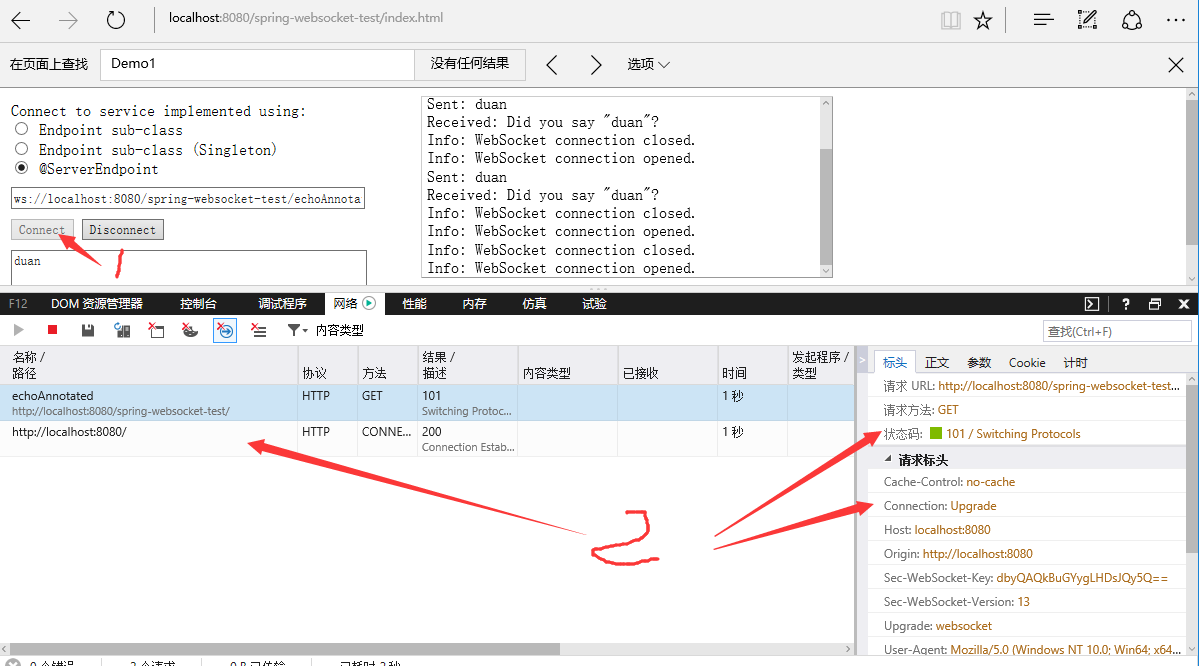
程序用maven打成war后用tomcat 8发布查看效果。
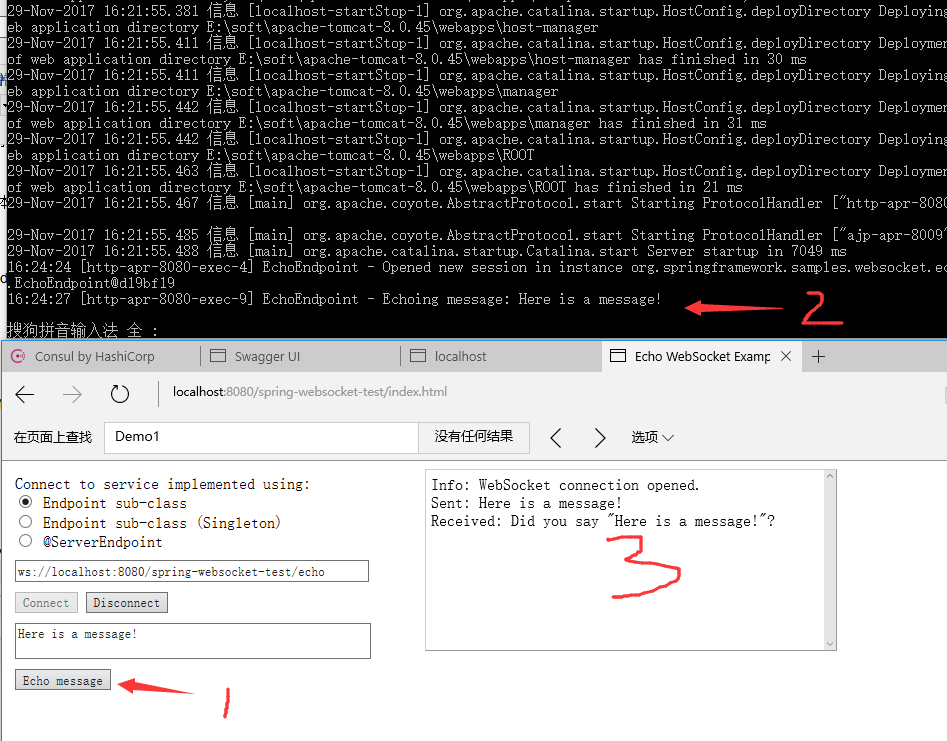
E:\myspace\spring-websocket-test-endpoint>mvn -DskipTests clean package
在target目录下生成了spring-websocket-test.war,部署到tomcat下,测试结果如下:
本例源码:spring-websocket-test-master.zip
spring4.0之九:websocket简单应用的更多相关文章
- Spring4.0系列9-websocket简单应用
http://wiselyman.iteye.com/blog/2003336 ******************************************* Spring4.0系列1-新特性 ...
- Spring 4.0 中的 WebSocket 架构
两年前,客户端与服务器端的全双工双向通信作为一个很重要的功能被纳入到WebSocket RFC 6455协议中.在HTML5中,WebSocket已经成为一个流行词,大家对这个功能赋予很多构想,很多时 ...
- [转]Struts2.3.16.1+Hibernate4.3.4+Spring4.0.2 框架整合
原文地址:http://blog.csdn.net/ycb1689/article/details/22928519 最新版Struts2+Hibernate+Spring整合 目前为止三大框架最新版 ...
- Spring4.0编程式定时任务配置
看过很多定时调度的配置,大多使用XML配置,觉得比较麻烦,也比较老套.这里介绍一种基于spring4.0注解编程式配置定时任务,简单清晰,使用方便.. 至于引入spring相关jar这里不多说,直接切 ...
- WebSocket简单介绍
Java后端WebSocket的Tomcat实现 一.WebSocket简单介绍 随着互联网的发展,传统的HTTP协议已经很难满足Web应用日益复杂的需求了.近年来,随着HTML5的诞生,WebSoc ...
- [CXF REST标准实战系列] 二、Spring4.0 整合 CXF3.0,实现测试接口
Writer:BYSocket(泥沙砖瓦浆木匠) 微博:BYSocket 豆瓣:BYSocket Reprint it anywhere u want. 文章Points: 1.介绍RESTful架构 ...
- Spring4.0之四:Meta Annotation(元注解)
Spring框架自2.0开始添加注解的支持,之后的每个版本都增加了更多的注解支持.注解为依赖注入,AOP(如事务)提供了更强大和简便的方式.这也导致你要是用一个相同的注解到许多不同的类中去.这篇文章介 ...
- [CXF REST标准实战系列] 二、Spring4.0 整合 CXF3.0,实现测试接口(转)
转自:[CXF REST标准实战系列] 二.Spring4.0 整合 CXF3.0,实现测试接口 文章Points: 1.介绍RESTful架构风格 2.Spring配置CXF 3.三层初设计,实现W ...
- websocket简单入门
今天说起及时通信的时候,突然被问到时用推的方式,还是定时接受的方式,由于之前页面都是用传统的ajax处理,可能对ajax的定时获取根深蒂固了,所以一时之间没有相同怎么会出现推的方式呢?当被提及webs ...
随机推荐
- ACM-ICPC 2018 焦作赛区网络预赛- L:Poor God Water(BM模板/矩阵快速幂)
God Water likes to eat meat, fish and chocolate very much, but unfortunately, the doctor tells him t ...
- htm基础知识,css的链入以及标签分类。
<!DocTYPE> DOC--Document 文档 TYPE 类型 文档类型 告诉浏览器这是什么文件 单标签: meta 设置 charset 设置编码 双标签: 开始 ...
- 一篇文章看懂java反射机制(反射实例化对象-反射获得构造方法,获得普通方法,获得字段属性)
Class<?> cls = Class.forName("cn.mldn.demo.Person"); // 取得Class对象传入一个包名+类名的字符串就可以得到C ...
- MySQL Transaction--事务无法正常回滚导致的异常
问题表现:系统增删改操作明显变慢(由原来的几十毫秒变为几十秒) 查看未提交事务 ## 查看未提交的事务 ## SELECT p.ID, P.USER, P.HOST, p.DB, P.TIME, T. ...
- Optimizing Docker Images for Rust Projects
转自:http://whitfin.io/speeding-up-rust-docker-builds/ This post will be the first of several addressi ...
- PHP获取站点根目录
http://rmingwang.com/php-access-to-the-site-root-directory.html php绝对路径与相对路径详解完整版 http://www.phpthin ...
- oracle-锁概念
http://liwenshui322.iteye.com/blog/1166934 ORACLE DDL锁介绍 在DDL操作中会自动为对象加DDL锁(DDL Lock),从而保护这些对象不会被其他会 ...
- 嵌入式LINUX设置时间
date -s "2018-12-15 08:55:00" 安装NTP从网络获取时间 基于Linux的嵌入式开发,需要用到本地的时间,但是网上找了很多修改时间的命令,但大多是Lin ...
- mobx 知识点
antd+mobx 项目例子:https://github.com/cag2050/antd_mobx_demo 在 create-react-app 创建的项目中,使用 mobx:https://s ...
- 【MatConvNet代码解析】 一些理解
1.DagNN对象的executionOrder属性 该属性是hidden属性,所以外部是访问不到的.只有dagnn.DagNN类和dagnn.Layer类可以访问到. 该属性的设置是在DagNN类的 ...