
Jetson tk1 刷机后要做的几件事
参考简书文章:
http://www.jianshu.com/p/997ede860d74
1. 查看Jetson TK1 L4T版本
head -n 1 /etc/nv_tegra_release
2. 查看系统位数(32/64),当然是32位的了
getconf LONG_BIT
3. 修改密码(ubuntu太长了)
sudo passwd ubuntu(root或对应的用户名)
4. 按照上一篇教程,更新软件源
参考上一篇博客
5. 安装git
sudo apt-get update

sudo apt-get install git
6. 配置postFlash脚本:
git clone https://github.com/jetsonhacks/postFlash.git

cd postFlash

./configureSystem.sh
这个脚本主要帮我们完成了一下一些事:
- Chromium is installed as a browser. Firefox has issues downloading .zip files, so Chromium is a good alternative. Two other applications are also installed, aptitude and git.
- USB 3.0 is enabled. The default is USB 2.0, /boot/extlinux/extlinux.conf must be modified to enable USB 3.0.
- Two scripts are installed in /usr/local/bin. To conserve power, by default the Jetson suspends power to the USB ports when they are not in use. In a desktop environment, this can lead to issues with devices such as cameras and webcams. The first script disables USB autosuspend.
- Also to conserve power, the Jetson manipulates the CPU cores and GPU clock speeds. The second script sets everything up for maximum performance.
7. 安装Grinch Kernel (本人未安装)
这一部分主要参考了以下这篇博客:
Install Grinch Kernel for L4T 21.3 on NVIDIA Jetson TK1
以及以下git中的代码:
https://github.com/jetsonhacks/installGrinch
关于Grinch是什么,为什么Nvidia没有默认安装Grinch:
Many people, especially those coming from desktop platforms, wonder why the Jetson lacks initial support for a wide variety of external peripherals when removed from the box. The reason is that the Jetson is an embedded development kit, which means its main initial intent was to help developers build devices that include the Tegra K1 chip. If you think about it from that perspective, it wouldn’t make much sense to have extra drivers and cruft installed that a device doesn’t use. For example, if you were building a phone, it doesn’t make sense to have drivers for 20 different wireless cards that the phone doesn’t contain.
However, the Jetson is also powerful enough to be a general purpose desktop computer. Desktop computer users have certain expectations, including being able to add devices and drivers, or have support for common devices available. Fortunately the Jetson community, led by user Santyago built a new Linux kernel named Grinch which includes a lot of the features to which most desktop users are accustomed.
安装方式如下:
git clone https://github.com/jetsonhacks/installGrinch.git

cd installGrinch

./installGrinch.sh
8. 安装ROS Indigo
这一部分主要参考了以下几篇文章:
Ubuntu ARM install of ROS Indigo
Robot Operating System (ROS) on NVIDIA Jetson TK1
git clone https://github.com/jetsonhacks/installROS.git

cd installROS
设置Rviz。至于安装脚本为什么没有默认设置RVIZ,我们可以参考官方wiki上的说明:
It is not recommended to run rviz on most ARM-based CPUs. They're generally too slow, and the version of OpenGL that is provided by the software (mesa) libraries it not new enough to start rviz.
'IF' you have a powerful board with a GPU and vendor-supplied OpenGL libraries, it might be possible to run rviz. The IFC6410 and the NVidia Jetson TK1 are two such boards where rviz will run, although neither is fast enough for graphics-heavy tasks such as displaying pointclouds.
Note that rviz will segfault if you have the GTK_IM_MODULE environment variable set, so it's best to unset it in your~/.bashrc:
unset GTK_IM_MODULE
根据官方wiki,设置RVIZ的方式很简单,我们只需在installROS.sh文件中加入如图所示的代码即可:
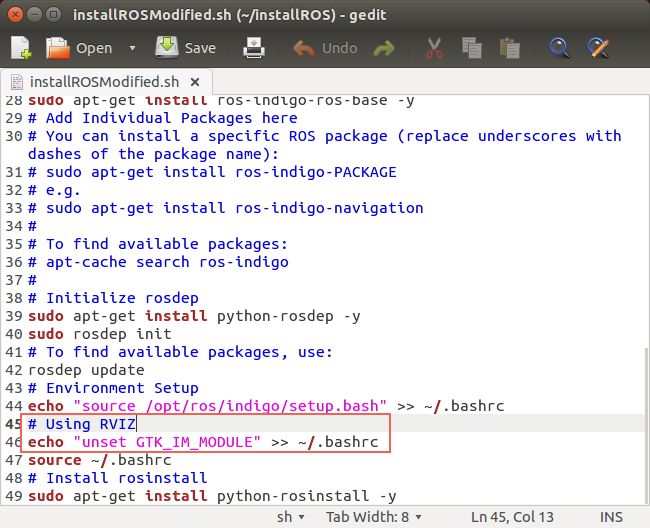 最后,在Terminal 中运行:
./installROS.h
等待一段时间,ROS Indigo就应该安装好了,可以运行 roscore 检查是否安装成功。
9. 安装g++编译器
没有 g++ 编译器,ROS没法跑:
sudo apt-get install g++
10. Hacking for OpenCV(还没做)
这一部分主要参考了以下几篇文章:
ROS, OpenCV and OpenCV4Tegra on the NVIDIA Jetson TK1
http://myzharbot.robot-home.it/blog/software/ros-nvidia-jetson-tx1-jetson-tk1-opencv-ultimate-guide/
需要修改的文件如下:
- /opt/ros/<ros-version>/lib/pkgconfig/cv_bridge.pc
- /opt/ros/<ros-version>/lib/pkgconfig/image_geometry.pc
- /opt/ros/<ros-version>/share/cv_bridge/cmake/cv_bridgeConfig.cmake
- /opt/ros/<ros-version>/share/image_geometry/cmake/image_geometryConfig.cmake
先备份:
sudo cp /opt/ros/indigo/lib/pkgconfig/cv_bridge.pc /opt/ros/indigo/lib/pkgconfig/cv_bridge.pc-bak

sudo cp /opt/ros/indigo/lib/pkgconfig/image_geometry.pc /opt/ros/indigo/lib/pkgconfig/image_geometry.pc-bak

sudo cp /opt/ros/indigo/share/cv_bridge/cmake/cv_bridgeConfig.cmake /opt/ros/indigo/share/cv_bridge/cmake/cv_bridgeConfig.cmake-bak

sudo cp /opt/ros/indigo/share/image_geometry/cmake/image_geometryConfig.cmake /opt/ros/indigo/share/image_geometry/cmake/image_geometryConfig.cmake-bak
对以上每个文件做如下修改:
- remove each instance
/usr/lib/arm-linux-gnueabihf/libopencv_ocl.so.2.4.8; - replace each instance of
/usr/lib/arm-linux-gnueabihf/with/usr/lib; - replace each instance of
2.4.8with2.4.12(or the current version of OpenCV in opencv4tegra package)
sudo gedit /opt/ros/indigo/lib/pkgconfig/cv_bridge.pc &

sudo gedit /opt/ros/indigo/lib/pkgconfig/image_geometry.pc &

sudo gedit /opt/ros/indigo/share/cv_bridge/cmake/cv_bridgeConfig.cmake &

sudo gedit /opt/ros/indigo/share/image_geometry/cmake/image_geometryConfig.cmake &
安装Kinect Driver等后续工作可以参考:
http://www.jianshu.com/p/997ede860d74
Jetson tk1 刷机后要做的几件事的更多相关文章
- 安装 Kali Linux 后需要做的 20 件事
安装 Kali Linux 后需要做的 20 件事 本文含有我觉得有用的每一件事情.本文分为三大部分: 专门针对Kali用户 Kali Linux是来自Debian的一个特殊版本,Kali Linux ...
- 安装 CentOS 7 后必做的七件事
原文 安装 CentOS 7 后必做的七件事 CentOS 是最多人用来运行服务器的 Linux 版本,最新版本是 CentOS 7.当你兴趣勃勃地在一台主机或 VPS 上安装 CentOS 7 后, ...
- 安装Ubuntu 13.04后要做的六件事
2013-05-07 09:23 最新版本的Ubuntu已经新鲜出炉:Ubuntu 13.04,代号为Raring Ringtail.作为幕后开发Ubuntu Linux的公司,Canonica ...
- Ubuntu装完后要做的几件事
Ubuntu装完后要做的几件事 改hosts 无论哪里,改hosts都是第一件事,没hosts咋google.没google咋活.在终端输入命令 sudo gedit /etc/hosts在# The ...
- debian 9 安装后需做的几件事
debian 9 安装后需做的几件事 安装环境:X86 >> Debian 9 Linux/GNU apt源更新 注意连上有线网络 刚安装好的debian系统中,/etc/apt/sour ...
- Jetson tk1 刷机教程
前期准备: 1. Jetson TK1开发板. 2. 安装有ubuntu系统的PC(或者ubuntu虚拟机)切记:不管是PC还是虚拟机,务必确保有大于5G的存储空间,之后安装过程会作详细解释. 3 ...
- Jetson TK1刷机+配置Mini PCI-e无线网卡
最近买了台4K电视,觉得可以当显示器用,但没主机,不知怎的想到了Jetson TK1,于是一冲动买了.因为没网线,而Jetson TK1没有无线网卡,所以也折腾了一番,记录一下,给万一也有像我一样没有 ...
- JETSON TK1 ~ 刷机和克隆固件
1:PC端的ubuntu. 要求必须是正常系统,不可以使用虚拟机.由于烧写过程采用刷机模式,虚拟机刷机易导致刷机问题. 2:驱动包.文件系统和源码下载 1.Driver package(驱动包,相当于 ...
- 安装完CentOS 7 后必做的七件事
CentOS是最多人用来运行服务器的 Linux 版本,最新版本是 CentOS 7.当你兴趣勃勃地在一台主机或 VPS 上安装 CentOS 7 后,首要的工作肯定是加强它的安全性,以下列出的七件事 ...
随机推荐
- CF1114D Flood Fill(DP)
题目链接:CF原网 题目大意:$n$ 个方块排成一排,第 $i$ 个颜色为 $c_i$.定义一个颜色联通块 $[l,r]$ 当且仅当 $l$ 和 $r$ 之间(包括 $l,r$)所有方块的颜色相同.现 ...
- CF710F String Set Queries
CF710F String Set Queries 支持字符串的插入和删除...SAM也干不了这个事 所以可以用cdq分治+AC自动机O(nlogn)解决 但是本题强制在线~~~ 我们还有一个工具,叫 ...
- A1074. Reversing Linked List
Given a constant K and a singly linked list L, you are supposed to reverse the links of every K elem ...
- SQL 运算符
运算符是一个保留字或字符,主要用于连接WHERE后面的条件. 一.算数运算符 运算符 描述 + 加法 把运算符两边的值相加 - 减法 左操作数减去右操作数 * 乘法 把运算符两边的值相乘 / 除法 左 ...
- 多目标遗传算法 ------ NSGA-II (部分源码解析)目标函数 problemdef.c
/* Test problem definitions */ # include <stdio.h> # include <stdlib.h> # include <ma ...
- 在 chrome 上导出 pdf
用html+css写出网页,然后在chrome上导出pdf 1. command + p:快捷呼出打印: 2. “目标打印机”:选择“更改”,之后选择“另存为PDF”: 3. 点“更多设置”,可以勾选 ...
- javascript 常用的正则表达式验证表单
<!DOCTYPE html> <html lang="en"> <head> <meta charset="UTF-8&quo ...
- 用jsch.jar实现SFTP上传下载删除【转】【补】
java类: 需要引用的jar: jsch-0.1.53.jar 关于jsch有篇文章关于目录的问题写得非常好:http://www.zzzyk.com/show/9f02969327434a6c.h ...
- 第二节:从程序集的角度分析MemoryCache,并完成基本封装
一. 轻车熟路 有了上一个章节对 System.Web.Caching.Cache 的探究,这里我们按照同样的思路对 MemoryCache 进行探究,相信必定会得心应手. 1. 程序集准备 a. 需 ...
- python读取Excel文件。
#!/usr/bin/python # -*- coding: utf-8 -*- from bs4 import BeautifulSoup import urllib.request import ...