
elastic search使用总结
1. elasticsearch安装
官方下载地址:https://www.elastic.co/downloads/elasticsearch
解压文件 elasticsearch-2.4.0.zip
修改配置文件
elasticsearch-2.4.0 cat config/elasticsearch.yml |grep -v "#"

cluster.name: rainbow

network.host: 127.0.0.1

http.port: 9200
配置说明
cluster.name表示es集群的名称,可以自定义一个自己需要的集群名称
http.port 表示对外提供http服务时的http端口。
network.host 表示本地监听绑定的ip地址,此处为测试环境,直接使用本机的ip地址 127.0.0.1.
启动说明
elasticsearch-2.4.0 nohup ./bin/elasticsearch &
启动后显示信息

es启动监听两个端口,9300和9200
9300端口是使用tcp客户端连接使用的端口;
9200端口是通过http协议连接es使用的端口;
2. 使用http方式增加和查询数据
增加数据(http PUT):
➜ curl -XPUT localhost:9200/user_idx/type_tags/12 -d\
 '{"name" : "Mr.YF", "tags" : ["Go","Java","Lua","C++","Tcl","..."]}'

{"_index":"user_idx","_type":"type_tags","_id":"12","_version":1,"_shards":{"total":2,"successful":1,"failed":0},"created":true}
查询数据(http GET)
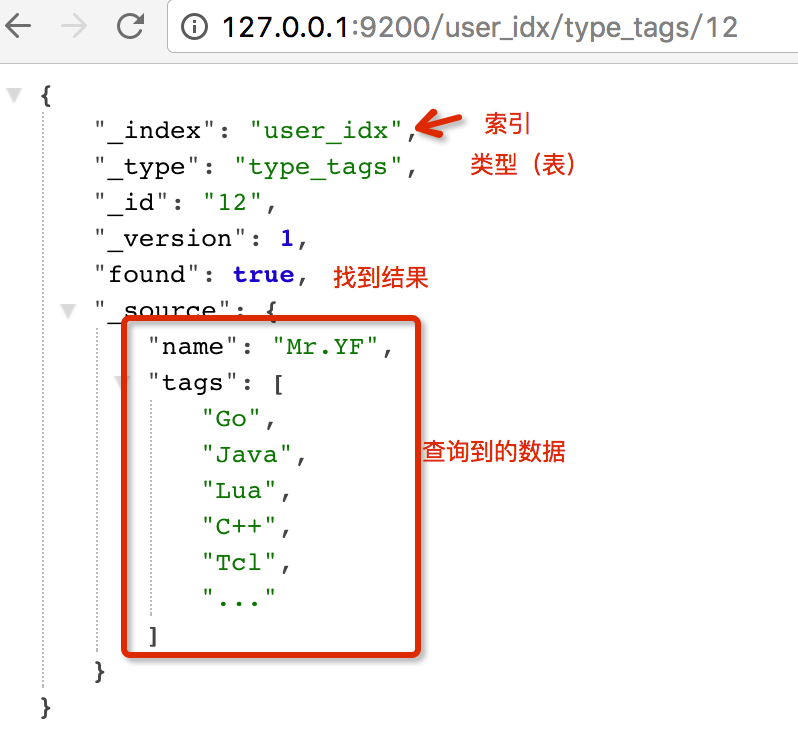
3. 使用elasticsearch客户端编写java代码访问es
编写es客户端提供者类,对es连接做简单的封装
SearchClientProvider.java
package org.wyf.elasticsearch.search;

/**

 * Created by wyf on 16/9/25.

 */

import org.elasticsearch.client.transport.TransportClient;

import org.elasticsearch.common.settings.Settings;

import org.elasticsearch.common.transport.InetSocketTransportAddress;

import org.slf4j.Logger;

import org.slf4j.LoggerFactory;

import org.wyf.common.property.XmlProperties;

import javax.annotation.PostConstruct;

import javax.annotation.PreDestroy;

import java.net.InetAddress;

import java.net.UnknownHostException;

import java.util.HashMap;

import java.util.Iterator;

import java.util.Map;

import static java.lang.System.out;

public class SearchClientProvider {

    private static final Logger LOGGER = LoggerFactory.getLogger(SearchClientProvider.class);

    private TransportClient client = null;

    private volatile boolean inited = false;

    public TransportClient get() {

        return this.client;

    }

    @PreDestroy

    public synchronized void close() {

        if (this.client != null) {

            this.client.close();

        }

    }

    @PostConstruct

    public synchronized void init() {

        if (!inited) {

            try {

                Map<String, String> config = XmlProperties.loadFromXml("properties/elasticsearch.xml");

                if (config == null) {

                    out.println("load xml err");

                    return;

                }

                Iterator<Map.Entry<String, String>> iterator = config.entrySet().iterator();

                Map<String, String> settingConfig = new HashMap<String, String>();

                while (iterator.hasNext()) {

                    Map.Entry<String, String> next = iterator.next();

                    if (!next.getKey().equals("transport.addresses")) {

                        settingConfig.put(next.getKey(), next.getValue());

                    }

                }

                Settings settings = Settings.builder().put(settingConfig).build();

                TransportClient client = TransportClient.builder().settings(settings).build();

                this.client = client;

                String[] addresses = config.get("transport.addresses").split(",");

                for (String address : addresses) {

                    String[] hostAndPort = address.split(":");

                    client.addTransportAddress(new InetSocketTransportAddress(InetAddress.getByName(hostAndPort[0]), Integer.valueOf(hostAndPort[1])));

                }

                this.inited = true;

            } catch (UnknownHostException e) {

                LOGGER.error(String.format("init search client err:=>msg:[%s]", e.getMessage()), e);

                if (client != null) {

                    this.client.close();

                }

            }

        }

    }

}
编写elasticsearch的配置文件加载类
XmlProperties.java
package org.wyf.common.property;

import org.slf4j.LoggerFactory;

import org.slf4j.Logger;

import java.io.File;

import java.io.FileInputStream;

import java.io.IOException;

import java.io.InputStream;

import java.util.*;

public class XmlProperties {

    private static final Logger LOGGER = LoggerFactory.getLogger(XmlProperties.class);

    private XmlProperties() {

    }

    public static Map<String, String> loadFromXml(String xmlPropertiesPath) {

        try {

            Object in = XmlProperties.class.getClassLoader().getResourceAsStream(xmlPropertiesPath);

            if(in != null) {

                LOGGER.info("Found the xml properties [{}] in class path,use it", xmlPropertiesPath);

                Map e1 = loadFromXml((InputStream)in);

                return e1;

            }

            Map<String, String> resMap = null;

            File e = new File(xmlPropertiesPath);

            if(!e.isFile()) {

                return resMap;

            }

            LOGGER.info("Found the xml properties [{}] in file path,use it", xmlPropertiesPath);

            in = new FileInputStream(new File(xmlPropertiesPath));

            resMap = loadFromXml((InputStream)in);

            ((InputStream) in).close();

            return resMap;

        } catch (Exception var7) {

            LOGGER.error("Load xml properties [" + xmlPropertiesPath + "] error.", var7);

        }

        return null;

    }

    public static Map<String, String> loadFromXml(InputStream in) throws IOException {

        Properties properties = new Properties();

        properties.loadFromXML(in);

        HashMap map = new HashMap();

        Set entries = properties.entrySet();

        Iterator iter = entries.iterator();

        while(iter.hasNext()) {

            Map.Entry entry = (Map.Entry)iter.next();

            map.put((String)entry.getKey(), (String)entry.getValue());

        }

        return map;

    }

}
编写elasticsearch简单的操作类,包含成员函数 save update get 和delete
SearchImpl.java
package org.wyf.elasticsearch;

/**

 * Created by wyf on 16/9/25.

 */

import org.elasticsearch.action.delete.DeleteRequestBuilder;

import org.elasticsearch.action.delete.DeleteResponse;

import org.elasticsearch.action.get.GetRequestBuilder;

import org.elasticsearch.action.get.GetResponse;

import org.elasticsearch.action.index.IndexRequestBuilder;

import org.elasticsearch.action.index.IndexResponse;

import org.elasticsearch.client.transport.TransportClient;

import org.elasticsearch.index.engine.VersionConflictEngineException;

import org.slf4j.Logger;

import org.slf4j.LoggerFactory;

import org.wyf.elasticsearch.search.SearchClientProvider;

import javax.annotation.PostConstruct;

import java.util.Map;

public class SearchImpl implements ISearch {

    private static final Logger LOGGER = LoggerFactory.getLogger(SearchImpl.class);

    private SearchClientProvider searchClientProvider;

    public  SearchImpl() {

        searchClientProvider = new SearchClientProvider();

        searchClientProvider.init();

    }

    public Map<String, Object> save(String index, String type, String id, Map<String, Object> data) {

        TransportClient client = searchClientProvider.get();

        IndexRequestBuilder builder = client.prepareIndex(index, type, id);

        IndexResponse response = builder

                .setSource(data)

                .execute()

                .actionGet();

        LOGGER.info("save index:=>index:{}, type:{}, id:{}, data:{}, rsp:{}", index, type, id, data, response);

        return data;

    }

    public int update(String index, String type, String id, Map<String, Object> data) {

        int i = 2;

        do {

            try {

                if (_innerUpdate(index, type, id, data)) return 1;

            } catch (VersionConflictEngineException e) {

                LOGGER.warn(String.format("update index:=>index:%s, type:%s, id:%s, data:%s, rsp:%s",

                        index, type, id, data, e.getMessage()), e);

            }

        } while ((i--) > 0);

        return _innerUpdate(index, type, id, data) ? 1 : 0;

    }

    public int delete(String index, String type, String id) {

        TransportClient client = searchClientProvider.get();

        DeleteRequestBuilder builder = client.prepareDelete(index, type, id);

        DeleteResponse response = builder.execute().actionGet();

        LOGGER.info("delete index:=>index:{}, type:{}, id:{}, rsp:{}",

                index, type, id, response);

        return response.isFound() ? 1 : 0;

    }

    public Map<String, Object> get(String index, String type, String id) {

        TransportClient client = searchClientProvider.get();

        GetRequestBuilder builder = client.prepareGet(index, type, id);

        GetResponse response = builder.execute().actionGet();

        return response.isExists() ? response.getSource() : null;

    }

    private boolean _innerUpdate(String index, String type, String id, Map<String, Object> data) {

        TransportClient client = searchClientProvider.get();

        GetRequestBuilder getRequestBuilder = client.prepareGet(index, type, id);

        GetResponse getResponse = getRequestBuilder.execute().actionGet();

        if (getResponse.isExists()) {

            final long version = getResponse.getVersion();

            final Map<String, Object> source = getResponse.getSource();

            source.putAll(data);

            IndexRequestBuilder builder = client.prepareIndex(index, type, id);

            IndexResponse response = builder

                    .setVersion(version)

                    .setSource(source)

                    .execute()

                    .actionGet();

            LOGGER.info("update index:=>index:{}, type:{}, id:{}, data:{}, rsp:{}",

                    index, type, id, data, response);

            return true;

        }

        throw new RuntimeException(String.format("can not get document:=>index:%s, type:%s, id:%s ", index, type, id));

    }

}
编写单元测试类
ElasticSearchTest.java
package org.wyf;

import org.junit.Before;

import org.junit.Test;

import org.wyf.elasticsearch.ISearch;

import org.wyf.elasticsearch.SearchImpl;

import java.util.HashMap;

import java.util.Iterator;

import java.util.Map;

import java.util.Set;

/**

 * Created by wyf on 16/9/25.

 */

public class ElasticsearchTest {

    ISearch search;

    @Test

    public void get() {

        Map<String,Object> map = search.get("a", "type1", "123");

        Set<String> set = map.keySet();

        for (Iterator<String> it = set.iterator(); it.hasNext();) {

            String key = it.next();

            System.out.println(key + ":" + map.get(key));

        }

    }

    @Test

    public void save() {

        Map<String, Object> values = new HashMap<String, Object>();

        values.put("k1", "v1");

        values.put("k2", "v2");

        Map<String,Object> map = search.save("a", "type1", "123", values);

        Set<String> set = map.keySet();

        for (Iterator<String> it = set.iterator(); it.hasNext();) {

            String key = it.next();

            System.out.println(key + ":" + map.get(key));

        }

    }

    @Before

    public void before() {

        search = new SearchImpl();

    }

}
elasticsearch的配置文件
<?xml version="1.0" encoding="UTF-8" standalone="no"?>

<!DOCTYPE properties SYSTEM "http://java.sun.com/dtd/properties.dtd">

<properties>

    <comment>elasticsearch的配置</comment>

    <entry key="client.transport.sniff">true</entry>

    <entry key="cluster.name">rainbow</entry>

    <entry key="transport.addresses">127.0.0.1:9300</entry>

</properties>
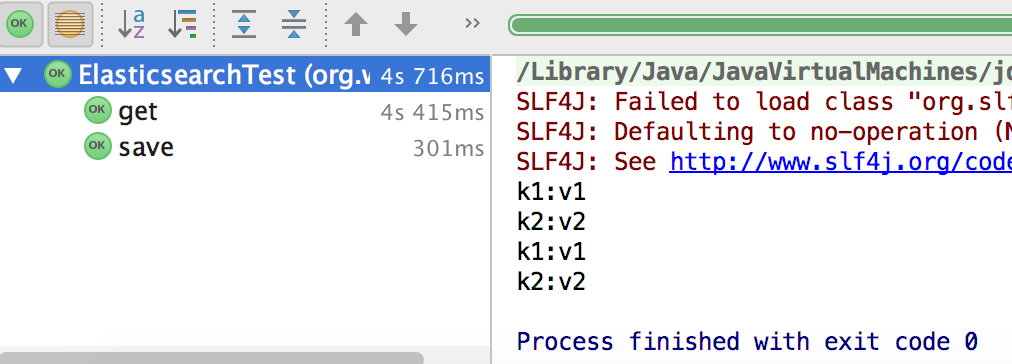
测试结果:
测试save函数结果
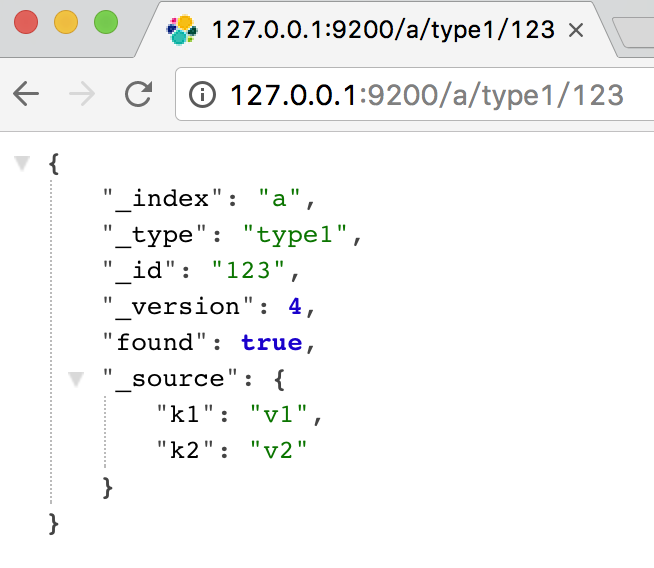
http接口查询结果页面
遇到的问题
最开始调试时返回如下错误
NoNodeAvailableException[None of the configured nodes are available: [{#transport#-1}{127.0.0.1}{127.0.0.1:9200}]

]

	at org.elasticsearch.client.transport.TransportClientNodesService.ensureNodesAreAvailable(TransportClientNodesService.java:290)

	at org.elasticsearch.client.transport.TransportClientNodesService.execute(TransportClientNodesService.java:207)

	at org.elasticsearch.client.transport.support.TransportProxyClient.execute(TransportProxyClient.java:55)

	at org.elasticsearch.client.transport.TransportClient.doExecute(TransportClient.java:283)

	at org.elasticsearch.client.support.AbstractClient.execute(AbstractClient.java:347)

	at org.elasticsearch.action.ActionRequestBuilder.execute(ActionRequestBuilder.java:85)

	at org.elasticsearch.action.ActionRequestBuilder.execute(ActionRequestBuilder.java:59)

	at org.wyf.elasticsearch.SearchImpl.save(SearchImpl.java:36)

	at org.wyf.ElasticsearchTest.save(ElasticsearchTest.java:35)

	at sun.reflect.NativeMethodAccessorImpl.invoke0(Native Method)

	at sun.reflect.NativeMethodAccessorImpl.invoke(NativeMethodAccessorImpl.java:62)

	at sun.reflect.DelegatingMethodAccessorImpl.invoke(DelegatingMethodAccessorImpl.java:43)

	at java.lang.reflect.Method.invoke(Method.java:498)

	at org.junit.runners.model.FrameworkMethod$1.runReflectiveCall(FrameworkMethod.java:47)

	at org.junit.internal.runners.model.ReflectiveCallable.run(ReflectiveCallable.java:12)

	at org.junit.runners.model.FrameworkMethod.invokeExplosively(FrameworkMethod.java:44)

	at org.junit.internal.runners.statements.InvokeMethod.evaluate(InvokeMethod.java:17)

	at org.junit.internal.runners.statements.RunBefores.evaluate(RunBefores.java:26)

	at org.junit.runners.ParentRunner.runLeaf(ParentRunner.java:271)

	at org.junit.runners.BlockJUnit4ClassRunner.runChild(BlockJUnit4ClassRunner.java:70)

	at org.junit.runners.BlockJUnit4ClassRunner.runChild(BlockJUnit4ClassRunner.java:50)

	at org.junit.runners.ParentRunner$3.run(ParentRunner.java:238)

	at org.junit.runners.ParentRunner$1.schedule(ParentRunner.java:63)

	at org.junit.runners.ParentRunner.runChildren(ParentRunner.java:236)

	at org.junit.runners.ParentRunner.access$000(ParentRunner.java:53)

	at org.junit.runners.ParentRunner$2.evaluate(ParentRunner.java:229)

	at org.junit.runners.ParentRunner.run(ParentRunner.java:309)

	at org.junit.runner.JUnitCore.run(JUnitCore.java:160)

	at com.intellij.junit4.JUnit4IdeaTestRunner.startRunnerWithArgs(JUnit4IdeaTestRunner.java:117)

	at com.intellij.junit4.JUnit4IdeaTestRunner.startRunnerWithArgs(JUnit4IdeaTestRunner.java:42)

	at com.intellij.rt.execution.junit.JUnitStarter.prepareStreamsAndStart(JUnitStarter.java:253)

	at com.intellij.rt.execution.junit.JUnitStarter.main(JUnitStarter.java:84)

	at sun.reflect.NativeMethodAccessorImpl.invoke0(Native Method)

	at sun.reflect.NativeMethodAccessorImpl.invoke(NativeMethodAccessorImpl.java:62)

	at sun.reflect.DelegatingMethodAccessorImpl.invoke(DelegatingMethodAccessorImpl.java:43)

	at java.lang.reflect.Method.invoke(Method.java:498)

	at com.intellij.rt.execution.application.AppMain.main(AppMain.java:147)
解决办法是检查es集群的名称和端口是否正确
由于端口配置错误,导致如上问题
正确的端口是9300,正如最开始说的那样,使用tcp方式访问es时,使用端口9300,使用http方式访问es使用端口9200.
代码git地址:
https://github.com/gityf/java_demo/tree/master/demo/src/main/java/org/wyf/elasticsearch
Done.
elastic search使用总结的更多相关文章
- elastic search查询命令集合
Technorati 标签: elastic search,query,commands 基本查询:最简单的查询方式 query:{"term":{"title" ...
- elastic search 学习笔记
Elastic search在数据分析的应用中相当于一个数据库的搜索引擎. 跟MySQL类似,它有自己的查询语言,只不过不是关系型数据库,属于NoSQL. 可以根据索引从分布式服务器文件系统中快速存取 ...
- elastic search 学习 一
初步阅读了elastic search 的文档,并使用command实践操作. 大概明白其概念模型.
- 分库分表后跨分片查询与Elastic Search
携程酒店订单Elastic Search实战:http://www.lvesu.com/blog/main/cms-610.html 为什么分库分表后不建议跨分片查询:https://www.jian ...
- 自学elastic search
工作也有一段时间了,虽然来这个公司之后学会了几门不同的语言,但想拨尖还是任重道远. 想往高级程序员甚至是架构师方向发展.他仍然是我的学习对象.我现在做着的,无非是他玩剩下的罢了. luncene之前有 ...
- Elastic Search 上市了,市值翻倍,这群人财务自由了!
国庆长假,大部分人还深浸在风花雪月之中,而就在昨天(美国时间10月5号),我们 Java 程序员所熟知的大名鼎鼎的 Elastic Search 居然在美国纽约证券交易所上市了! 当说到搜索时,大部分 ...
- Elastic Search 安装和配置
目标 部署一个单节点的ElasticSearch集群 依赖 java环境 $java -version java version "1.8.0_161" Java(TM) SE R ...
- [elastic search][redis] 初试 ElasticSearch / redis
现有项目组,工作需要. http://www.cnblogs.com/xing901022/p/4704319.html Elastic Search权威指南(中文版) https://es.xiao ...
- elastic search文档详解
在elastic search中文档(document)类似于关系型数据库里的记录(record),类型(type)类似于表(table),索引(index)类似于库(database). 文档一定有 ...
- elastic search 查询
eelastic search主要有两种查询方式,一种是查询字符串,一种是请求体(json格式)查询. 查询字符串: 查询字符串的功能相对简单,使用容易. 比如GET http://localhost ...
随机推荐
- 移动电商时代、微分销商城O2O生活圈系统开发功能分析
O2O生活圈系统的功能管理简单易用,随时随地发布新商品然后进行分类.管理,老少皆宜童叟无欺,实现多供应商多店铺经营模式的多层分润分销平台,满足企业自营商品与第三方供应商商品共存,打造京东+拍拍微店模式 ...
- ACCELEROMETER
顾名思义,是加速感应器.有2种应用吧:1,电脑保护,例如当笔记本掉落时,可以被自动检测到,此时会自动关闭硬盘操作以保护数据不在强烈冲击时丢失.
- python中的迭代器
1.可以直接作用于for循环的数据类型 第一类:集合数据类型,如list.tuple.dict.set.str等: 第二类:generator,包括集合定义generator和带yield的gener ...
- C# 带签名dll破解
首先申明,本文只是从技术的角度来分析下怎样破解带签名的C#写的dll文件.大家如有遇到收费的软件或类库还是应该去购买正版,程序员何苦为难程序员呢. 不带签名的破解 不带签名的dll文件的破解很简单,通 ...
- FujiXerox CP116w换无线路由器后重新连接
因为手头没有安装光盘, 不得不用土办法修改cp116w的wifi连接参数 1. 将路由器的2.4GHz SSID和密码设置为和旧路由器一样, 这样打印机就能连接上了 2. 在路由器控制界面中找到类似于 ...
- Could not load type 'System.Web.Mvc.ViewPage<dynamic>' in asp.net mvc2 after publishing the website
在WebConfig里 找到 <pages></pages> <pages pageParserFilterType="System.Web.Mvc.ViewT ...
- C语言中struct位域的定义和使用
位域的定义和使用 有些信息在存储时,并不需要占用一个完整的字节, 而只需占几个或一个二进制位.例如在存放一个开关量时,只有0和1 两种状态, 用一位二进位即可.为了节省存储空间,并使处理简便,C语言又 ...
- Linux下 JDK安装
在linux下安装JDK步骤如下: 第一步:查看Linux自带的JDK是否已安装 (1)查看jdk: [root@web-server ~]# rpm -qa|grep jdk ← 查看jdk的信息或 ...
- WCF、Web API、WCF REST、Web Service比较
原文地址:http://www.dotnet-tricks.com/Tutorial/webapi/JI2X050413-Difference-between-WCF-and-Web-API-and- ...
- 使用视 meta 标签来控制手机浏览器布局
移动浏览器的Fennec一样呈现在一个虚拟的"窗口"页面(视),通常比屏幕宽.所以他们不需要去挤每个页面布局到一个小窗口(这会破坏许多非移动优化的网站) .用户可以平移和缩放才能看 ...