
Hive HiveServer2+beeline+jdbc客户端访问操作
HiveServer
查看/home/hadoop/bigdatasoftware/apache-hive-0.13.1-bin/bin目录文件,其中有hiveserver2
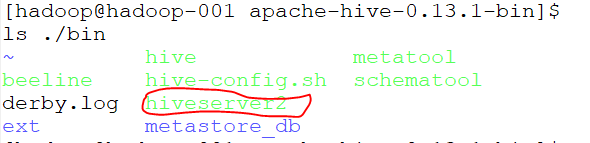
启动hiveserver2,如下图:

打开多一个终端,查看进程

有RunJar进程说明hiveserver正在运行;
beeline
启动beeline
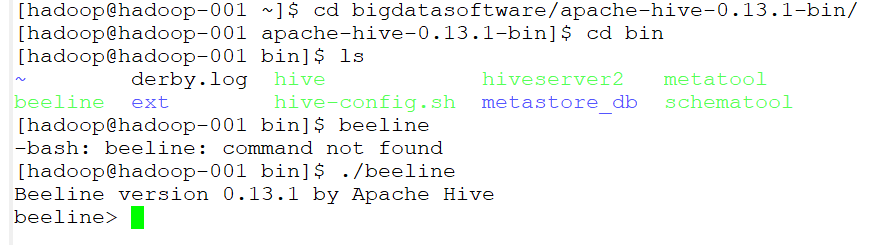
连接到jdbc
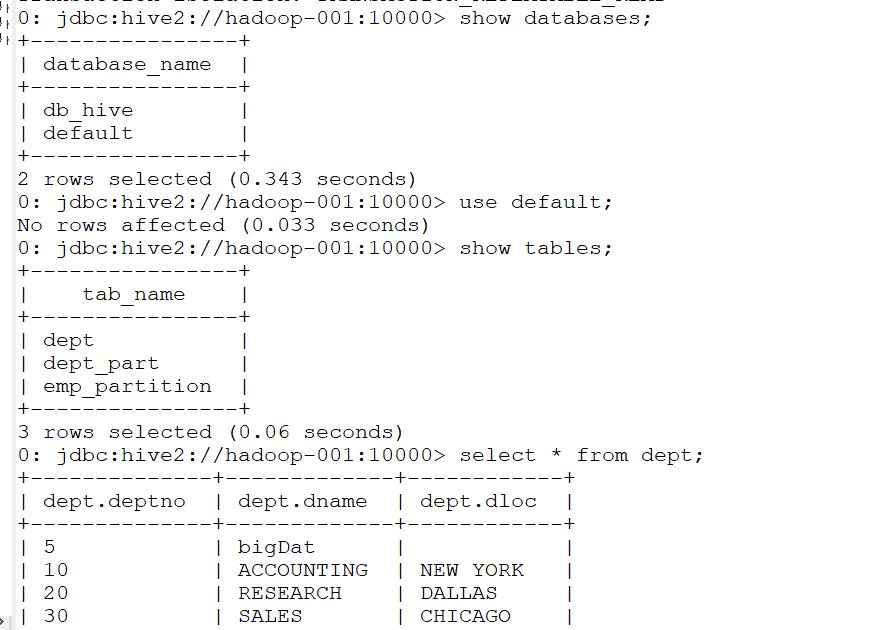
!connect jdbc:hive2://hadoop-001:10000 hadoop hadooporg.apache.hive.jdbc.HiveDriver;

然后就可以进行一系列操作了
IDEA上jdbc客户端操作hive
Using JDBC
You can use JDBC to access data stored in a relational database or other tabular format.
Load the HiveServer2 JDBC driver. As of 1.2.0 applications no longer need to explicitly load JDBC drivers using Class.forName().
For example:
Class.forName("org.apache.hive.jdbc.HiveDriver");
Connect to the database by creating a
Connectionobject with the JDBC driver.For example:
Connection cnct = DriverManager.getConnection("jdbc:hive2://<host>:<port>", "<user>", "<password>");
The default
<port>is 10000. In non-secure configurations, specify a<user>for the query to run as. The<password>field value is ignored in non-secure mode.
Connection cnct = DriverManager.getConnection("jdbc:hive2://<host>:<port>", "<user>", "");
In Kerberos secure mode, the user information is based on the Kerberos credentials.
Submit SQL to the database by creating a
Statementobject and using itsexecuteQuery()method.For example:
Statement stmt = cnct.createStatement();

ResultSet rset = stmt.executeQuery("SELECT foo FROM bar");
- Process the result set, if necessary.
These steps are illustrated in the sample code below.
代码如下:
package com.gec.demo;

import java.sql.SQLException;

import java.sql.Connection;

import java.sql.ResultSet;

import java.sql.Statement;

import java.sql.DriverManager;

public class HiveJdbcClient {

    private static final String DRIVERNAME = "org.apache.hive.jdbc.HiveDriver";

    /**

     * @param args

     * @throws SQLException

     */

    public static void main(String[] args) throws SQLException {

        try {

            Class.forName(DRIVERNAME);

        } catch (ClassNotFoundException e) {

            // TODO Auto-generated catch block

            e.printStackTrace();

            System.exit(1);

        }

        //replace "hive" here with the name of the user the queries should run as

        Connection con = DriverManager.getConnection("jdbc:hive2://hadoop-001:10000/default", "hadoop", "hadoop");

        Statement stmt = con.createStatement();

        String tableName = "dept";

//        stmt.execute("drop table if exists " + tableName);

//        stmt.execute("create table " + tableName + " (key int, value string)");

        // show tables

        String sql = "show tables '" + tableName + "'";

        System.out.println("Running: " + sql);

        ResultSet res = stmt.executeQuery(sql);

        if (res.next()) {

            System.out.println(res.getString(1));

        }

        // describe table

        sql = "describe " + tableName;

        System.out.println("Running: " + sql);

        res = stmt.executeQuery(sql);

        while (res.next()) {

            System.out.println(res.getString(1) + "\t" + res.getString(2));

        }

        // load data into table

        // NOTE: filepath has to be local to the hive server

        // NOTE: /tmp/a.txt is a ctrl-A separated file with two fields per line

//        String filepath = "/";

//        sql = "load data local inpath '" + filepath + "' into table " + tableName;

//        System.out.println("Running: " + sql);

//        stmt.execute(sql);

        // select * query

        sql = "select * from " + tableName;

        System.out.println("Running: " + sql);

        res = stmt.executeQuery(sql);

        while (res.next()) {

            System.out.println(String.valueOf(res.getInt(1)) + "\t" + res.getString(2));

        }

        // regular hive query

        sql = "select count(1) from " + tableName;

        System.out.println("Running: " + sql);

        res = stmt.executeQuery(sql);

        while (res.next()) {

            System.out.println(res.getString(1));

        }

    }

}
pom.xml配置文件如下:
<?xml version="1.0" encoding="UTF-8"?>

<project xmlns="http://maven.apache.org/POM/4.0.0" xmlns:xsi="http://www.w3.org/2001/XMLSchema-instance"

         xsi:schemaLocation="http://maven.apache.org/POM/4.0.0 http://maven.apache.org/xsd/maven-4.0.0.xsd">

    <parent>

        <artifactId>BigdataStudy</artifactId>

        <groupId>com.gec.demo</groupId>

        <version>1.0-SNAPSHOT</version>

    </parent>

    <modelVersion>4.0.0</modelVersion>

    <artifactId>HiveJdbcClient</artifactId>

    <name>HiveJdbcClient</name>

    <!-- FIXME change it to the project's website -->

    <url>http://www.example.com</url>

    <properties>

        <project.build.sourceEncoding>UTF-8</project.build.sourceEncoding>

        <maven.compiler.source>1.8</maven.compiler.source>

        <maven.compiler.target>1.8</maven.compiler.target>

        <hadoop.version>2.7.2</hadoop.version>

        <!--<hive.version> 0.13.1</hive.version>-->

    </properties>

    <dependencies>

        <dependency>

            <groupId>junit</groupId>

            <artifactId>junit</artifactId>

            <version>4.11</version>

            <scope>test</scope>

        </dependency>

        <dependency>

            <groupId>org.apache.logging.log4j</groupId>

            <artifactId>log4j-core</artifactId>

            <version>2.8.2</version>

        </dependency>

        <dependency>

            <groupId>org.apache.hadoop</groupId>

            <artifactId>hadoop-common</artifactId>

            <version>2.7.2</version>

        </dependency>

        <dependency>

            <groupId>org.apache.hadoop</groupId>

            <artifactId>hadoop-hdfs</artifactId>

            <version>${hadoop.version}</version>

        </dependency>

        <dependency>

            <groupId>org.apache.hadoop</groupId>

            <artifactId>hadoop-client</artifactId>

            <version>${hadoop.version}</version>

        </dependency>

        <dependency>

            <groupId>org.apache.hive</groupId>

            <artifactId>hive-jdbc</artifactId>

            <version>0.13.1</version>

        </dependency>

        <dependency>

            <groupId>org.apache.hive</groupId>

            <artifactId>hive-exec</artifactId>

            <version>0.13.1</version>

        </dependency>

    </dependencies>

</project>
Hive HiveServer2+beeline+jdbc客户端访问操作的更多相关文章
- 3.1 HiveServer2.Beeline JDBC使用
https://cwiki.apache.org/confluence/display/Hive/HiveServer2+Clients 一.HiveServer2.Beeline 1.HiveSer ...
- JDBC数据库访问操作的动态监测 之 Log4JDBC
log4jdbc是一个JDBC驱动器,能够记录SQL日志和SQL执行时间等信息.log4jdbc使用SLF4J(Simple Logging Facade)作为日志系统. 特性: 1.支持JDBC3和 ...
- JDBC数据库访问操作的动态监测 之 p6spy
P6spy是一个JDBC Driver的包装工具,p6spy通过对JDBC Driver的封装以达到对SQL语句的监听和分析,以达到各种目的. P6spy1.3 sf.net http://sourc ...
- hive JDBC客户端启动
JDBC客户端操作步骤
- [Hive]HiveServer2配置
HiveServer2(HS2)是一个服务器接口,能使远程客户端执行Hive查询,并且可以检索结果.HiveServer2是HiveServer1的改进版,HiveServer1已经被废弃.HiveS ...
- [Hive]HiveServer2概述
1. HiveServer1 HiveServer是一种可选服务,允许远程客户端可以使用各种编程语言向Hive提交请求并检索结果.HiveServer是建立在Apache ThriftTM(http: ...
- [Spark][Hive]Hive的命令行客户端启动:
[Spark][Hive]Hive的命令行客户端启动: [training@localhost Desktop]$ chkconfig | grep hive hive-metastore 0:off ...
- jdbc数据访问技术
jdbc数据访问技术 1.JDBC如何做事务处理? Con.setAutoCommit(false) Con.commit(); Con.rollback(); 2.写出几个在Jdbc中常用的接口 p ...
- Redis的C++与JavaScript访问操作
上篇简单介绍了Redis及其安装部署,这篇记录一下如何用C++语言和JavaScript语言访问操作Redis 1. Redis的接口访问方式(通用接口或者语言接口) 很多语言都包含Redis支持,R ...
随机推荐
- Python 面向对象和面向过程对比
# 大象装冰箱 # 脚本, 此时代码是最简单的. 不需要构思整个程序的概况 print("开门") print("装大象") print("关门&qu ...
- 排序jq
var arr = [1,2,3,4,5,6,7]; arr.sort(function (a, b) { 从大到小 if (a > b) { return 1; } else if (a &l ...
- 性能测试-3.Fiddler进行弱网测试
fiddler模拟限速的原理(原文地址) 我们可以通过fiddler来模拟限速,因为fiddler本来就是个代理,它提供了客户端请求前和服务器响应前的回调接口,我们可以在这些接口里 面自定义一些逻辑. ...
- 【Python】进程-控制块
一.进程控制块 PCB (Process Control Block): 存放进程的管理和控制信息的数据结构称为进程控制块.它是进程管理和控制的最重要的数据结构,每一个进程均有一个PCB,在创建进程时 ...
- 2.24 js处理内嵌div滚动条
2.24 js处理内嵌div滚动条 前言 前面有篇专门用js解决了浏览器滚动条的问题,生活总是多姿多彩,有的滚动条就在页面上,这时候又得仰仗js大哥来解决啦.一.内嵌滚动条 1.下面这张图 ...
- day 019 常用模块
主要内容: 1模块的简单认识 2collection模块 3time时间模块 4random模块 5os模块 6sys模块 一 模块的简单认识 引入模块的方式: 1import (常见方式) 2 ...
- HDU 2561
F - 第二第二 Time Limit:1000MS Memory Limit:32768KB 64bit IO Format:%I64d & %I64u Submit Status Prac ...
- oracle 数据库相关名词--图解
通过下图,我们可以更好的理解oracle的结构关系. 知识拓展: 知识点及常用的命令如下: 1)通常情况我们称的“数据库”,并不仅指物理的数据集合,他包含物理数据.数据库管理系统.也即物理数据.内存 ...
- 《DSP using MATLAB》Problem 5.12
1.从别的地方找的证明过程: 2.代码 function x2 = circfold(x1, N) %% Circular folding using DFT %% ----------------- ...
- Ajax异步请求原理的分析
我们知道,在同步请求模型中,浏览器是直接向服务器发送请求,并直接接收.处理服务器响应的数据的.这就导致了浏览器发送完一个请求后,就只能干等着服务器那边处理请求,响应请求,在这期间其它事情都做不了.这就 ...