
Hive HiveServer2+beeline+jdbc客户端访问操作
HiveServer
查看/home/hadoop/bigdatasoftware/apache-hive-0.13.1-bin/bin目录文件,其中有hiveserver2
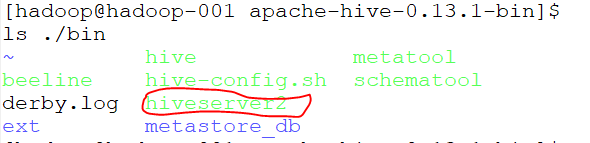
启动hiveserver2,如下图:

打开多一个终端,查看进程

有RunJar进程说明hiveserver正在运行;
beeline
启动beeline
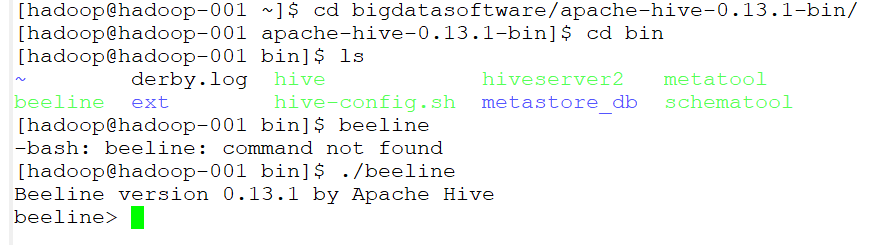
连接到jdbc
!connect jdbc:hive2://hadoop-001:10000 hadoop hadooporg.apache.hive.jdbc.HiveDriver;

然后就可以进行一系列操作了
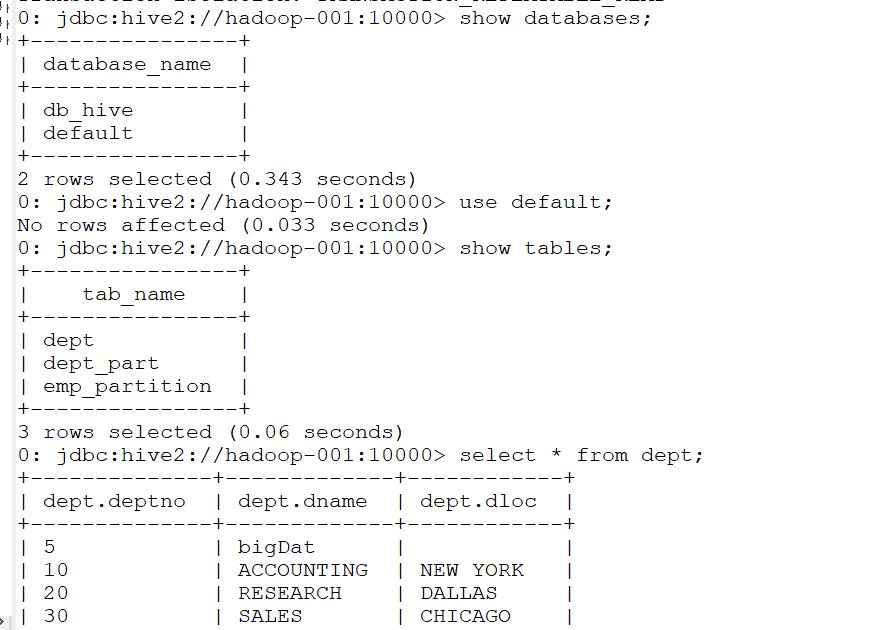
IDEA上jdbc客户端操作hive
Using JDBC
You can use JDBC to access data stored in a relational database or other tabular format.
Load the HiveServer2 JDBC driver. As of 1.2.0 applications no longer need to explicitly load JDBC drivers using Class.forName().
For example:
Class.forName("org.apache.hive.jdbc.HiveDriver");
Connect to the database by creating a
Connectionobject with the JDBC driver.For example:
Connection cnct = DriverManager.getConnection("jdbc:hive2://<host>:<port>", "<user>", "<password>");
The default
<port>is 10000. In non-secure configurations, specify a<user>for the query to run as. The<password>field value is ignored in non-secure mode.
Connection cnct = DriverManager.getConnection("jdbc:hive2://<host>:<port>", "<user>", "");
In Kerberos secure mode, the user information is based on the Kerberos credentials.
Submit SQL to the database by creating a
Statementobject and using itsexecuteQuery()method.For example:
Statement stmt = cnct.createStatement();

ResultSet rset = stmt.executeQuery("SELECT foo FROM bar");
- Process the result set, if necessary.
These steps are illustrated in the sample code below.
代码如下:
package com.gec.demo;

import java.sql.SQLException;

import java.sql.Connection;

import java.sql.ResultSet;

import java.sql.Statement;

import java.sql.DriverManager;

public class HiveJdbcClient {

    private static final String DRIVERNAME = "org.apache.hive.jdbc.HiveDriver";

    /**

     * @param args

     * @throws SQLException

     */

    public static void main(String[] args) throws SQLException {

        try {

            Class.forName(DRIVERNAME);

        } catch (ClassNotFoundException e) {

            // TODO Auto-generated catch block

            e.printStackTrace();

            System.exit(1);

        }

        //replace "hive" here with the name of the user the queries should run as

        Connection con = DriverManager.getConnection("jdbc:hive2://hadoop-001:10000/default", "hadoop", "hadoop");

        Statement stmt = con.createStatement();

        String tableName = "dept";

//        stmt.execute("drop table if exists " + tableName);

//        stmt.execute("create table " + tableName + " (key int, value string)");

        // show tables

        String sql = "show tables '" + tableName + "'";

        System.out.println("Running: " + sql);

        ResultSet res = stmt.executeQuery(sql);

        if (res.next()) {

            System.out.println(res.getString(1));

        }

        // describe table

        sql = "describe " + tableName;

        System.out.println("Running: " + sql);

        res = stmt.executeQuery(sql);

        while (res.next()) {

            System.out.println(res.getString(1) + "\t" + res.getString(2));

        }

        // load data into table

        // NOTE: filepath has to be local to the hive server

        // NOTE: /tmp/a.txt is a ctrl-A separated file with two fields per line

//        String filepath = "/";

//        sql = "load data local inpath '" + filepath + "' into table " + tableName;

//        System.out.println("Running: " + sql);

//        stmt.execute(sql);

        // select * query

        sql = "select * from " + tableName;

        System.out.println("Running: " + sql);

        res = stmt.executeQuery(sql);

        while (res.next()) {

            System.out.println(String.valueOf(res.getInt(1)) + "\t" + res.getString(2));

        }

        // regular hive query

        sql = "select count(1) from " + tableName;

        System.out.println("Running: " + sql);

        res = stmt.executeQuery(sql);

        while (res.next()) {

            System.out.println(res.getString(1));

        }

    }

}
pom.xml配置文件如下:
<?xml version="1.0" encoding="UTF-8"?>

<project xmlns="http://maven.apache.org/POM/4.0.0" xmlns:xsi="http://www.w3.org/2001/XMLSchema-instance"

         xsi:schemaLocation="http://maven.apache.org/POM/4.0.0 http://maven.apache.org/xsd/maven-4.0.0.xsd">

    <parent>

        <artifactId>BigdataStudy</artifactId>

        <groupId>com.gec.demo</groupId>

        <version>1.0-SNAPSHOT</version>

    </parent>

    <modelVersion>4.0.0</modelVersion>

    <artifactId>HiveJdbcClient</artifactId>

    <name>HiveJdbcClient</name>

    <!-- FIXME change it to the project's website -->

    <url>http://www.example.com</url>

    <properties>

        <project.build.sourceEncoding>UTF-8</project.build.sourceEncoding>

        <maven.compiler.source>1.8</maven.compiler.source>

        <maven.compiler.target>1.8</maven.compiler.target>

        <hadoop.version>2.7.2</hadoop.version>

        <!--<hive.version> 0.13.1</hive.version>-->

    </properties>

    <dependencies>

        <dependency>

            <groupId>junit</groupId>

            <artifactId>junit</artifactId>

            <version>4.11</version>

            <scope>test</scope>

        </dependency>

        <dependency>

            <groupId>org.apache.logging.log4j</groupId>

            <artifactId>log4j-core</artifactId>

            <version>2.8.2</version>

        </dependency>

        <dependency>

            <groupId>org.apache.hadoop</groupId>

            <artifactId>hadoop-common</artifactId>

            <version>2.7.2</version>

        </dependency>

        <dependency>

            <groupId>org.apache.hadoop</groupId>

            <artifactId>hadoop-hdfs</artifactId>

            <version>${hadoop.version}</version>

        </dependency>

        <dependency>

            <groupId>org.apache.hadoop</groupId>

            <artifactId>hadoop-client</artifactId>

            <version>${hadoop.version}</version>

        </dependency>

        <dependency>

            <groupId>org.apache.hive</groupId>

            <artifactId>hive-jdbc</artifactId>

            <version>0.13.1</version>

        </dependency>

        <dependency>

            <groupId>org.apache.hive</groupId>

            <artifactId>hive-exec</artifactId>

            <version>0.13.1</version>

        </dependency>

    </dependencies>

</project>
Hive HiveServer2+beeline+jdbc客户端访问操作的更多相关文章
- 3.1 HiveServer2.Beeline JDBC使用
https://cwiki.apache.org/confluence/display/Hive/HiveServer2+Clients 一.HiveServer2.Beeline 1.HiveSer ...
- JDBC数据库访问操作的动态监测 之 Log4JDBC
log4jdbc是一个JDBC驱动器,能够记录SQL日志和SQL执行时间等信息.log4jdbc使用SLF4J(Simple Logging Facade)作为日志系统. 特性: 1.支持JDBC3和 ...
- JDBC数据库访问操作的动态监测 之 p6spy
P6spy是一个JDBC Driver的包装工具,p6spy通过对JDBC Driver的封装以达到对SQL语句的监听和分析,以达到各种目的. P6spy1.3 sf.net http://sourc ...
- hive JDBC客户端启动
JDBC客户端操作步骤
- [Hive]HiveServer2配置
HiveServer2(HS2)是一个服务器接口,能使远程客户端执行Hive查询,并且可以检索结果.HiveServer2是HiveServer1的改进版,HiveServer1已经被废弃.HiveS ...
- [Hive]HiveServer2概述
1. HiveServer1 HiveServer是一种可选服务,允许远程客户端可以使用各种编程语言向Hive提交请求并检索结果.HiveServer是建立在Apache ThriftTM(http: ...
- [Spark][Hive]Hive的命令行客户端启动:
[Spark][Hive]Hive的命令行客户端启动: [training@localhost Desktop]$ chkconfig | grep hive hive-metastore 0:off ...
- jdbc数据访问技术
jdbc数据访问技术 1.JDBC如何做事务处理? Con.setAutoCommit(false) Con.commit(); Con.rollback(); 2.写出几个在Jdbc中常用的接口 p ...
- Redis的C++与JavaScript访问操作
上篇简单介绍了Redis及其安装部署,这篇记录一下如何用C++语言和JavaScript语言访问操作Redis 1. Redis的接口访问方式(通用接口或者语言接口) 很多语言都包含Redis支持,R ...
随机推荐
- audit:backlog limit exceeded
今天发现存储服务器业务不可用,服务器能ping通,远程不了! 到机房管理员那里查看服务器状态后,发现显示如下: 显然系统已经崩溃,只能先重启服务器,先恢复业务,然后针对backlog limit e ...
- ios中xib文件的用法
ZQRView文件: // // ZQRView.h // // // Created by zzqqrr on 17/8/20. // // #import <UIKit/UIKit.h> ...
- 团队作业8——敏捷冲刺博客合集(Beta阶段)
第一篇(冲刺前安排):https://www.cnblogs.com/Aragaki-Yui/p/9057951.html 第二篇(冲刺第一天):https://www.cnblogs.com/Ara ...
- ipv6地址管理
为了彻底解决IPv4存在的问题,国际互联网工程任务组从1995年开始,着手研究开发下一代IP协议,即IPv6.可彻底解决IPv4地址不足的问题,除此之外,IPv6还采用分级地址模式.高效IP包头.主机 ...
- PAT 乙级 1061. 判断题(15)
判断题的评判很简单,本题就要求你写个简单的程序帮助老师判题并统计学生们判断题的得分. 输入格式: 输入在第一行给出两个不超过100的正整数N和M,分别是学生人数和判断题数量.第二行给出M个不超过5的正 ...
- verilog实现中值滤波
前言 项目需要,想要实现算法中的其中一步即中值滤波,同时,因为图像处理部分中值滤波相对来说还是比较简单的,将中值滤波的硬件实现作为进入FPGA领域的第一次尝试.虽然说网上有较多关于中值滤波的文档,可是 ...
- [LeetCode&Python] Problem 427. Construct Quad Tree
We want to use quad trees to store an N x N boolean grid. Each cell in the grid can only be true or ...
- ubuntu上安装boost库
只需一条命令: sudo apt install libboost-dev
- soft-nms
https://blog.csdn.net/app_12062011/article/details/77963494 ----> NMS-非极大值抑制进行后处理. 通常的做法是将检测框按得分排 ...
- (1)HTML的组成(什么是标签、指令、转义字符、数据、标签字符表)
html的组成:标签+指令+转义字符+数据 1.标签 <>内的,以字母开头,可以结合合法字符(- 或者数字),能被浏览器解析的符号 <!DOCTYPE html> #这个是系统 ...