
ResourceBundle与Properties读取配置文件
常用的读取方式有ResourceBundle和Properties,两者的区别在于ResourceBundle通常是用于国际化的属性配置文件读取,Properties则是一般的属性配置文件读取。
一、ResourceBundle方式
实例:
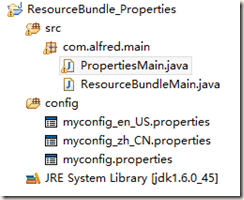
关键代码:

package com.alfred.main;

import java.util.Locale;

import java.util.ResourceBundle;

public class ResourceBundleMain {

	public static void main(String[] args) {

		System.out.println("default:"+Locale.getDefault());

		ResourceBundle resourceBundle0 = ResourceBundle.getBundle("myconfig");

		System.out.println(resourceBundle0.getString("say.hello"));

		System.out.println(resourceBundle0.getString("say.sorry"));

		System.out.println("=================");

		Locale locale1 = new Locale("zh", "CN");

		ResourceBundle resourceBundle1 = ResourceBundle.getBundle("myconfig",locale1);

		System.out.println(resourceBundle1.getString("say.hello"));

		System.out.println(resourceBundle1.getString("say.sorry"));

		System.out.println("=================");

		Locale locale2 = new Locale("en", "US");

		ResourceBundle resourceBundle2 = ResourceBundle.getBundle("myconfig",locale2);

		System.out.println(resourceBundle2.getString("say.hello"));

		System.out.println(resourceBundle2.getString("say.sorry"));

	}

}
ResourceBundleMain.java
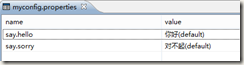
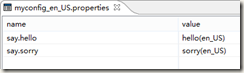
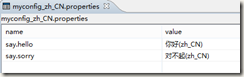
运行Main,打印结果如下:
default:zh_CN

你好(zh_CN)

对不起(zh_CN)

=================

你好(zh_CN)

对不起(zh_CN)

=================

hello(en_US)

sorry(en_US)
可以看到,我们读取的是对应国际化后缀的配置文件,命名格式为:配置文件名_语言代码_国家代码.properties,在没有加”语言代码_国家代码”的情况下ResourceBundle默认读取的是系统所使用地区码的配置文件,例子中,系统默认为zh_CN,所以读取的就是zh_CN结尾的配置文件。
如果删除myconfig_zh_CN.properties文件,则打印结果如下:
default:zh_CN

你好(default)

对不起(default)

=================

你好(default)

对不起(default)

=================

hello(en_US)

sorry(en_US)
需要注意的是,在没指定配置文件路径的情况下,ResourceBundle读取的文件路径是classpath下。所以如果将myconfig.properties和myconfig_zh_CN.properties文件移动到com.alfred.main包下,那么就无法读取到文件,报错:Can't find bundle for base name myconfig, locale zh_CN。
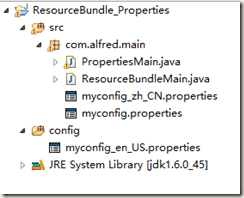
这时,需要加上文件路径,则可以正常读取
ResourceBundle resourceBundle0 = ResourceBundle.getBundle("com.alfred.main.myconfig");
实例中ResourceBundle使用到了Locale类,Locale对象表示了特定的地理、政治和文化地区。需要Locale来执行其任务的操作称为语言环境敏感的操作,它使用Locale为用户量身定制信息。例如,显示一个数值就是语言环境敏感的操作,应该根据用户的国家、地区或文化的风俗/传统来格式化该数值。
可以使用此类中的构造方法来创建Locale:
Locale(String language)
Locale(String language, String country)
Locale(String language, String country, String variant)
创建完Locale后,就可以查询有关其自身的信息。使用getCountry可获取ISO国家代码,使用getLanguage则获取ISO语言代码。可用使用getDisplayCountry来获取适合向用户显示的国家名。同样,可用使用getDisplayLanguage来获取适合向用户显示的语言名。有趣的是,getDisplayXXX方法本身是语言环境敏感的,它有两个版本:一个使用默认的语言环境作为参数,另一个则使用指定的语言环境作为参数。
Locale locale1 = new Locale("zh", "CN");

System.out.println(locale1.getCountry());

System.out.println(locale1.getDisplayCountry());

System.out.println(locale1.getLanguage());

System.out.println(locale1.getDisplayLanguage());

Locale locale2 = new Locale("en", "US");

System.out.println(locale1.getDisplayCountry(locale2));

System.out.println(locale1.getDisplayLanguage(locale2));
打印结果:
CN

中国

zh

中文

China

Chinese
二、Properties方式
关键代码:
package com.alfred.main;

import java.io.File;

import java.io.FileInputStream;

import java.io.FileOutputStream;

import java.io.IOException;

import java.io.InputStream;

import java.io.OutputStream;

import java.util.Enumeration;

import java.util.Properties;

public class PropertiesMain {

	/**

	 * 根据Key读取Value

	 *

	 * @param filePath

	 * @param key

	 * @return

	 */

	public static String getValueByKey(String filePath, String key) {

		Properties pps = new Properties();

		InputStream in = null;

		try {

			// in = new BufferedInputStream(new FileInputStream(filePath));

			in = PropertiesMain.class.getResourceAsStream(filePath);

			pps.load(in);

			String value = pps.getProperty(key);

			System.out.println(key + " = " + value);

			return value;

		} catch (IOException e) {

			e.printStackTrace();

			return null;

		}

	}

	/**

	 * 读取Properties的全部信息

	 *

	 * @param filePath

	 * @throws IOException

	 */

	public static void getAllProperties(String filePath) throws IOException {

		Properties pps = new Properties();

		InputStream in = PropertiesMain.class.getResourceAsStream(filePath);

		pps.load(in);

		Enumeration en = pps.propertyNames(); // 得到配置文件的名字

		while (en.hasMoreElements()) {

			String strKey = (String) en.nextElement();

			String strValue = pps.getProperty(strKey);

			System.out.println(strKey + "=" + strValue);

		}

	}

	/**

	 * 写入Properties信息

	 *

	 * @param filePath

	 * @param pKey

	 * @param pValue

	 * @throws IOException

	 */

	public static void writeProperties(String filePath, String pKey,

			String pValue) throws IOException {

		Properties pps = new Properties();

		InputStream in = new FileInputStream(filePath);

		// 从输入流中读取属性列表(键和元素对)

		pps.load(in);

		OutputStream out = new FileOutputStream(filePath);

		Object setProperty = pps.setProperty(pKey, pValue);

		System.out.println(setProperty);

		// 将此 Properties 表中的属性列表(键和元素对)写入输出流

		pps.store(out, "Update " + pKey + " name");

	}

	public static void main(String[] args) throws IOException {

		// 打印当前目录

		// System.out.println(new File(".").getAbsolutePath());

		// 如果使用FileInputStream方式读取文件流 ./config/myconfig.properties

		// 如果使用getResourceAsStream方式读取文件流 /myconfig.properties

		// String value = getValueByKey("/myconfig.properties", "say.hello");

		// System.out.println(value);

		// getAllProperties("/myconfig.properties");

		// writeProperties("./config/myconfig.properties","long", "2112");

	}

}
PropertiesMain.java
Properties通过文件流读取配置文件,文件流可以使用”类class.getResourceAsStream(配置文件路径)”方式获取,也可以通过FileInputStream的方式获取。
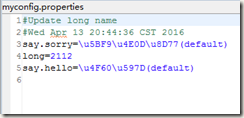
此外通过Properties类还可以动态修改配置文件内容。修改时会自动加入修改日志,我们可以指定修改备注内容,如下:
Properties读取的配置文件路径与ResourceBundle有所不同,getResourceAsStream方式读取classpath路径下需加上斜杠(例如:/myconfig.properties),而如果使用文件流FileInputStream方式读取,那么可以使用绝对路径,如果使用相对路径的话,则需要确定当前项目路径(new File(".").getAbsolutePath()),之后在当前项目路径下使用相对路径(./config/myconfig.properties)。
ResourceBundle与Properties读取配置文件的更多相关文章
- ResourceBundle和properties 读取配置文件区别
java.util.ResourceBundle 和java.util.properties 读取配置文件区别 这两个类都是读取properties格式的文件的,而Properties同时还能用来写文 ...
- java.util.Properties 读取配置文件中的参数
用法 getProperty方法的返回值是String类型. java.util.Properties 读取配置文件中的参数 //读取配置文件 FileInputStream inStream = n ...
- 使用 java.util.Properties 读取配置文件中的参数
配置文件格式 如下的配置参数格式都支持: Key = ValueKey = Key:ValueKey :Value 用法 getProperty方法的返回值是String类型. //读取配置文件 Fi ...
- Java.util.properties读取配置文件分析
Java.util.properties API链接: https://docs.oracle.com/javase/8/docs/api/java/util/Properties.html Clas ...
- 使用Properties去读取配置文件,并获得具体内容值
有时候,写了一个配置文件,需要知道读出来的内容对不对,我们需要测试一下,看看读出来的跟我们要的是不是一样.这里写了一个工具类,用来读取配置文件里面的内容. 一.使用Properties工具类来读取. ...
- 封装properties从配置文件读取测试用例输入数据
当每个测试用例都有输入数据,而且数据量比较大的情况,可以采取从文件读取 如果想让同一套测试用例能够适应相似的输入数据,如果直接代码里面来回切换回可能会漏,而且还需要debug检错 可以把一些公用的输入 ...
- Properties读取properties配置文件
package cn.rocker.readProperties; import java.io.IOException; import java.io.InputStream; import jav ...
- //读取配置文件(属性文件)的工具类-ConfigManager
package com.pb.news.util; import java.io.IOException;import java.io.InputStream;import java.sql.Resu ...
- 在java中读取配置文件信息
public class PropertyUtil { public static final Properties PROP = new Properties(); /** * 读取配置文件的内容( ...
随机推荐
- ThreadLocal(一):Thread 、ThreadLocal、ThreadLocalMap
一.ThreadLocalMap是ThreadLocal的内部类.Thread持有ThreadLocalMap的引用 Entry类继承了WeakReference<ThreadLocal< ...
- Eclipse ADT中的logcat不显示解决方法
今天维护android的程序,也不知道几百年前写的,elipse,一个日志文件都不显示,做的想哭,我使用的方法二,这里给自己留一个备份,怕再忘记了 1.在Eclipse界面中找到DDMS,然后找到 ...
- OC照片选择器MJPhotoBrowser
图片选择器,看cocoachina发现一个有趣的框架,很好用,分享一下,其实做出该功能我之前写过一篇博客,使用转场动画写的,就是图片的手势缩放没写,有兴趣可以看看 效果图: github地址:http ...
- 013-程序性能分析之thread dump和heap dump
一.dump基本概念 主要用于故障定位(尤其是out of memory)和性能分析.主要记录了JVM运行期间的内存占用.线程执行等情况,这就是常说的dump文件.常用的有heap dump和thre ...
- 20165236 实验二 《Java面向对象程序设计》实验报告
20165236 实验二<Java面向对象程序设计>实验报告 姓名:郭金涛 学号:20165236 课程:Java程序设计 指导老师:娄嘉鹏 实验时间:2 ...
- golang 中 channel 的非阻塞访问方法
在golang中,基本的channel读写操作都是阻塞的,如果你想要非阻塞的,可以使用如下示例: 即只要在select中加入default,阻塞立即变成非阻塞: package main import ...
- 爆破root密码hash John the Ripper和hydra爆破ssh密码
官方网站:http://www.openwall.com/john/ 下载:wget http://www.openwall.com/john/j/john-1.8.0.tar.gz 解压:tar - ...
- emq数据库插件
- Python生态工具、文本处理和系统管理(虚拟)
一.Python生态工具 一.Python内置小工具 1.秒级启动一个下载服务器 Python 内置了一个下载服务器就能够显著提升效率了 . 例如, 你的同事要让你传的文件位于某一个目录下,那么,你可 ...
- 一文看懂POS收单中"MCC"是什么意思?
MCC的前世今生! 是否经常听人提起过“MCC”?听起来如此高大上的词,背后有着怎样的知识内涵呢?您知道吗?今天,我们就一起来了解了解“MCC”的前世今生,让它也“接接地气”吧!商户类别码(简称MCC ...