
8.1_springboot2.x之Actuator应用监控
1、监管端点测试
引入依赖
<?xml version="1.0" encoding="UTF-8"?>

<project xmlns="http://maven.apache.org/POM/4.0.0" xmlns:xsi="http://www.w3.org/2001/XMLSchema-instance"

         xsi:schemaLocation="http://maven.apache.org/POM/4.0.0 https://maven.apache.org/xsd/maven-4.0.0.xsd">

    <modelVersion>4.0.0</modelVersion>

    <parent>

        <groupId>org.springframework.boot</groupId>

        <artifactId>spring-boot-starter-parent</artifactId>

        <version>2.1.9.RELEASE</version>

        <relativePath/> <!-- lookup parent from repository -->

    </parent>

    <groupId>com.example</groupId>

    <artifactId>springboot-08-actuator</artifactId>

    <version>0.0.1-SNAPSHOT</version>

    <name>springboot-08-actuator</name>

    <description>Demo project for Spring Boot</description>

    <properties>

        <java.version>1.8</java.version>

    </properties>

    <dependencies>

        <dependency>

            <groupId>org.springframework.boot</groupId>

            <artifactId>spring-boot-starter-actuator</artifactId>

        </dependency>

        <dependency>

            <groupId>org.springframework.boot</groupId>

            <artifactId>spring-boot-starter-web</artifactId>

        </dependency>

        <dependency>

            <groupId>org.springframework.boot</groupId>

            <artifactId>spring-boot-devtools</artifactId>

            <scope>runtime</scope>

            <optional>true</optional>

        </dependency>

        <dependency>

            <groupId>org.springframework.boot</groupId>

            <artifactId>spring-boot-starter-test</artifactId>

            <scope>test</scope>

        </dependency>

    </dependencies>

    <build>

        <plugins>

            <plugin>

                <groupId>org.springframework.boot</groupId>

                <artifactId>spring-boot-maven-plugin</artifactId>

            </plugin>

        </plugins>

    </build>

</project>
application.yml
server:

  port: 8080

# actuator监控

management:

  server:

    # 设置监控服务端口

    port: 8081

  endpoints:

    # 设置端点是否可用 默认只有shutdown可用

    enabled-by-default: true

    web:

      # 设置是否暴露端点 默认只有health和info可见

      exposure:

        # 包括所有端点

        include: "*" # 注意需要添加引号

        # 排除端点

        exclude: shutdown
Spring Boot内置端点(和1.x版本相比,不少端点名称发生改变)
官方链接:https://docs.spring.io/spring-boot/docs/2.2.0.RELEASE/reference/htmlsingle/#production-ready
每个端点可以启用或禁用。创建此控件是否终结点存在于应用程序上下文。要远程访问端点也必须通过JMX或HTTP公开。大多数应用程序选择HTTP,在那里随着/执行器的前缀端点的ID映射到URL。例如,默认情况下,/actuator/health.
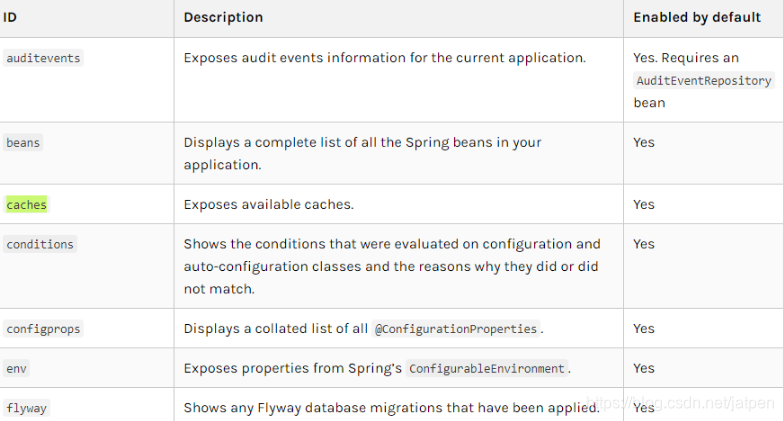
| 端点名 | 描述 |
|---|---|
| conditions | 所有自动配置信息 |
| auditevents | 审计事件 |
| beans | 所有Bean的信息 |
| configprops | 所有自动化配置属性 |
| threaddump | 线程状态信息 |
| env | 当前环境信息 |
| health | 应用健康状况 |
| info | 当前应用信息 |
| metrics | 应用的各项指标 |
| mappings | 应用@RequestMapping映射路径 |
| shutdown | 关闭当前应用(默认关闭) |
| httptrace | 追踪信息(最新的http请求) |
启动测试
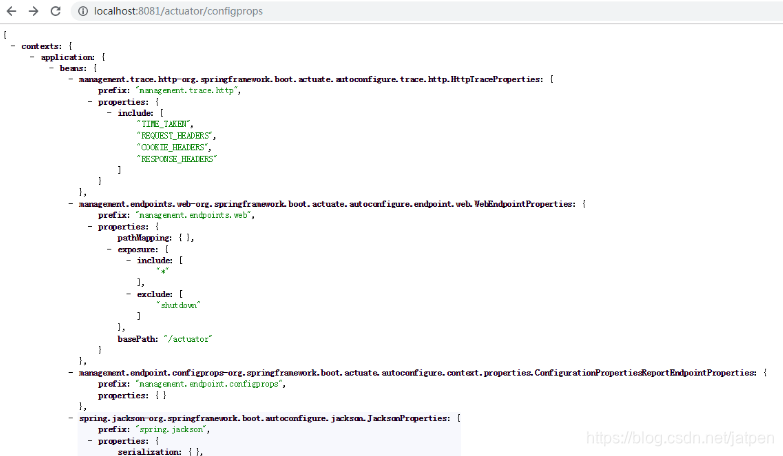
例如浏览器输入:http://localhost:8081/actuator/configprops
运行结果:
2、定制端点信息
**启用端点:**默认情况下,启用除shutdown 之外的所有端点。要配置端点的启用,请使用其management.endpoint..enabled 属性。以下示例启用shutdown 端点:
management.endpoint.shutdown.enabled=true
如果您希望端点启用是选择加入而不是选择退出,请将management.endpoints.enabled-by-default 属性设置为false 并使用单个端点enabled 属性重新加入。以下示例启用info endpoint并禁用所有其他端点:
management.endpoints.enabled-by-default=false

management.endpoint.info.enabled=true
配置端点:端点自动缓存对不带任何参数的读取操作的响应。要配置端点缓存响应的时间量,请使用其cache.time-to-live 属性。以下示例将beans 端点缓存的生存时间设置为10秒:
management.endpoint.beans.cache.time-to-live=10s
更多内容请查看官方文档。
3、健康信息
您可以使用运行状况信息来检查正在运行的应用程序的状态。监视软件经常使用它来在生产系统出现故障时向某人发出警报。health 端点公开的信息取决于management.endpoint.health.show-details 属性,该属性可以使用以下值之一进行配置:
| never | 细节永远不会显示 |
|---|---|
| when-authorized | 详细信息仅向授权用户显示。可以使用management.endpoint.health.roles 配置授权角色 |
| always | 详细信息显示给所有用户 |
默认值为never 。当用户处于一个或多个端点的角色时,将被视为已获得授权。如果端点没有配置角色(默认值),则认为所有经过身份验证的用户都已获得授权。可以使用management.endpoint.health.roles 属性配置角色。
自定义健康指示器
package com.example.springboot08actuator.health;

import org.springframework.boot.actuate.health.Health;

import org.springframework.boot.actuate.health.HealthIndicator;

import org.springframework.stereotype.Component;

@Component

public class MyHealthIndicator implements HealthIndicator {

    @Override

    public Health health() {

        /*

        * 自定义健康

        *  Health.up().build() 代表健康

        * */

        return Health.down().withDetail("msg","服务异常").build();

    }

}
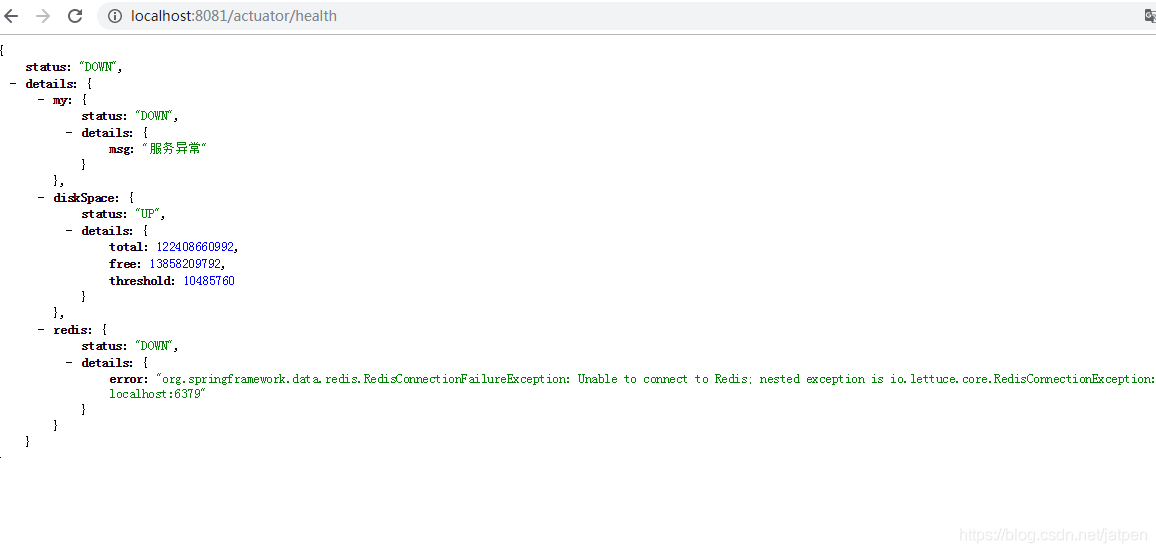
这里本地环境没有安装redis,启动程序查看健康信息:
8.1_springboot2.x之Actuator应用监控的更多相关文章
- SpringBoot actuator 应用监控。
前言 : 今天在阅读 <SpringCloud微服务实战>一书时看到了SpringBoot actuator相关知识,并且自己也本地调试实践.觉得SpringBoot这一套监控还是挺有意思 ...
- springcloud(九) springboot Actuator + admin 监控
前一章讲的都是Feign项目(调用方)的监控.接下来讲的是服务提供方的监控 一.springboot actuator + springboot admin Spring Boot Admin 是一个 ...
- Spring Boot (27) actuator服务监控与管理
actuaotr是spring boot项目中非常强大的一个功能,有助于对应用程序进行监控和管理,通过restful api请求来监管.审计.收集应用的运行情况,针对微服务而言它是必不可少的一个环节. ...
- spring boot 2.x 系列 —— actuator 服务监控与管理
文章目录 一.概念综述 1.1 端点 1.2 启用端点 1.3 暴露端点 1.4 健康检查信息 二.项目说明 1.1 项目结构说明 1.2 主要依赖 1.3 项目配置 1.4 查看监控状态 三.自定义 ...
- Spring Boot整合actuator实现监控管理
Spring Boot使用actuator监控管理 1.在pom文件中导入相关的依赖 <dependency> <groupId>org.springframework.boo ...
- 强大的 actuator 服务监控与管理
SpringBoot 是为了简化 Spring 应用的创建.运行.调试.部署等一系列问题而诞生的产物,自动装配的特性让我们可以更好的关注业务本身而不是外部的XML配置,我们只需遵循规范,引入相关的依赖 ...
- SpringBoot如何利用Actuator来监控应用?
目录 Actuator是什么? 快速开始 引入依赖 yml与自动配置 主程序类 测试 Endpoints 官方列举的所有端点列表 启动端点 暴露端点 配置端点 发现页面 跨域支持 实现一个定义的端点 ...
- spring boot actuator服务监控与管理
1.引入actuator所需要的jar包 <dependency> <groupId>org.springframework.boot</groupId> < ...
- [转]Eureka自我保护机制、健康检查的作用、actuator模块监控
Eureka自我保护机制 接着以上篇文章建立的三个工程为基础(eureka-server,uerreg,myweb),默认Eureka是开启自我保护的.我们来做个测试,我们先启动三个工程,我们访问注册 ...
随机推荐
- Java中深度克隆和浅度克隆
一:使用目的: 就是为了快速构造一个和已有对象相同的副本.如果需要克隆对象,一般需要先创建一个对象,然后将原对象中的数据导入到新创建的对象中去,而不用根据已有对象进行手动赋值操作. 二:Object中 ...
- 201⑨湘潭邀请赛 Chika and Friendly Pairs(HDU6534)
原题链接:http://acm.hdu.edu.cn/showproblem.php?pid=6534 题意: 给你一个数组,对于第i个数来说,如果存在一个位置j,使得j>i并且a[j]-k&l ...
- ZJUT11 多校赛补题记录
牛客第一场 (通过)Integration (https://ac.nowcoder.com/acm/contest/881/B) (未补)Euclidean Distance (https://ac ...
- 转 MySQL乐观锁和悲观锁
悲观锁(Pessimistic Lock) 顾名思义,就是很悲观,每次去拿数据的时候都认为别人会修改,所以每次在拿数据的时候都会上锁,这样别人想拿这个数据就会block直到它拿到锁.传统的关系型数据库 ...
- 数据库全表扫描的SQL种类
1.所查询的表的条件列没有索引: 2.需要返回所有的行: 3.对索引主列有条件限制,但是使用了函数,则Oracle 使用全表扫描,如: where upper(city)=’TOKYO’; 这样的语 ...
- 线性方程组迭代算法——Jacobi迭代算法的python实现
原理: 请看本人博客:线性方程组的迭代求解算法——原理 代码: import numpy as np max=100#迭代次数上限 Delta=0.01 m=2#阶数:矩阵为2阶 n=3#维数:3X3 ...
- 安装FTP
yum install vsftpd -y cd /etc/vsftpd/ touch login.txt vim login.txt db_load -T -t hash -f /etc/vsftp ...
- ubuntu 设置root密码
- Activiti获取当前活动(任务)的出口(动态生成提交按钮)
1.设置出口变量 当一个任务有一个或多个出口时,可以在出口连线出设置判断条件如图: 2.根据任务Id获取出口集合 public List<String> getOutGoingTransN ...
- 死磕Spring源码系列
一.Spring总体架构 1.架构图 2.SpringIOC:核心容器提供 Spring 框架的基本功能.核心容器的主要组件是 BeanFactory,它是工厂模式的实现.BeanFactory 使用 ...